
사용자의 정보를 받아 데이터베이스에 안전하게 저장하는 회원 가입 기능을 구현해보자.
개발 환경 : NestJS, Prisma, Swagger
DTO(Data Transfer Object) 정의
- 회원가입 시 사용하는 DTO는
CreateUserDTO와UserDTO가 있다.CreateUserDTO는 비밀번호 같은 민감한 정보를 포함한다.UserDTO는 민감한 정보를 포함하지 않고, 클라이언트에게 노출되어도 되는 정보를 포함한다.
- 각 DTO가 독립적으로 관리되므로, 사용자 생성과 정보 반환 요구사항이 변경될 때 각각의 DTO만 수정하면 된다.
CreateUserDTO
- 회원가입 시 클라이언트로부터 입력받는 데이터를 정의한다.
- 사용자 생성에 필요한 username과 password 같은 정보를 포함한다.
- 아래 DTO는 유효성 검사 및 Swagger 문서화를 포함하고 있다.
user/dtos/create-user.dto.ts
import { ApiProperty, ApiPropertyOptional } from '@nestjs/swagger';
import { IsNotEmpty, MinLength, Validate } from 'class-validator';

export class CreateUserDTO {
  @IsNotEmpty({ message: '아이디를 입력해 주세요.' })
  @ApiProperty({ description: '아이디', example: 'username' })
  username: string;

  @IsNotEmpty({ message: '연락처를 입력해 주세요.' })
  @ApiPropertyOptional({ description: '연락처', example: '010-1234-5678' })
  contact: string;

  @IsNotEmpty({ message: '비밀번호를 입력해 주세요.' })
  @MinLength(8, { message: '비밀번호는 최소 8자 이상이어야 합니다.' })
  @ApiProperty({ description: '비밀번호', example: 'password' })
  password: string;

  @IsNotEmpty({ message: '비밀번호를 다시 한 번 입력해 주세요.' })
  @ApiProperty({ description: '비밀번호 확인', example: 'password' })
  passwordConfirm: string;
}
비밀번호 확인 유효성 검사
- 회원가입 시 사용자가 입력한 비밀번호와 비밀번호 확인 필드의 값이 일치하는지 확인해야 한다.
class-validator라이브러리의ValidatorConstraint와ValidatorConstraintInterface를 사용하여 커스텀 유효성 검사기를 만들 수 있다.validate메서드에서args.object를CreateUserDTO타입으로 캐스팅하여password필드와passwordConfirm필드의 값을 비교한다.- 두 값이 일치하면
true를 반환하고, 그렇지 않으면false를 반환한다.
- 두 값이 일치하면
validators/password-match.validator.ts
import {
  ValidatorConstraint,
  ValidatorConstraintInterface,
  ValidationArguments,
} from 'class-validator';
import { CreateUserDTO } from '../dtos/create-user.dto';

/**
 * 비밀번호와 비밀번호 확인 필드가 일치하는지 확인하는 Validator
 */
@ValidatorConstraint({ name: 'PasswordMatch', async: false })
export class PasswordMatch implements ValidatorConstraintInterface {
  validate(passwordConfirm: string, args: ValidationArguments) {
    const object = args.object as CreateUserDTO;
    return object.password === passwordConfirm;
  }

  defaultMessage(_args: ValidationArguments) {
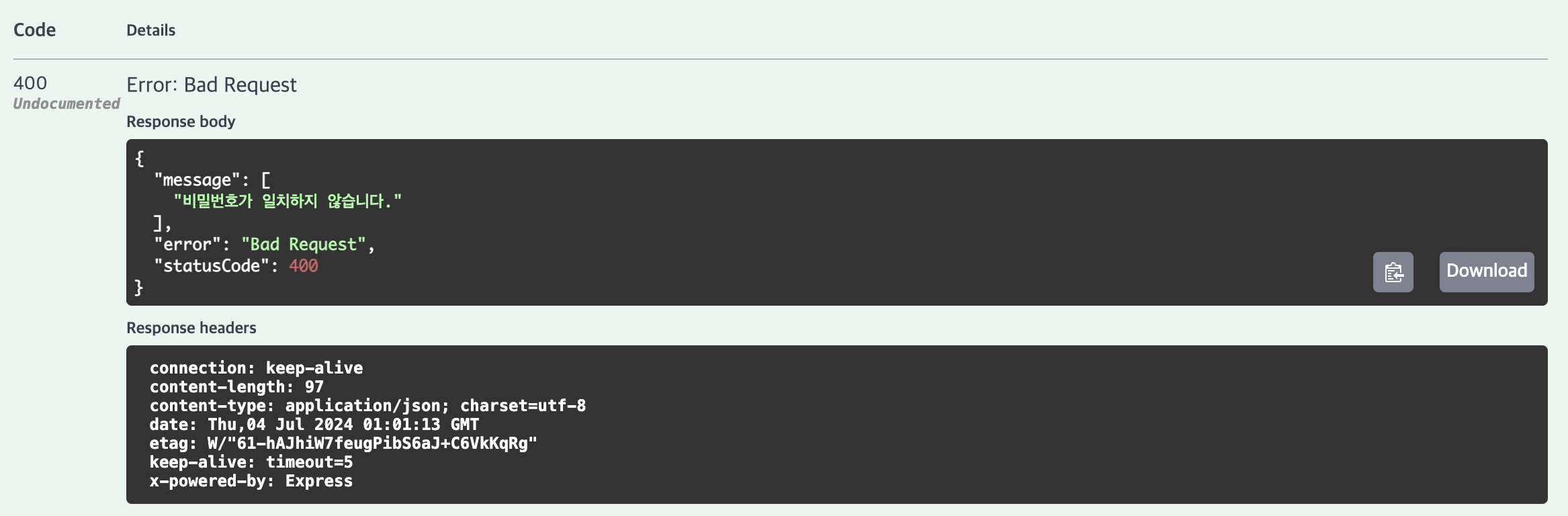
    return '비밀번호가 일치하지 않습니다.';
  }
}- 이제
CreateUserDTO클래스에서PasswordMatch유효성 검사기를 사용하여 비밀번호와 비밀번호 확인 필드의 일치를 검증할 수 있다.
import { ApiProperty, ApiPropertyOptional } from '@nestjs/swagger';
import { IsNotEmpty, MinLength, Validate } from 'class-validator';
import { PasswordMatch } from '../validators/password-match.validator';

export class CreateUserDTO {
  @IsNotEmpty({ message: '아이디를 입력해 주세요.' })
  @ApiProperty({ description: '아이디', example: 'username' })
  username: string;

  @IsNotEmpty({ message: '연락처를 입력해 주세요.' })
  @ApiPropertyOptional({ description: '연락처', example: '010-1234-5678' })
  contact: string;

  @IsNotEmpty({ message: '비밀번호를 입력해 주세요.' })
  @MinLength(8, { message: '비밀번호는 최소 8자 이상이어야 합니다.' })
  @ApiProperty({ description: '비밀번호', example: 'password' })
  password: string;

  @IsNotEmpty({ message: '비밀번호를 다시 한 번 입력해 주세요.' })
  @Validate(PasswordMatch, { message: '비밀번호가 일치하지 않습니다.' }) // 추가
  @ApiProperty({ description: '비밀번호 확인', example: 'password' })
  passwordConfirm: string;
}
ValidationPipe 설정
- NestJS 애플리케이션에 전역 유효성 검사를 적용하기 위해서는 ValidationPipe를 설정해야 한다.
- 전역 유효성 파이프를 설정하면 모든 컨트롤러의 핸들러 메서드에 전달되는 DTO에 대해 자동으로 유효성 검사가 수행된다.
main.ts
import { ValidationPipe } from '@nestjs/common';
import { NestFactory } from '@nestjs/core';
import { AppModule } from './app.module';

async function bootstrap() {
  const app = await NestFactory.create(AppModule);

  app.useGlobalPipes(new ValidationPipe()); // 추가

  // ...

  await app.listen(3000);
}
bootstrap();
UserDTO
- 사용자를 성공적으로 생성한(회원가입) 후 반환할 DTO를 작성한다.
- 사용자 데이터가 클라이언트에게 반활될 데이터를 정의해야하므로, 비밀번호와 같은 민감한 정보는 포함하지 않는다.
- 아래 DTO는 Swagger 문서화를 포함하고 있다.
import { ApiProperty, ApiPropertyOptional } from '@nestjs/swagger';
import { Exclude, Expose } from 'class-transformer';
import { randomUUID } from 'crypto';

@Exclude()
export class UserDTO {
  @Expose()
  @ApiProperty({ description: 'ID', example: randomUUID() })
  id: string;

  @Expose()
  @ApiProperty({ description: '아이디', example: 'username' })
  username: string;

  @Expose()
  @ApiPropertyOptional({ description: '연락처', example: '010-1234-5678' })
  contact: string;

  @Expose()
  @ApiProperty({ description: '등록일시', type: 'Date' })
  createdAt: Date;

  @Expose()
  @ApiProperty({ description: '수정일시', type: 'Date' })
  updatedAt: Date;
}
Service 작성
비밀번호 해싱
- 사용자 비밀번호를 안전하게 저장하기 위해서는 비밀번호 해싱 과정이 반드시 필요하다.
- 비밀번호 해싱을 통해 비밀번호를 저장할 때 원래 비밀번호를 알 수 없도록 변환하고, 해커가 데이터베이스를 탈취하더라도 원래 비밀번호를 알아낼 수 없도록 보호한다.
bcrypt
- bcrypt는 단방향 암호화를 위해 만들어진 해시 함수이다.
- bcrypt는 각 비밀번호마다 고유의 salt 값을 생성하여 동일한 비밀번호라도 다른 해시 값을 가지게 하며, 이는 rainbow 테이블 공격을 방지한다.
- bcrypt는 설정할 수 있는 작업 비용(work factor)을 가지고 있다.
- 작업 비용을 높이면 해싱 연산이 더 오래 걸리게 되어 공격자가 해시 값을 역산하기 어려워진다.
- 작업 비용은 2^cost 만큼 시간이 소요되며, cost 값은 보통 4에서 31 사이로 설정된다.
bcrypt 라이브러리를 사용하여 비밀번호를 해싱해보자.
bcrypt패키지 설치
npm install bcrypt
npm install @types/bcrypt --save-devbcrypt의hashSync메서드는 동기적으로 비밀번호를 해싱한다.- 이 함수는 비밀번호와 솔트 값을 입력으로 받아 해시된 비밀번호를 출력한다.
const hashedPassword = hashSync(plainPassword, 10);Service 작성
- 사용자가 입력한 정보에 따라 비밀번호를 해싱 한 후 데이터베이스에 저장하는 Service 를 작성하였다.
- CreateUserDTO에서 passwordConfirm 필드를 사용하지 않도록 하여 User 엔티티에 저장되는 데이터에 포함되지 않게 한다.
user/user.service.ts
import {
  ConflictException,
  Injectable,
  Logger,
  NotFoundException,
} from '@nestjs/common';
import { Prisma, User } from '@prisma/client';
import { PrismaService } from 'src/prisma/prisma.service';
import { CreateUserDTO } from './dtos/create-user.dto';
import { hashSync } from 'bcrypt';

@Injectable()
export class UserService {
  private readonly logger = new Logger(UserService.name);
  constructor(private readonly prismaService: PrismaService) {}

  async create(body: CreateUserDTO): Promise<User> {
    const check = await this.findByUsername(body.username);
    if (check) throw new ConflictException('이미 사용 중인 아이디 입니다.');

    return this.prismaService.user.create({
      data: {
        username: body.username,
        contact: body.contact,
        password: hashSync(body.password, 10),
      },
    });
  }

  findByUsername(username: string): Promise<User> {
    return this.prismaService.user.findUnique({ where: { username } });
  }
}
Controller 작성
- 앞에서 작성한 Service를 바탕으로 회원가입 요청을 처리하는 컨트롤러를 작성한다.
POST /user/create엔드포인트에서 요청을 받도록 작성하였다.
user/user.controller.ts
import { Body, Controller, Post } from '@nestjs/common';
import { UserService } from './user.service';
import { ApiBody, ApiCreatedResponse, ApiOperation } from '@nestjs/swagger';
import { UserDTO } from './dtos/user.dto';
import { plainToInstance } from 'class-transformer';
import { CreateUserDTO } from './dtos/create-user.dto';

@Controller('user')
export class UserController {
  constructor(private readonly userService: UserService) {}

  @ApiOperation({
    summary: '사용자 생성',
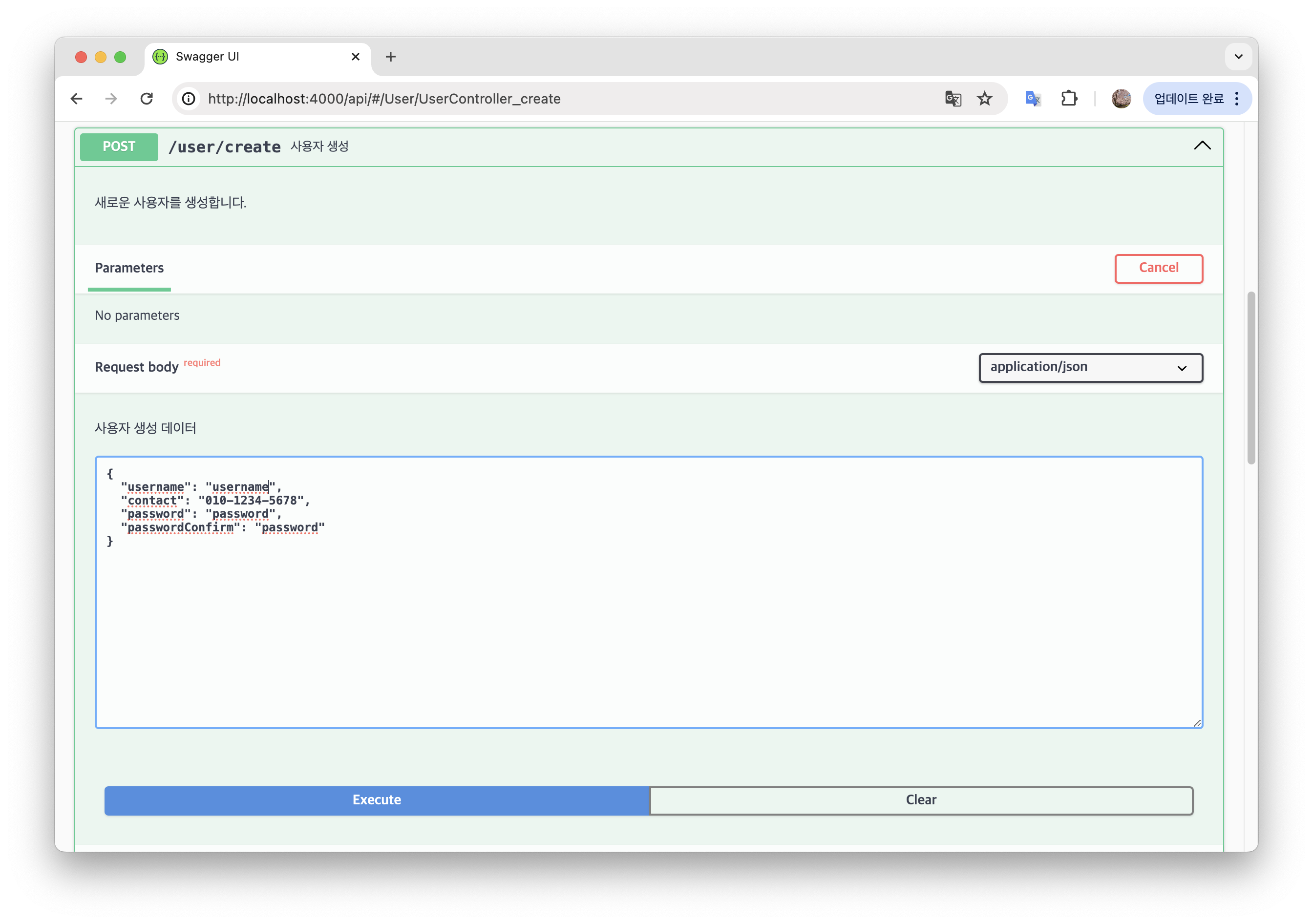
    description: '새로운 사용자를 생성합니다.',
  })
  @ApiBody({ description: '사용자 생성 데이터', type: CreateUserDTO })
  @Post('create')
  @ApiCreatedResponse({
    description: '성공적으로 생성됨',
    type: UserDTO,
  })
  async create(@Body() body: CreateUserDTO) {
    return plainToInstance(UserDTO, await this.userService.create(body));
  }
}
결과 확인
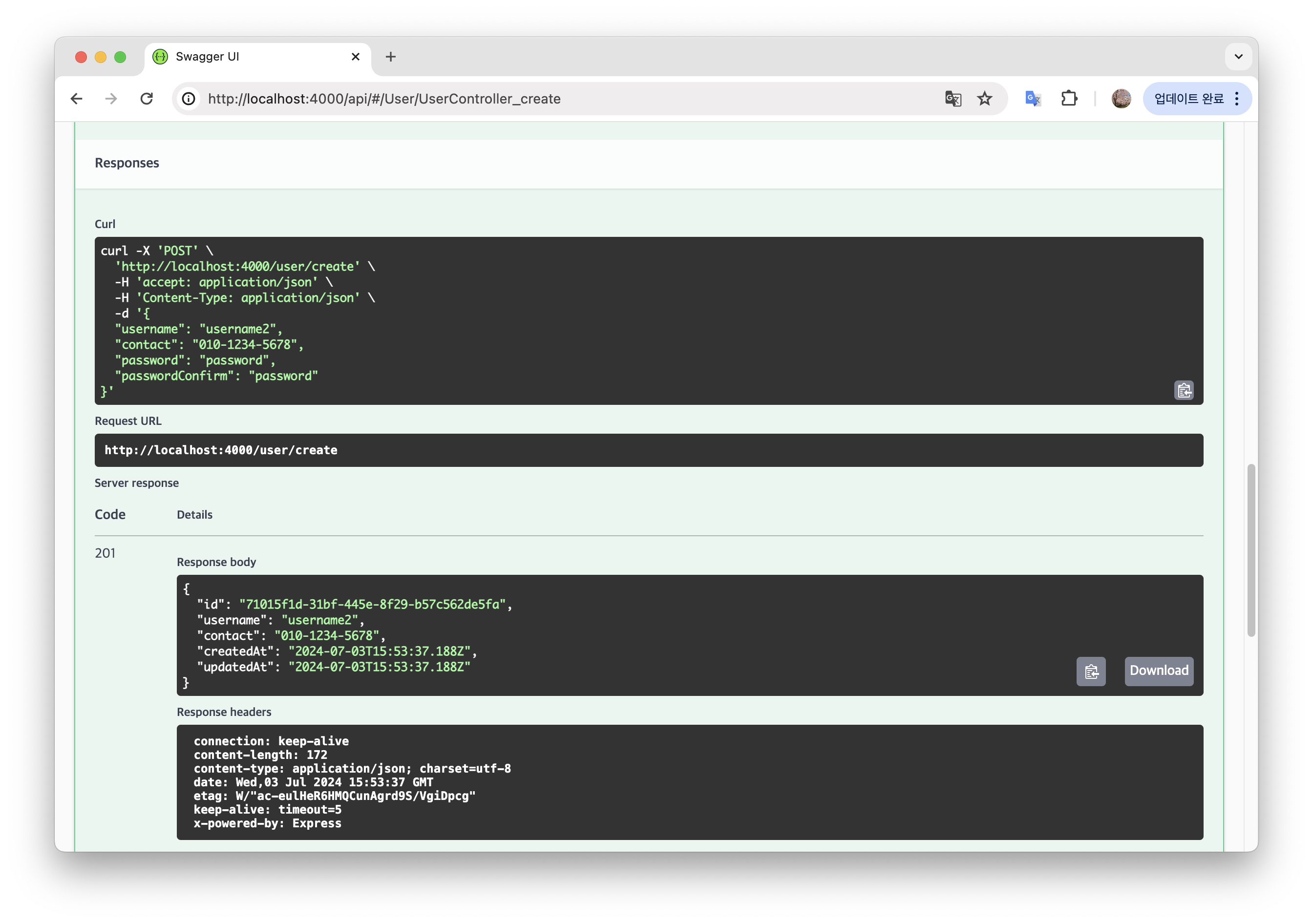
- Swagger에서 테스트 결과 API 가 정상 작동함을 확인할 수 있다!
-
DB 에도 비밀번호가 잘 암호화 되어 저장 되었다.

-
비밀번호와 비밀번호 확인이 일치하지 않는 경우 오류를 반환하고, DB에 저장하지 않는다.
코드로 꿈을 펼치는 개발자의 이야기, 노력과 열정이 가득한 곳 🌈