표현언어
변수의 값을 출력할 때 사용하는 스크립트 언어.
표현언어는 4가지 영역에 저장된 값을 출력할 때 사용.
지금까지 JSP에서 변수 값 출력 할 때
EL(Expression Language) 변수 값 출력할 때 사용
기능
JSP 내장 객체의 영역에 담긴 속성을 사용할 수 있다.
- 산술 연산
- 산술 연산, 비교연산, 논리 연산 가능
- 자바 클래스에 정의된 메서드 호출 가능
- 표현언어만의 객체를 통해 JSP와 동일한 기능을 수행가능
- JSP 스크립트 요소에서는 사용 불가능(스크립틀릿 표현식 선언부)
${속성}
특정영역에 저장한 변수인 경우: ${영역, 변수명}
객체 표현 방식
{ param["name"]}
{ header["user-agent"] } < 가능
{ King['한글']} < 가능
${ King.한글} < 에러발생
4가지 영역에 속성값 저장하고 읽어오기
- pageScope
- requestScope
- sessionScope
- applicationScope
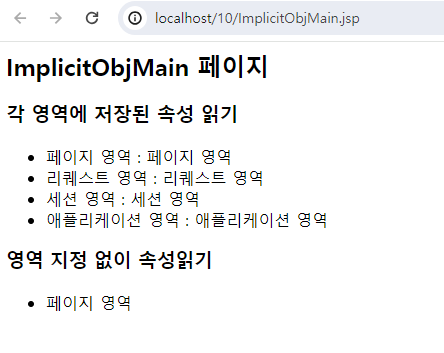
//ImplicitObjMain.jsp
<%@ page contentType="text/html;charset=UTF-8" language="java" %>
<%
        pageContext.setAttribute("scopeValue", "페이지 영역");
        request.setAttribute("scopeValue", "리퀘스트 영역");
        session.setAttribute("scopeValue", "세션 영역");
        application.setAttribute("scopeValue", "애플리케이션 영역");

%>


<html>
<head>
    <title>표현언어</title>
</head>
<body>
<h2>ImplicitObjMain 페이지</h2>
<h3>각 영역에 저장된 속성 읽기</h3>
<ul>
    <li>페이지 영역 : ${pageScope.scopeValue } </li>
    <li>리퀘스트 영역 : ${requestScope.scopeValue } </li>
    <li>세션 영역 : ${sessionScope.scopeValue } </li>
    <li>애플리케이션 영역 : ${applicationScope.scopeValue } </li>
</ul>

<h3>영역 지정 없이 속성읽기</h3>
<ul>
    <li>${ scopeValue}</li>

</ul>
<%--<jsp:forward page="ImplicitForwardResult"></jsp:forward>--%>
</body>
</html>
결과
//ImplicitObjMain.jsp forward처리한 것.
<%@ page contentType="text/html;charset=UTF-8" language="java" %>
<%
        pageContext.setAttribute("scopeValue", "페이지 영역");
        request.setAttribute("scopeValue", "리퀘스트 영역");
        session.setAttribute("scopeValue", "세션 영역");
        application.setAttribute("scopeValue", "애플리케이션 영역");

%>


<html>
<head>
    <title>표현언어</title>
</head>
<body>
<h2>ImplicitObjMain 페이지</h2>
<h3>각 영역에 저장된 속성 읽기</h3>
<ul>
    <li>페이지 영역 : ${pageScope.scopeValue } </li>
    <li>리퀘스트 영역 : ${requestScope.scopeValue } </li>
    <li>세션 영역 : ${sessionScope.scopeValue } </li>
    <li>애플리케이션 영역 : ${applicationScope.scopeValue } </li>
</ul>

<h3>영역 지정 없이 속성읽기</h3>
<ul>
    <li>${ scopeValue}</li>

</ul>
<jsp:forward page="ImplicitForwardResult"></jsp:forward>
</body>
</html>
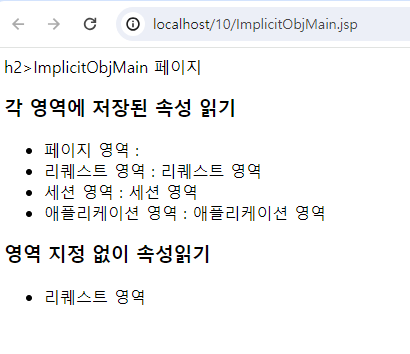
<%@ page contentType="text/html;charset=UTF-8" language="java" %>
<html>
<head>
    <title>표현언어</title>
</head>
<body>
h2>ImplicitObjMain 페이지</h2>
<h3>각 영역에 저장된 속성 읽기</h3>
<ul>
    <li>페이지 영역 : ${ pageScope.scopeValue } </li>
    <li>리퀘스트 영역 : ${ requestScope.scopeValue } </li>
    <li>세션 영역 : ${ sessionScope.scopeValue } </li>
    <li>애플리케이션 영역 : ${ applicationScope.scopeValue } </li>
</ul>

<h3>영역 지정 없이 속성읽기</h3>
<ul>
    <li>${ scopeValue}</li>

</ul>

</body>
</html>
폼값 처리하기
JSP에서는 전송방식(get/post)에 상관없이 request.getParameter()로 폼값을 받을 수 있다. EL에서도 마찬가지다.
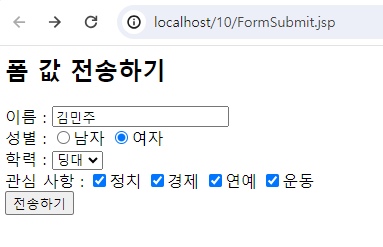
<%@ page contentType="text/html;charset=UTF-8" language="java" %>
<html>
<head>
    <title>표현언어 폼값 처리</title>
</head>
<body>
<h2>폼 값 전송하기</h2>
<form name="frm" method="post" action="FormResult.jsp" >
    이름 : <input type="text" name="name"><br/>
    성별 : <input type="radio" name="gender" value="Man">남자
          <input type="radio" name="gender" value="Woman">여자<br/>
    학력 : <select name="grade">
            <option value="ele">딩초</option>
            <option value="mid">딩중</option>
            <option value="high">딩고</option>
            <option value="uni">딩대</option>
</select><br/>
    관심 사항 : <input type="checkbox" name="inter" value="pol">정치
                <input type="checkbox" name="inter" value="eco">경제
                <input type="checkbox" name="inter" value="ent">연예
                <input type="checkbox" name="inter" value="spo">운동<br/>

    <input type="submit" value="전송하기"/>

</form>


</body>
</html>
<%@ page contentType="text/html;charset=UTF-8" language="java" %>
<html>
<head>
    <title>표현언어 폼값처리</title>
</head>
<body>
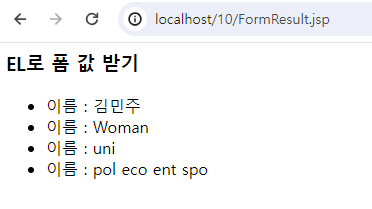
<h3>EL로 폼 값 받기</h3>
<ul>
    <li>이름 : ${ param.name }</li>
    <li>이름 : ${ param.gender }</li>
    <li>이름 : ${ param.grade }</li>
    <li>이름 : ${ paramValues.inter[0] }
            ${ paramValues.inter[1] }
            ${ paramValues.inter[2] }
            ${ paramValues.inter[3] }
    </li>

</ul>


</body>
</html>
결과
결과
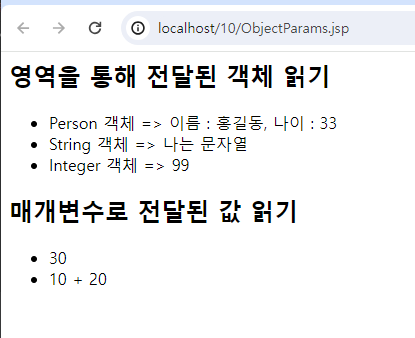
객체 전달하기
//ObjectParam.jsp
<%@ page import="com.common.Person" %>
<%@ page contentType="text/html;charset=UTF-8" language="java" %>
<html>
<head>
    <title>표현언어 객체 매개변수</title>
</head>
<body>
<%
request.setAttribute("personObj", new Person("홍길동", 33));
request.setAttribute("StringObj", "나는 문자열");
request.setAttribute("integerObj", new Integer(99));
%>

<jsp:forward page="ObjectResult.jsp">
    <jsp:param name="firNum" value="10"/>
    <jsp:param name="SecondNum" value="20"/>

</jsp:forward>

</body>
</html>
//ObjectResult.jsp
<%@ page contentType="text/html;charset=UTF-8" language="java" %>
<html>
<head>
    <title>표현 언어 - 객체 매개변수</title>
</head>
<body>
<h2>영역을 통해 전달된 객체 읽기</h2>
<ul>
    <li>Person 객체 => 이름 : ${ personObj.name }, 나이 : ${ personObj.age }</li>
    <li>String 객체 => ${ requestScope.StringObj }</li>
    <li>Integer 객체 => ${ integerObj }</li>
</ul>
<h2>매개변수로 전달된 값 읽기</h2>
<ul>
    <li>${ param.firstNum + param['SecondNum']}</li>
    <li>${ param.firstNum } + ${param["SecondNum"]}</li>
</ul>

</body>
</html>
결과