실습 준비
데이터 추가하기
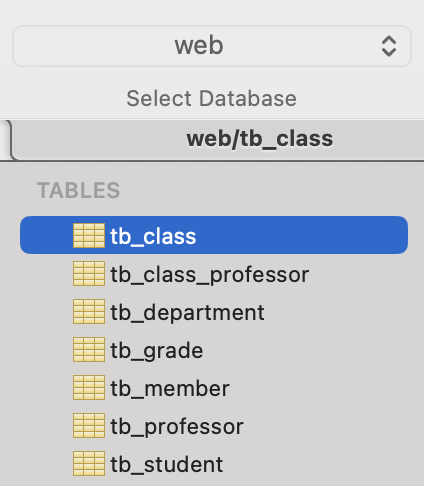
https://github.com/beyond-sw-camp-08/mariadb/blob/main/16_university%20%EC%8B%A4%EC%8A%B5.sql
: 해당 sql문 실행하여 web 데이터 베이스 내 테이블 및 데이터 추가
[ 결과 ]
sts4 설치 후 lombok 설치하기
🔗 sts4 설치 링크
https://spring.io/tools
🔗 lombok 설치 방법 참고 링크
https://hyuneexpress.tistory.com/entry/macOS-lombok%EB%A1%AC%EB%B3%B5-%EB%8B%A4%EC%9A%B4%EB%A1%9C%EB%93%9C-%EB%B0%8F-%EC%84%A4%EC%B9%98
프로젝트 생성 툴
🔗 Spring Initializr
https://start.spring.io/
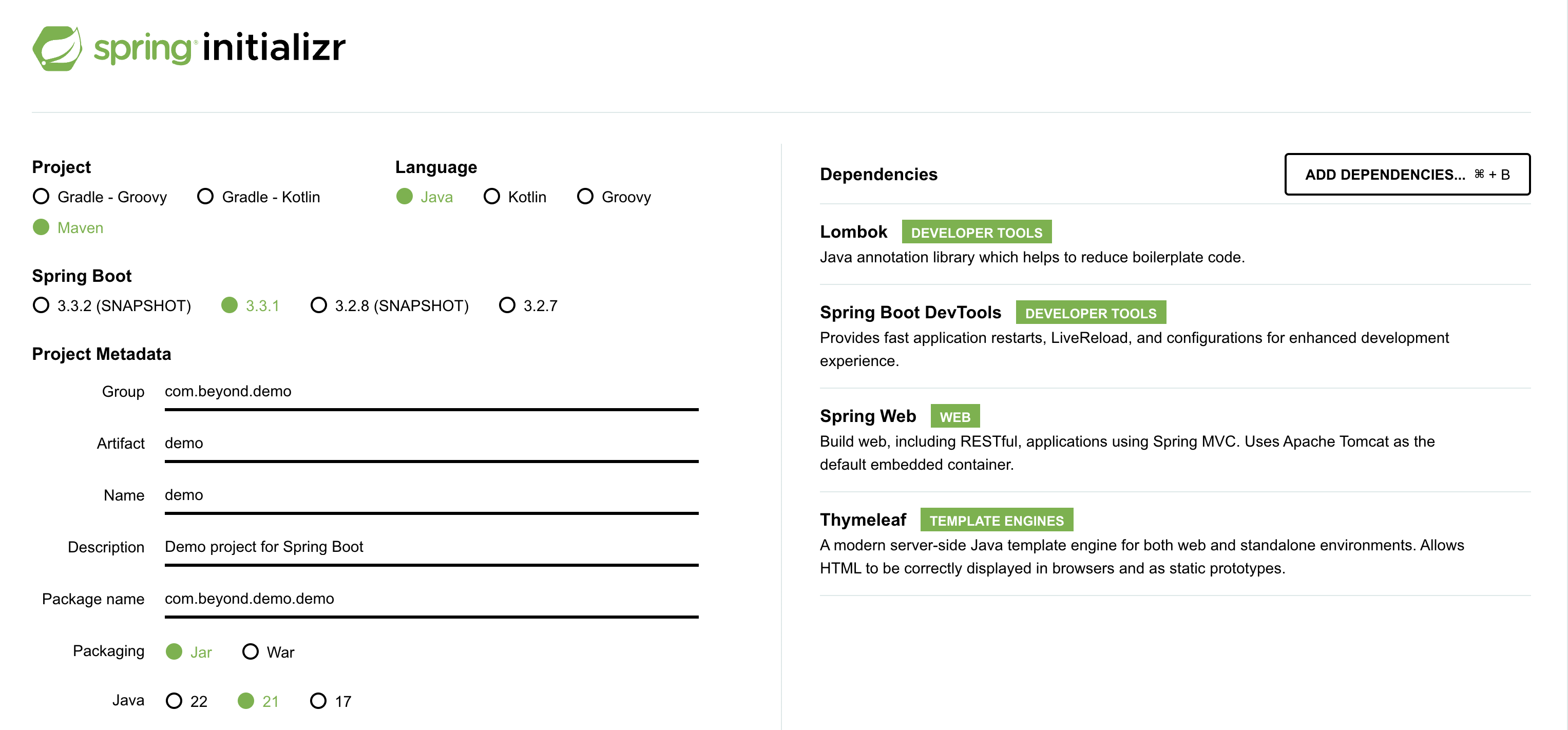
프로젝트 생성
File -> New -> Spring Starter Project

next> 선택 후 의존성 추가
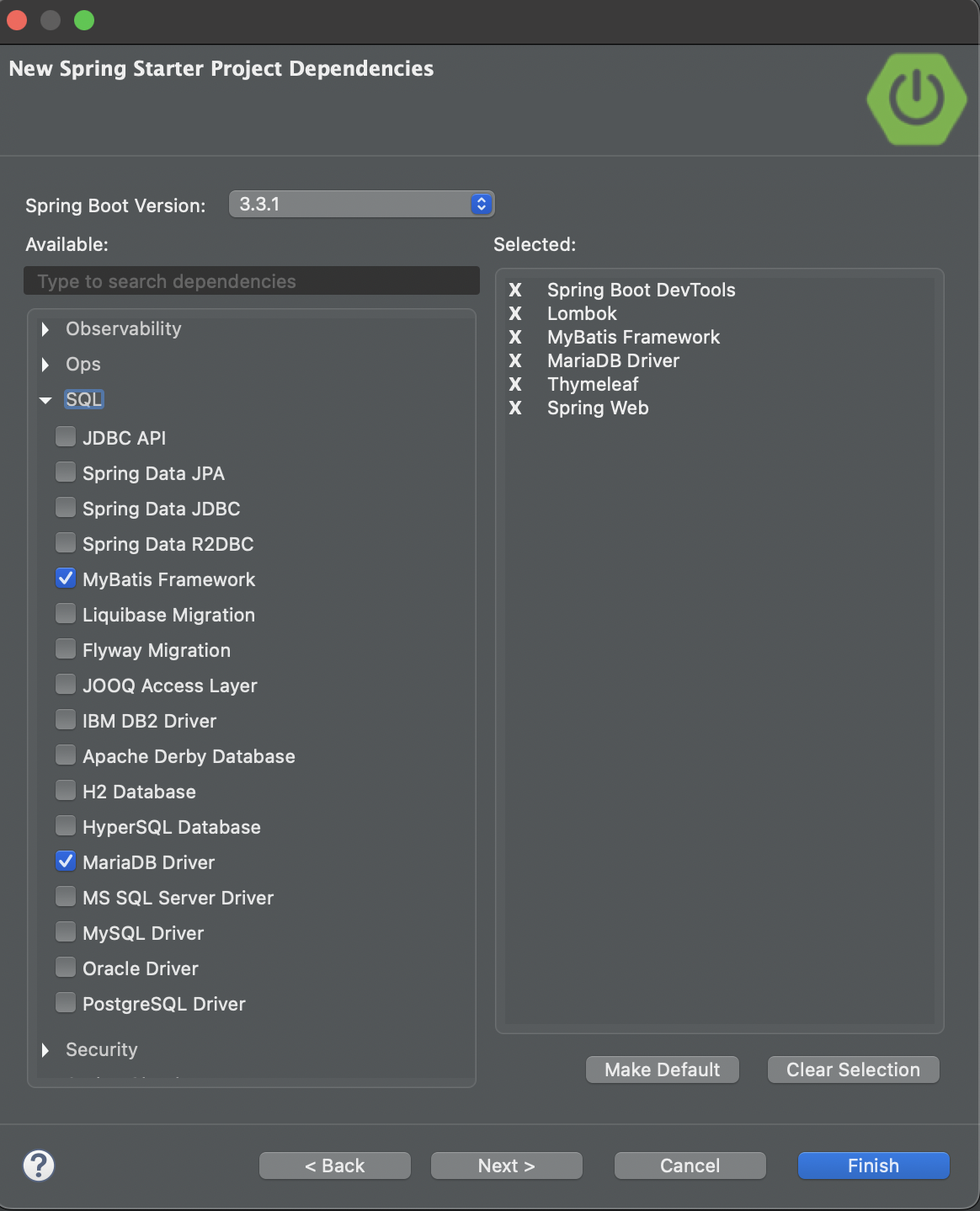
next> -> Finish
프로젝트 설정
- pom.xml에서 descripton 태그 밑부터 properties 태그 위까지 삭제(사용하지 않는 태그)
- pom.xml에서 jdbc 의 scope 태그 삭제(계속 돌고 있어야 함)
  <dependency>
    <groupId>org.mariadb.jdbc</groupId>
    <artifactId>mariadb-java-client</artifactId>
  </dependency>
-> 여기 있던 scope 삭제!
- 코드 실행 전에 설정이 덜 되어서 오류가 나므로 pom.xml에서 하단 코드 주석처리
  <dependency>
    <groupId>org.mybatis.spring.boot</groupId>
    <artifactId>mybatis-spring-boot-starter</artifactId>
    <version>3.0.3</version>
  </dependency>

  <dependency>
    <groupId>org.mariadb.jdbc</groupId>
    <artifactId>mariadb-java-client</artifactId>
  </dependency>

  <dependency>
    <groupId>org.mybatis.spring.boot</groupId>
    <artifactId>mybatis-spring-boot-starter-test</artifactId>
    <version>3.0.3</version>
    <scope>test</scope>
  </dependency>
Spring Boot
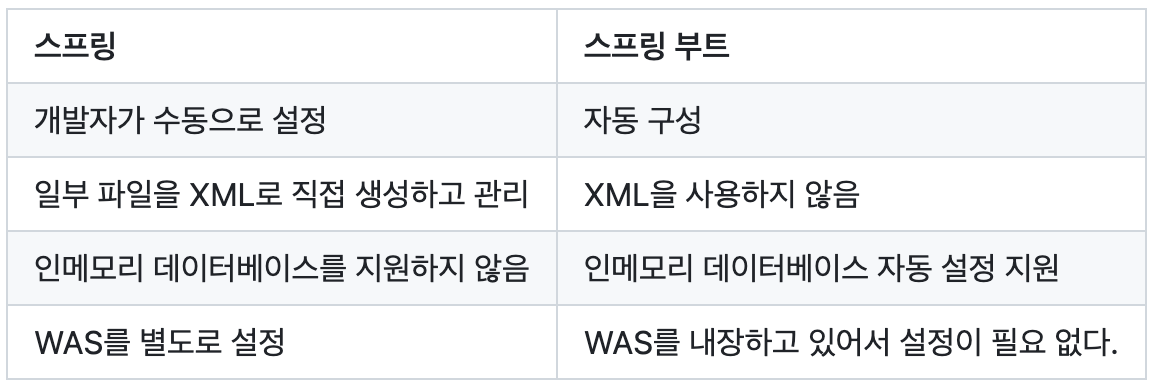
- 스프링 부트는 스프링 프레임워크를 더 쉽고 빠르게 이용할 수 있도록 만들어주는 도구이다.
- 빠르게 스프링 프로젝트를 설정할 수 있다.
- 스타터를 사용해 간편하게 의존성을 사용할 수 있다.
- 웹 애플리케이션 서버(WAS)를 내장하고 있어서 따로 설치하지 않아도 독립적으로 실행할 수 있다. ( 내장된 Tomcat )
Spring VS Spring Boot
Spring Boot Starter
- 의존성이 모여있는 그룹이다.
- 스타터를 사용하면 필요한 기능을 간편하게 설정할 수 있다.
- " spring-boot-starter-{작업유형} "
1.spring-boot-starter-web
: Spring MVC를 사용해서 웹 서비스를 개발할 때 필요한 의존성 모음
2.spring-boot-starter-test
: 스프링 애플리케이션을 테스트하기 위해 필요한 의존성 모음
3.spring-boot-starter-validation
: 유효성 검사를 위해 필요한 의존성 모음
4.spring-boot-starter-actuator
: 모니터링을 위해 애플리케이션에서 제공하는 다양한 정보를 제공하기 쉽게하는 의존성 모음
5.spring-boot-starter-jpa
: ORM을 사용하기 위한 인터페이스의 모음인 JPA를 더 쉽게 사용하기 위한 의존성 모음
설정/구성 관련 어노테이션
- @SpringBootApplication
: 스프링 부트 사용에 필요한 기본 설정을 한다. - @SpringBootConfiguration
: 스프링 부트 관련 설정을 나타내는 어노테이션이다.
: @Configuration을 상속해서 만든 어노테이션이다. - @EnableAutoConfiguration
: 스프링 부트 자동 구성을 활성화하는 어노테이션이다.
: 스프링 부트 애플리케이션이 실행될 때 스프링 부트의 메타 파일(spring.factories)을 읽고 정의된 설정들을 자동으로 구성하는 역할을 한다.
: spring.factories안에 자동 구성해야하는 목록을 가지고 있다. - @ComponentScan
: 사용자가 등록한 빈을 읽고 등록하는 어노테이션이다.
Spring Application 실행 함수
- SpringApplication.run()
- 첫 번째 매개값은 스프링 부트 애플리케이션의 메인 클래스로 사용할 클래스를 지정한다.
- 두 번째 매개값은 커맨드 라인의 인수들을 전달한다.
Profile 설정
- 스프링 부트는 기본적으로 application.properties 또는 application.yml 파일을 사용하여 설정을 관리한다.
- 스프링 부트는 프로파일을 설정해서 환경별로 다른 설정을 적용할 수 있는데 application-{profile}.properties 또는 application-{profile}.yml로 환경별로 설정 파일을 만들 수 있다.
          # application.yml
          server:
          port: 8080

          # application-dev.yml
          spring:
            profiles: dev
          server:
            port: 8088

          # application-live.yml
          spring:
            profiles: live
          server:
            port: 8089
: Run -> Run Configuration 에서 프로파일 지정 후 사용 가능
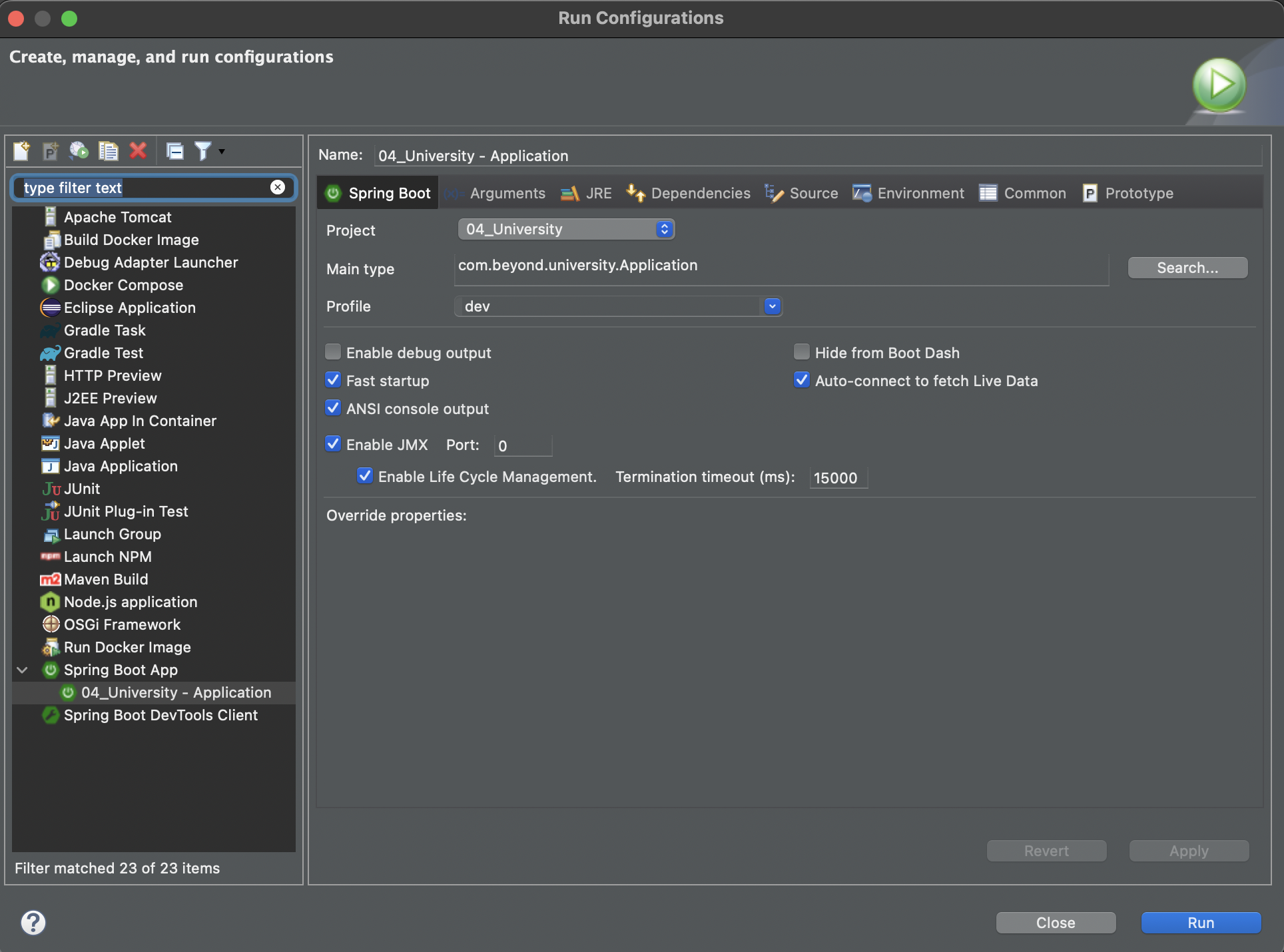
- 스프링 부트 애플리케이션을 실행할 때 명령줄 인수로 프로파일을 설정할 수 있다.
:java -jar myapp.jar --spring.profiles.active=dev - 운영체제의 환경 변수를 설정하여 프로파일을 지정할 수도 있다.
- 스프링 부트 애플리케이션 코드 내에서 프로파일을 설정할 수도 있다.
    // Application.java
    public static void main(String[] args) {
      new SpringApplicationBuilder(Application.class).profiles("dev").run(args);
    }

    // 특정 프로파일에서만 활성화되는 빈을 설정
    @Bean
    @Profile("dev")
    public TestBean testBean() {
      return new TestBean();
}- 테스트 코드에서 프로파일을 설정할 수도 있다.
    @SpringBootTest
    @ActiveProfiles("dev")
    public class ApplicationTest {
      @Test
      void contextLoads() {
      }
    }
TimeLeaf
- 타임리프는 템플릿 엔진으로 HTML5와 완전히 호환되며 스프링 부트는 타임리프를 사용하는 것을 권장하고 있다.
- 스프링 부트에서 타임리프를 사용하려면 pom.xml에 의존성을 추가해야 한다.
      <dependency>
          <groupId>org.springframework.boot</groupId>
          <artifactId>spring-boot-starter-thymeleaf</artifactId>
</dependency>- 또한 HTML 문서에서 타임리프 속성들을 사용하려면 HTML 문서에 xmlns를 설정해야 한다.
      <!DOCTYPE html>
      <html xmlns:th="http://www.thymeleaf.org">
        ...
      </html>
속성
- 태그 안에 텍스트를 설정하려면 th:text 속성을 사용한다.
    <!-- 컨트롤러로 전달받은 Model에 접근할 때는 ${..} 표현법을 사용한다. -->
<span th:text="${message}"></span>- 태그에 링크를 설정하려면 th:href 속성을 사용한다.
    <!-- 링크를 지정할 때는 @{..} 표현법을 사용한다. -->
<a th:href="@{/home}">Home</a>- form 태그에서 데이터를 전송할 서버의 URL을 지정할 때는 th:action 속성을 사용한다.
    <form th:action="@{/submit}" method="post">
      ...
</form>- input 태그에 값을 설정하려면 th:value 속성을 사용한다.
<input type="text" th:value="${address}"></span>- 조건을 만족하는 경우 HTML 요소를 표시하려면 th:if 속성을 사용한다.
<span th:if="${name != null}" th:text="${name}"></span>- 배열이나 컬렉션 요소를 반복해 요소를 표시하려면 th:each를 사용한다.
    <ul>
      <li th:each="item : ${items}" th:text="${item}"></li>
    </ul>