TIL (Today I Learned)
오늘 공부한거! (중요!!)
RecyclerView
 어떤 녀석인고....
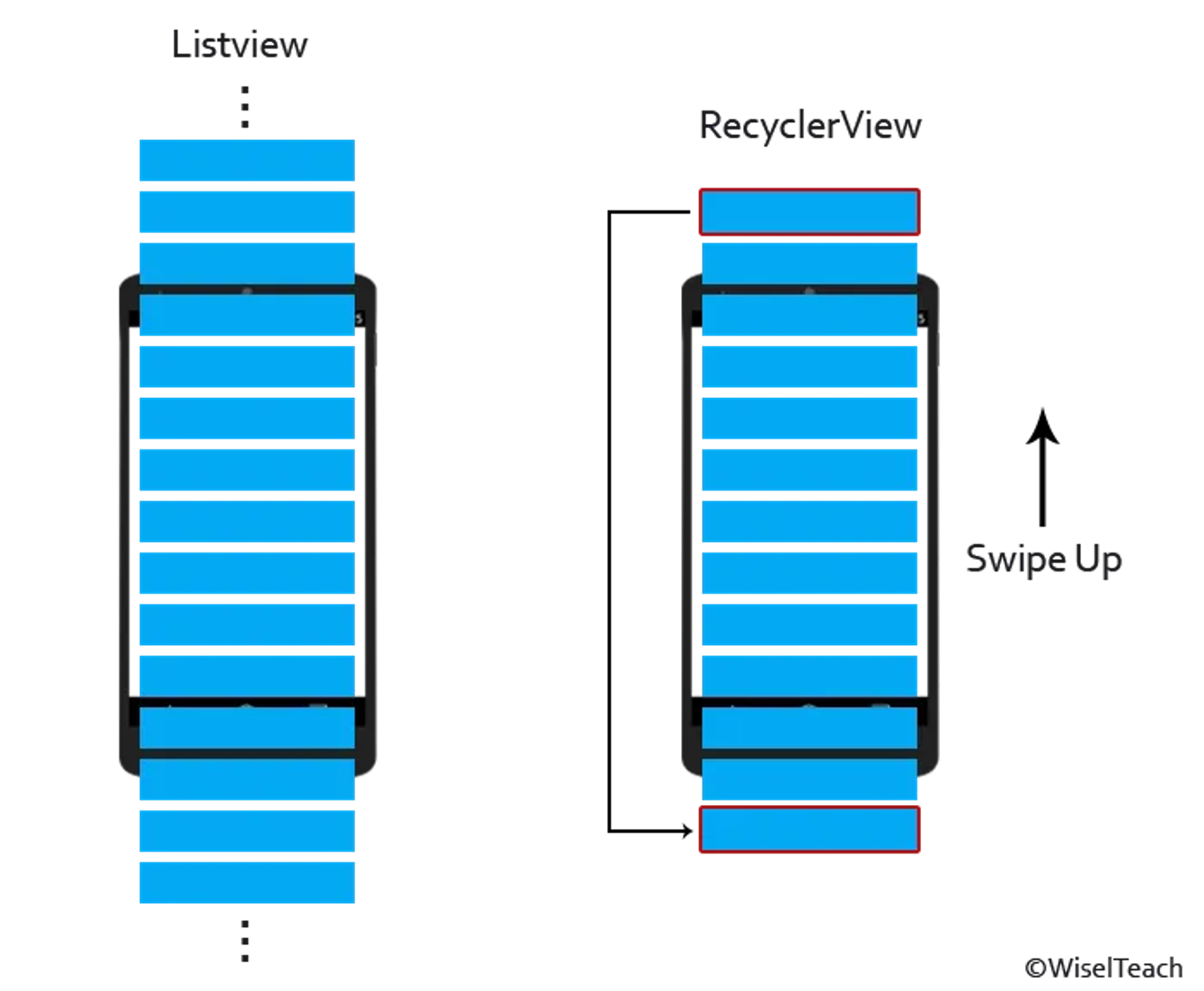
- 리스트 형태의 Data를 표시하는데 사용되는 위젯 중 가장 신제품
- 리스트를 스크롤 할 때, 위에 있던 아이템은 재활용 돼서 아래로 이동하여 재사용 함.
(공항의 검색대 처럼 바구니(홀더)는 그대로이고 내용물(컨탠츠)만 빼고 바꿔 가며 보여줌) - 많은 아이템을 효율적으로 관리하고 보여주는 역할
 그럼....어케써?
RecyclerView 준비물!!
-
LayoutManager
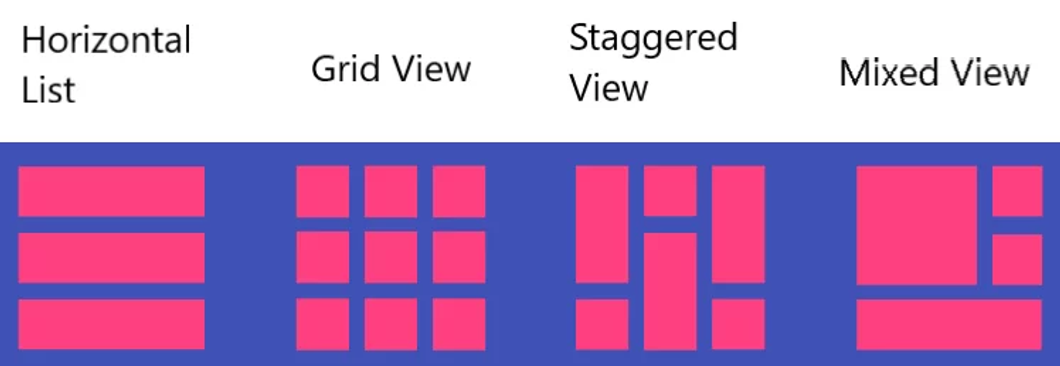
RecyclerView내부의 아이템들이 어떻게 배치될지를 결정합니다.- 기본 제공되는
LayoutManager로는LinearLayoutManager,GridLayoutManager,StaggeredGridLayoutManager등이 있습니다
val recyclerView.layoutManager = LinearLayoutManager(this) // 수직 리스트를 위한 LinearLayoutManager
val recyclerView.layoutManager = GridLayoutManager(this, 4) // 2열 그리드를 위한 GridLayoutManager
val staggeredGridLayoutManager = StaggeredGridLayoutManager(3, LinearLayoutManager.VERTICAL)
//기본 수직방향 사용시 (숫자 3은 그리드의 열 수)
val staggeredGridLayoutManager = StaggeredGridLayoutManager(3, LinearLayoutManager.HORIZONTAL)
//기본 수평방향 사용시 (숫자 3은 그리드의 열 수)
 recycler_view.layoutManager = staggeredGridLayoutManager
-
RecyclerView.Adapter
-
RecyclerView에 표시될 데이터와 해당 데이터를 보여줄ViewHolder를 연결합니다. -
Adapter는 데이터셋의 변경 사항을RecyclerView에 알리고, 데이터를 기반으로 뷰를 생성합니다.class MyListAdapter(private val dataList: MutableList<String>) : RecyclerView.Adapter<MyListAdapter.MyViewHolder>() { inner class MyViewHolder(view: View) : RecyclerView.ViewHolder(view) { val textView: TextView = view.findViewById(R.id.textView) val thumbnailView: ImageView = view.findViewById(R.id.thumbnail) } override fun onCreateViewHolder(parent: ViewGroup, viewType: Int): MyViewHolder { val itemView = LayoutInflater.from(parent.context).inflate(R.layout.item_view, parent, false) return MyViewHolder(itemView) } override fun onBindViewHolder(holder: MyViewHolder, position: Int) { ****** Log.d("RecycleView", "onBindViewHolder :$position") holder.textView.text = dataList[position] holder.thumbnailView.setImageUri(dataList[position].thubnailUrl) } override fun getItemCount() = dataList.size // 데이터 추가 fun addItem(data: String) { dataList.add(data) notifyItemInserted(dataList.size - 1) } // 데이터 삭제 fun removeItem(position: Int) { if (position < dataList.size) { dataList.removeAt(position) notifyItemRemoved(position) } } }
-
-
ViewHolder
RecyclerView의 개별 아이템 뷰를 위한 객체입니다.- 아이템 뷰의 모든 서브 뷰를 담고 있어 재사용과 성능 최적화에 도움을 줍니다.
inner class MyViewHolder(view: View) : RecyclerView.ViewHolder(view) {
     val thumbnailView: ImageView = view.findViewById(R.id.thumbnailView)
     val titleView: TextView = view.findViewById(R.id.titleView)
     // 여기에 필요한 다른 뷰를 추가할 수 있습니다.
 }
Sample 코드
- MainActivity.kt 일부
binding = inflate(layoutInflater)
binding.recyclerView.apply {
            this@MainActivity.adapter = VideoListAdapter(VideoList.list) { video ->
                val intent = Intent(applicationContext, DetailActivity::class.java).apply {
                    putExtra(EXTRA_VIDEO, video)
                }
                startActivity(intent)
            }
adapter = this@MainActivity.adapter- activity_main.xml
<androidx.recyclerview.widget.RecyclerView
        android:id="@+id/recycler_view"
        android:layout_width="0dp"
        android:layout_height="0dp"
        //LayoutManager 를 고정해 둠
        app:layoutManager="androidx.recyclerview.widget.LinearLayoutManager"
        app:layout_constraintBottom_toBottomOf="parent"
        app:layout_constraintEnd_toEndOf="parent"
        app:layout_constraintStart_toStartOf="parent"
app:layout_constraintTop_toBottomOf="@id/chip_group"/>- ListAdapter.kt
class VideoListAdapter(private val list: MutableList<Video>, private val onClick: (Video) -> Unit) :
    RecyclerView.Adapter<VideoListAdapter.VideoHolder>() {
    override fun onCreateViewHolder(parent: ViewGroup, viewType: Int): VideoHolder {
        val binding = ItemLayoutBinding.inflate(LayoutInflater.from(parent.context), parent, false)
        return VideoHolder(binding)
    }

    override fun getItemCount(): Int {
        return list.size
    }

    override fun onBindViewHolder(videoHolder: VideoHolder, position: Int) {
        runCatching {
            list[position].run {
                videoHolder.bind(this)
            }
        }.onFailure { exception ->
            Log.e("VideoListAdapter", "Exception! ${exception.message}")
        }
    }

    // 데이터 추가
    fun addItem(video: Video) {
        list.add(video)
        notifyItemInserted(VideoList.size - 1)
    }

    // 데이터 삭제
    fun removeItem(position: Int) {
        if (position < list.size) {
            list.removeAt(position)
            notifyItemRemoved(position)
        }
    }

    inner class VideoHolder(binding: ItemLayoutBinding) : RecyclerView.ViewHolder(binding.root) {
        private val channelLogo = binding.logo
        private val channelName = binding.channelName
        private val titleView = binding.title
        private val thumbnailView = binding.mainImage

        fun bind(video: Video) {
            with(video) {
                Glide.with(itemView).load(thumbnail).into(thumbnailView)
                thumbnailView.setOnClickListener { onClick(this) }
                titleView.text = title
                channelName.text = channelTitle
                channelLogo.setImageResource(R.drawable.haelin)
            }
        }
    }
}
Today Review

공장자동화와 웹 개발을 핥아 먹다 앱 개발로 전향한 개발자의 키보드의 낡은 키캡⛑️