TIL (Today I Learned)
오늘 공부한거!
알림
-
Notification anatomy 알림 디자인 해부
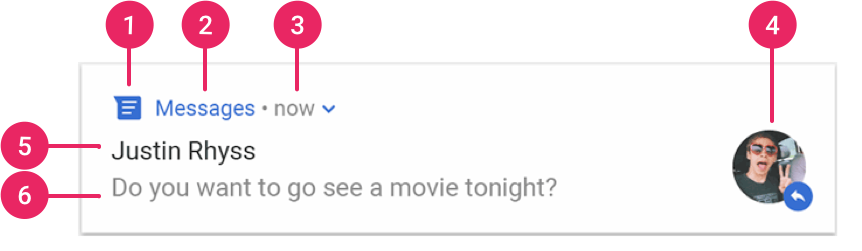
- Small Icon : setSmallIcon() 함수로 설정 가능하다
- App name : 안드로이드에서 자체적으로 제공해준다
- Time stamp : 안드로이드에서 자체적으로 제공해준다.
- setWhen()함수로 override 할 수 있고 setShowWhen(false)로 감출수도 있다
- Lage Icon : Optional한 요소이다. setLargeIcon() 함수로 설정가능하다
- Title : Optional이다 setContentTitle() 로 설정 가능하다
- Text : Optional이다 setContentText() 로 설정 가능하다
- Notification Actions 알림 액션
- 필수는 아니지만 알림은 알림을 탭 하였을 때 적절한 app activity를 호출해야 하며 이러한 작업은 default action으로 간주된다.
- default action에 추가하여 알림에 acttion button을 달아 줄 수 있다.
- Android 7.0(API level 24) 이상부터는 reply action 버튼을 추가해 줄 수 있다. 이는 알림에서 텍스트를 입력하여 메세지를 보내는 기능을 한다
- Android 10(API level 29) 이상부터는 안드로이드에서 suggested intent-base actions 기반으로 action button을 자동 생성해준다.
- 맹글기
참고:1.알림 채널
- Android 8.0 이상부터는 알림을 만들기 전에 알림 채널부터 만들어야 함
- 알림 채널은 알림을 그룹화해 알림 활성화 / 알림 방식 변경 등을 할 수 있음```kotlin private val myNotificationID = 1 private val channelID = "default" // 알림 채널 생성 메서드 구현 private fun createNotificationChannel() { // Android 8.0 이상일 때 if (Build.VERSION.SDK_INT >= Build.VERSION_CODES.O) { // Android 8.0 val channel = NotificationChannel(channelID, "default channel", NotificationManager.IMPORTANCE_DEFAULT) channel.description = "description text of this channel." val notificationManager = getSystemService(Context.NOTIFICATION_SERVICE) as NotificationManager notificationManager.createNotificationChannel(channel) } } ```- 알림 생성
- NotificationCompat.Builder 객체에서 알림에 대한 UI 정보와 작업을 지정
- NotificationCompat.Builder.build()를 통해 Notification 객체를 반환
- NotificationManagerCompat.notify() 를 호출해 시스템에 Notification 객체를 전달
private val myNotificationID = 1 private fun showNotification() { val builder = NotificationCompat.Builder(this, channelID) .setSmallIcon(R.mipmap.ic_launcher) .setContentTitle("title") .setContentText("notification text") .setPriority(NotificationCompat.PRIORITY_DEFAULT) NotificationManagerCompat.from(this).notify(myNotificationID, builder.build()) } - 알림 중요도 = 채널 중요도(Android 8.0 이상) / 알림 우선순위(Android 7.1 이하)
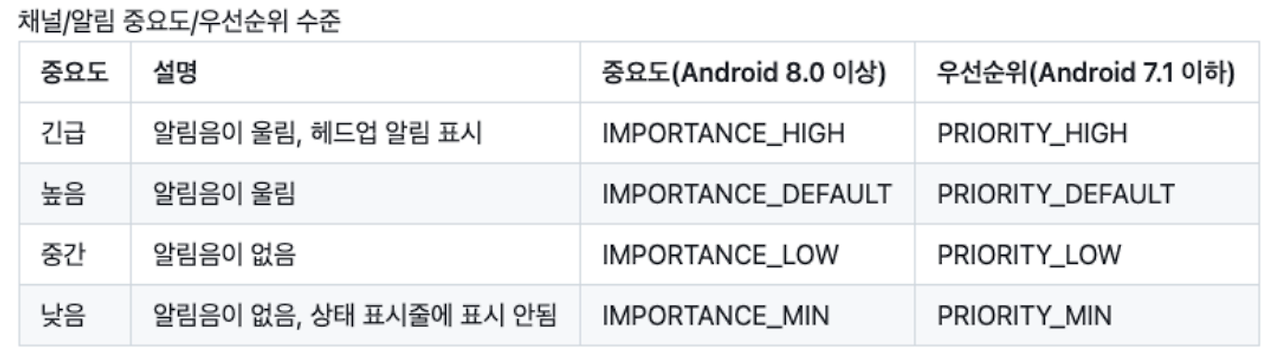
https://skycat1127.tistory.com/129
https://developer.android.com/design/ui/mobile/guides/home-screen/notifications - 알림 생성

공장자동화와 웹 개발을 핥아 먹다 앱 개발로 전향한 개발자의 키보드의 낡은 키캡⛑️