오류
타입스크립트와 styled-components를 사용하던 중
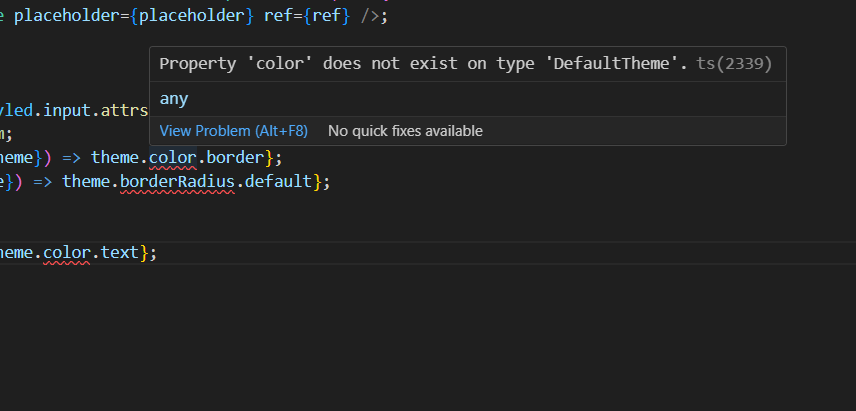
Property 'color' does not exist on type 'DefaultTheme'
라는 오류가 발생했다.
DefaultTheme에 color속성이 존재하지 않는다는데...
export interface Theme {
  name: ThemeName;
  color: Record<ColorKey, string>;
  heading: {
    [key in HeadingSize]: {
      fontSize: string;
    };
  };

...
나는 color 속성을 정의해줬다 ㅠㅠ
하지만 신기하게도
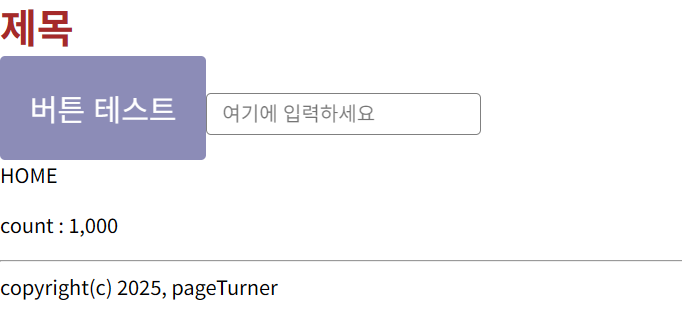
화면 렌더링은 오류 없이 작동했다...!!
문제 해결
나는 분명 속성을 정의해줬고 화면 렌더링은 정상적으로 작동해서
바로 구글링을 하였다.
알고 보니 타입스크립트에서는 DefaultTheme를 꼭 정의해줘야 한다고 한다...!!
import 'styled-components';
import {DefaultTheme} from 'styled-components';

declare module 'styled-components' {
  export interface DefaultTheme {
    name: ThemeName;
    color: Record<ColorKey, string>;
    heading: {
      [key in HeadingSize]: {
        fontSize: string;
      };
    };
...
기존 사용하던 인터페이스를 Theme에서 DefaultTheme로 이름을 바꾼후
declare module 'styled-components' 을 추가해서 타입스크립트에게
DefaultTheme가 존재한다는 것을 알려주었다.
이걸 추가해주니 보기 싫었던 빨간줄의 오류가 해결되었다. ㅎㅎ
🤔후기
솔직히 화면 렌더링은 정상적으로 동작해서 오류를 해결하지 않을까도 했지만
오류를 해결하니 속이 후련하고 기분이 좋다 ㅎㅎ
타입스크립트를 사용하면서 '이런거까지 타입을 정의해줘야해??'
하는것들이 정말 많은 거 같다 ㅜㅜ
📝참고

웹 개발자가 되고픈