[Spring Boot] 스프링부트로 로그인 구현 (ajax, bcrypt)
로그인 화면
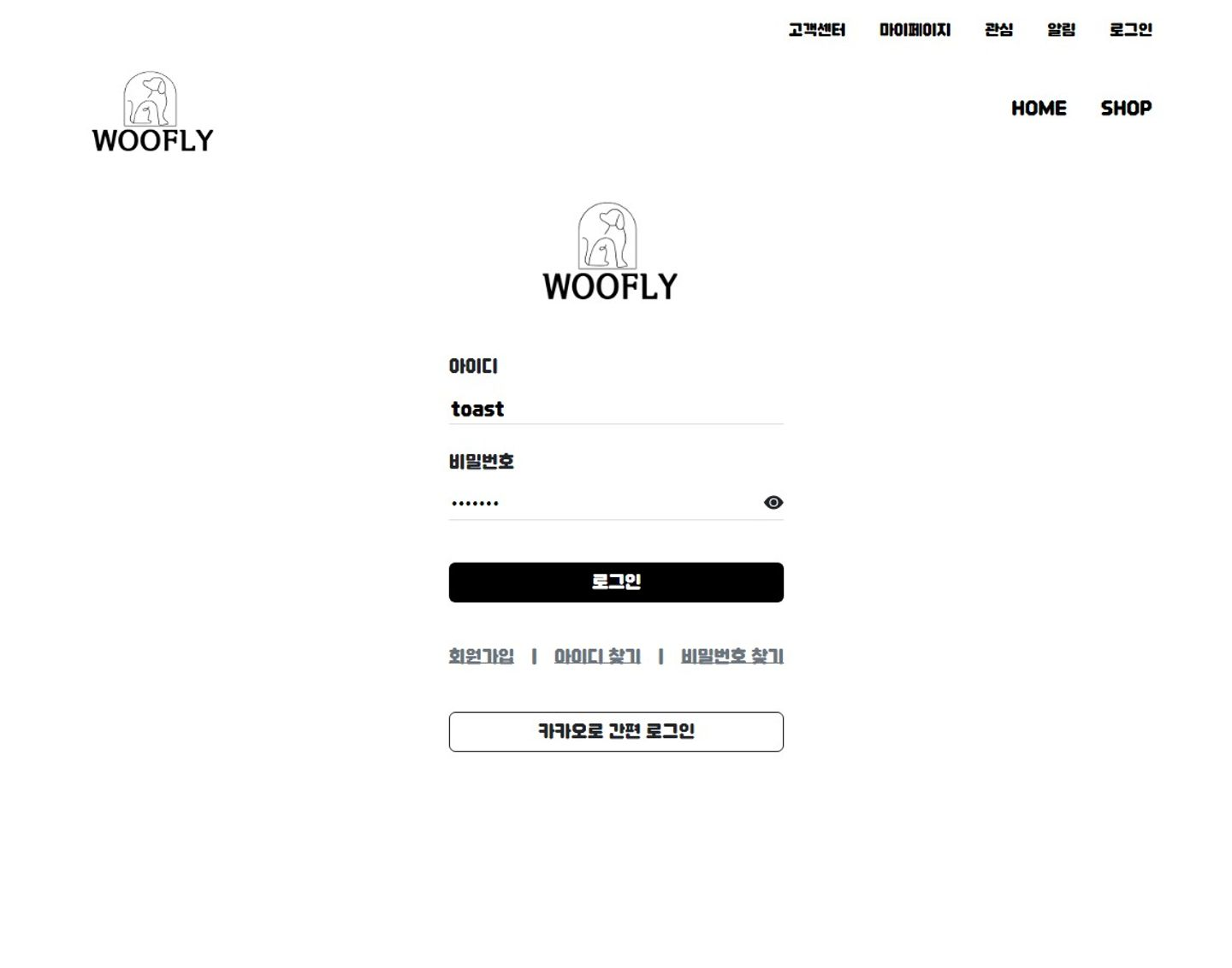
- 화면은 BootStrap으로 구현하였습니다.
- 비동기 방식인 ajax를 활용하여 id가 존재하는지, 정지된 계정인지, 틀린 비밀번호인지 조건문을 통과하고 최종적으로 모든 data가 일치하면 로그인을 실행합니다.
login.html
<main>
	<div class="alert alert-danger" id="liveAlertPlaceholder" style="z-index: 9999; display:none; position: fixed; top: 10%; left: 50%; transform: translate(-50%, 0);"></div>
	<div class="d-flex justify-content-center mx-5">
		<div class="col-10 pt-3 mb-5 d-flex justify-content-center">
			<div>
				<div class="text-center">
					<img src="/image/woofly.png" style="width:200px">
				</div>
				<br>
				<form action="/login.dw" method="post">
					<div class="mt-3">
						<p>아이디</p>
						<div class="border-bottom d-flex justify-content-between">
						    <input id="mbId" type="text" name="mbId" style="border:none; background: transparent; width:100%">
						</div>
					</div>
					<br>
					<div class="mb-3">
						<p>비밀번호</p>
						<div class="border-bottom d-flex justify-content-between" id="pwd">
							<input id="mbPwd" type="password" name="mbPwd" style="border: none; background: transparent; width:100%">
							 <svg id="showPwd" xmlns="http://www.w3.org/2000/svg" width="20" height="20" fill="currentColor" class="bi bi-eye-fill" viewBox="0 0 16 16">
					            <path d="M10.5 8a2.5 2.5 0 1 1-5 0 2.5 2.5 0 0 1 5 0"/>
					            <path d="M0 8s3-5.5 8-5.5S16 8 16 8s-3 5.5-8 5.5S0 8 0 8m8 3.5a3.5 3.5 0 1 0 0-7 3.5 3.5 0 0 0 0 7"/>
					        </svg>
						</div>
						<div class="form-text" id="pwdCheckWarn" style="color:red;" ></div>
					</div>
					<br>
					<div>
						<button type="button" onclick="checkLogin()" id="loginBtn" class="btn btn-outline-white mb-3 text-white" style="background-color: #ebebeb; width:100%">로그인</button>
					</div>
					<input type="hidden" name="beforeURL"> <!-- 로그인하면 이전 페이지로 넘어가는 코드 -->
				</form>
				<br>
				<div class="gap-3 d-flex">
					<a href="/account/signUp" role="button" class="text-secondary">회원가입</a>
					<p class="text-secondary">|</p>
					<a href="/account/findId" role="button" class="text-secondary">아이디 찾기</a>
					<p class="text-secondary">|</p>
					<a href="/account/findPwd" role="button" class="text-secondary">비밀번호 찾기</a>
				</div>
				<br>
				<div>
					<a class="btn btn-outline-dark mb-3" href="https://kauth.kakao.com/oauth/authorize?client_id=1ca4e62a403e811b888aebec433f8494&redirect_uri=http://192.168.20.217:8080/kakaoLogin&response_type=code" style="width:100%">카카오로 간편 로그인</a>
				</div>
			</div>
		</div>
	</div>
</main>
js
<script>
	//setTimeOut 함수 이용하여 경고알림 보여줄 시간 설정
	const alertTimeOut = () => {
		setTimeout(() => {
			const liveAlertPlaceholder = document.getElementById("liveAlertPlaceholder");
			liveAlertPlaceholder.style.display = 'none';

		}, 1500)
	}

	//비동기 방식으로 실시간 경고문구 띄우기
	const checkLogin = () => {
		const mbId = document.getElementById("mbId").value;
		const liveAlertPlaceholder = document.getElementById("liveAlertPlaceholder");
		const mbPwd = document.getElementById("mbPwd").value;
		liveAlertPlaceholder.style.display = 'none';

		$.ajax({
			url: '/checkLogin.dw',
			data: {'mbId': mbId, 'mbPwd': mbPwd},
			success: data => {
				console.log(data);
				if (data == 'good') {
					document.querySelector('form').submit();
				} else if (data == 'noId') {
					liveAlertPlaceholder.style.display = 'block';
					liveAlertPlaceholder.innerText = '존재 하지 않는 아이디 입니다.';
					alertTimeOut();
				} else if (data == 'banned') {
					liveAlertPlaceholder.style.display = 'block';
					liveAlertPlaceholder.innerText = '정지된 계정입니다. 관리자에게 문의해주세요.';
					alertTimeOut();
				} else {
					liveAlertPlaceholder.style.display = 'block';
					liveAlertPlaceholder.innerText = '틀린 비밀번호 입니다.';
					alertTimeOut();
				}
			},
			error: data => console.log(data)
		})
	}

	//엔터누르면 클릭과 동일한 이벤트 발생
	document.addEventListener('keyup', (event) => {
		if (event.key === 'Enter') {
			liveAlertPlaceholder.style.display = 'none';
			$('#loginBtn').click();
		}
	})

	//눈 모양 아이콘을 누르면 입력한 pwd 값 보여줌
	$(document).ready(function () {
		$('#showPwd').on('click', function () {
			var pwdInput = $('#mbPwd');
			var icon = $(this);

			if (pwdInput.attr('type') === 'password') {
				pwdInput.attr('type', 'text');
				icon.removeClass('bi-eye-fill').addClass('bi-eye-slash-fill');
			} else {
				pwdInput.attr('type', 'password');
				icon.removeClass('bi-eye-slash-fill').addClass('bi-eye-fill');
			}
		});
	});

	//input값에 데이터가 있으면 버튼 색상 변경
	document.getElementById('mbPwd').addEventListener('keyup', function () {
		const id = document.getElementById('mbId')
		const pwd = document.getElementById('mbPwd')
		const loginBtn = document.getElementById('loginBtn');

		if (id !== '' && pwd !== '') {
			loginBtn.style.backgroundColor = 'black';
		} else {
			loginBtn.style.backgroundColor = '#ebebeb';
		}

	});

	//null값이면 경고
	function checkData() {
		const id = document.getElementById('mbId').value.trim(); //.trim을 통해 사용자가 잘못 띄어쓰기 해도 제거
		const pwd = document.getElementById('mbPwd').value.trim();

		if (id === '' || pwd === '') {
			alert('아이디와 비밀번호를 모두 입력하세요.');
			return false;
		} else {
			document.querySelector('form').submit()
			return true;
		}

	}

	window.onload = () => {
		const beforeURL = document.referrer; //이전 URL 정보를 갖고잇음
		document.getElementsByName('beforeURL')[0].value = beforeURL;
	}
</script>
Member.java
public class Member {
	private String mbId;
	private String mbPwd;
	private String mbName;
	private String mbPhoto;
	private String mbIntro;
	private String mbNickName;
	private String mbEmail;
	@DateTimeFormat(pattern = "yyyy-MM-dd")
	private Date mbBirth;
	private String mbTel;
	private int mbPoint;
	private String mbStatus;
	private String isAdmin;
	private String isPrivate;
	private Date nextChange;
	private String isKakao;

	private String isBanned;

}
AccountController.java
👾 로그인은 아이디가 없는 경우(noId 반환), 계정이 정지된 경우(banned 반환), 패스워드가 일치하지 않는 경우(wrongPwd 반환) 세가지 경우의 수로 검사합니다.
👾 패스워드는 보안을 위해 bcrypt로 암호화 하였습니다.
👾 카카오 간편로그인 api는 다른 포스트에서 설명하도록 하겠습니다.
@SessionAttributes("loginUser")
@Controller
public class AccountController {

	@Autowired
	private AccountService aService;

	@Autowired
	private BCryptPasswordEncoder bcrypt;

    //로그인 화면 이동
    @GetMapping("/account/login")
	public String loginView(Model model) {
		return "login";
	}

    // 비동기 ajax
    @GetMapping("checkLogin.dw")
    @ResponseBody
    public String checkLogin(@ModelAttribute Member m) {
       Member loginUser = aService.login(m);
       if (loginUser == null) {
          return "noId";
       } else {
          if (loginUser.getIsBanned().equals("Y")) {
             return "banned";
          } else if (bcrypt.matches(m.getMbPwd(), loginUser.getMbPwd())) {
             return "good";
          } else {
             return "wrongPwd";
          }
       }
    }

    @PostMapping("login.dw")
	public String login(@ModelAttribute Member m, Model model, @RequestParam("beforeURL") String beforeURL, HttpSession response) {
		Member loginUser = aService.login(m);

		if (loginUser != null) {
			if (bcrypt.matches(m.getMbPwd(), loginUser.getMbPwd())) {
				model.addAttribute("loginUser", loginUser);

				if (!beforeURL.equals("http://192.168.20.217:8080/logout.dw")
						&& !beforeURL.equals("http://192.168.20.217:8080/signUp.dw")) {
					return "redirect:" + beforeURL;
				} else {
					return "redirect:home.me";
				}
			} else {
				model.addAttribute("msg", "로그인에 실패하였습니다.\n아이디와 비밀번호를 다시 확인해주세요.");
				model.addAttribute("searchUrl", "views/account/signUp");
				return "redirect:/account/signUp";

			}

		} else {
			model.addAttribute("msg", "로그인에 실패하였습니다.\n아이디와 비밀번호를 다시 확인해주세요.");
			model.addAttribute("searchUrl", "views/account/signUp");
			return "redirect:/account/signUp";
		}
	}
}
account-mapper.xml
<select id="login" resultType="Member">
		select *
		from member
		where MB_ID = #{mbId} and mb_status='Y'
	</select>
나의 코딩 다이어리🖥️👾✨