Mastering Inter-Component Communication in Flutter with MI Broadcast
In Flutter app development, managing inter-
component communication between different parts of a Flutter app (widgets, services, or modules) can be challenging. While Flutter Dart provides several solutions like ‘StreamController’, ‘Provider’, or ‘Bloc’, sometimes you need a simple, direct approach for Flutter widget communication and event handling.
Enter MI Broadcast Flutter – a lightweight, powerful Flutter package that provides broadcasting capabilities for Flutter applications. This library offers a simple yet effective way to implement inter-component communication with features like sticky broadcasts, persistent messages, and context-based registration.
If you’re planning to scale your projects, working with an experienced Flutter App Development Company can help you adopt best practices and streamline architecture decisions.
What is MI Broadcast in Flutter Development?
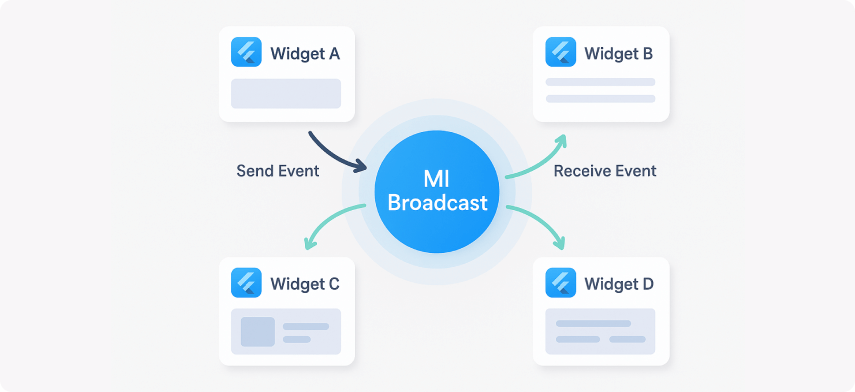
MI Broadcast is a Flutter package that implements a broadcasting system similar to Android’s BroadcastReceiver. It allows you to:
- Register receivers for specific events
- Broadcast messages to all registered receivers
- Send sticky broadcasts that are delivered to future receivers
- Persist messages for later retrieval
- Use context-based registration for automatic cleanup
- Implement two-way communication with callbacks
Key Features of MI Broadcast for Flutter Widget Communication
Simple Registration and Broadcasting
// Register a receiver
MIBroadcast().register('user_login', (value, callback) {
print('User logged in: $value');
}, context: this);
// Broadcast a message
MIBroadcast().broadcast('user_login', value: 'john_doe');
Code language: JavaScript (javascript)
The straightforward approach makes Flutter custom event handling easy without relying on complex Flutter architecture patterns. For projects requiring deeper system-level handling, you may also explore Flutter Isolates & Background Processing.
Sticky Broadcasts
Sticky broadcasts are delivered to receivers that register after the broadcast was sent, making it useful for Flutter communication between widgets where state should persist.
// Send a sticky broadcast
MIBroadcast().stickyBroadcast('app_state', value: 'initialized');
// Later, when a receiver registers, it will receive the sticky message
MIBroadcast().register('app_state', (value, callback) {
print('App state: $value'); // Will print: App state: initialized
}, context: this);
Code language: PHP (php)
Persistent Messages
Messages can be stored during the app session and retrieved throughout the lifecycle. This is helpful for Flutter data sharing between components across multiple screens.
// Send a persistent message
MIBroadcast().broadcast('user_preferences',
value: {'theme': 'dark', 'language': 'en'},
persistence: true
);
// Retrieve the persistent value later
final prefs = MIBroadcast.value<Map<String, dynamic>>('user_preferences');
Code language: JavaScript (javascript)
Developers often combine this with APIs and networking — for example, handling data requests with Flutter Dio Tutorial: HTTP Client.
Context-Based Registration
MI Broadcast leverages context-based registration for automatic cleanup, reducing memory leaks – a best practice in Flutter component decoupling.
class MyWidget extends StatefulWidget {
@override
State createState() => _MyWidgetState();
}
class _MyWidgetState extends State {
@override
void initState() {
super.initState();
// Register with context - will be automatically unregistered when widget disposes
MIBroadcast().register('event', _handleEvent, context: this);
}
void _handleEvent(dynamic value, void Function(dynamic result)? callback) {
// Handle the event
}
}
Code language: JavaScript (javascript)
Two-way Communication
Implement callbacks for two-way communication:
// Register receiver with response capability
MIBroadcast().register('data_request', (value, callback) {
final data = fetchData(value);
callback?.call(data); // Send response back
}, context: this);
// Broadcast with callback
MIBroadcast().broadcast('data_request',
value: 'user_profile',
callback: (result) {
print('Received data: $result');
}
);
Code language: PHP (php)
Real-World Use Cases of MI Broadcast in Flutter Apps
User Authentication State Management
// Auth service broadcasts login/logout events
class AuthService {
void login(String username) {
// Perform login logic
MIBroadcast().stickyBroadcast('auth_state', value: {
'isLoggedIn': true,
'username': username,
'timestamp': DateTime.now()
});
}
void logout() {
MIBroadcast().stickyBroadcast('auth_state', value: {
'isLoggedIn': false,
'username': null,
'timestamp': DateTime.now()
});
}
}
// UI components listen to auth changes
class ProfileWidget extends StatefulWidget {
@override
State createState() => _ProfileWidgetState();
}
class _ProfileWidgetState extends State {
Map<String, dynamic>? _authState;
@override
void initState() {
super.initState();
MIBroadcast().register('auth_state', (value, callback) {
setState(() {
_authState = value as Map<String, dynamic>;
});
}, context: this);
}
@override
Widget build(BuildContext context) {
if (_authState?['isLoggedIn'] == true) {
return Text('Welcome, ${_authState!['username']}');
} else {
return Text('Please log in');
}
}
}
Code language: JavaScript (javascript)
Network State Monitoring
Monitor real-time connectivity and broadcast state updates.
// Network service
class NetworkService {
void checkConnectivity() {
// Simulate network check
final isConnected = Random().nextBool();
MIBroadcast().stickyBroadcast('network_state', value: {
'isConnected': isConnected,
'timestamp': DateTime.now()
});
}
}
// Network-aware components
class NetworkAwareWidget extends StatefulWidget {
@override
State createState() => _NetworkAwareWidgetState();
}
class _NetworkAwareWidgetState extends State {
bool _isConnected = true;
@override
void initState() {
super.initState();
MIBroadcast().register('network_state', (value, callback) {
setState(() {
_isConnected = (value as Map<String, dynamic>)['isConnected'];
});
}, context: this);
}
@override
Widget build(BuildContext context) {
return Container(
padding: EdgeInsets.all(8),
color: _isConnected ? Colors.green : Colors.red,
child: Text(_isConnected ? 'Online' : 'Offline'),
);
}
}
Code language: JavaScript (javascript)
If you’re building smaller apps or enterprise-grade solutions, partnering with a trusted Mobile App Development Company ensures that architectural patterns like MI Broadcast integrate seamlessly into your overall Flutter ecosystem.
Best Practices
Use Context-Based Registration
Always use context-based registration to prevent memory leaks:
// Good
MIBroadcast().register('event', _handler, context: this);
// Avoid
MIBroadcast().register('event', _handler); // No automatic cleanup
Code language: JavaScript (javascript)
Choose the Right Broadcast Type
-
Regular broadcast: For one-time events
-
Sticky broadcast: For state that new receivers should know about
-
Persistent broadcast: For data that needs to be retrieved later