0. 공부하게 된 이유
회사에서 사용하는 모달 컴포넌트는 두 종류가 있다.
하나는 형식이 정형화된 모달로, 스타일이 고정되어 있어 보여줄 문자열 정도만 바꾸면 된다.
다른 하나는 커스텀 모달로, 정형화된 모달과 스타일이 다를 경우 사용한다.
커스텀 모달은 컴포넌트 자체를 인자로 넘겨받아 렌더링하는데, 커스텀 모달을 띄우려할 때 아래와 같은 경고가 나왔다.
(참고로 production 환경에서는 나오지 않는다. development 환경일 때만 출력하도록 되어 있는 것 같다)
Vue received a Component which was made a reactive object. This can lead to unnecessary performance overhead, and should be avoided by marking the component with
markRawor usingshallowRefinstead ofref.
markRaw나 shallowRef가 ref와 무슨 차이가 있길래 성능 저하가 발생할 수 있으니 ref 사용을 고려해보라는 건지 궁금했다.
1. Vue 반응형 API
(ref를 이용해 예시를 작성해도 됐지만 markRaw처럼 객체를 인자로 받는 reactive를 이용해서 글을 작성하겠다)
잘 알다시피 Vue는 reactive로 감쌈으로써 반응형 변수를 선언할 수 있다.
기본적으로 reactive는 중첩 객체 내부, 즉 객체의 깊은 부분까지 반응형으로 동작한다.
하지만 shallowReactive는 내부 깊숙한 곳의 변경이 반응형으로 작동하지 않고, 얕게 루트 수준의 속성 변경에 대해서만 반응형인 객체를 선언하는 데에 사용한다.
markRaw도 shallowReactive랑 비슷하다.
객체를 프록시 변환하지 않도록 하고 객체 자체를 반환하는 함수이다.
간단한 예시를 확인해보자.
reactive
<template>
    <!--<p>{{ rawObj.name.first }} {{rawObj.name.last}}</p>-->
    <!--<p>{{ shallowReactiveObj.name.first }} {{shallowReactiveObj.name.last}}</p>-->
    <p>{{ deepReactiveObj.name.first }} {{deepReactiveObj.name.last}}</p>
    <button type="button" @click="updateName">Update Name</button>
</template>

<script>
import { markRaw, shallowReactive, reactive } from "vue";

export default {
    setup() {
        const rawObj = markRaw({ name: { first: "raw", last: "Robj" } });
        const shallowReactiveObj = shallowReactive({ name: { first: "shallow", last: "Sobj" } });
        const deepReactiveObj = reactive({ name: { first: "deep", last: "Dobj" } });

        const updateName = () => {
            rawObj.name.first = "rawUpdated";
            shallowReactiveObj.name.first = "shallowUpdated";
            deepReactiveObj.name.first = "deepUpdated";

            console.warn("rawObj:", rawObj.name);
            console.warn("shallowReactiveObj:", shallowReactiveObj.name);
            console.warn("deepReactiveObj:", deepReactiveObj.name);
        };

        return {
            rawObj, shallowReactiveObj, deepReactiveObj, updateName,
        };
    },
};
</script>deepReactiveObj에 대한 변화는 기대처럼 렌더링 결과를 갱신한다.

참고로 콘솔에 찍히는 내용을 보면, 값 자체는 rawObj도, shallowReactiveObj도 갱신은 된다.

shallowReactive
<template>
    <!--<p>{{ rawObj.name.first }} {{rawObj.name.last}}</p>-->
    <p>{{ shallowReactiveObj.name.first }} {{shallowReactiveObj.name.last}}</p>
    <!--<p>{{ deepReactiveObj.name.first }} {{deepReactiveObj.name.last}}</p>-->
    <button type="button" @click="updateName">Update Name</button>
</template>

<script>
// 생략
</script>shallowReactiveObj에 대한 변화는 렌더링 결과를 갱신하지 않는다.

참고로 깊은 반응형 객체로 인해 화면이 갱신되면 얕은 객체도 변경된 사항이 화면에 반영된다.
즉, 위 예시에서 deepReactiveObj 렌더링하는 부분을 주석 처리하지 않았다면 shallowReactiveObj에 대한 변경 사항이 화면에 적용되어 나타난다.
markRaw
<template>
    <p>{{ rawObj.name.first }} {{rawObj.name.last}}</p>
    <!--<p>{{ shallowReactiveObj.name.first }} {{shallowReactiveObj.name.last}}</p>-->
    <!--<p>{{ deepReactiveObj.name.first }} {{deepReactiveObj.name.last}}</p>-->
    <button type="button" @click="updateName">Update Name</button>
</template>

<script>
// 생략
</script>rawObj에 대한 변화 또한 렌더링 결과를 갱신하지 않는다.

위 결과에서 알 수 있듯이 shallowReactive나 markRaw는 Vue가 관찰하지 않으려는 복잡한 객체가 있거나 불필요한 재렌더링을 줄여 애플리케이션의 성능을 최적화하려는 경우에 유용하다.
이 API들에 대한 공식문서는 여기를 참고하자.
2. 커스텀 모달 열기 코드
아래는 문제가 되는 코드의 일부이다.
// 컴포넌트 열기
import CustomComponent from "./CustomComponent";

openCustomModal({
  component: CustomComponent,
  props: {
    // ...
  }
})
<!--모달 컴포넌트-->
<!--openCustomModal 함수를 호출하면 렌더링됨-->
<!--openCustomModal 함수를 호출하면 경고 문구가 출력됨-->
<template>
<div class="wrap">
<div class="modal">
<component :is="modal" v-bind="modal.props" />
</div>
</div>
</template>cf) 특수 컴포넌트
component는 빌트인 컴포넌트로, 동적 컴포넌트 또는 엘리멘트를 렌더링하기 위한 "메타 컴포넌트"이다.
is라는 props는 렌더링할 실제 컴포넌트를 받는다.
3. 해결
아주 심플하다.
아래처럼 Customcomponent를 markRaw로 감싸면 더이상 경고가 나오지 않는다.
컴포넌트(객체) 자체를 반응형이 아닌 상태로 만들어서 렌더링하면 되기 때문이다.
// 컴포넌트 열기
import {markRaw} from "vue";
import CustomComponent from "./CustomComponent";

openCustomModal({
  component: markRaw(CustomComponent),
  props: {
    // ...
  }
})
Why?
컴포넌트 속성을 확인해 보기로 했다.
console.log(CustomComponent);
console.log(markRaw(CustomComponent));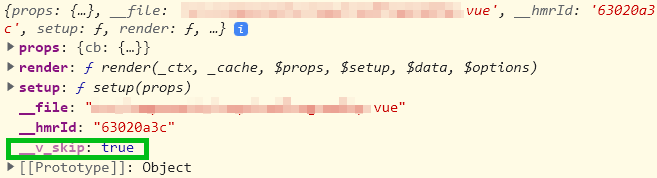
위 두 결과의 차이는 __v_skip 속성의 여부이다.
그렇다면 markRaw가 __v_skip 속성을 추가했다는 뜻 같으니 이참에 Vue 코드도 확인해봤다.
// packages/reactivity/src/reactive.ts

// ...

export enum ReactiveFlags {
  SKIP = '__v_skip',
  IS_REACTIVE = '__v_isReactive',
  IS_READONLY = '__v_isReadonly',
  IS_SHALLOW = '__v_isShallow',
  RAW = '__v_raw',
}

// ...

export function markRaw<T extends object>(value: T): Raw<T> {
  if (Object.isExtensible(value)) {
    def(value, ReactiveFlags.SKIP, true)
  }
  return value
}

// Object.isExtensible
// Returns a value that indicates whether new properties can be added to an object.
// packages/shared/src/general.ts
export const def = (obj: object, key: string | symbol, value: any) => {
Object.defineProperty(obj, key, {
configurable: true,
enumerable: false,
value,
})
}생각보다 훨씬 간단한 코드로, markRaw 함수가 하는 주요한 역할은 __v_skip 속성에 true 값을 할당함으로써 반응형이 아닌 객체를 return하는 것이다.
다만, markRaw가 새로운 객체를 생성하지 않는다는 것에는 유의해야겠다.
인자로 받은 객체의 속성을 바꾸기 때문에, 한 번 markRaw로 컴포넌트를 감쌌다면 해당 컴포넌트를 import한 scope 내에서는 계속 __v_skip이 true 상태로 유지된다.