
Pipe 정리
1. Pipe vs FIFO
| 구분 | Pipe (Unnamed) | FIFO (Named) |
|---|---|---|
| 식별자 | 이름 없음 (파일 디스크립터로 접근) | 파일 시스템 내 경로명 (이름 있음) |
| 통신 범위 | 부모-자식 등 혈연 관계 프로세스 간 | 관계없는 독립적인 프로세스 간 |
| 생성 방식 | pipe() 시스템 콜 | mkfifo() 시스템 콜 또는 명령 |
| 지속성 | 프로세스 종료 시 소멸 | 명시적으로 삭제(unlink) 전까지 유지 |
| 통신 방향 | 반이중(Half-Duplex) | 반이중(Half-Duplex) |
2. Pipe (Unnamed Pipe) 상세
- 커널 메모리에 유지되는 한정된 용량의 버퍼(기본 4KB)입니다.
- 읽을 데이터가 없으면
read()는 블록(Block)됩니다. 쓰기 측이 파이프를 닫으면 EOF(0)를 수신합니다. - 단방향이 기본이므로, 전이중 통신을 위해서는 두 개의 파이프가 필요합니다.
dup2()를 이용해 표준 출력(1)을 파이프의 쓰기 종단으로, 표준 입력(0)을 파이프의 읽기 종단으로 연결하여exec계열 함수와 함께 자주 사용됩니다.
2.1) Unnamed Pipe 통신 예제 (C언어)
이 코드는 자식 프로세스가 ls -l과 같은 명령을 실행하고, 부모 프로세스가 그 결과를 파이프를 통해 읽어와서 출력하는 "입출력 리다이렉션" 메커니즘을 시뮬레이션합니다.
#include <stdio.h>
#include <stdlib.h>
#include <unistd.h>
#include <string.h>
#include <sys/wait.h>

#define BUF_SIZE 1024

int main() {
    int pipe_fds[2]; // [0]: Read end, [1]: Write end
    pid_t pid;
    char buffer[BUF_SIZE];

    // 1. 파이프 생성
    if (pipe(pipe_fds) == -1) {
        perror("pipe failed");
        return 1;
    }

    // 2. 자식 프로세스 생성
    pid = fork();

    if (pid < 0) {
        perror("fork failed");
        return 1;
    }

    if (pid == 0) {
        /*** 자식 프로세스: 송신자(Writer) ***/

        // 사용하지 않는 읽기용 FD는 즉시 닫음 (매우 중요)
        close(pipe_fds[0]);

        const char *msg = "Hello from Child process via Pipe!";
        printf("[Child] Sending data to parent...\n");

        // 커널 버퍼에 데이터 쓰기
        write(pipe_fds[1], msg, strlen(msg) + 1);

        // 쓰기 완료 후 FD 닫기 (부모 측에 EOF 전달)
        close(pipe_fds[1]);
        exit(0);

    } else {
        /*** 부모 프로세스: 수신자(Reader) ***/

        // 사용하지 않는 쓰기용 FD는 즉시 닫음
        close(pipe_fds[1]);

        printf("[Parent] Waiting for data...\n");

        // 파이프에서 데이터 읽기 (데이터가 올 때까지 Blocking)
        ssize_t nbytes = read(pipe_fds[0], buffer, sizeof(buffer));

        if (nbytes > 0) {
            printf("[Parent] Received message: %s\n", buffer);
        }

        // 읽기 완료 후 FD 닫기
        close(pipe_fds[0]);

        // 자식 프로세스 종료 대기 (Zombie 방지)
        wait(NULL);
        printf("[Parent] Child finished. Exiting.\n");
    }

    return 0;
}
2.2) 핵심 체크포인트
- FD 관리 (Unused Close):
fork()직후 각 프로세스에서 사용하지 않는 방향의 파일 디스크립터를 즉시 닫아야 합니다.- 특히 쓰기 종단(
pipe_fds[1])이 모든 프로세스에서 닫히지 않으면, 읽기 측 프로세스의read()함수는 EOF를 감지하지 못하고 무한 대기(Hang) 상태에 빠질 수 있습니다.
- Atomic Write:
PIPE_BUF크기(일반적으로 4KB) 이하의 데이터 쓰기는 원자성(Atomicity)이 보장됩니다. 여러 프로세스가 동시에 쓸 때 데이터 섞임을 방지하려면 이 크기를 고려해야 합니다.
- Blocking I/O:
- 파이프는 기본적으로 동기적입니다. 데이터가 없으면
read는 블록되고, 파이프 버퍼가 가득 차면write가 블록됩니다. 비동기 처리가 필요하다면fcntl을 통해O_NONBLOCK설정을 고려해야 합니다.
- 파이프는 기본적으로 동기적입니다. 데이터가 없으면
3. FIFO (Named Pipe) 상세
- 특징: "이름이 있는 파이프"로, 파일 시스템에 특수 파일 형태로 존재합니다.
- 접근성: 파일 경로만 안다면 서로 모르는 프로세스(예: Client-Server)끼리도
open()을 통해 통신할 수 있습니다. - 생성:
- C 코드:
mkfifo("/tmp/myfifo", 0666); - Shell:
$ mkfifo myfifo
- C 코드:
3-1) 예제 -FIFO(Named Pipe)는 서로 관계가 없는 독립적인 프로세스 간의 통신
파일 시스템에 실제 경로를 가진 Special File을 생성합니다.
통신을 확인하기 위해 Writer(송신)와 Reader(수신) 두 개의 독립적인 프로그램을 작성해야 합니다.
3-2) FIFO Reader (수신측: fifo_reader.c)
이 프로그램은 FIFO 파일을 생성하고, 데이터가 들어올 때까지 대기(Blocking)합니다.
#include <stdio.h>
#include <stdlib.h>
#include <fcntl.h>
#include <sys/stat.h>
#include <unistd.h>
#include <string.h>

#define FIFO_NAME "/tmp/my_test_fifo"
#define BUF_SIZE 1024

int main() {
    int fd;
    char buffer[BUF_SIZE];

    // 1. FIFO 파일 생성 (이미 존재하면 건너뜀)
    // 권한: 0666 (rw-rw-rw-)
    if (mkfifo(FIFO_NAME, 0666) == -1) {
        // 이미 존재하는 경우는 에러가 아니므로 체크
    }

    printf("[Reader] Waiting for a writer...\n");

    // 2. FIFO 오픈 (송신측이 열 때까지 여기서 블록됨)
    fd = open(FIFO_NAME, O_RDONLY);
    if (fd == -1) {
        perror("open");
        return 1;
    }

    printf("[Reader] Writer connected. Reading data...\n");

    // 3. 데이터 읽기
    while (1) {
        ssize_t n = read(fd, buffer, BUF_SIZE);
        if (n <= 0) break; // EOF (Writer가 닫음)

        printf("[Reader] Received: %s", buffer);
        memset(buffer, 0, BUF_SIZE);
    }

    close(fd);
    unlink(FIFO_NAME); // 통신 종료 후 FIFO 파일 삭제
    printf("[Reader] Finished.\n");

    return 0;
}
3-3) FIFO Writer (송신측: fifo_writer.c)
이 프로그램은 이미 생성된 FIFO 파일에 데이터를 씁니다.
#include <stdio.h>
#include <stdlib.h>
#include <fcntl.h>
#include <sys/stat.h>
#include <unistd.h>
#include <string.h>

#define FIFO_NAME "/tmp/my_test_fifo"

int main() {
    int fd;
    char *msg1 = "Hello from Writer!\n";
    char *msg2 = "Named Pipe (FIFO) test success.\n";

    printf("[Writer] Attempting to open FIFO...\n");

    // 1. FIFO 오픈 (수신측이 열려 있어야 오픈 성공)
    fd = open(FIFO_NAME, O_WRONLY);
    if (fd == -1) {
        perror("open (Is reader running?)");
        return 1;
    }

    // 2. 데이터 전송
    printf("[Writer] Sending data...\n");
    write(fd, msg1, strlen(msg1) + 1);
    sleep(1);
    write(fd, msg2, strlen(msg2) + 1);

    close(fd);
    printf("[Writer] Finished.\n");

    return 0;
}
3.4) 실행 및 테스트 방법
두 프로그램을 각각 컴파일한 후, 두 개의 터미널에서 실행하세요.
1. Terminal 1 (Reader 실행):Bash
gcc fifo_reader.c -o reader
./reader
결과: Waiting for a writer... 메시지와 함께 대기 상태가 됩니다.
2. Terminal 2 (Writer 실행):Bash
```bash
gcc fifo_writer.c -o writer
./writer
```

*결과: Writer가 실행되는 즉시 Reader 터미널에 메시지가 출력됩니다.*
3.5) 핵심 요약
- Synchronization (Rendezvous): FIFO는
open()시점에 동기화가 발생합니다.O_RDONLY로 여는 프로세스는 다른 프로세스가O_WRONLY로 열 때까지 블록됩니다 (반대도 마찬가지). - Persistent Node: FIFO 파일은
pipe()와 달리 파일 시스템 상에 노드로 남습니다. 따라서 사용 후unlink()를 통해 명시적으로 제거해주는 것이 깔끔합니다. - Blocking Behavior:
read()시 파이프가 비어있으면 데이터가 들어올 때까지 대기하며,write()시 파이프 버퍼가 가득 차면 빈 공간이 생길 때까지 대기합니다. - Non-blocking: 비동기 처리가 필요할 경우
open(FIFO_NAME, O_RDONLY | O_NONBLOCK)으로 설정하여 즉시 리턴받도록 구현할 수 있습니다.
3.6) 예제 : g_count를 pipe를 이용
2개의 자식 프로세스를 만들어 각각 100,000더한후 부모 프로세스에서 파이프로 받아서 합산하여 출력.
#include <stdio.h>
#include <unistd.h>
#include <sys/wait.h>
#include <sys/mman.h>
#define MAX_COUNT 100000
/*
Q. 전역변수 int g_count=0;을 만들고, fork()를 이용 하여 2개의 프로세스가  전역변수를 같이 1씩 증가 시키려면?
- MAX_COUNT=100,000;
- 예상 결과값 : 100,000 ~200,000
*/
int g_count=0;

int main() {

    int pipefd[2];
    pipe(pipefd);

    pid_t pid1= fork();
    pid_t pid2= fork();

    if (pid1 == 0 && pid2>0)
    {
        // [Child] 무거운 연산 담당
        printf("[Child1] g_count++ 중... (PID: %d)\n", getpid());
        while(1){
            g_count++;
            if(g_count>=MAX_COUNT) break;
        }
        printf("child1 >  g_count=%d\n",g_count);
        printf("[Child1] 완료!\n");

        int my_count=g_count;
        write(pipefd[1], &my_count, sizeof(int));
    }
    else if(pid1 >0 && pid2==0)
    {
        printf("[Child2] g_count++ 중... (PID: %d)\n", getpid());
        while(1){
            g_count++;
            if(g_count>=MAX_COUNT) break;
        }
        printf("child2 > g_count=%d\n",g_count);
        printf("[Child2] 완료!\n");

        int my_count=g_count;
        write(pipefd[1], &my_count, sizeof(int));
    }
    else if(pid1 >0 && pid2 >0)
    {
        // [Parent] 사용자 입력 대기 또는 UI 갱신
        wait(NULL);
        wait(NULL);

        int child1_count, child2_count;
        read(pipefd[0], &child1_count, sizeof(int));
        read(pipefd[0], &child2_count, sizeof(int));
        g_count = child1_count + child2_count;
        printf("[Parent] 자식 프로세스 대기중 (PID: %d)\n", getpid());
        printf("\n==========< 최종 parent > g_count=%d >============\n",g_count);
    }

    return 0;
}
4. 쉘 명령어: Pipe (|) vs tee
프로세스 간 데이터 흐름을 제어할 때 쉘에서 자주 사용하는 도구입니다.
- Pipe (
|): 단순히 앞 명령어의 출력을 다음 명령어의 입력으로 수직 전달합니다. (중간 확인 불가) - tee: 입력을 받아서 표준 출력(화면)과 파일에 동시에 기록합니다.
- 사용 예:
ls | tee list.txt | grep "test"(파일로 저장하면서 동시에 다음 필터로 전달)
- 사용 예:
4.1) Pipe code 예제 – 1 : pipe() - 부모와 자식 프로세스간 데이터 전송 -반이중
- Pipe (unnamed pipe)
- 프로세스간 통신을 위한 단방향 데이터 전송 채널
- Pipe는 바이트 스트림 통신
- PIPE_BUF(4096 bytes) 까지 쓰기가 보장 (limit.h)
- Pipe는 커널 메모리에 유지되는 단순한 버퍼 - 최대 용량이 제한
- 데이터가 있는 파이프를 읽고자 하는 경우 파이프에 적어도 1바이트가 pipe에 쓰여질 때까지 블럭됨
- 파이프에 쓰는 측에서 파이프를 닫으면 읽는 측에서는 EOF을 의미하는 0을 수신
- 파이프는 구조가 간단하여 사용하기가 쉽고, 반 이중(Half-Duplex) 통신만 제공함
- 하나의 프로세스는 단지 데이터의 송신만 가능하고 다른 프로세스는 데이터의 수신만 가능함
- 파이프를 이용하여 전 이중(Full-Duplex) 통신을 하려면 두 개의 파이프를 사용 해야 함 파일
- 사용 시의 보안 문제 해결
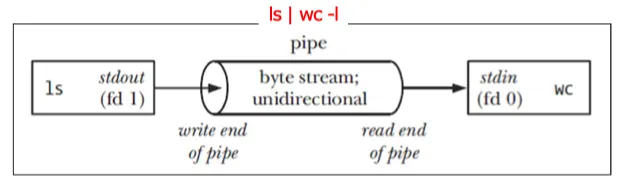
- pipe() 함수 원형
#include <unistd.h>
int pipe(int pipefd[2]);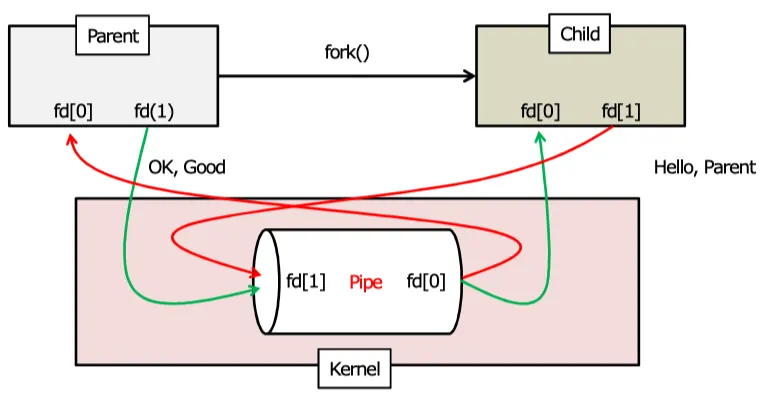
4.2) Pipe code 예제1
05.ipc/01.mypipe1.c
#include <stdio.h>
#include <string.h>
#include <stdlib.h>
#include <unistd.h>
#include <sys/types.h>
#include <time.h>

int main(void) {
	int pd[2], read_fd, write_fd;
	pid_t pid;
	time_t timer1, timer2;
	char tx_buf[100], rx_buf[100];

	if ( pipe(pd) == -1 ) {
		perror("pipe");
		exit(1);
	}

	read_fd = pd[0];
	write_fd = pd[1];

	switch(pid=fork()) {
		case 0: //child
			close(read_fd);
			for(int i=0; i<11; i++){
				sprintf(tx_buf, "\e[31mHello Parent. I am child ---%d\n", i);
				write(write_fd, tx_buf, strlen(tx_buf)+1);
				for(timer1=time(NULL); time(NULL)<timer1 + 1;)
					continue;
			}
			exit(0);
		default: //parent
#if 1
			close(write_fd);
			for(int i=0; i<10; i++){
				read(read_fd, rx_buf, sizeof(rx_buf));
				printf("\e[00mPARENT: %s\n", rx_buf);
			}
#else
			for(int i=0; i<10; i++){
				for(timer2=time(NULL); time(NULL)<timer2 + 2;)
					continue;
				strcpy(tx_buf, "\e[00mHello Child. I am Parent");
				write(write_fd, tx_buf, strlen(tx_buf)+1);
				read(read_fd, rx_buf, sizeof(rx_buf));
				printf("\e[00mPARENT: %s\n", rx_buf);
			}
#endif
			exit(0);
	}
}
$ gcc 01.mypipe1.c -o 01.mypipe1
$ ./01.mypipe1
PARENT: Hello Parent. I am child ---0
PARENT: Hello Parent. I am child ---1
PARENT: Hello Parent. I am child ---2
PARENT: Hello Parent. I am child ---3
PARENT: Hello Parent. I am child ---4
PARENT: Hello Parent. I am child ---5
PARENT: Hello Parent. I am child ---6
PARENT: Hello Parent. I am child ---7
PARENT: Hello Parent. I am child ---8
PARENT: Hello Parent. I am child ---94.3) Pipe code 예제2
pipe() - 부모와 자식 프로세스간 데이터 전송 - 전이중
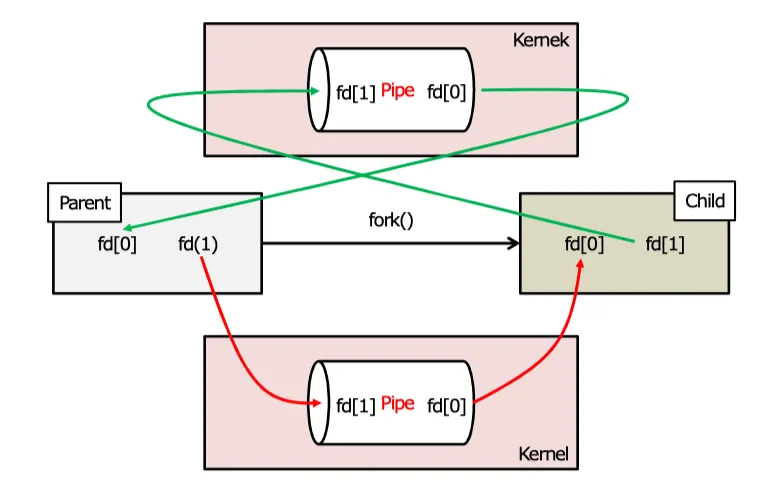
#include <stdio.h>
#include <string.h>
#include <stdlib.h>
#include <unistd.h>
#include <sys/types.h>
#include <time.h>

int main(void) {
	int pd[2], read_fd, write_fd;
	pid_t pid;
	time_t timer1, timer2;
	char tx_buf[100], rx_buf[100];

	if ( pipe(pd) == -1 ) {
		perror("pipe");
		exit(1);
	}

	read_fd = pd[0];
	write_fd = pd[1];

	switch(pid=fork()) {
		case 0: //child
			close(read_fd);
			for(int i=0; i<11; i++){
				sprintf(tx_buf, "\e[31mHello Parent. I am child ---%d\n", i);
				write(write_fd, tx_buf, strlen(tx_buf)+1);
				for(timer1=time(NULL); time(NULL)<timer1 + 1;)
					continue;
			}
			exit(0);
		default: //parent
			close(write_fd);
			for(int i=0; i<10; i++){
				read(read_fd, rx_buf, sizeof(rx_buf));
				printf("\e[00mPARENT: %s\n", rx_buf);
			}
			exit(0);
	}
}
$ gcc 01.mypipe1.c -o 01.mypipe1
$ ./01.mypipe1
PARENT: Hello Parent. I am child ---0
PARENT: Hello Parent. I am child ---1
PARENT: Hello Parent. I am child ---2
PARENT: Hello Parent. I am child ---3
PARENT: Hello Parent. I am child ---4
PARENT: Hello Parent. I am child ---5
PARENT: Hello Parent. I am child ---6
PARENT: Hello Parent. I am child ---7
PARENT: Hello Parent. I am child ---8
PARENT: Hello Parent. I am child ---95. FIFO(Named Pipe)
- FIFO는 파일 시스템 내에 이름을 갖고, 일반 파일과 동일한 방법으로 open 한다.
- 즉, FIFO = 이름이 부여된 PIPE
- 관련이 없는 프로세스간 통신에 사용 (Client <-> Server)
- (익명을 사용하는) PIPE는 관련이 있는 프로세스간 통신에 사용
#include <sys/types.h>
#include <sys/stat.h>

int mkfifo(const char *pathname, mode_t mode);

$ mkfifo [ -m mode ] pathname - FIFO가 생성된 후에는 어느 프로세스도 파일을 열 수 있고 사용할 수 있음
- I/O는 PIPE와 동일
- FIFO와 tee 사용
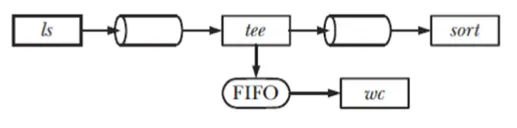
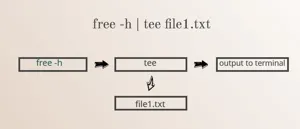
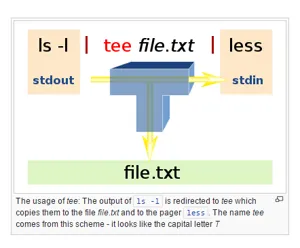
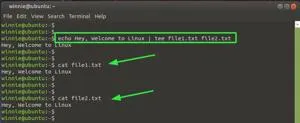
리눅스 쉘에서 pipe(|)와 tee 명령어는 모두 명령어의 출력을 다루지만, 목적과 동작 방식에 차이가 있습니다.
5.1) FIFO code 예제 1
- myfifo_recv.c
#include <sys/types.h>
#include <sys/stat.h>
#include <fcntl.h>
#include <unistd.h>
#include <stdio.h>
#include <stdlib.h>
#include <string.h>

int main(){
	int fd;
	char buf[128];
	int count = 0;

	if((access ("/tmp/myfifo", F_OK)) != 0){
		if(mkfifo("/tmp/myfifo", S_IRUSR | S_IWUSR) == -1){
			perror("mkfifo");
			exit(1);
		}
	}

	if((fd = open("/tmp/myfifo", O_RDONLY)) == -1){
		perror("open");
		exit(1);
	}

	while(1){
		memset(buf, 0, sizeof(buf));
		read(fd, buf, sizeof(buf));
		printf("Rx - %s\n", buf);
		if(strstr(buf, "end")){
			break;
		}
	}
	close(fd);
	unlink("/tmp/myfifo");
	return 0;
}
$ gcc 03.myfifo_recv.c -o recv
$ ./recv
Rx - Hello(0)
Rx - Hello(1)
Rx - Hello(2)
Rx - Hello(3)
Rx - Hello(4)
Rx - end5.2) FIFO code 예제 2
myfifo_send.c
#include <sys/types.h>
#include <sys/stat.h>
#include <fcntl.h>
#include <unistd.h>
#include <stdio.h>
#include <stdlib.h>
#include <string.h>
#include <time.h>

int main(){
	int fd, i;
	char buf[128];
	time_t timer1;

	if((fd = open("/tmp/myfifo", O_WRONLY)) == -1){
		perror("open");
		exit(2);
	}

	for(i=0; i<5; i++){
		memset(buf, 0, sizeof(buf));
		sprintf(&buf[0], "Hello(%d)", i);
		write(fd, &buf[0], strlen(buf)+1);
		printf("Tx: %s\n", buf);
		for(timer1=time(NULL); time(NULL)<timer1 + 2;)
			continue;
	}
	memset(buf, 0, sizeof(buf));
	sprintf(buf, "end");
	write(fd, buf, strlen(buf)+1);
	close(fd);
	/* unlink("/tmp/mkfifo"); */
	return 0;
}
$ gcc 04.myfifo_send.c -o send
$ ./send
Tx: Hello(0)
Tx: Hello(1)
Tx: Hello(2)
Tx: Hello(3)
Tx: Hello(4)6. unnamed 파이프를 이용한 프로세스간 통신
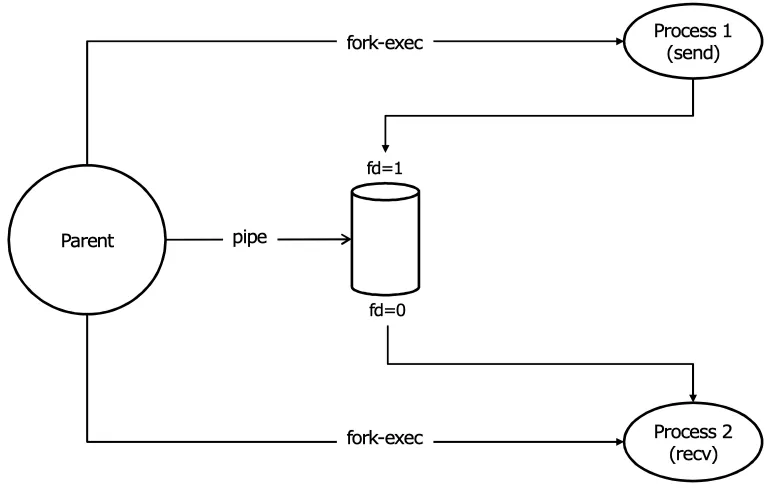
6.1) unmaned-pipe 예제 1
- child.c
#include <stdio.h>
#include <string.h>
#include <stdlib.h>
#include <unistd.h>
#include <string.h>
#include <time.h>
#include <sys/types.h>
#include <sys/stat.h>
#include <fcntl.h>

#define MSGSIZE	64

int main(){

	time_t timer1;
	char sbuf[MSGSIZE];
	int i;

	for(i=0; i<5; i++){
		sprintf(&sbuf[0], "Hello, Parent --- I am child -- %d", i);
		write(1, sbuf, strlen(sbuf));
		for(timer1=time(NULL); time(NULL)<timer1 + 1;)
			continue;
	}
	return 0;
}
6.2) unmaned-pipe 예제 2
- parent.c
#include <stdio.h>
#include <string.h>
#include <stdlib.h>
#include <unistd.h>
#include <string.h>
#include <time.h>
#include <sys/types.h>
#include <sys/stat.h>
#include <fcntl.h>

#define MSGSIZE	1024

int main(){

	time_t timer1;
	char rbuf[MSGSIZE];
	int i, len;

	for(i=0; ; i++){
		memset(&rbuf[0], 0, MSGSIZE);
		len = read(0, rbuf, MSGSIZE);
		if(len == 0){
			break;
		}
		printf("%s\n", rbuf);
	}
	exit(0);
}
6.3) unmaned-pipe 예제 3
- unnamed.c
#include <stdio.h>
#include <string.h>
#include <time.h>
#include <sys/types.h>
#include <sys/stat.h>
#include <fcntl.h>
#include <unistd.h>
#include <sys/wait.h>

#define MSGSIZE	64

int main(void){
	int status;
	time_t timer1;
	int fd;
	int pd[2];

	pipe(pd);

	switch(fork()){
		case 0:					//child
			close(pd[0]);
			dup2(pd[1], 1);
			if((execl("./child", "child", (char *) 0)) == -1)
				perror("execl-child");
		default:				//parent
			switch(fork()){
				case 0:
					close(pd[1]);
					dup2(pd[0],0);
					if((execl("./parent", "parent",  (char *) 0)) == -1)
						perror("execl-parent");
				default:
					wait(&status);
			}
	}
	close(pd[0]);
	close(pd[1]);
	return 0;
}
child.c 소스 코드를 컴파일하여 child 실행 파일을 만들고, parent.c 소스 파일을 컴파일 해서 parent 실행 파일을 생성한 후 03.unamed 를 실행
$ gcc 03.unnamed.c  -o 03.unnamed

$ gcc child.c  -o child

$ gcc parent.c  -o parent

$ ./03.unnamed
Hello, Parent --- I am child -- 0
Hello, Parent --- I am child -- 1
Hello, Parent --- I am child -- 2
Hello, Parent --- I am child -- 3
Hello, Parent --- I am child -- 4
임베디드 개발자가 되기 위해 공부중입니다!