성능테스트 ngrinder 활용하기
도입 계기
프로젝트를 진행하면서 프론트가 실수로 한번에 요청을 몇천번 보내는 일이 잦았고, 그로인해 서버의 cpu가 100퍼를 찍으며 죽는 일이 자주 발생하였다. 서버에 많은 요청이 들어와도 안정성을 높이기 위해 성능테스트가 필요하다고 판단 하였고 ngrinder를 이용하여 성능테스트를 진행하기로 했다.
nGrinder
- JMeter 와 같은 부하 및 성능 테스트 도구
- JMeter 와 차이점
- JMeter 는 단일 데스크톱 컴퓨터에서 수행되는 반면에 nGrinder 는 컨트롤러 및 에이전트로 구성된 분산 아키텍처로 수행된다.
- nGrinder는 jython 또는 Groovy 같은 스크립트 언어를 사용하여 스크립트를 작성한다.
- 클라우드 환경에서도 실행 가능하다. - Controller
- 테스트를 생성하고, 실행하고, 테스트 결과를 수집하고 분석한다.
- 단일 머신에 설치된다. - Agent
컨트롤러가 생성한 테스트를 수행하는 실행 환경.
각 에이전트는 분산된 머신 또는 가상 머신에 설치된다.
에이전트가 테스트에 필요한 부하를 생성하고, 데이터를 수집하여 컨트롤러에 전송한다.
nGrinder 설치
https://github.com/naver/ngrinder/releases
war 파일을 다운로드 한다.
java -jar ngrinder-controller-3.5.5-p1.war --port 7070
로 실행하면
localhost:7070 으로 접속하면

초기 아이디: admin
초기 비번: admin
으로 접속
Agent 다운
// 압축 해제
tar -xvf ngrinder-agent-{version}-localhost.tar
// 폴더로 이동
cd ngrinder-agent
// 쉘파일 실행
./run_agent.sh
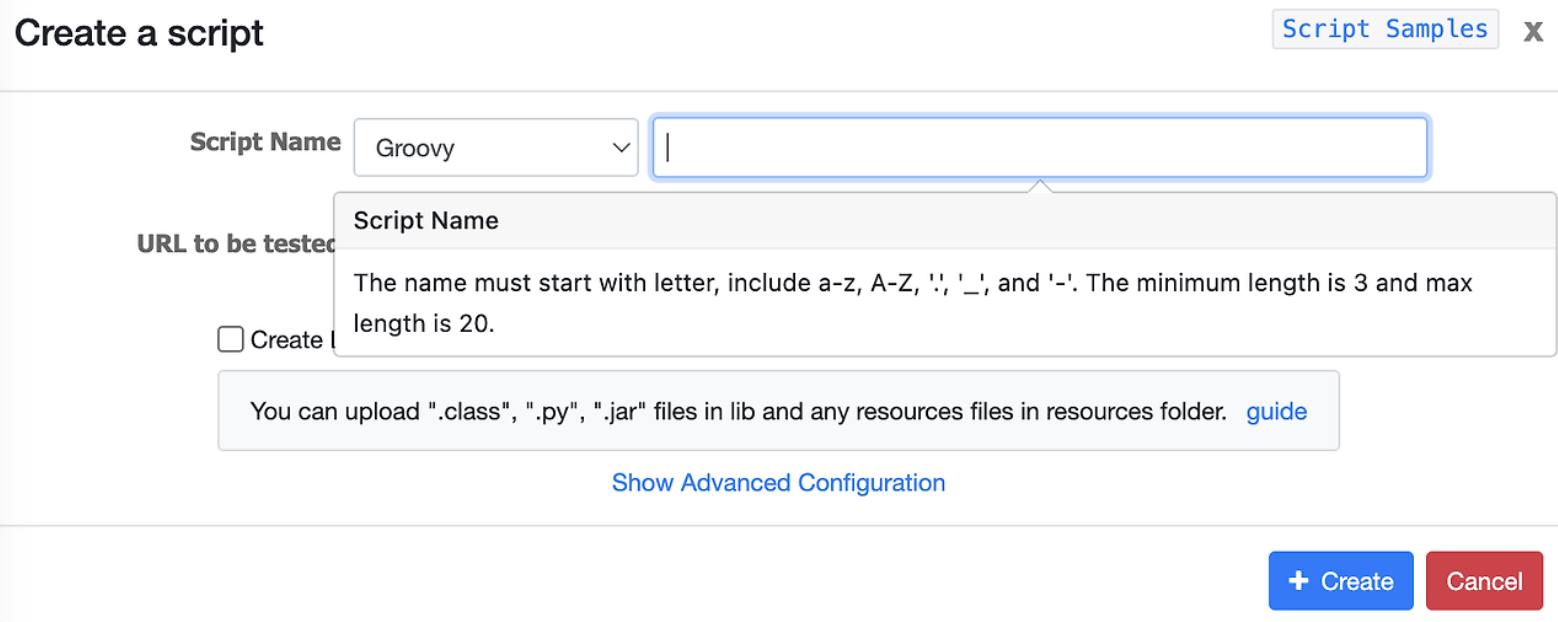
script 제작
import static net.grinder.script.Grinder.grinder
import static org.junit.Assert.*
import static org.hamcrest.Matchers.*
import net.grinder.script.GTest
import net.grinder.script.Grinder
import net.grinder.scriptengine.groovy.junit.GrinderRunner
import net.grinder.scriptengine.groovy.junit.annotation.BeforeProcess
import net.grinder.scriptengine.groovy.junit.annotation.BeforeThread
// import static net.grinder.util.GrinderUtils.* // You can use this if you're using nGrinder after 3.2.3
import org.junit.Before
import org.junit.BeforeClass
import org.junit.Test
import org.junit.runner.RunWith

import org.ngrinder.http.HTTPRequest
import org.ngrinder.http.HTTPRequestControl
import org.ngrinder.http.HTTPResponse
import org.ngrinder.http.cookie.Cookie
import org.ngrinder.http.cookie.CookieManager

/**
* A simple example using the HTTP plugin that shows the retrieval of a single page via HTTP.
*
* This script is automatically generated by ngrinder.
*
* @author admin
*/
@RunWith(GrinderRunner)
class TestRunner {

	public static GTest test
	public static HTTPRequest request
	public static Map<String, String> headers = [:]
	public static String body = "{\n  \"questionId\": 1,\n  \"pickedId\": 4\n}"
	public static List<Cookie> cookies = []

	@BeforeProcess
	public static void beforeProcess() {
		HTTPRequestControl.setConnectionTimeout(300000)
		test = new GTest(1, "43.203.223.211")
		request = new HTTPRequest()

		// Set header data
		headers.put("Content-Type", "application/json")
		headers.put("Authorization", "Bearer eyJhbGciOiJIUzI1NiJ9.eyJzdWIiOiI0Iiwicm9sZSI6IkFETUlOIiwiaWF0IjoxNzMxMjI5NTg4LCJleHAiOjE3MzQ4Mjk1ODh9.eT42SAcdxGgOr-rPbWIf7HZwJ0QQhp0_hLaqQ9IizYU")
		grinder.logger.info("before process.")
	}

	@BeforeThread
	public void beforeThread() {
		test.record(this, "test")
		grinder.statistics.delayReports = true
		grinder.logger.info("before thread.")
	}

	@Before
	public void before() {
		request.setHeaders(headers)
		CookieManager.addCookies(cookies)
		grinder.logger.info("before. init headers and cookies")
	}

	@Test
	public void test() {
		HTTPResponse response = request.POST("http://43.203.223.211:8080/api/answer/common", body.getBytes())

		if (response.statusCode == 301 || response.statusCode == 302) {
			grinder.logger.warn("Warning. The response may not be correct. The response code was {}.", response.statusCode)
		} else {
			assertThat(response.statusCode, is(200))
		}
	}
}
위와 같이 스크립트를 작성하여 테스트 할 수 있다.
groovy로 제작 하였고, api와 헤더를 넣을 수 있다.
성능 테스트
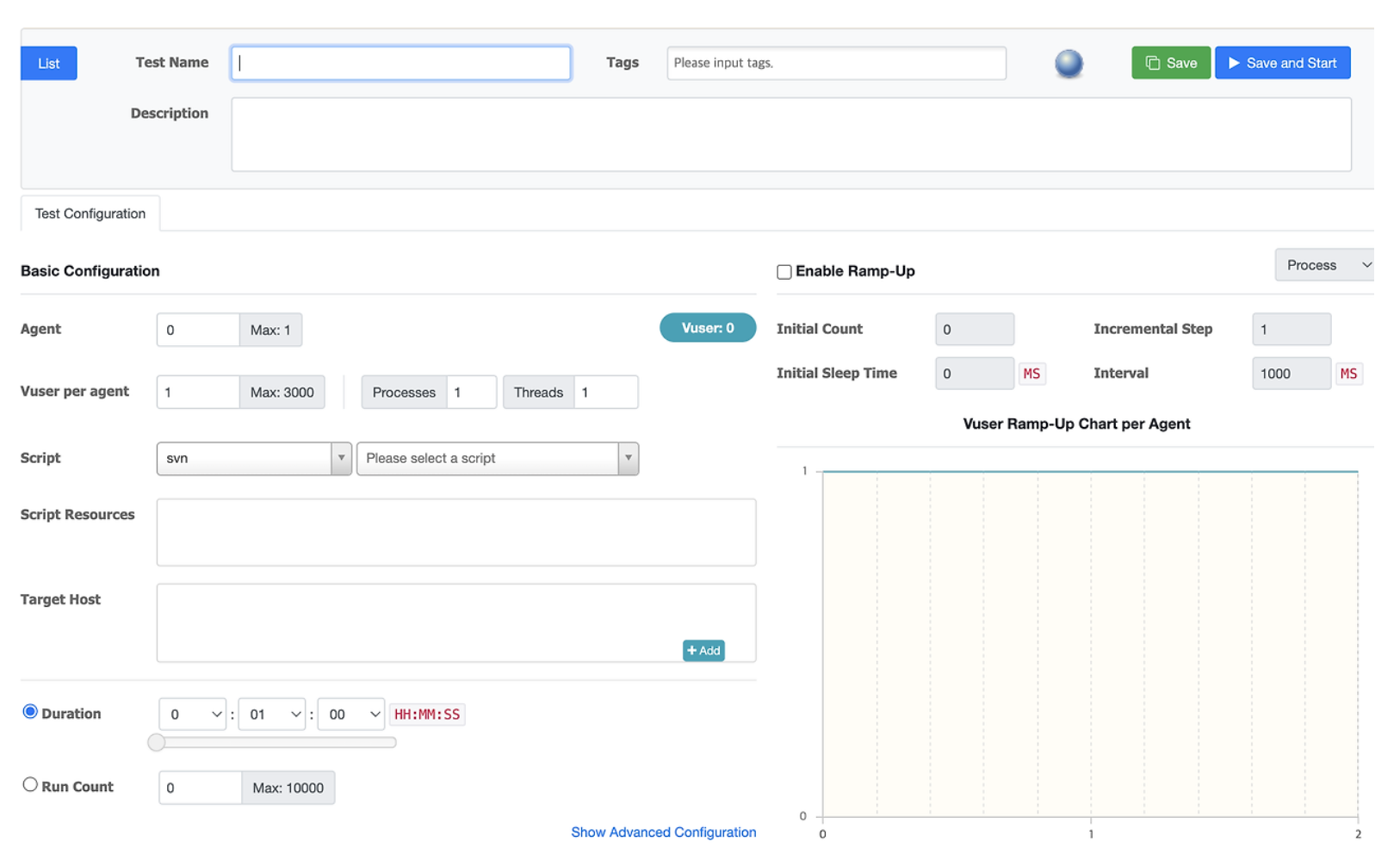
이후 Performance Test에서 Create Test 를 누르면 셋팅할 수 있는 화면을 보여준다.
각각은 다음과 같다
- Agent
- 성능 측정에 사용할 Agent
- Agent를 여러개로 구성하고 싶은 경우 Docker 나 cloud service 를 고려해 볼 수 있다. - Vuser per agent
- Agent 당 설정할 가상 사용자 수
- 동시에 요청을 날리는 사용자 - Process / Thread
- 하나의 Agent에서 생성할 프로세스와 스레드 개수 - Script
- 성능 측정 시 각 Agent 에서 실행할 스크립트
- 방금 우리가 생성한 Script를 추가한다. - Duration
- 성능 측정 수행 시간 - Run Count
- 스레드 당 테스트 코드를 수행하는 횟수
- Run Count와 Duration의 경우 둘 중 하나만 선택해서 기간 동안 실행하거나, Run Count 만큼 실행하게 한다. - Enable Ramp-up
- 성능 측정 과정에서 가상 사용자를 점진적으로 늘리도록 활성화 - Initial Count
- 처음 시작 시 가상 사용자 수 - Initial Sleep Time
- 테스트 시작 시간 - Incremental Step
- Process 또는 thread 를 증가시키는 개수 - Interval
- Process 또는 Thread를 증가시키는 시간 간격
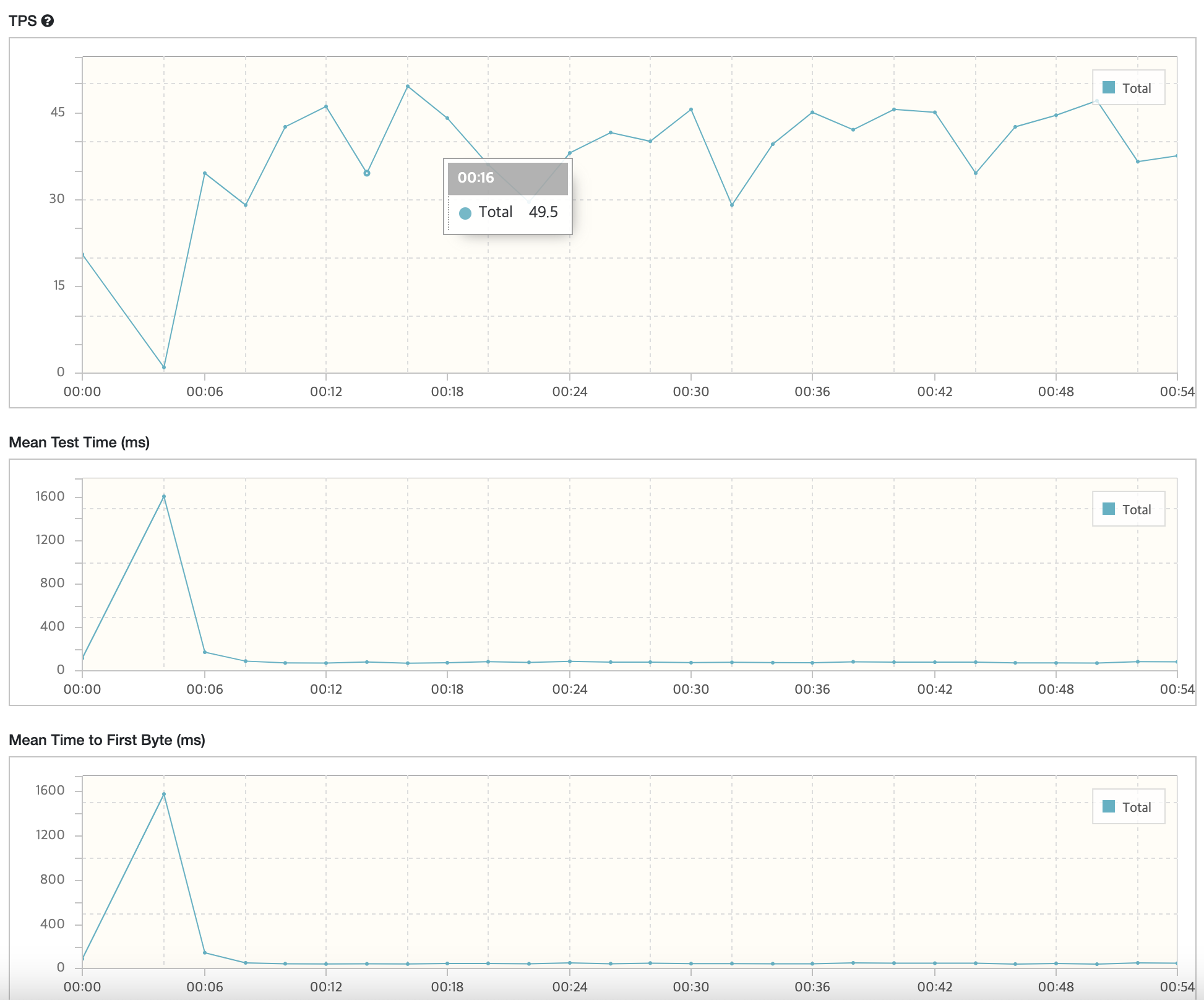
위와 같이 성능 테스트가 돌아가는 것을 확인 할 수 있다.

엄마나는커서개발자가될래요!!!