
HTML
java 코테와 문법 공부로 오랜만에 봤던 html에 대해 정리해본다.
-
body 태그
직접적인 내용이 포함되는 공간
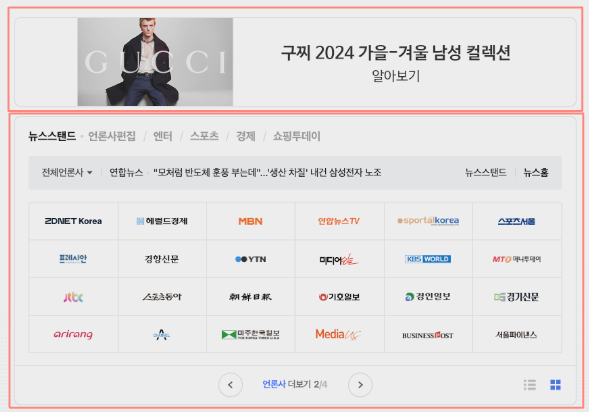
네이버를 예로 든다면 위의 사진이 body 부분이다. -
div 태그
body 안의 부분에서 여러 부분들을 나눌 수 있다.
사진 상 빨간 구역이 해당 구역이다.
class 명을 각각 만들어 각 부분마다 설정을 따로 줄 수 있다.
<div class="mypostingbox">
    <div class="form-floating mb-3">
      <input type="email" class="form-control" id="floatingInput" placeholder="앨범 이미지">
      <label for="floatingInput">앨범 이미지</label>
 </div>
- style 태그
각 부분 안의 스타일을 변경하고자 할 때 사용한다.
만약,mypositgbox부분의 스타일을 변경한다면 아래와 같이 작성할 수 있다.
<style>
  .mypostingbox {
              width: 500px;
              margin: 30px auto 0px auto; //바깥쪽의 여백
              padding: 10px; //안쪽의 여백
              box-shadow: 0px 0px 3px blue; //테두리 그림자 효과
              border-radius: 5px; //테두리 곡선
          }
</style>
bootstrap
빠르고 예쁜 디자인을 위해 부트스트랩을 활용하자!
부트스트랩 링크
간단한 앨범 저장 웹 구현
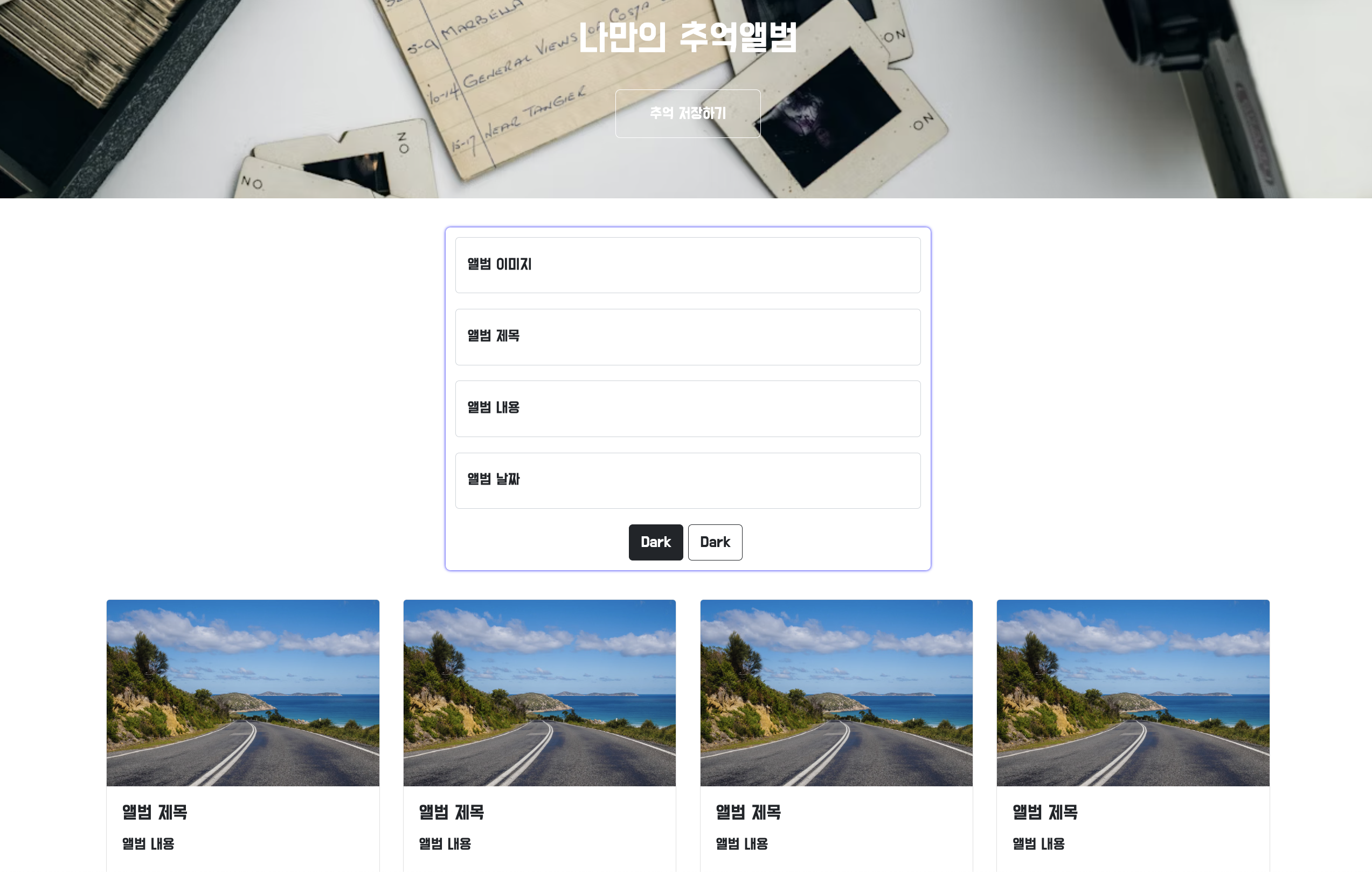
<!DOCTYPE html>
<html lang="en">

<head>
    <meta charset="UTF-8">
    <meta name="viewport" content="width=device-width, initial-scale=1.0">
    <title>나만의 추억 앨범</title>
    <link href="https://cdn.jsdelivr.net/npm/bootstrap@5.0.2/dist/css/bootstrap.min.css" rel="stylesheet"
        integrity="sha384-EVSTQN3/azprG1Anm3QDgpJLIm9Nao0Yz1ztcQTwFspd3yD65VohhpuuCOmLASjC" crossorigin="anonymous">
    <style>
        @import url('https://fonts.googleapis.com/css2?family=Do+Hyeon&display=swap');

        * {
            font-family: "Do Hyeon", sans-serif;
            font-weight: 400;
            font-style: normal;
        }

        .mytitle {
            height: 250px;
            color: white;

            display: flex;
            flex-direction: column;
            align-items: center;
            justify-content: center;

            background-image: url(https://images.unsplash.com/photo-1511992243105-2992b3fd0410?ixlib=rb-4.0.3&ixid=M3wxMjA3fDB8MHxwaG90by1wYWdlfHx8fGVufDB8fHx8fA%3D%3D&auto=format&fit=crop&w=1470&q=80);
            background-position: center;
            background-size: cover;
        }

        .mytitle>button {
            width: 150px;
            height: 50px;
            background-color: transparent;
            color: white;
            border: 1px solid white;
            border-radius: 5px;
            margin-top: 20px;
        }

        .mycards {
            width: 1200px;

            margin: 30px auto 0px auto;
        }

        .mypostingbox {
            /* background-color: green; */
            width: 500px;
            margin: 30px auto 0px auto;
            padding: 10px;
            box-shadow: 0px 0px 3px blue;
            border-radius: 5px;
        }

        .mybtn {
            display: flex;
            flex-direction: row;
            align-items: center;
            justify-content: center;
        }

        .mybtn > button {
            margin-right: 5px;
        }

    </style>
</head>

<body>
    <div class="mytitle">
        <h1>나만의 추억앨범</h1>
        <button>추억 저장하기</button>
    </div>
    <div class="mypostingbox">
        <div class="form-floating mb-3">
            <input type="email" class="form-control" id="floatingInput" placeholder="앨범 이미지">
            <label for="floatingInput">앨범 이미지</label>
        </div>
        <div class="form-floating mb-3">
            <input type="email" class="form-control" id="floatingInput" placeholder="앨범 제목">
            <label for="floatingInput">앨범 제목</label>
        </div>
        <div class="form-floating mb-3">
            <input type="email" class="form-control" id="floatingInput" placeholder="앨범 내용">
            <label for="floatingInput">앨범 내용</label>
        </div>
        <div class="form-floating mb-3">
            <input type="email" class="form-control" id="floatingInput" placeholder="앨범 날짜">
            <label for="floatingInput">앨범 날짜</label>
        </div>
        <div class="mybtn">
            <button type="button" class="btn btn-dark">Dark</button>
            <button type="button" class="btn btn-outline-dark">Dark</button>
        </div>
    </div>
    <div class="mycards">
        <div class="row row-cols-1 row-cols-md-4 g-4">
            <div class="col">
                <div class="card h-100">
                    <img src="https://images.unsplash.com/photo-1446768500601-ac47e5ec3719?ixlib=rb-4.0.3&ixid=M3wxMjA3fDB8MHxwaG90by1wYWdlfHx8fGVufDB8fHx8fA%3D%3D&auto=format&fit=crop&w=1446&q=80"
                        class="card-img-top" alt="...">
                    <div class="card-body">
                        <h5 class="card-title">앨범 제목</h5>
                        <p class="card-text">앨범 내용</p>
                    </div>
                    <div class="card-footer">
                        <small class="text-body-secondary">앨범 날짜</small>
                    </div>
                </div>
            </div>
            <div class="col">
                <div class="card h-100">
                    <img src="https://images.unsplash.com/photo-1446768500601-ac47e5ec3719?ixlib=rb-4.0.3&ixid=M3wxMjA3fDB8MHxwaG90by1wYWdlfHx8fGVufDB8fHx8fA%3D%3D&auto=format&fit=crop&w=1446&q=80"
                        class="card-img-top" alt="...">
                    <div class="card-body">
                        <h5 class="card-title">앨범 제목</h5>
                        <p class="card-text">앨범 내용</p>
                    </div>
                    <div class="card-footer">
                        <small class="text-body-secondary">앨범 날짜</small>
                    </div>
                </div>
            </div>
            <div class="col">
                <div class="card h-100">
                    <img src="https://images.unsplash.com/photo-1446768500601-ac47e5ec3719?ixlib=rb-4.0.3&ixid=M3wxMjA3fDB8MHxwaG90by1wYWdlfHx8fGVufDB8fHx8fA%3D%3D&auto=format&fit=crop&w=1446&q=80"
                        class="card-img-top" alt="...">
                    <div class="card-body">
                        <h5 class="card-title">앨범 제목</h5>
                        <p class="card-text">앨범 내용</p>
                    </div>
                    <div class="card-footer">
                        <small class="text-body-secondary">앨범 날짜</small>
                    </div>
                </div>
            </div>
            <div class="col">
                <div class="card h-100">
                    <img src="https://images.unsplash.com/photo-1446768500601-ac47e5ec3719?ixlib=rb-4.0.3&ixid=M3wxMjA3fDB8MHxwaG90by1wYWdlfHx8fGVufDB8fHx8fA%3D%3D&auto=format&fit=crop&w=1446&q=80"
                        class="card-img-top" alt="...">
                    <div class="card-body">
                        <h5 class="card-title">앨범 제목</h5>
                        <p class="card-text">앨범 내용</p>
                    </div>
                    <div class="card-footer">
                        <small class="text-body-secondary">앨범 날짜</small>
                    </div>
                </div>
            </div>
        </div>
    </div>
</body>

</html>