오류
- 일반적으로 회복이 불가능한 문제
- 시스템 레벨에서, 또는 주로 환경적인 이유로 발생
예외
- 일반적으로 회복이 가능한 문제
- 전제는 우리가 “그 예외가 발생할 수 있다는 것을 인지하고, 대응했을 것”
- 코드레벨에서 할 수 있는 문제상황에 대한 대응은 “예외처리”
- 코드실행 관점
- 컴파일 에러
- .java 파일을 .class 파일로 컴파일할때 발생하는 에러
- 대부분 프로그래밍 언어의 규칙을 지키지 않았기 때문에 발생
- 해결 방법은 문법에 맞게 다시 작성하는 것
- 런타임 에러
- 문법적인 오류는 아니라서, 컴파일은 되었지만 “프로그램”이 실행도중 맞닥뜨리게 되는 예외
- 컴파일 에러
- 예외처리 관점
- 확인된 예외 (Checked Exception)
- 컴파일 시점에 확인하는 예외
- 반드시 예외 처리를 해줘야하는 예외
- 이미 특정한 문제를 인지하고 있어서, 해당 예외를 정의해두었고, 정의해두었기 때문에 컴파일 하는동안 이 예외에 대한 예외처리를 했는지 확인(Check) 할 수 있는 예외
- 예외처리를 하지 않으면 컴파일 에러가 발생
- 미확인된 예외 (Unchecked Exception)
- 런타임 시점에 확인되는 예외
- 예외 처리가 반드시 필요하지 않은 예외
- 확인된 예외 (Checked Exception)
- 예외 정의
예외 클래스를 만들어 예외를 정의

    class OurBadException extends Exception {
    	public OurBadException() {
    		super("위험한 행동을 하면 예외처리를 꼭 해야합니다!");
    	}
    }
class OurClass {
    private final Boolean just = true;

    public void thisMethodIsDangerous() throws OurException {
        if (just) {
            throw new OurException();
        }
    }
}
- 메서드를 실행했을 경우, 그 메서드가 위험하다는 것을 미리 예측
- 예측된 메서드를 throw 메서드를 통해 위험하다고 알림public class StudyException {
public static void main(String[] args) {
OurClass ourClass = new OurClass();
try {
// 1. 위험한 메소드의 실행을 "시도"
// "시도" 해보는 코드가 들어가는 블럭
ourClass.thisMethodIsDangerous();
} catch (OurException e) { // 어떤 예외를 받아 처리 할지 정함 (모든 예외면 Exception)
// 2. 예외가 발생하면, "잡아서" handling 합니다.
// 예외가 발생하는경우 "handling" 하는 코드가 들어가는 블럭
// 즉 try 블럭 내의 구문을 실행하다가 예외가 발생하면
// 예외가 발생한 줄에서 바로 코드 실행을 멈추고
// 여기 있는 catch 블럭 내의 코드가 실행
// 여러개의 catch문 사용 가능
System.out.println(e.getMessage());
} finally {
// 3. 예외의 발생 여부와 상관없이, 실행시켜야 하는 코드
// 무조건 실행되는 코드가 들어가는 블럭
System.out.println("우리는 방금 예외를 handling 했습니다!");
}
}
}-
throw (메서드 안에) & throws (클래스 뒤에)
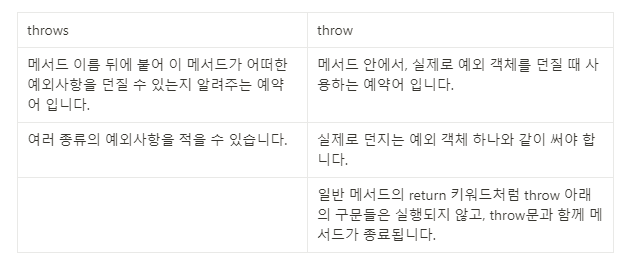
-
Throwable Class
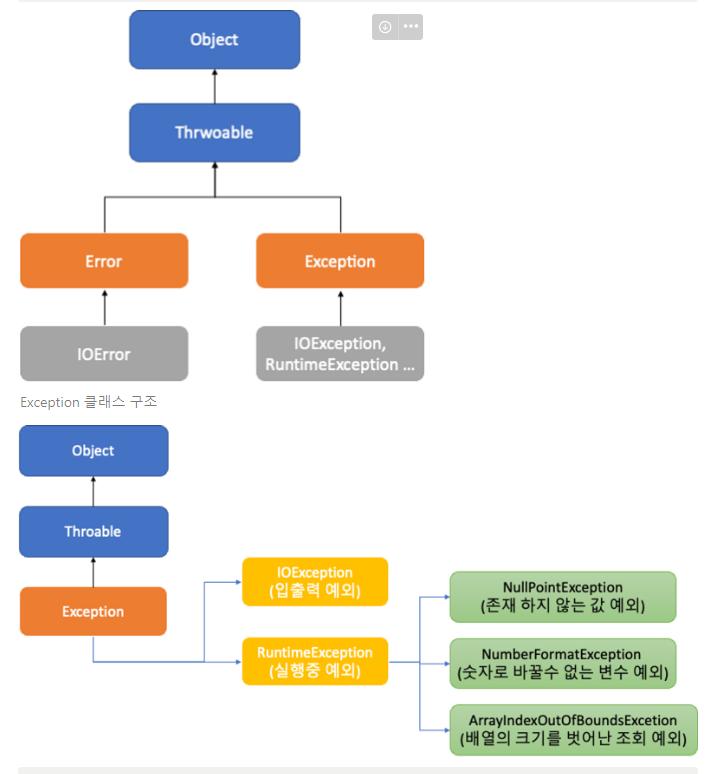
- RuntimeException을 상속한 예외들은 UncheckedException, 반대로 상속하지 않은 예외들은 CheckedException으로 구현되어 있다.
-> Runtime 도중에 발생되는 에러들은 일단 컴파일은 되기 때문
-> 즉 NullPointException, ArrayIndexOutOfBoundsException 등의 예외 구현체들은 명시적인 에러처리를 하지 않아도 컴파일 에러가 발생하지는 않는다.
-> Checked Exception에 속하는 에러 구현체들은 핸들링 하지 않으면 컴파일 에러가 발생하는 대신, 컴파일이 됐다면 100% 복구가 가능한 에러
- 연결된 예외 (Chained Exception)
- 예외 A가 예외 B를 발생시켰다면, 예외 A는 B의 원인 예외
- 예외 연결 : 원인 예외를 새로운 예외에 등록한 후 다시 새로운 예외를 발생
- 메서드
initCause()- 지정한 예외를 원인 예외로 등록하는 메소드
getCause()- 원인 예외를 반환하는 메소드
// 연결된 예외
public class main {

    public static void main(String[] args) {
        try {
            // 예외 생성
            NumberFormatException ex = new NumberFormatException("가짜 예외이유");

            // 원인 예외 설정(지정한 예외를 원인 예외로 등록)
            ex.initCause(new NullPointerException("진짜 예외이유"));

            // 예외를 직접 던집니다.
            throw ex;
        } catch (NumberFormatException ex) {
            // 예외 로그 출력
            ex.printStackTrace();
            // 예외 원인 조회 후 출력
            ex.getCause().printStackTrace();
        }

        // checked exception 을 감싸서 unchecked exception 안에 넣습니다.
        throw new RuntimeException(new Exception("이것이 진짜 예외 이유 입니다."));
    }
}

// 출력
Caused by: java.lang.NullPointerException: 진짜 예외이유
실제 예외 처리
- 예외 복구
public String getDataFromAnotherServer(String dataPath) {
		try {
				return anotherServerClient.getData(dataPath).toString();
		} catch (GetDataException e) {
				return defaultData;
		}
}- 실제로 try-catch로 예외를 처리하고 프로그램을 정상 상태로 복구하는 방법
- 가장 기본적인 방식, 현실적으로 복구가 가능한 상황이 아닌 경우가 많거나 최소한의 대응만 가능한 경우가 많기 때문에 자주 사용되지는 않는다.
- 예외 처리 회피
public void someMethod() throws Exception { ... }

public void someIrresponsibleMethod() throws Exception {
		this.someMethod();
}- someMethod()에서 발생한 에러가 someIrresponsibleMethod()의 throws를 통해서 그대로 다시 흘러나가게 됨
- 관심사를 분리해서 한 레이어에서 처리하기 위함
- 예외 전환
public void someMethod() throws IOException { ... }

public void someResponsibleMethod() throws MoreSpecificException {
		try {
			this.someMethod();
		} catch (IOException e) {
			throw new MoreSpecificException(e.getMessage());
		}
}- 예외처리에 더 신경쓰고싶은 경우 or RuntimeException처럼 일괄적으로 처리하기 편한 예외로 바꿔서 던지고 싶은 경우 사용
Generic
- 중복되거나 필요없는 코드를 줄여주는 것 + 그러면서도 타입 안정성을 해치지 않는 것
// 1. 클래스 이름 뒤에 <> 문법 안에 들어가야 할 타입 변수를 지정
public class Generic<T> {
	// 2. 선언 해둔 타입 변수는 해당 클래스 내에서 특정한 타입이 들어갈 자리에 대신 들어갈 수 있다.
    private T t;
    // 3. 메서드의 리턴타입에 들어가는 것 역시 마찬가지
    public T get() {
        return this.t;
    }

    public void set(T t) {
        this.t = t;
    }

    public static void main(String[] args) {
		// 4. 클래스에 선언했기 때문에 인스턴스를 만들기 위해서 타입변수에 들어갈 실제 변수의 값을 넣어줘야함
        Generic<String> stringGeneric = new Generic<>();
		// 5. 타입변수로 대체 해뒀던 곳에 String이 들어가있기 때문에, 이와 같이 사용
        stringGeneric.set("Hello World");

        String tValueTurnOutWithString = stringGeneric.get();

        System.out.println(tValueTurnOutWithString);
    }
}-
용어
- 제네릭 클래스 : 제네릭을 사용한 클래스
- 타입 변수 : <>사이에 들어가는 변수명 T
- Generic 클래스를 원시 타입 이라고함
-
제한
- 객체의 static 멤버에 사용 할 수 없다.
-> 타입 변수는 인스턴스 변수로 간주되고, 모든 객체에 동일하게 동작해야하는 static 필드 특성상 사용 할 수 없다. - 제네릭 배열을 생성 할 수 없다.
-> 제네릭 타입은 불공변하며 런타임에 소거, 이로 인해 배열은 타입 안전성을 보장해줄 수 없어 제네릭 배열을 직접 생성할 수 없다.
- 객체의 static 멤버에 사용 할 수 없다.
-
문법
- 다수의 타입변수를 사용 할 수 있습니다.
public class Generic<T, U, E> { public E multiTypeMethod(T t, U u) { ... } } Generic<Long, Integer, String> instance = new Generic(); instance.multiTypeMethod(longVal, intVal);- 다형성, 상속과 타입의 관계는 그대로 적용
-> 부모 클래스로 제네릭 타입변수를 지정하고, 그 안에 자식클래스를 넘기는 것은 잘 동작 - 와일드 카드를 통해 제네릭의 제한을 구체적으로 정할 수 있다.
- "<? extends T>" : T와 그 자손들만 사용 가능
- "<? super T>" : T와 그 조상들만 가능
- "<?>" : 제한 없음
HW4
Main.javapackage hw.week04;
public class Main {
public static void main(String[] args) {
boolean calculateEnded = false;
// 구현 2.
while (!calculateEnded) {
try {
calculateEnded = CalculatorApp.start();
} catch (Exception e) {
System.out.println(e.getMessage());
}
}
System.out.println("계산이 끝났습니다.");
}
}package hw.week04;
import java.util.Objects;
import java.util.regex.Pattern;
public class Parser {
private static final String OPERATION_REG = "[+\\-*/%]";
private static final String NUMBER_REG = "^[0-9]*$";
private final Calculator calculator = new Calculator();
public Parser parseFirstNum(String firstInput) throws BadInputException {
// 구현 1.
if (!Pattern.matches(NUMBER_REG, firstInput)) {
throw new BadInputException("Number값");
}
this.calculator.setFirstNumber(Integer.parseInt(firstInput));
return this;
}
public Parser parseSecondNum(String secondInput) throws BadInputException {
// 구현 1.
if (!Pattern.matches(NUMBER_REG, secondInput)) {
throw new BadInputException("Number값");
}
this.calculator.setSecondNumber(Integer.parseInt(secondInput));
return this;
}
public Parser parseOperator(String operationInput) throws BadInputException {
// 구현 1.
if (!Pattern.matches(OPERATION_REG, operationInput)) {
throw new BadInputException("Operand값");
}
if (Objects.equals("+", operationInput)) this.calculator.setOperation(new AddOperation());
else if (Objects.equals("-", operationInput)) this.calculator.setOperation(new SubstractOperation());
else if (Objects.equals("*", operationInput)) this.calculator.setOperation(new MultiplyOperation());
else if (Objects.equals("/", operationInput)) this.calculator.setOperation(new DivideOperation());
else if (Objects.equals("%", operationInput)) this.calculator.setOperation(new RemainOperation());
return this;
}
public double executeCalculator() {
return calculator.calculate();
}
}package hw.week04;
import java.util.Scanner;
public class CalculatorApp {
public static boolean start() throws Exception{
Parser parser = new Parser();
Scanner scanner = new Scanner(System.in);
System.out.println("첫번째 숫자를 입력해주세요!");
String firstInput = scanner.nextLine();
parser.parseFirstNum(firstInput);
System.out.println("연산자를 입력해주세요!");
String operator = scanner.nextLine();
parser.parseOperator(operator);
System.out.println("두번째 숫자를 입력해주세요!");
String secondInput = scanner.nextLine();
parser.parseSecondNum(secondInput);
System.out.println("연산 결과 : " + parser.executeCalculator());
return true;
}
}package hw.week04;
public class BadInputException extends Exception {
public BadInputException(String type) {
super("잘못된 입력입니다! " + type + "을 입력해주세요!");
}
}