간단한 내용이지만 매번 구현하려할때마다 찾아보게 되는거같아서 작성한다.
내가 구현하려는 화면은 다음과 같다.
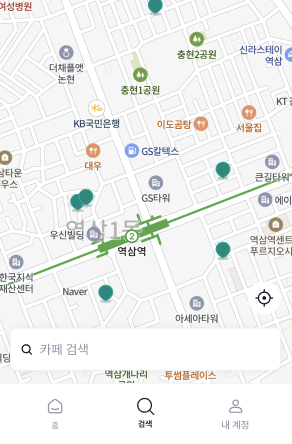
아래 검색 탭이 있고 그 위에 FAB 가 위치해있다. (그림자는 export 할때 딸려오는걸 방지하기 위해 제거함)
이를 xml 로 구현하려고 아래와 같이 레이아웃 코드를 작성하였다.
<?xml version="1.0" encoding="utf-8"?><!--
  ~ Designed and developed by Wedemy 2023.
  ~
  ~ Licensed under the MIT.
  ~ Please see full license: https://github.com/Wedemy/eggeum-android/blob/main/LICENSE
  -->

<androidx.constraintlayout.widget.ConstraintLayout xmlns:android="http://schemas.android.com/apk/res/android"
  xmlns:app="http://schemas.android.com/apk/res-auto"
  xmlns:tools="http://schemas.android.com/tools"
  android:layout_width="match_parent"
  android:layout_height="match_parent">

  <com.naver.maps.map.MapView
    android:id="@+id/mv_search"
    android:layout_width="0dp"
    android:layout_height="0dp"
    app:layout_constraintBottom_toBottomOf="parent"
    app:layout_constraintEnd_toEndOf="parent"
    app:layout_constraintStart_toStartOf="parent"
    app:layout_constraintTop_toTopOf="parent" />

   <com.google.android.material.floatingactionbutton.FloatingActionButton
    android:id="@+id/fab_search_tracking"
    android:layout_width="wrap_content"
    android:layout_height="wrap_content"
    android:layout_marginBottom="16dp"
    android:contentDescription="Tracking"
    android:src="@drawable/ic_mark_filled_40"
    app:layout_constraintBottom_toTopOf="@id/cv_search_cafe"
    app:layout_constraintEnd_toEndOf="parent"
    tools:ignore="HardcodedText" />

  <androidx.cardview.widget.CardView
    android:id="@+id/cv_search_cafe"
    android:layout_width="0dp"
    android:layout_height="wrap_content"
    android:layout_marginHorizontal="16dp"
    android:layout_marginBottom="16dp"
    android:elevation="8dp"
    app:cardCornerRadius="8dp"
    app:layout_constraintBottom_toBottomOf="parent"
    app:layout_constraintEnd_toEndOf="parent"
    app:layout_constraintStart_toStartOf="parent">

    <com.google.android.material.textfield.TextInputLayout
      android:id="@+id/til_search_cafe"
      style="@style/Widget.Eggeum.TextInputLayout.SearchBox"
      app:boxStrokeColor="@drawable/selector_box_stroke_color_white"
      app:startIconDrawable="@drawable/ic_search_filled_16">

      <com.google.android.material.textfield.TextInputEditText
        android:id="@+id/tiet_search_cafe"
        style="@style/Widget.Eggeum.TextInputEditText.OutlinedBox"
        android:ellipsize="end"
        android:hint="@string/search_cafe"
        android:inputType="text"
        android:maxLines="1" />

    </com.google.android.material.textfield.TextInputLayout>

  </androidx.cardview.widget.CardView>

</androidx.constraintlayout.widget.ConstraintLayout>
결과..
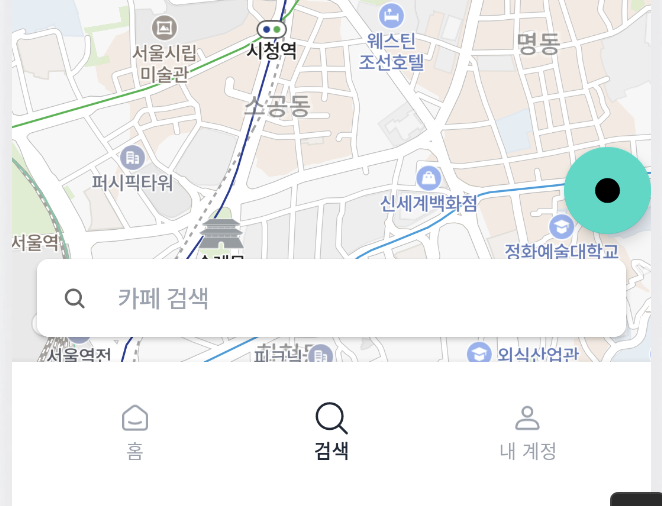
배경색상이 기본으로 지정되는것을 확인할 수 있다. src 도 내가 생각했던것과 다르게 보여지고
배경색상은 설정하지 않으면 기본적으로 ColorAccent 색이 지정되기 때문에 원하는 색상을 지정해주어야 한다
android:backgroundTint="@color/white"결과..
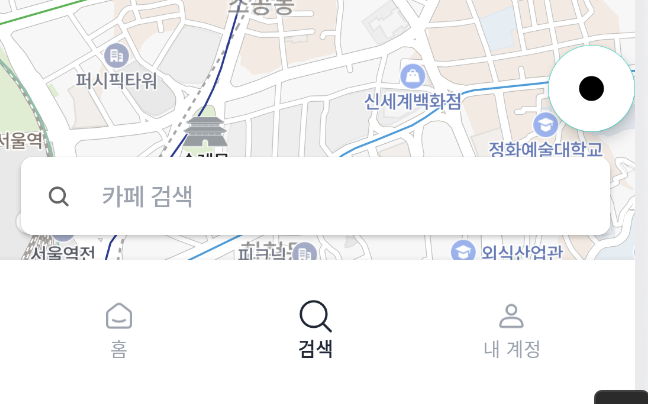
내부는 흰색으로 변했지만 테두리, Border(가장자리)는 여전이 기본 색상이 적용된 것을 확인할 수 있다.
이를 제거하기 위해
app:borderWidth="0dp"마지막으로 원하는 이미지를 넣어주려면 FAB 에서는 src 가 아닌 forground 속성에 drawable 을 지정해야한다는 것을 구글링을 통해 알 수 있었다
android:foreground="@drawable/ic_mark_filled_40"최종 결과)
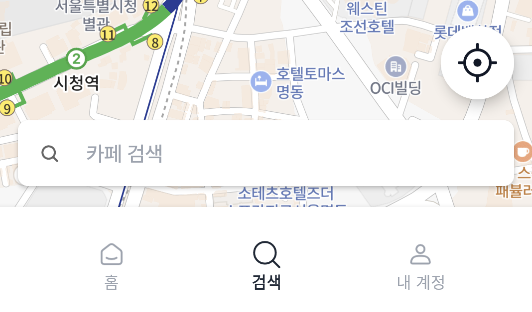
이로써 시안과 같은 버튼을 만들 수 있었다.
최종 코드)
<?xml version="1.0" encoding="utf-8"?><!--
  ~ Designed and developed by Wedemy 2023.
  ~
  ~ Licensed under the MIT.
  ~ Please see full license: https://github.com/Wedemy/eggeum-android/blob/main/LICENSE
  -->

<androidx.constraintlayout.widget.ConstraintLayout xmlns:android="http://schemas.android.com/apk/res/android"
  xmlns:app="http://schemas.android.com/apk/res-auto"
  xmlns:tools="http://schemas.android.com/tools"
  android:layout_width="match_parent"
  android:layout_height="match_parent">

  <com.naver.maps.map.MapView
    android:id="@+id/mv_search"
    android:layout_width="0dp"
    android:layout_height="0dp"
    app:layout_constraintBottom_toBottomOf="parent"
    app:layout_constraintEnd_toEndOf="parent"
    app:layout_constraintStart_toStartOf="parent"
    app:layout_constraintTop_toTopOf="parent" />

  <com.google.android.material.floatingactionbutton.FloatingActionButton
    android:id="@+id/fab_search_tracking"
    android:layout_width="wrap_content"
    android:layout_height="wrap_content"
    android:layout_marginBottom="16dp"
    android:backgroundTint="@color/white"
    android:contentDescription="Tracking"
    android:foreground="@drawable/ic_mark_filled_40"
    app:borderWidth="0dp"
    app:layout_constraintBottom_toTopOf="@id/cv_search_cafe"
    app:layout_constraintEnd_toEndOf="parent"
    tools:ignore="HardcodedText" />

  <androidx.cardview.widget.CardView
    android:id="@+id/cv_search_cafe"
    android:layout_width="0dp"
    android:layout_height="wrap_content"
    android:layout_marginHorizontal="16dp"
    android:layout_marginBottom="16dp"
    android:elevation="8dp"
    app:cardCornerRadius="8dp"
    app:layout_constraintBottom_toBottomOf="parent"
    app:layout_constraintEnd_toEndOf="parent"
    app:layout_constraintStart_toStartOf="parent">

    <com.google.android.material.textfield.TextInputLayout
      android:id="@+id/til_search_cafe"
      style="@style/Widget.Eggeum.TextInputLayout.SearchBox"
      app:boxStrokeColor="@drawable/selector_box_stroke_color_white"
      app:startIconDrawable="@drawable/ic_search_filled_16">

      <com.google.android.material.textfield.TextInputEditText
        android:id="@+id/tiet_search_cafe"
        style="@style/Widget.Eggeum.TextInputEditText.OutlinedBox"
        android:ellipsize="end"
        android:hint="@string/search_cafe"
        android:inputType="text"
        android:maxLines="1" />

    </com.google.android.material.textfield.TextInputLayout>

  </androidx.cardview.widget.CardView>

</androidx.constraintlayout.widget.ConstraintLayout>
참고)
https://stackoverflow.com/questions/30969455/android-changing-floating-action-button-color

실력은 고통의 총합이다. Android Developer