
서두
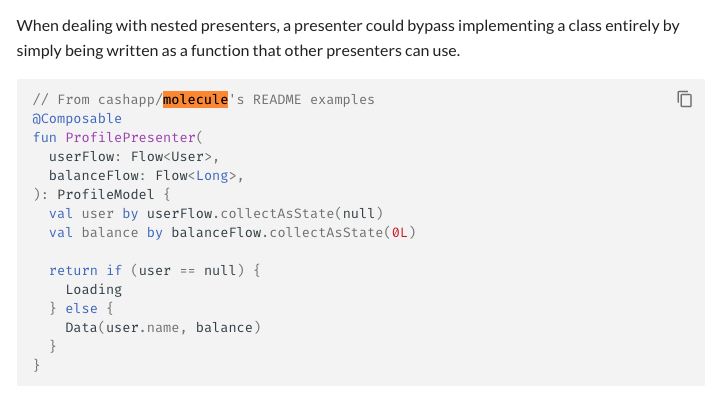
https://slackhq.github.io/circuit/presenter/
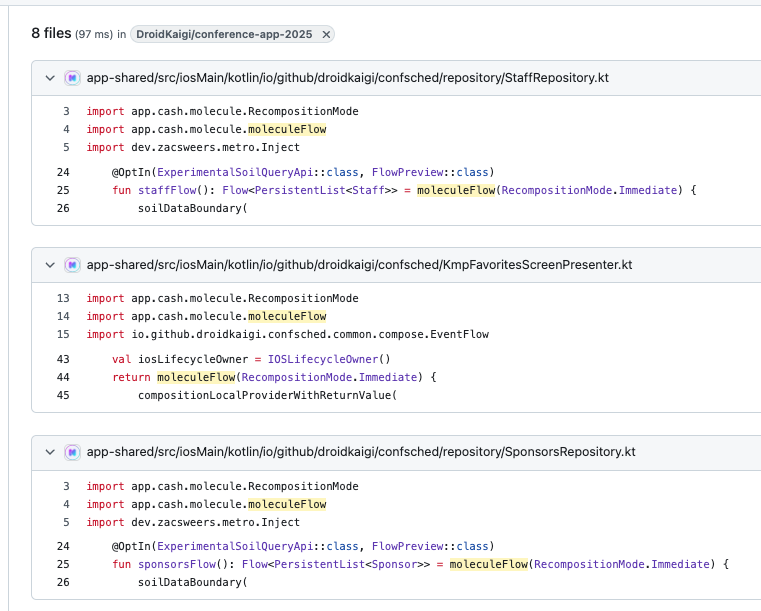
https://github.com/search?q=repo%3ADroidKaigi%2Fconference-app-2025%20molecule&type=code
관심있는 라이브러리나 레포지토리 코드를 봤을 때 Molecule이라는 라이브러리가 언급, 사용되는 것을 확인할 수 있었다.
이번 글에선 이 Molecule에 대해 알아보고 이를 활용한 사례들을 소개해보고자 한다.
찍먹 글이니 가볍게만 정리해보도록 하겠다.
본론
Molecule 이 뭐임?
Molecule은 Cash App에서 만들어 실제 서비스 내에도 적용중인 라이브러리로, UI 없이 Compose Runtime을 실행하여 상태 변화를 추적하고, 그 결과를 Flow나 StateFlow로 내보내는 API를 제공한다.
collectAsState: StateFlow → Compose State (소비)
Molecule: Composable → Flow/StateFlow (생산)
참고로 Android 개발자라면 모를 수가 없는 Jake Wharton 선생님께서 Molecule의 메인테이너이시다.
Cash App은 Molecule 외에도 Coroutine Flow 테스트를 위한 Turbine, Type-Safe Kotlin DB API 생성을 위한 SQLDelight, Paparazzi, Zipline, Redwood와 같은 Kotlin 생태계에 핵심적인 오픈소스 라이브러리들을 개발 및 유지보수하고 있다.
초기 릴리즈는 21년 11월로 상당히 이르며 정식 릴리즈는 23년 7월, 현재는 2.2.0 버전까지 나온 검증된 라이브러리이다.
Molecule isn't a Framework

Molecule README에는 위와 같은 이미지가 있다. 이게 무슨 말일까?
Molecule은 아키텍처와 같은 구조를 강제하지 않는다.
Circuit과 같은 프레임워크처럼 Presenter/UI 구조나 Navigation 방식을 지정, 강제하지 않는다. 필요시 기존 ViewModel 구조에 그대로 끼워넣을 수 있다.
그러면 어떻게 동작함?
Molecule은 이 Compose Runtime의 상태 추적 기능(Snapshot System)을 UI 없이(Headless) 활용한다.
어떻게 이게 가능할까? README에서 주창하는 핵심은 여기 있다.
Compose가 사실 UI Toolkit만을 지칭하는게 아니라는 점이다.
Compose의 본질은 상태 변화를 추적하고 반응하는 시스템(Compiler + Runtime) 이다. Compose UI는 그 위에 올라간 하나의 활용 사례일 뿐, 그외 Molecule을 포함한 다양한 활용 사례들이 존재한다.
Molecule은 이 중에서 유일하게 렌더 타겟 자체가 없는 케이스이긴 하다.
다음으로 Molecule에서 지원하는 두 가지 함수에 대해 알아보도록 하겠다.
launchMolecule
반환 타입이 다른 2 종류의 launchMolecule 함수가 존재한다.
1. StateFlow 반환
fun <T> CoroutineScope.launchMolecule(
    mode: RecompositionMode,
    context: CoroutineContext = EmptyCoroutineContext,
    snapshotNotifier: SnapshotNotifier = defaultSnapshotNotifier(),
    body: @Composable () -> T
): StateFlow<T>
CoroutineScope에 코루틴을 launch하고, body를 지속적으로 recompose하며, body가 반환한 T값을 StateFlow<T>로 내보낸다(생산).
코루틴 컨텍스트는 CoroutineScope에서 상속되며, context 인자로 추가 컨텍스트 요소 지정 가능하다.
scope가 cancel되면 Composition도 함께 종료된다.
예시
@Composable
fun ProfilePresenter(
  userFlow: Flow<User>,
  balanceFlow: Flow<Long>,
): ProfileModel {
  val user by userFlow.collectAsState(null)
  val balance by balanceFlow.collectAsState(0L)

  return if (user == null) {
    Loading
  } else {
    Data(user.name, balance)
  }
}
val models: StateFlow<ProfileModel> = scope.launchMolecule(mode = ContextClock) {
ProfilePresenter(userRepo, balanceRepo)
}@Composable
fun Profile(models: StateFlow<ProfileModel>) {
val model by models.collectAsState()
when (model) {
is Loading -> Text("Loading…")
is Data -> Text("${model.name} - ${model.balance}")
}
}2. emitter 콜백(Unit 반환)
fun <T> CoroutineScope.launchMolecule(
    mode: RecompositionMode,
    emitter: (value: T) -> Unit,
    context: CoroutineContext = EmptyCoroutineContext,
    snapshotNotifier: SnapshotNotifier = defaultSnapshotNotifier(),
    body: @Composable () -> T
)
위와 마찬가지로, CoroutineScope에 코루틴을 launch하고 body를 지속적으로 recompose하되, body가 반환한 T 값을 emitter 콜백으로 전달한다.
emitter 는 항상 free-running(소비자 속도와 관계없이 계속 값을 emit하며)으로 동작하며 backpressure를 지원하지 않는다.
| StateFlow 버전 | emitter 버전 | |
|---|---|---|
| 반환 | StateFlow<T> | Unit |
| 특징 | 상태 홀더 생성 | 값만 콜백으로 전달 |
| 사용 | 상태 구독이 필요할 때 | 부수 효과 처리만 필요할 때 |
moleculeFlow
collect 시 body를 지속적으로 recompose하여 T 값의 Flow를 생산한다. launchMolecule과 달리 backpressure를 지원한다.
fun <T> moleculeFlow(
    mode: RecompositionMode,
    snapshotNotifier: SnapshotNotifier = defaultSnapshotNotifier(),
    body: @Composable () -> T
): Flow<T>
예시
val models: Flow<ProfileModel> = moleculeFlow(mode = Immediate) {
    ProfilePresenter(userRepo, balanceRepo)
}
Turbine과 조합하여 Flow처럼 테스트
fun counter(): Flow<Int> = moleculeFlow(mode = Immediate) {
  var count by remember { mutableStateOf(0) }

  LaunchedEffect(Unit) {
    while (true) {
      delay(1_000)
      count++
    }
  }

  count
}

@Test
fun counter() = runTest {
    moleculeFlow(RecompositionMode.Immediate) {
        Counter()
    }.test {
        assertEquals(0, awaitItem())
        assertEquals(1, awaitItem())
        assertEquals(2, awaitItem())
        cancel()
    }
}
주로 유닛 테스트 코드 작성시 사용되는 것을 확인할 수 있었다.
| launchMolecule | moleculeFlow | |
|---|---|---|
| 반환 | StateFlow<T> (hot) | Flow<T> (cold) |
| Composition 생성 | 즉시 | collect 시 |
| backpressure | 미지원 | 지원 |
| CoroutineScope | 필요 | 불필요 |
backpressure?
생산 속도가 소비 속도보다 빠를 때 흐름을 제어하는 것으로,
backpressure 있음 -> 소비자가 준비될 때까지 생산 대기를 의미한다
- launchMolecule -> StateFlow라 최신값만 유지 (이전 값 덮어씀)
- launchMolecule (emitter) → free-running, backpressure 무시
- moleculeFlow -> collector 속도에 맞춰 emit 조절
mode?
launchMolecule, moculeFlow 함수를 보면 인자로 mode를 받는 것을 확인할 수 있는데 이는 RecompositionMode를 의미한다.
ContextClock 옵션은 UI Frame Clock에 동기화되며 프레임 사이에 상태가 여러 번 바뀌어도 다음 프레임에 최종 상태로 1번만 emit된다.
Immediate는 상태 변경시 즉각적으로 emit되는 차이가 있다.
| Mode | 언제 recompose | 용도 |
|---|---|---|
ContextClock | 다음 UI 프레임 (16ms) | Android Main 스레드, UI와 동기화 |
Immediate | 상태 변경 즉시 | 테스트, 백그라운드 |
UI Frame Clock
화면이 갱신하는 주기를 의미.
60fps: 1초에 60번 갱신(약 16ms 간격)
120fps: 1초에 120번 갱신(약 8ms 간격)
그밖에 sample 및 ViewModel과 Molecule을 같이 사용하는 예시는 Molecule 레포지토리에서 확인이 가능하다.
https://github.com/cashapp/molecule/tree/trunk/sample
https://github.com/cashapp/molecule/tree/trunk/sample-viewmodel
그래서 왜 써야함?
활용 사례
Circuit 없이 Circuit Presenter 패턴 사용하기
Circuit의 Presenter 패턴을 사용하고 싶지만, Circuit 이라는 프레임워크의 의존성(Navigation, DI, Retained State)을 전부 끌어다 사용하는 것이 다소 헤비하게 느껴진다면, Molecule을 사용하여 패턴만을 차용해볼 수 있다.
Circuit 도입 시 고려사항
- Navigation, DI, Retained State 등 UI 레이어가 Circuit에 종속
- 프레임워크 버전업 시 breaking change와 싸워야 할 수 있음
- 기존 코드와 혼재 시 복잡도 증가
-> Molecule은 이런 부담 없이 Presenter 내에 코드 작성 방식만 가져오는게 가능하다.
Presenter 내에서 사용하게되는 Circuit의 Retain State API는 Rin 혹은 Compose Retain API를 통해 대체하면 된다. Navigation은 Navigation3로
Circuit Presenter Test
Circuit에선 Presenter의 테스트를 위한 presenterTestOf 함수를 제공하는데, 이를 통해 Presenter를 Composable 컨텍스트 없이 단독으로 테스트가 가능하다.
이게 가능한 이유는 내부적으로 Molecule과 Turbine을 사용하여 Composable를 Flow/StateFlow로 변환, awaiteItem() 같은 Flow Test API를 활용하기 때문이다.
@Test
fun test() = runTest {
    presenterTestOf({ FavoritesPresenter() }) {
        awaitItem() shouldBe Loading
        awaitItem() shouldBe Data(...)
    }
}
Kotlin Multiplatform
Molecule을 쓰면 Composable 문법으로 Presenter(StateHolder)를 구성하고, 그 결과를 Flow/StateFlow로 iOS에 내보낼 수 있다.
┌─────────────────────────────────────────────┐
│              Shared (commonMain)            │
│                                             │
│  @Composable ← Flow 연산자 대신 Compose 문법    │
│  fun ProfilePresenter(): ProfileModel       │
│           │                                 │
│           ▼                                 │
│  launchMolecule() → StateFlow<ProfileModel> │
└─────────────────┬───────────────────────────┘
                  │
        ┌─────────┴─────────┐
        ▼                   ▼
   Android App          iOS App
   Compose UI           SwiftUI
Circuit/Compose Multiplatform은 UI까지 Compose로 통일해야 하지만, Molecule을 통해 Flow/StateFlow만 내보내니까 iOS 환경에서 SwiftUI 그대로 사용 가능.
Swift에서 Flow 수집은 SKIE 라이브러리를 통해 처리
DroidKaigi 2025 레포에서 실제 사용 예시를 확인할 수 있다. 없는게 없는 DroidKaigi;;
import app.cash.molecule.RecompositionMode
import app.cash.molecule.moleculeFlow
// ...

@Inject
class SessionsRepository(
    private val swrClient: SwrClientPlus,
    private val timetableQueryKey: TimetableQueryKey,
    private val favoriteTimetableIdsSubscriptionKey: FavoriteTimetableIdsSubscriptionKey,
    // ...
) {
    @OptIn(ExperimentalSoilQueryApi::class, FlowPreview::class)
    fun timetableFlow(): Flow<Timetable> = moleculeFlow(RecompositionMode.Immediate) {
        soilDataBoundary(
            state1 = rememberQuery(key = timetableQueryKey, client = swrClient),
            state2 = rememberSubscription(key = favoriteTimetableIdsSubscriptionKey, client = swrClient),
        ) { timetable, favoriteTimetableIds ->
            timetable.copy(bookmarks = favoriteTimetableIds)
        }
    }
        .filterNotNull()
        .distinctUntilChanged()
        .catch {
            // Errors thrown inside flow can't be caught on iOS side, so we catch it here.
            emit(Timetable())
        }

    // ...
}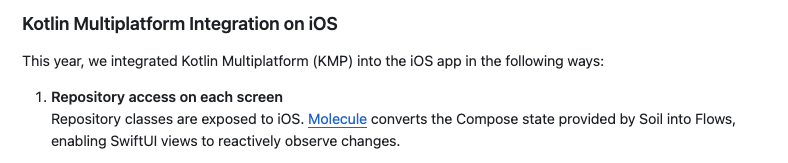
Soil에 의해 제공되는 Compose State를 Flow로 변환하기 위해 Molecule을 사용하였다고 README에 언급되어 있으며, 이는 SwiftUI 환경에서도 reactive 하게 상태 변경을 구독할 수 있도록 한다.
KMP iOS 모듈 환경에서 Molecule에 의해 반환된 Presenter의 StateFlow를 Touchlab의 SKIE를 사용해서 SwiftUI에서 소비하는 예시는 해당 글에서도 확인할 수 있다.
결론
Molecule 이라는 라이브러리에 대한 이해와 Molecule 도입시 얻을 수 있는 장점에 대해 알아볼 수 있었다.
내 생각
개인적으로 AAC ViewModel과 Molecule의 조합은 그다지 메리트가 없다고 생각한다.
sample-viewmodel 모듈내에 예제를 확인해보면
Composable 함수로 Presenter를 구성하여 상태를 Compose State로 관리하고, 변경된 상태를 새로운 Model 객체로 방출하는 식으로 구현되어있다.
@Composable
fun pupperPicsPresenter(events: Flow<Event>, service: PupperPicsService): Model {
  var breeds: List<String> by remember { mutableStateOf(emptyList()) }
  var currentBreed: String? by remember { mutableStateOf(null) }
  var currentUrl: String? by remember { mutableStateOf(null) }
  var fetchId: Int by remember { mutableIntStateOf(0) }

  // Grab the list of breeds and sets the current selection to the first in the list.
  // Errors are ignored in this sample.
  // ...

  // Load a random URL for the current breed whenever it changes, or the fetchId changes.
 // ...

  // Handle UI events.
  LaunchedEffect(Unit) {
    events.collect { event ->
      when (event) {
        is Event.SelectBreed -> currentBreed = event.breed
        Event.FetchAgain -> fetchId++ // Incrementing fetchId will load another random image URL.
      }
    }
  }

  return Model(
    loading = currentBreed == null,
    breeds = breeds,
    dropdownText = currentBreed ?: "Select breed",
    currentUrl = currentUrl,
  )
}
이때, launchMolecule 함수를 통해 반환된 Model을 stateFlow로 감싸서 ViewModel내에서 관리 -> UI에서 collectAsState를 통해 다시 Compose State로 다시 변환하여 상태를 구독한다.
abstract class MoleculeViewModel<Event, Model> : ViewModel() {
    // 1. scope 제공 (config change에서 유지됨)
    private val scope = CoroutineScope(viewModelScope.coroutineContext + AndroidUiDispatcher.Main)

    // 2. StateFlow 들고 있기 (UI와 Presenter를 연결)
    val models: StateFlow<Model> by lazy {
        scope.launchMolecule(mode = ContextClock) {
            models(events)  // 3. 실제 로직은 여기 (Composable)
        }
    }
}

class MainActivity : ComponentActivity() {
  override fun onCreate(savedInstanceState: Bundle?) {
    super.onCreate(savedInstanceState)
    WindowCompat.setDecorFitsSystemWindows(window, false)
    val viewModel by viewModels<PupperPicsViewModel>()
    setContent {
      RootContainer {
        val model by viewModel.models.collectAsState()
        PupperPicsScreen(model, onEvent = { event -> viewModel.take(event) })
      }
    }
  }
}
State -> Flow -> State 이러한 비효율적인 왕복 과정이 생기게 되는 것인데, Presenter가 Compose State로 상태를 관리하면, UI도 이를 바로 State로 구독하는게 효율적이지 않냐는게 내 생각이고, Circuit이 그러고 있다.
이러면 중간 과정에서 Flow로 변환할 필요가 없으니, Molecule도 필요없는거 아닌가?
왜 이런 비효율적인 방식이 공식 샘플일까에 대한 의문을 해소하기 위해 PR 내역들을 확인해보았는데, 재미난 대화내용을 확인할 수 있었다.
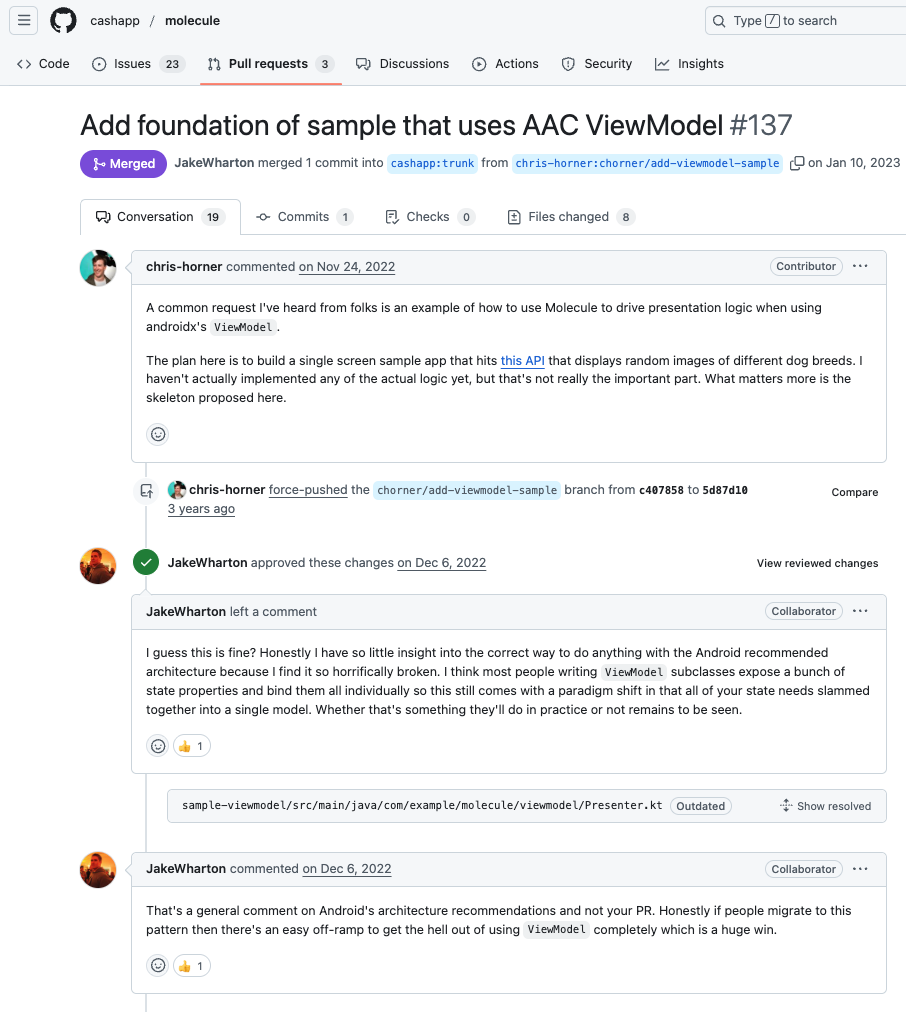
https://github.com/cashapp/molecule/pull/137
요약하자면, Jake Wharton 선생님께서는 22년 후반 ~ 23년 초 기준, Android 권장 아키텍처가 끔찍하게 망가졌다고 생각하시며(horrifically broken), sample-viewmodel 예제는 기존 ViewModel을 사용하는 팀이 점진적으로 ViewModel을 탈출할 수 있는 패턴을 제공하는 예시라는 것이다.
실제로 예제에서는 모든 StateHolder로서의 역할을 Presenter 내부에서 구현하고 있고, ViewModel은 Presenter와 UI를 연결하는 접착제(glue)역할을 수행하고 있다.
sample-viewmodel에서 ViewModel 역할
Config change 대응 - viewModelScope가 화면 회전에서 살아남음
Scope 제공 - launchMolecule에 필요한 CoroutineScope(viewModelScope)
연결 - Presenter <-> UI 를 연결 및 상태를 StateFlow를 통해 관리
여기까지 파악했을 땐 통상적인 Android 프로젝트에 한정했을 경우, Molecule을 사용해야 할 이유에 대해서 아직 공감을 하지 못한 상태라 조금 더 Molecule에 대한 글들을 찾아봐야겠다.
Molecule이 필요 없다고 생각한 이유
통상적인 Android 프로젝트에서 Molecule을 쓴다면 AAC ViewModel에서 벗어나 Composable Presenter 혹은 MVVM ViewModel등으로의 Migration을 위해 사용할 것이다.
근데 Molecule에는 config change로 부터 데이터를 보존할 수 있는 기능을 지원하지 않기 때문에, 결국 위에 sample-viewmodel처럼 ViewModel에게 ViewModelScope등을 빌려서 사용해야하며 state -> flow -> state라는 왕복과정도 수반하게 된다.
하지만 현시점에서는 Circuit/Rin에서 제공하는 rememberRetained, 그리고 아직 프로젝트에선 사용해보지 않았지만 Compose retain API 도 나온 시점에서 ViewModel의 힘을 빌리지 않아도(암시적으로 사용하긴하더라도) Compose State로 관리되는 상태를 Compose UI에서 중간 변환 과정없이 그대로 Compose State로 바라보고 사용하는 것이 가능하다.
Molecule을 실제로 사용하시는 분이 계시다면 어떤 목적으로, 어떤 문제를 해결하기 위해 사용하고 계시는지 댓글 남겨주시면 감사하겠습니다!
reference)
https://github.com/cashapp/molecule
https://slackhq.github.io/circuit/testing/
https://youtu.be/O70beCWbSCY?si=z8oCJCQBtO9onbvQ
https://medium.com/@keisardev/circuit-vs-jetpack-compose-viewmodel-in-depth-analysis-d3c8f4d02cc1
https://appmilla.com/latest/experimenting-with-composable-presenters-in-kotlin-multiplatform/
https://github.com/cashapp/molecule/pull/137