2.3 Python Input/Output
When programming, often find writing the same thing over and over again.
This is when a function is needed.
In other words, if there is a repetitive part, the 'repeatedly used valuable part' is grouped together and written as a function such as 'return a certain result value when a certain input value is given'.
2.3.1 function
ex
def add(a, b):
    return a + b
Practice
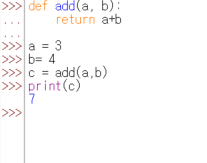
>>> def add(a, b):
...     return a+b
...
>>>

>>> a = 3
>>> b = 4
>>> c = add(a, b)  # add(3, 4)의 리턴값을 c에 대입
>>> print(c)
7
2.3.1.1 function without input
>>> def say():
...     return 'Hi'

>>> a = say()
>>> print(a)
Hi
2.3.1.2 function without return
>>> def add(a, b):
...     print("%d, %d의 합은 %d입니다." % (a, b, a+b))

>>> add(3, 4)
3, 4의 합은 7입니다.

>>> print(a)
None     # there is no return value
2.3.1.3 function without both input/return
>>> def say():
...     print('Hi')

>>> say()
Hi
2.3.1.4 Calling function with parameters select
>>> def sub(a, b):
...     return a - b

>>> result = sub(a=7, b=3)  # a 7, b 3
>>> print(result)
4

>>> result = sub(b=5, a=3)  # b 5, a 3
>>> print(result)
-2
2.3.1.5 Function that receives multiple inputs
>>> def add_many(*args):
...     result = 0
...     for i in args:
...         result = result + i   # *args에 입력받은 모든 값을 더한다.
...     return result


>>> result = add_many(1,2,3)
>>> print(result)
6
>>> result = add_many(1,2,3,4,5,6,7,8,9,10)
>>> print(result)
55
example
>>> def add_mul(choice, *args):
...     if choice == "add":   # 매개변수 choice에 "add"를 입력받았을 때
...         result = 0
...         for i in args:
...             result = result + i
...     elif choice == "mul":   # 매개변수 choice에 "mul"을 입력받았을 때
...         result = 1
...         for i in args:
...             result = result * i
...     return result

>>> result = add_mul('add', 1,2,3,4,5)
>>> print(result)
15
>>> result = add_mul('mul', 1,2,3,4,5)
>>> print(result)
120
2.3.1.6 keyword parameter (kwargs)
>>> def print_kwargs(**kwargs):
...     print(kwargs)


>>> print_kwargs(a=1)
{'a': 1}
>>> print_kwargs(name='foo', age=3)
{'age': 3, 'name': 'foo'}
"**" make key=value type to dictionary type
If a=1 is used as the input value of the function, kwargs will be the dictionary of {'a': 1'} and if name='foo' and age=3 are used as the input values, kwargs will be the dictionary of {'age': 3, 'name': 'foo'}. In other words, if you put before the parameter name like " **kwargs", the parameter kwargs will be the dictionary and all Key=Value-type inputs will be stored in that dictionary.
2.3.1.7 Multiple function's Return value
>>> def add_and_mul(a,b):
...     return a+b, a*b

>>> result = add_and_mul(3,4)

result = (7, 12)

>>> result1, result2 = add_and_mul(3, 4)
2.3.2 User input/output
most programs have input and output according to input
2.3.2.1 input
>>> a = input()
Life is too short, you need python
>>> a
'Life is too short, you need python'
>>> number = input("숫자를 입력하세요: ")
숫자를 입력하세요: 3
>>> print(number)
3

>>> type(number)
<class 'str'>    # input handle all data with str
2.3.2.2 print
>>> a = 123
>>> print(a)
123
>>> a = "Python"
>>> print(a)
Python
>>> a = [1, 2, 3]
>>> print(a)
[1, 2, 3]
>>> print("life" "is" "too short")  # 1
lifeistoo short
>>> print("life"+"is"+"too short")  # 2
lifeistoo short
>>> print("life", "is", "too short")
life is too short
>>> for i in range(10):
...     print(i, end=' ')
...
0 1 2 3 4 5 6 7 8 9 >>>
2.3.3 file read/write
Learn how to input and output through files
2.3.3.1 Create file (Create)
# newfile.py
f = open("newfile.txt", 'w')
f.close()
file mode | function
r => read mode : Use to read files only.
w => write mode : Used to write content to a file.
a => add mode : Use to add new content at the end of a file.
# newfile2.py
f = open("C:/python_file/newfile.txt", 'w')
f.close()       # closing open file objects
f.close() => the function of closing open file objects
2.3.3.2 Open a file in write mode and write contents (Write)
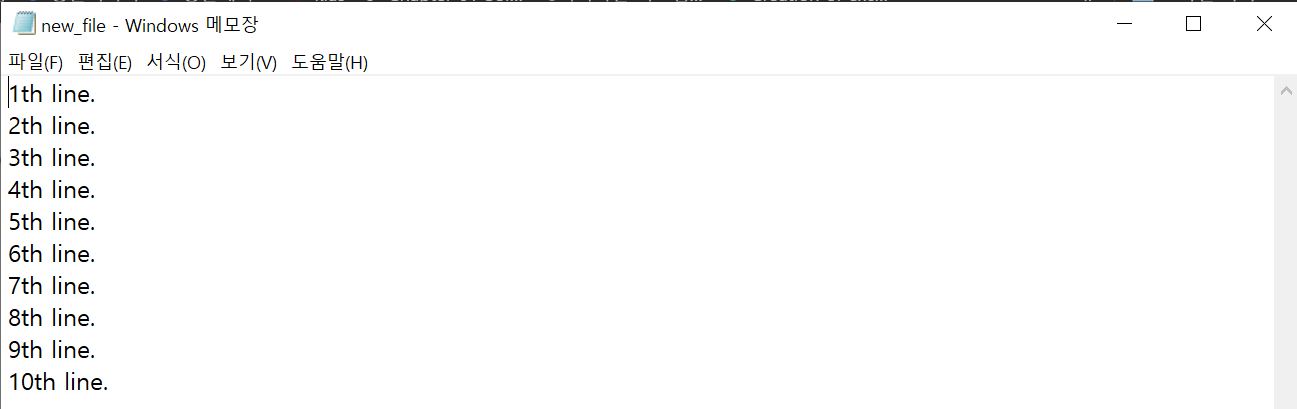
# write_test.py
f = open("C:/python_file/newfile.txt", 'w')
for i in range(1, 11):
    data = "%dth line.\n" % i
    f.write(data)
f.close()
for i in range(1, 11):
    data = "%dth line\n" % i
    print(data)  # can use instead of f.write(data)
2.3.3.3 Different ways to read files (Read)
1) readline
# readline_test.py
f = open("C:/python_file/newfile.txt", 'r')
line = f.readline()
print(line)
f.close()
2) Read all lines in "newfile.txt" and output them to the screen
# readline_all.py
f = open("C:/python_file/newfile.txt", 'r')
while True:
    line = f.readline()
    if not line: break
    print(line)
f.close()
3) with "readlines" function
# readlines.py
f = open("C:/python_file/newfile.txt", 'r')
lines = f.readlines()
for line in lines:
    print(line)
f.close()
4) read function
# read.py
f = open("C:/python_file/newfile.txt", 'r')
data = f.read()
print(data)
f.close()
5) read with for statement
# read_for.py
f = open("C:/python_file/newfile.txt", 'r')
for line in f:
    print(line)
f.close()
2.3.3.4 Adding new content to a file
# add_data.py
f = open("C:/python_file/newfile.txt",'a')
for i in range(11, 20):
    data = "%dth line(added)\n" % i
    f.write(data)
f.close()
2.3.4 input/output Program
2.3.4.1 Use sys module
In Python, the "sys module" can be used to pass arguments to programs.
To use the "sys module", you must "import sys" for use "sys module"
# sys1.py
import sys

args = sys.argv[1:]
for i in args:
    print(i)
The above is outputting the arguments received when the program is executed one by one using the for statement.
The argv of the sys module means an argument transmitted when the program is executed.
That is, if entered as follows, argv[0] becomes the file name sys1.py , and from argv[1] the following arguments become elements of argv in turn.
C:\python_file>python sys1.py aaa bbb ccc

aaa
bbb
ccc
*example
# sys2.py
import sys
args = sys.argv[1:]
for i in args:
    print(i.upper(), end=' ')
sys2.py should be in python_file
C:\python_file>python sys2.py life is too short, you need pythonanswer
LIFE IS TOO SHORT, YOU NEED PYTHON음 안되네