[사전스터디 1주차] 2) CSS 주요 내용 정리.
사전스터디 1주차는 HTML/CSS를 학습하고, 자기소개서 페이지를 완성해보는 것이다.
이번 포스트는 CSS에 대한 간략한 개념과 실제 자주 쓰이는 내용들 위주로 간략히 정리하고, 실제 코드의 쓰임새에 대해서 정리한다.(추후 위코드 실제 과정을 시작하면서 자세한 내용들을 마저 정리할 예정이다.)
1. CSS의 정의 / 쓰임새
- Cascading Style Sheets의 약어로 HTML 마크업 언어가 실제 표시되는 방식을 기술한 언어.
- 실무적으로 단순히 말하자면, HTML에 시각적으로 효과를 넣을 수 있는 다양한 그래픽 효과, 데코레이션 기능을 제공한다.
2. Box Model
-
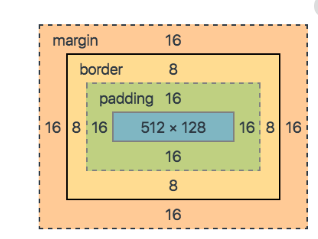
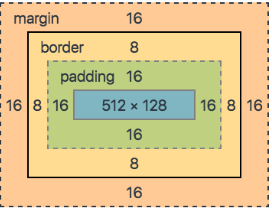
CSS를 이용해 프로그래밍을 할 때는 웹 페이지를 Box로 나눠 구성한다.
-
프로그래머의
-
Box의 경계는 border이고 Content와 border 사이의 공간이 Padding.
-
Box 바깥의 공간을 margin이라고 한다.
-
-
CSS 효과를 적용하려면 html 파일 내 head에 style 태그안에 넣을 수도 있고,
따로 .css 파일을 만들어 href로 html 파일에 연결시켜도 된다. -
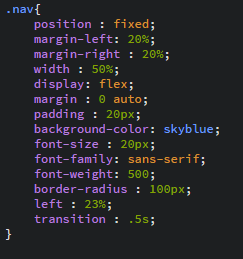
box 내 position, margin의 좌우 너비, padding의 넓이, 글자의 font 속성 설정,
border의 색깔 또는 각 등을 조정할 수 있다. 그 외에도 다양한 시각적 효과를 주는
CSS 속성들을 사용할 수 있다.
4. 자기소개 페이지에서의 css 코드
.nav{
  position : fixed;
  margin-left: 20%;
  margin-right : 20%;
  width : 50%;
  display: flex;
  margin : 0 auto;
  padding : 20px;
  background-color: skyblue;
  font-size : 20px;
  font-family: sans-serif;
  font-weight: 500;
  border-radius : 100px;
  left : 23%;
  transition : .5s;
}


body{
  background-size : cover;
  background-image : url(https://t1.daumcdn.net/cfile/blog/2602343A51ADFFC618);
  background-size : cover;
}


.main{
  margin : 0 auto;
  text-align: center;
  top : 100px;
  margin-left: 100px;
  margin-right : 100px;

}

.who{
  font-size : 50px;
  text-align : center;
  margin : 0 auto;
  margin-bottom : 100px;
  font-family: fantasy;
  font-weight: 1200;

}

.intro{
  border : 2px solid black;
  margin : 0 auto;
  width : 650px;
  height : 250px;
  padding : 30px;
  border-radius: 40px;
  border-bottom: 10px solid black;
  background-color: aquamarine;

}

.prof{
  margin : 0 auto;
  border : 2px solid black;
  border-radius : 40px;
  border-bottom : 10px solid black;
  width : 650px;
  height : 250px;
  text-align: center;
  margin-top : 100px;
  background-color : lightyellow;

}

img{
  width : 250px;
  height : 300px;
}

a:hover{
  color : orangered;
  transition: .5s;
}

a:link {
  text-decoration:none;
  color : white;
}

오늘을 모아 내일을