Composite 패턴
파일 탐색기를 생각해보자. 폴더 안에 파일이 있고, 그 폴더 안에 또 폴더가 있고, 그 안에 또 파일이 있다. 폴더와 파일은 다른 존재지만, "크기를 계산한다"거나 "이름을 출력한다" 같은 동작은 둘 다 똑같이 수행한다. 이 구조를 코드로 표현하려면 어떻게 해야 할까.
Composite 패턴이란
단일 객체와 복합 객체(컨테이너)를 동일한 인터페이스로 다루는 패턴이다. 트리 구조의 데이터를 표현할 때 자주 쓰인다.
클라이언트는 개별 객체인지 복합 객체인지 구분하지 않고 동일하게 다룰 수 있다.
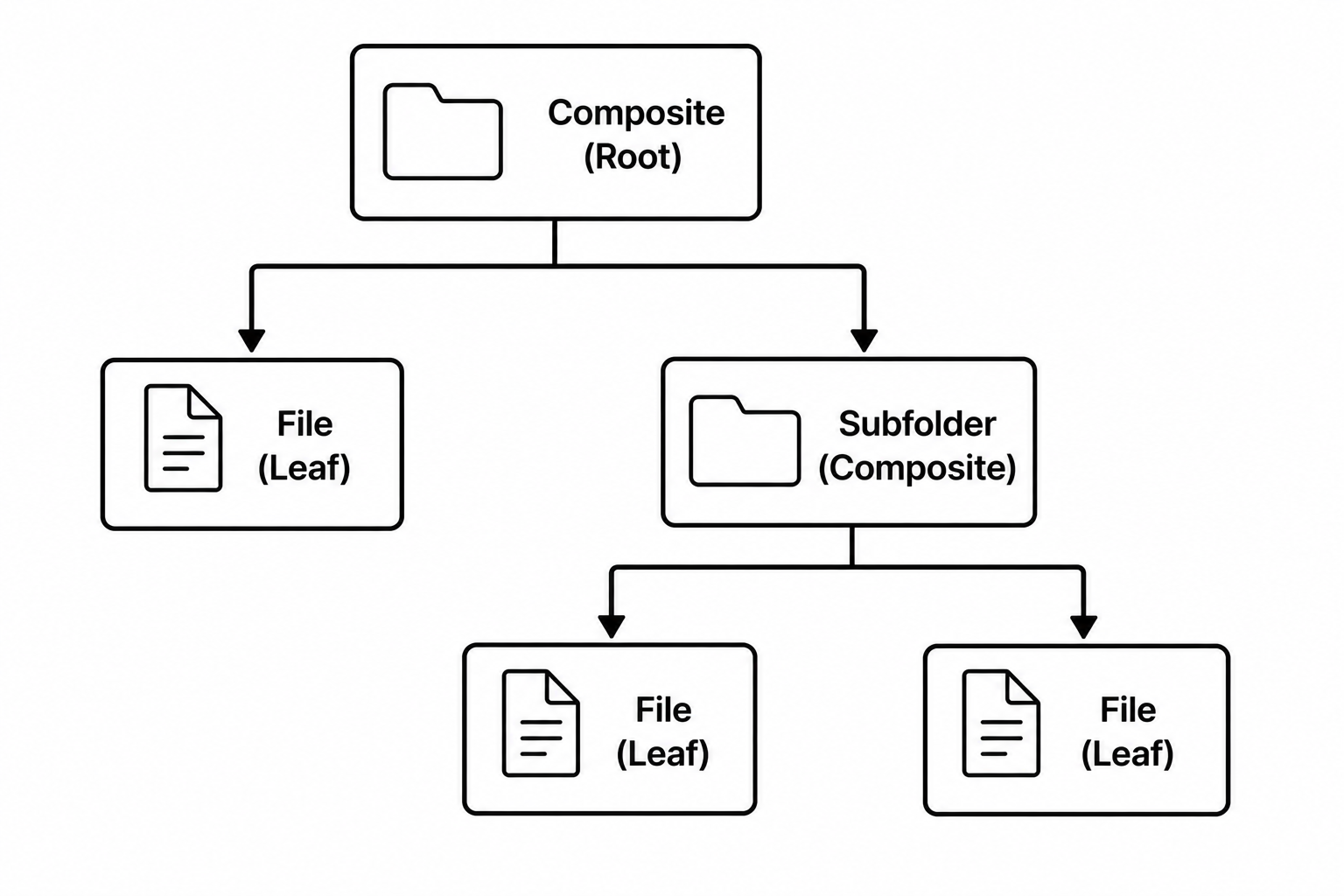
구조
// 공통 인터페이스 — 파일과 폴더 모두 이걸 구현
public interface FileComponent {
    void print(String indent);
    int getSize();
}
// Leaf — 단일 객체 (자식 없음)
public class File implements FileComponent {
private String name;
private int size;
public File(String name, int size) {
this.name = name;
this.size = size;
}
@Override
public void print(String indent) {
System.out.println(indent + "📄 " + name + " (" + size + "KB)");
}
@Override
public int getSize() {
return size;
}
}// Composite — 복합 객체 (자식을 담을 수 있음)
public class Folder implements FileComponent {
private String name;
private List<FileComponent> children = new ArrayList<>();
public Folder(String name) {
this.name = name;
}
public void add(FileComponent component) {
children.add(component);
}
@Override
public void print(String indent) {
System.out.println(indent + "📁 " + name);
for (FileComponent child : children) {
child.print(indent + " "); // 재귀적으로 출력
}
}
@Override
public int getSize() {
int total = 0;
for (FileComponent child : children) {
total += child.getSize(); // 재귀적으로 합산
}
return total;
}
}// 트리 구성
Folder root = new Folder("root");
Folder documents = new Folder("documents");
documents.add(new File("resume.pdf", 120));
documents.add(new File("cover_letter.docx", 45));
Folder images = new Folder("images");
images.add(new File("photo1.jpg", 3200));
images.add(new File("photo2.jpg", 2800));
root.add(documents);
root.add(images);
root.add(new File("readme.txt", 5));
root.print("");
System.out.println("전체 크기: " + root.getSize() + "KB");📁 root
📁 documents
📄 resume.pdf (120KB)
📄 cover_letter.docx (45KB)
📁 images
📄 photo1.jpg (3200KB)
📄 photo2.jpg (2800KB)
📄 readme.txt (5KB)
전체 크기: 6170KBroot.getSize()를 호출하면 폴더가 내부적으로 자식들의 getSize()를 재귀 호출해서 전체 크기를 합산한다. 사용하는 쪽은 File인지 Folder인지 신경 쓰지 않는다.
재귀 구조가 핵심이다
Composite 패턴에서 Composite 객체는 Component 인터페이스 타입의 자식들을 담는다. 자식이 Leaf일 수도 있고, 또 다른 Composite일 수도 있다. 이 덕분에 트리가 얼마나 깊어지든 동일한 방식으로 탐색할 수 있다.
언제 쓰는가
- 파일 시스템, 메뉴 트리, 조직도처럼 계층 구조를 표현해야 할 때
- 개별 객체와 그룹을 동일하게 다루고 싶을 때
- 재귀적인 구조를 일관된 방식으로 순회해야 할 때
Composite의 포인트는 "단일과 복합을 구별하지 않는다"는 것이다. 트리의 어느 노드에서 메서드를 호출해도 결과가 자연스럽게 전파된다. 계층 구조를 다루는 코드가 복잡해질수록 이 패턴이 빛을 발한다.

<- 개발 공부하는 나