form
서버로 데이터 전송이 사용되는 태그

get 방식
<form action=“search.jsp“ method="get">
  <input type="text" name="keyword">
  <input type="submit" value="검색">
</form>
post 방식
<form action=“search.jsp“ method=“post>
  <input type="text" name="keword">
  <input type="submit" value="검색">
</form>
input type
input 태그에 여러 옵션을 붙일 수 있다.
type
type명 : 설명
- text : 한줄짜리 텍스트 입력
- password : 비밀번호 입력(입력내용이 안 보임)
- hidden : 사용자에게 보이지 않음
- file : 파일첨부
- radio : 주어진 항목중 1개 선택
- checkbox : 주어진 항목중 여러 개 선택
그 외에도
email, number, search, date, month, week, color 등 여러 타입이 있다.
버튼 태그

type명 : 설명
- submit : form과 /form 사이의 데이터를 서버에게 전송하는 역할.
- button : 개발자가 직접 커스텀 할 수 있는 버튼
- reset : form과 /form 사이의 데이터를 초기화
<button type=“submit”>전송하기</button>
<button type=“button”>팝업창호출</button>
<button type=“reset”>초기화</button>
input checkbox
name끼리의 중복 체크를 허용합니다.
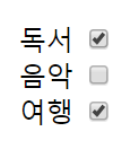
<!-- 체크박스1 -->
<label for="chk-book">독서</label>
<input type="checkbox" id="chk-book" name="hobby" value="book" checked="checked">
<label for="chk-music">음악</label>
<input type="checkbox" id="chk-music" name="hobby" value="music">
<label for="chk-trip">여행</label>
<input type="checkbox" id="chk-trip" name="hobby" value="trip" checked="checked">
<br><br>

<!-- 체크박스2 -->
<label for="chk-dog">개</label>
<input type="checkbox" id="chk-dog" name="pet"" value="dog“>
<label for="chk-cat">고양이</label>
<input type="checkbox" id="chk-cat" name="pet" value="cat">
<label for="chk-bird">새</label>
<input type="checkbox" id="chk-bird" name="pet" value="bird">
input radio
name끼리의 중복 체크를 허용하지 않습니다.
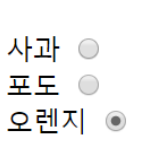
<!-- 라디오1 -->
<label for="rdo-apple">사과</label>
<input type="radio" id="rdo-apple" name="fruit" value="apple" checked="checked">
<label for="rdo-grape">포도</label>
<input type="radio" id="rdo-grape" name="fruit" value="grape">
<label for="rdo-orange">오렌지</label>
<input type="radio" id="rdo-orange" name="fruit" value="orange" checked="checked">
<!-- 라디오2 -->
<label for="rdo-m1">1월</label>
<input type="radio" id="rdo-m1" name="month" value="1" ><br>
<label for="rdo-m2">2월</label>
<input type="radio" id="rdo-m2" name="month" value="2" checked="checked"><br>
<label for="rdo-m3">3월</label>
<input type="radio" id="rdo-m3" name="month" value="3"><br>
select
<select>
	<option>옵션 1</option>
    <option>옵션 2</option>
    <option>옵션 3</option>
    <option>옵션 4</option>
</select>
의 형식으로 사용합니다.
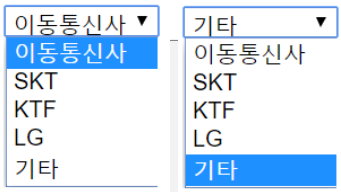
<select name="telecom">
	<option value="">이동통신사</option>
	<option value="sk">SKT</option>
	<option value="kt">KTF</option>
	<option value="lg">LG</option>
	<option value="et“ selected=“selected”>기타</option>
</select>
selected=“selected”: 기본값
textarea
<textarea></textarea>의 형식으로 사용합니다.
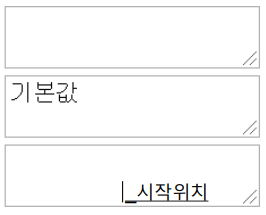
<textarea></textarea>
<textarea>기본값</textarea>
fieldset, legend
form 태그를 border로 묶을 때 사용합니다.
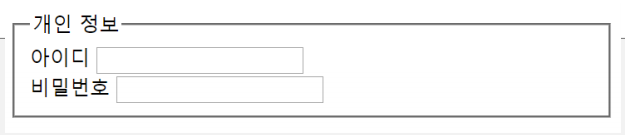
<fieldset>
	<legend>개인 정보</legend>
	<lable for=“u-id”>아이디</label>
	<input type=“text” id=“u-id” name=“userid”>
	<br>
	<lable for=“u-pw”>아이디</label>
	<input type=“password" id=“u-pw” name=“userpw”>
</fieldset>