Typescript ③

TS Function
- Call Signatures

함수 위에 마우스를 올렸을 때 보게되는 것,
ex) (param1: type, param2: type) => type
함수의 매개변수 타입과 함수 리턴타입을 알려준다.
- 함수의 call signature 타입 만드는 방법
( 1 ) 단축
type Add = ⭐ (a: number, b: number) => number ⭐

const add : Add = (a, b) => a + b
( 2 )
type Add = {
    (a: number, b: number) : number
}

const add : Add = (a, b) => a + b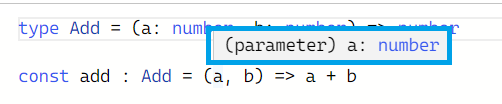
add 함수의 매개변수 타입을 따로 지정해주지 않아도
함수 자체에 Add 타입을 명시함으로 타입스크립트가 매개변수의 타입을 유추할 수 있게됨
React로 코드 작성 시,
props로 함수를 전달할 때는 타입스크립트한테 매개변수의 타입이 무엇인지, 함수의 return 값이 뭔지 설명이 필요하다 --> call signature 사용
: 프로그램을 디자인하면서 타입을 먼저 생각하고, 코드 구현
- 오버로딩 (Overloading)
function overloading, method overloading으로도 불리운다.
오버로딩은 패키지나 라이브러리를 디자인할 때 많은 사람들이 사용한다.
⭐ 함수가 서로 다른 여러개의 call signature을 가지고 있을 때, 발생된다.
즉, 오버로딩은 여러 call signatures가 있는 함수이다.
🔽 아주 바보같지만 오버로딩의 핵심을 보여주는 예시
type Add = {
    (a: number, b: number) : number
    (a: number, b: string) : number
}

const add : Add = (a, b) => {
    if(typeof b === 'string') return a
    return a + b
}
🔽 일상에서 발견할 수 있는 예시
( 1 ) in Next.JS
Router.push('/home')
// Router : Next.js의 객체
: string값으로 push하여 페이지 이동 가능
( 2 ) : 객체 형식 또한 가능
Router.push({
    path: '/home',
    state: 1
})
객체 안에 path를 지정하면 됨
(추가적으로 더 넣어서 같이 보낼 수도 있음)
( 3 ) : 자주 보이는 케이스
type Config = {
    path: string,
    state: object
}

type Push = {
    (path: string): void
    (config: Config): void
}

const push: Push = (config) => {       // 매개변수로 path 또는 config를 받는다
    if (typeof config === 'string') { console.log(config) }	     // 타입체크
    else {
        console.log(config.path, config.state)
    }
}
// 반환 타입이 void임으로 아무것도 리턴하지 않는다
➕ 다른 여러개의 argument를 가지고 있을 떄 발생하는 효과
🔽 call signature의 파라미터 개수가 서로 다른 경우
type Add = {
    (a: number, b: number): number
    (a: number, b: number, c: number): number
}

⛔ 에러발생
const add : Add = (a,b,c) => {]
    return a + b
}
// 에러 발생이유 : 시그니처가 서로 다른 개수의 파라미터를 가지기 때문
⭕ 에러 해결
const add: Add = (a, b, c?: number) => {
if (c) return a + b + c
return a + b
}
add(1, 2);
add(1, 2, 3);
// 다른 개수의 파라미터를 가지게 되면, 나머지 파라미터도 타입 지정이 필요하다 ~ !: 모든 call signature가 파라미터로 가지는 a, b와 달리 추가 파리미터인 c는 옵션이라는 것
: ⭐ 추가적으로 타입을 명시해줘야하고, ?로 해당 파라미터는 선택사항이라는 것을 알려줘야 한다
- 다형성 (Polymorphism)
-
Poly의 사전적 의미
그리스어로 many, several, much, multi를 뜻한다.polygon(다각형) : poly(많은, 다수) + gon(각도) -
morphos의 사전적 의미
form(형태), structure(구조)를 뜻한다. (형태나 구조 혹은 모양) -
polymorphism = many structure
= 여러가지 다른 구조(형태, 모양)들
ex)
기본적으로 함수는 여러가지 다른 형태를 가지고 있다.
다른 2~3개의 매개변수를 가질 수 있다.
타입스크립트에서 함수는 string이나 object를 첫번째 파라미터로 가질 수 있다.
다형성을 활용하는 더 좋은 방법
Q . 배열을 받고, 그 배열의 요소를 print해주는 함수를 만들어보자 (어떤 타입이든)
=> 여러타입의 배열의 함수 만들기
// 1. call signature 생성
type SuperPrint = {
    (arr: number[]): void
    (arr: boolean[]): void
    (arr: string[]): void
}

// 2. 함수 생성
const superPrint: SuperPrint = (arr) => {
    arr.forEach(item => console.log(item))
}

// 3. 함수실행
superPrint([1, 2, 3])
superPrint([true, false, false])
superPrint(['banana', 'orange', 'apple'])
⛔ 에러발생
superPrint([1, 2, true, false]);
// 위와 같은 arr에 대한 call signature가 없기때믄-
문제 해결
- 이전까지 해왔던 방식 ( concreate type 이용 )
ex) number, boolean, string, void, unknown...
- 이전까지 해왔던 방식 ( concreate type 이용 )
type SuperPrint = {
	(arr: number[]): void
    (arr: boolean[]): void
    (arr: string[]): void

    ➕ (arr: (number | boolean)[]): void
}
한계 : 모든 가능성을 다 조합해서 만들어줘야 한다.
- More than better ⭐ Generic 사용
- Generics
generic이란, 타입의 placeholder와 같음
+ placeholder : 아래의 드래그 영역과 같이 타입지정을 위한 것
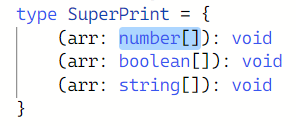
대부분 코드를 작성하고 함수를 구현하고 사용할 때는 concreate type을 사용
call signature을 작성할 때, concreate type을 알 수 없는 경우 generic을 사용한다.
Generic 사용해보기
- generic을 사용하기 위해서는 generic 사용을 명시해야한다.
type SuperPrint = {
   <Generic> (arr: Generic[]): Generic
    // 해당 argument가 제네릭을 사용함을 명시
    // <> 꺽쇠괄호를 열고 원하는대로 제네릭 이름 설정 가능 -> ⭐알파벳 T, V를 많이 사용
}
<Generic>(parameter: parameter type): return type
타입스크립트가 타입을 유추할 수 있도록 알려주는 것Generic은 기본적으로 placeholder를 사용해서 작성한 코드의 타입 기준으로 변경
const superPrint: SuperPrint = (arr) => arr[0]superPrint는 매개변수로 arr를 받고, 그 배열의 첫번째 요소를 리턴(Generic 타입요소 중 하나)
superPrint([1, 2, 3])  //number[]
superPrint([true, false, false])  //boolean[]
superPrint(['banana', 'orange', 'apple'])   //string[]
superPrint([1, 2, true, false]);   //number | boolean[]
✔ superPrint 함수는 많은 형태를 가지고 있다.
- 함수의 placeholder
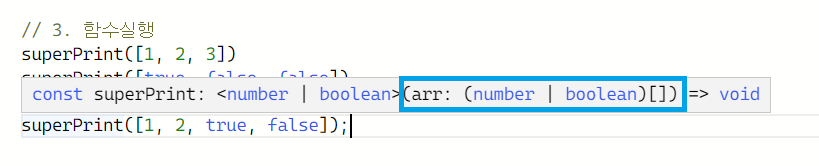
superPrint([**1, 2, true, false**]); number | boolean이 코드를 통하여 타입스크립트가 타입을 유추하여 placeholder에 대체해준다
만약 배열에 string을 추가한다면 ?
superprint([1, 2, true, 'hello'])

함수의 call signatrue을 입력할때 placeholder 사용 ====> 다형성(Polymorphism)
Generics Recap