
다음 내용은 인프런에서 공부한 내용을 복습하는 차원에서 기록한 것입니다.
출처 : https://www.inflearn.com/course/%EB%85%B8%EB%93%9C-js-%EA%B5%90%EA%B3%BC%EC%84%9C
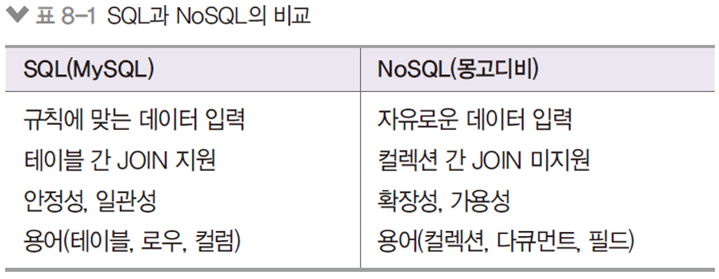
💻 8.1 NoSQL vs SQL
📌 NoSQL
✏️ MySQL같은 SQL 데이터베이스와 다른 유형의 데이터
- NoSQL의 대표주자로 mongoDB가 있음
- JOIN: 관계가 있는 테이블끼리 합치는 기능 (몽고디비 aggregate로 흉내 가능)
- 빅데이터, 메시징, 세션 관리 등(비정형 데이터)에는 몽고디비가 좋지 않음
💻 8.3 데이터베이스, 컬렉션 생성하기
📌 데이터베이스 생성하기
✏️ use 데이터베이스명 으로 생성하기
- ex) use nodejs
✏️ show dbs 로 데이터베이스 목록 확인
- ex) show dbs
✏️ db로 현재 사용중인 데이터베이스 확인
- ex) db
📌 컬렉션 생성하기
✏️ 따로 생성할 필요 없음
- 다큐먼트를 넣는 순간 컬렉션도 자동 생성됨
- show collections 로 현재 데이터베이스의 컬렉션 확인
💻 8.4 CRUD 작업하기
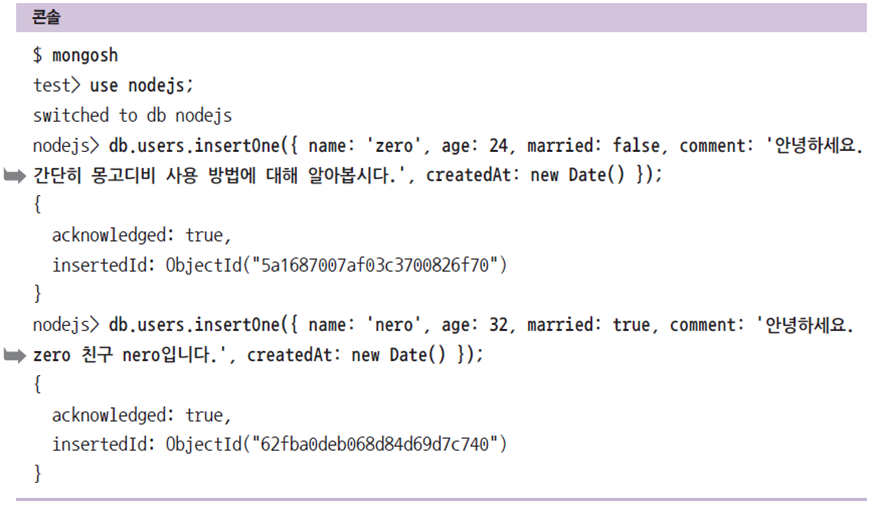
📌 Create
✏️ 몽고디비는 미리 컬럼을 정의하지 않아도 됨
- 자유로움이 장점이지만 무엇인 들어올지 미리 알지 못함
- ObjectId는 몽고디비에서 자동으로 생성해주는 고유값
- insertOne 메서드로 데이터 저장
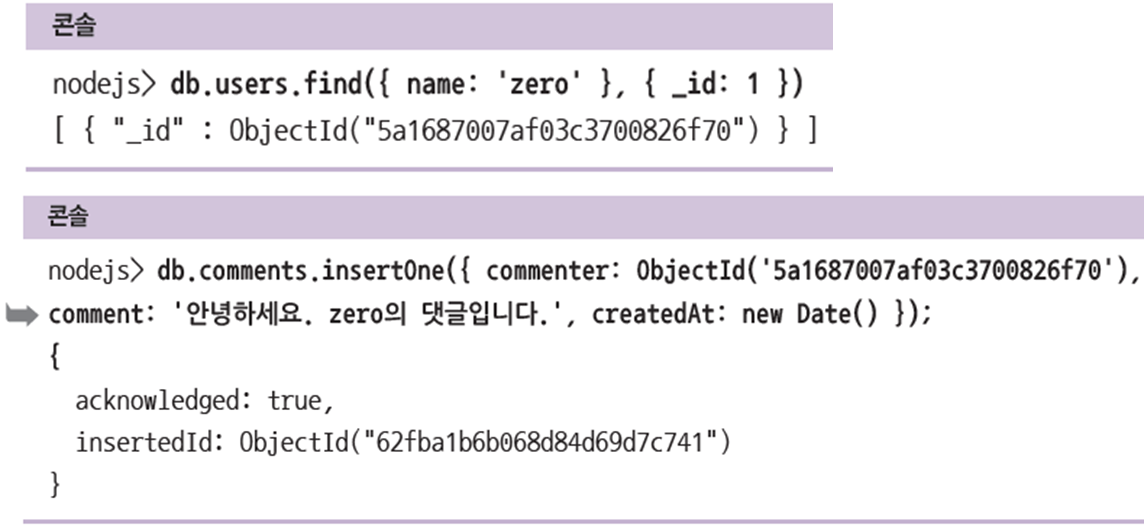
✏️ 컬렉션 간 관계를 강요하는 제한이 없으므로 직접 ObjectId를 넣어 연결
- 사용자의 ObjectId를 찾아서 댓글 컬렉션에 직접 넣을 수 있음
📌 Read
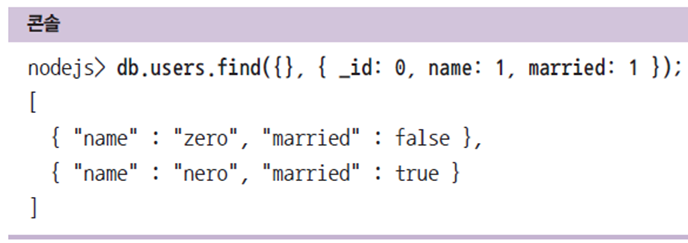
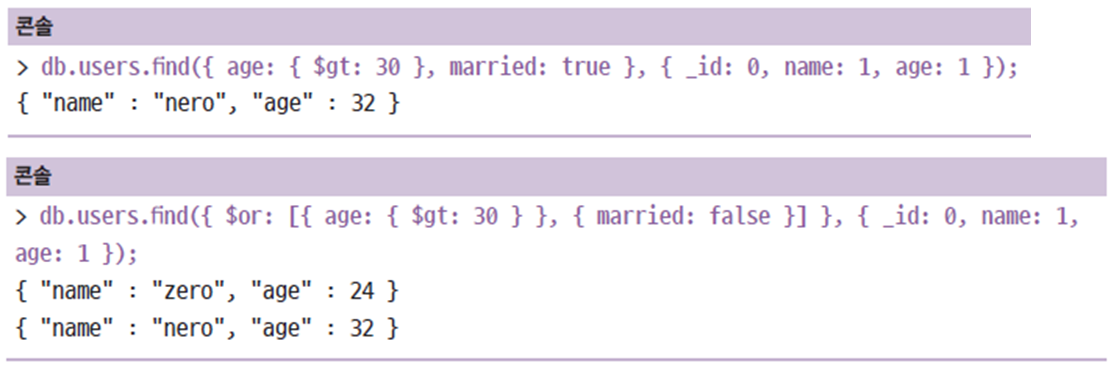
✏️ 두 번째 인수로 조회할 필드를 선택할 수 있음
- 1은 추가, 0은 제외
✏️ 첫 번째 인수로 조회 조건 입력 가능
- $gt 나 $or 같은 조건 연산자 사용
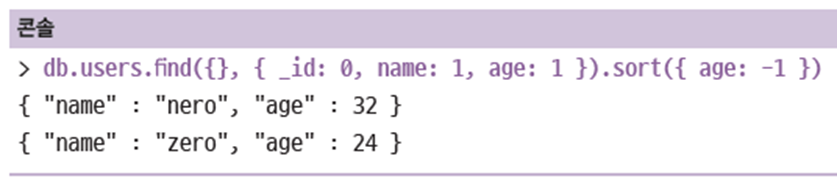
✏️ 정렬은 sort 메서드 사용
✏️ limit 메서드로 조회할 다큐먼트 개수 제한

✏️ skip 메서드로 건너뛸 다큐먼트 개수 제공

📌 Update
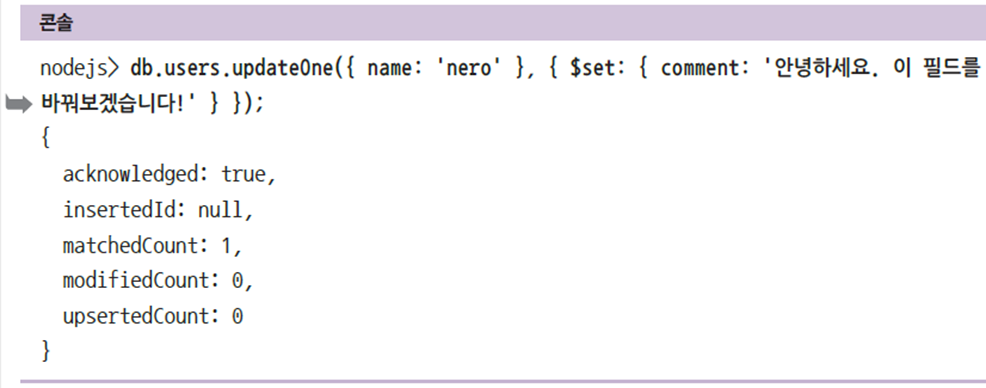
✏️ updateOne 메서드로 쿼리
- 첫 번째 인수에는 수정 대상의 조건
- 두 번째 인수에는 수정 내용
- $set을 붙이지 않으면 다큐먼트 전체가 수정됨
- 밑 예제를 예로 들면 $set을 붙이지 않으면 'nero'라는 유저의 모든 댓글이 '안녕하세요. 이 필드를 바꿔보겠습니다!'로 수정됨
- 결과값으로 수정 대상의 개수와 수정된 개수 등이 나옴
📌 Delete
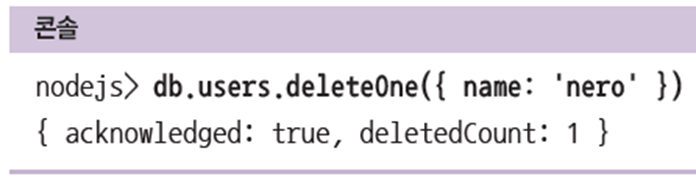
✏️ deleteOne 메서드로 쿼리
- 첫 번째 인수에는 삭제할 대상의 조건
- 성공 시 삭제된 개수를 반환
💻 8.5 몽구스 사용하기
📌 몽구스 ODM
✏️ 몽고디비 작업을 쉽게 할 수 있도록 도와주는 라이브러리
- ODM(Object Document Mapping): 객체와 다큐먼트를 매핑(1대1)
- 몽고디비에 없어 불편한 기능들을 몽구스가 보완
- 특히 테이블과 유사한 기능, JOIN 기능 추가
- npm install mongoose 로 설치
📌 몽고디비 연결하기
✏️ 몽구스를 통해 몽고디비 연결하기
- 인증은 admin 데이터베이스에서 함 ('mongod --ipv6 --auth'와 같은 과정)
- 서비스는 dbName 데이터베이스에서 함 (mongoose.connect를 통해)
# schemas/index.js
const mongoose = require('mongoose');

const connect = () => {
  if (process.env.NODE_ENV !== 'production') {
    mongoose.set('debug', true);
  }
  mongoose.connect('mongodb://root:nodejs@localhost:27017/admin', {
    dbName: 'nodejs',
    useNewUrlParser: true,
  }).then(() => {
    console.log("몽고디비 연결 성공");
  }).catch((err) => {
    console.error("몽고디비 연결 에러", err);
  });
};

mongoose.connection.on('error', (error) => {
  console.error('몽고디비 연결 에러', error);
});
mongoose.connection.on('disconnected', () => {
  console.error('몽고디비 연결이 끊겼습니다. 연결을 재시도합니다.');
  connect();
});

module.exports = connect;
📌 app.js와 연결하기
✏️ app.js로 연결
- schemas/index.js의 함수가 실행됨
- index.js에서 moudule.exports를 통해 connect를 보냄
- app.js는 connect()를 통해서 index.js의 connect를 실행
# app.js
const express = require('express');
const path = require('path');
const morgan = require('morgan');
const nunjucks = require('nunjucks');

const connect = require('./schemas');
const indexRouter = require('./routes/index');
const usersRouter = require('./routes/users');
const commentsRouter = require('./routes/comments');

const app = express();
app.set('port', process.env.PORT || 3002);
app.set('view engine', 'html');
nunjucks.configure('views', {
  express: app,
  watch: true,
});
connect();

app.use(morgan('dev'));
app.use(express.static(path.join(__dirname, 'public')));
app.use(express.json());
app.use(express.urlencoded({ extended: false }));

app.use('/', indexRouter);
app.use('/users', usersRouter);
app.use('/comments', commentsRouter);

app.use((req, res, next) => {
  const error =  new Error(`${req.method} ${req.url} 라우터가 없습니다.`);
  error.status = 404;
  next(error);
});

app.use((err, req, res, next) => {
  res.locals.message = err.message;
  res.locals.error = process.env.NODE_ENV !== 'production' ? err : {};
  res.status(err.status || 500);
  res.render('error');
});

app.listen(app.get('port'), () => {
  console.log(app.get('port'), '번 포트에서 대기 중');
});
📌 스키마 정의하기
✏️ schemas 폴더 안에 작성
- 스키마는 해당 컬렉션(테이블)의 필드 타입을 정의함
- MySQL의 테이블처럼 정해진 타입의 데이터만 들어갈 수 있도록 함
- type : 자료형
- require : 필수 여부
- default : 기본값
- unique는 고유값인지 여부
# schemas/users.js
const mongoose = require('mongoose');

const { Schema } = mongoose;
const userSchema = new Schema({
  name: {
    type: String,
    required: true,
    unique: true,
  },
  age: {
    type: Number,
    required: true,
  },
  married: {
    type: Boolean,
    required: true,
  },
  comment: String,
  createdAt: {
    type: Date,
    default: Date.now,
  },
});

module.exports = mongoose.model('User', userSchema);
📌 사용자 라우터
✏️ router.get, post, put, patch, delete
- populate()는 객체ID가 들어가야할 부분을 실제 객체로 바꿔주는 함수
- 이를 통해 사용자 라우터에서 댓글 객체 정보에 접근 가능
# routes/users.js
const express = require('express');
const User = require('../schemas/user');
const Comment = require('../schemas/comment');

const router = express.Router();

router.route('/')
  .get(async (req, res, next) => {
    try {
      const users = await User.find({});
      res.json(users);
    } catch (err) {
      console.error(err);
      next(err);
    }
  })
  .post(async (req, res, next) => {
    try {
      const user = await User.create({
        name: req.body.name,
        age: req.body.age,
        married: req.body.married,
      });
      console.log(user);
      res.status(201).json(user);
    } catch (err) {
      console.error(err);
      next(err);
    }
  });

router.get('/:id/comments', async (req, res, next) => {
  try {
    const comments = await Comment.find({ commenter: req.params.id })
      .populate('commenter');
    console.log(comments);
    res.json(comments);
  } catch (err) {
    console.error(err);
    next(err);
  }
});

module.exports = router;
📌 댓글 라우터
✏️ router.get, post, put, patch, delete
- update()는 매개변수로 조건, 어떻게 수정할지 순으로 들어가야 함 (시퀄라이즈랑 반대)
const express = require('express');
const Comment = require('../schemas/comment');

const router = express.Router();

router.post('/', async (req, res, next) => {
  try {
    const comment = await Comment.create({
      commenter: req.body.id,
      comment: req.body.comment,
    });
    console.log(comment);
    const result = await Comment.populate(comment, { path: 'commenter' });
    res.status(201).json(result);
  } catch (err) {
    console.error(err);
    next(err);
  }
});

router.route('/:id')
  .patch(async (req, res, next) => {
    try {
      const result = await Comment.updateOne({
        _id: req.params.id,
      }, {
        comment: req.body.comment,
      });
      res.json(result);
    } catch (err) {
      console.error(err);
      next(err);
    }
  })
  .delete(async (req, res, next) => {
    try {
      const result = await Comment.deleteOne({ _id: req.params.id });
      res.json(result);
    } catch (err) {
      console.error(err);
      next(err);
    }
  });

module.exports = router;
조금씩 정리하자!!!