
11653번 소인수 분해
#include <bits/stdc++.h>
using namespace std;

int main() {
	ios::sync_with_stdio(0);
	cin.tie(0);

	int N;
	cin >> N;

	int i = 2;
	while(N>1) {
		if (N % i == 0) {
			N /= i;
			cout << i << '\n';
		}
		else {
			i++;
		}
	}
}
처음에는 소수인지 판명을 해줘야할 것 같아 소수 판명함수를 넣어놨는데, 생각해보니까 if (N % i == 0)과정에서 i로 나눠지는 경우는 이미 다 사라지기 때문에 따로 소수를 판명하지 않아도 됬다.
때문에 브루트 포스로 소인수 분해만 시켰다.
11720번 숫자의 합
using namespace std;
int main() {
	ios::sync_with_stdio(0);
	cin.tie(0);

	int N;
	cin >> N;
	string numbers;
	cin >> numbers;
	int sum = 0;

	for (int i = 0; i < N; i++) {
		int num = (int)numbers[i];
		sum += (num-48);
	}

	cout << sum;
}
문자열의 해당 문자를 int형으로 형변환 후, 해당 아스키 코드에서 48을 빼서 원래 숫자가 나오게 하였다. 이후 이 숫자들을 모두 더해서 답을 출력했다.
Spring - 1강
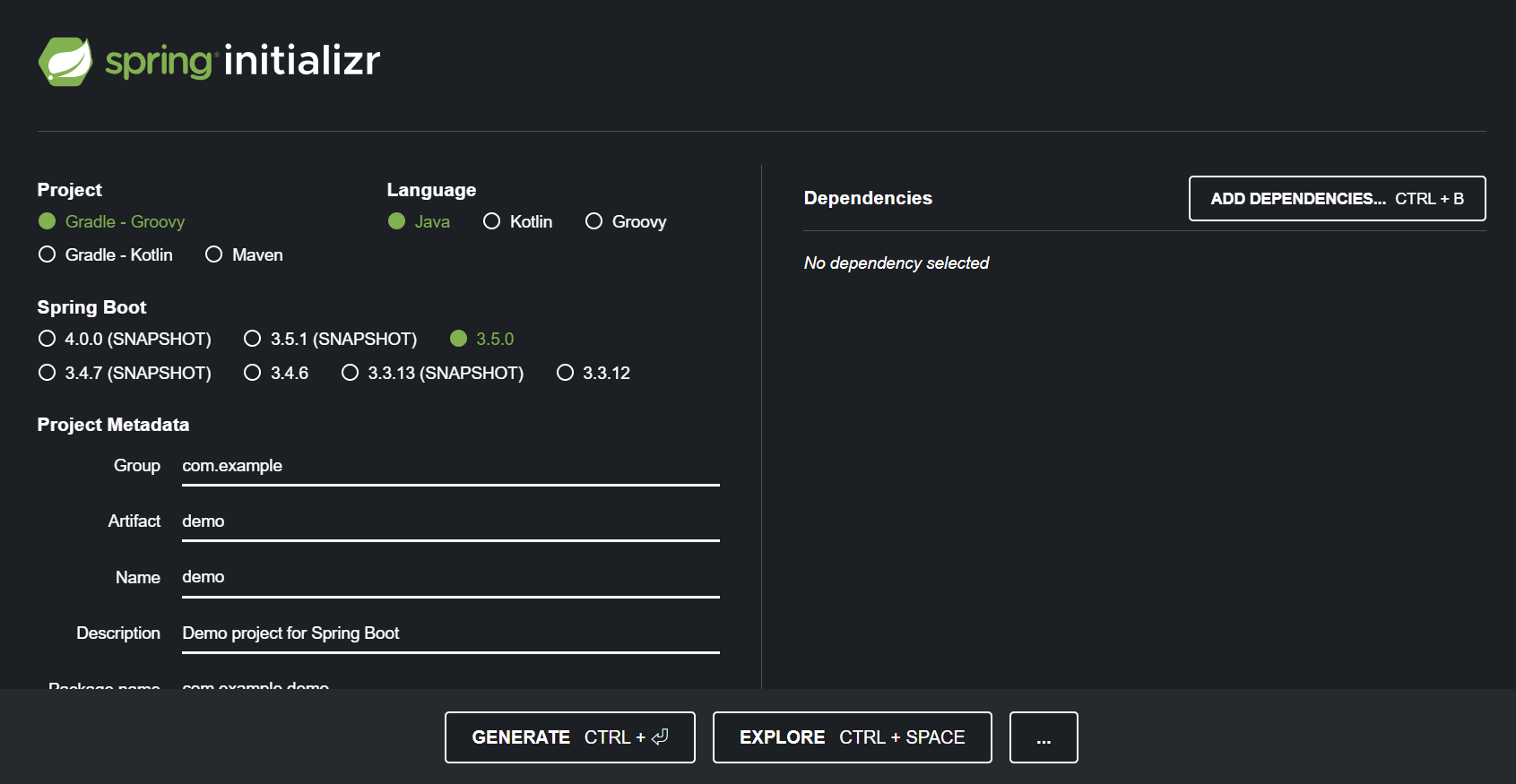
Gradle 프로젝트로
Group : 기업
Artifact : 프로젝트 이름
요즘 개발 트렌드는 기본적으로 main과 test로 나눈다.
build.gradle
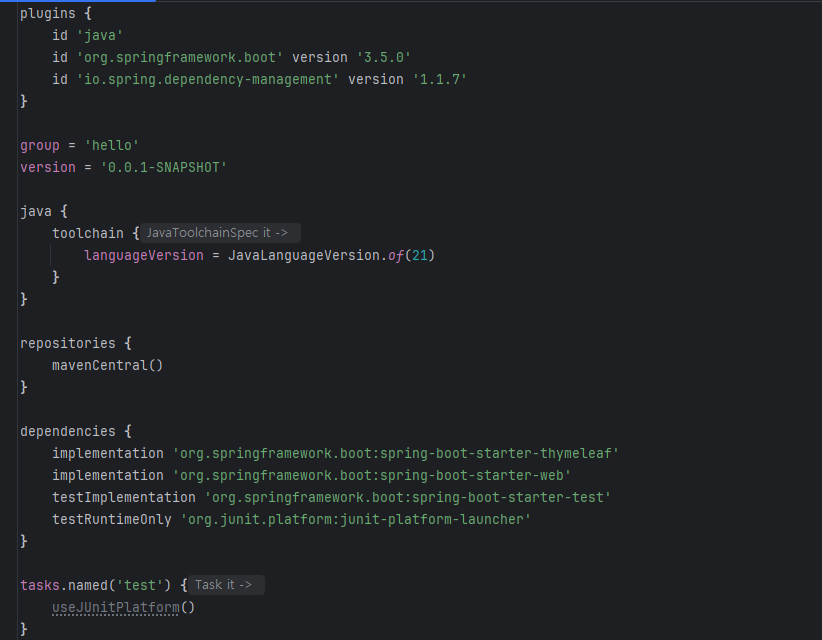
우리는 JDK 21을 쓸것이기 때문에 toolchain을 21로 변경해준다.
HelloSpringApplication
@SpringBootApplication
public class HelloSpringApplication {

	public static void main(String[] args) {
		SpringApplication.run(HelloSpringApplication.class, args);
	}

}
메인 메소드를 실행하면 tomcat에 내장된 웹서버를 실행해서 spring boot를 한다.
라이브러리 살펴보기
Gradle의 라이브러리는 서로의 의존관계를 살펴보면서 필요한 라이브러리를 모두 가져온다.
spring-boot-starter-tomcat에 소스를 업로드해서 웹서버를 실행한다.
핵심 라이브러리
spring-boot-starter-web
ㄴ spring-boot-starter-tomcat 톰캣
ㄴ spring-webmvc 스프링 웹 MVC
spring-boot-starter-thymeleaf 타임리프 템플릿 엔진
spring-boot-starter : 스프링 부트 + 스프링 코어 + 로깅
view 환경설정
static/index.html을 올려두면 자동으로 welcome page를 제공한다.
thymeleaf 템플릿 엔진
타임리프는 서버사이드 템플릿 엔진으로, html에 데이터를 바인딩해서 동적으로 html을 생성한다.
여러 페이지에서 쓰는 헤더나 푸터 같은 기능을 th:fragment로 정의해서 여러 페이지에서 재사용이 가능하다.
- FreeMarker
- Thymeleaf
- Mustache
이렇게 3개의 템플릿 엔진 중 하나를 선택해서 쓸 수 있다.
이 템플릿 엔진을 이용하면
package hello.hello_spring.controller;

import org.springframework.stereotype.Controller;
import org.springframework.web.bind.annotation.GetMapping;
import org.springframework.ui.Model;
@Controller
public class HelloController {
    @GetMapping("hello")
    public String hello(Model model){
        model.addAttribute("data","hello!");
        return "hello";
    }
}
위와 같이 /hello 페이지에 data 변수명이라고 되어있는 hello! 텍스트를 가진 model을
<!DOCTYPE html>
<html lang="en" xmlns:th="http://www.thymeleaf.org">
  <head>
    <meta charset="UTF-8" />
    <title>Title</title>
  </head>
  <body>
  <p th:text="'안녕하세요. ' + ${data}">안녕하세요. 손님</p>
  </body>
</html>
hello.html의 data 변수 안에 삽입해준다.
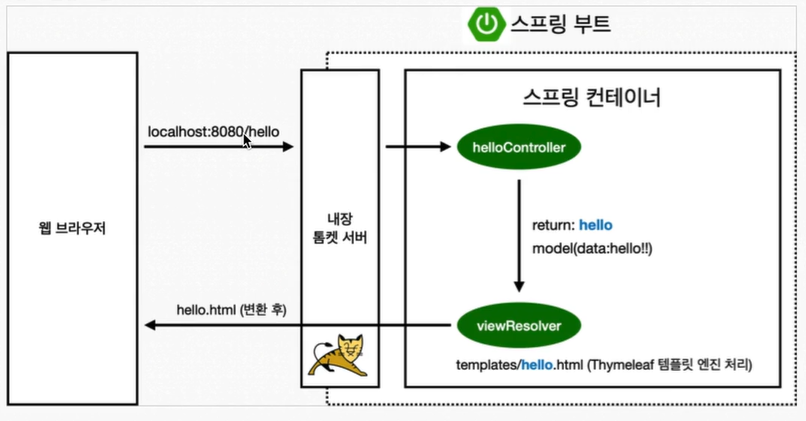
viewResolver가 return : hello로 hello.html을 찾고
거기에 model을 넘긴다.
resources:templates/+viewname+.html
여기서data를 찾아 거기에 값hello를 삽입해준다.