네트워크 기초
브라우저에 URL을 입력하면 어떤 일이 발생할까?
1. URL을 해석한다
URL : scheme://<user>:<password>@<host>:<port>/<url-path>2. DNS(Domain Name System)를 조회
- 도메인과 IP주소를 서로 변환해준다.
- DNS로 요청을 보내기 전에
브라우저 캐시와hosts 파일 참조- 있다면 내부적으로 IP 반환
3. 해당 IP가 존재하는 서버로 이동
- 네트워크 장비 라우터를 통해 이동한다.
동적 라우팅통해 해당 서버가 존재하는 대역으로 이동
4. ARP를 이용하여 MAC 주소로 변환
- Address Resolution Protocol
- 논리 주소인 IP 주소를 물리 주소인 MAC 주소로 변환하는 프로토콜
- 네트워크 내에 ARP를 브로드캐스팅하면 해당 IP 주소를 가지고 있는 기기가 자신의 MAC 주소를 반환
- IP는 논리적인 주소, MAC은 물리적인 주소
- 기계의 실제 위치를 알기 위해선 물리적인 주소가 필요하다.
- Ex) 도로명 주소나 지번 주소는 바뀔 수 있고 그것만 가지고 정확한 위치를 확인하기 어렵다.(논리적)
- Ex) GPS 좌표를 안다면 언제든 알 수 있다.(물리적)
- IP는 대역을 통해 범위를 좁혀나가는 용도로 사용된다.
- 서울특별시 -> 종로구 -> 세종로
5. TCP 통신을 위해 서버의 Socket을 연다
- TCP 연결을 허락받기 위해
3 way handshake로 연결 요청 - 네트워크를 통해 해당 기기로 패킷(데이터)을 전달하고 요청이 수락되면 기기는 패킷(데이터)을 받아 처리한다.
6. 서버는 응답을 반환
- 데이터를 받은 서버는 데이터를 읽고 요청에 따라 처리한다.
- HTTP 프로토콜로 들어온 패킷을 읽고 처리한다.(HTML)
7. 브라우저는 렌더링
- HTML을 읽어 DOM Tree를 구축한다.
- 만들어진 DOM Tree를 이용해 화면에 렌더링 한다.
- 스크립트가 있다면 실행
암호화
인터넷 상에서 암호화는 매우 중요하다. 악의를 가진 해커에게 내 개인정보를 다 털릴 수 있다.🤐
- 평문을 해독할 수 없는 암호문으로 변환하는 것
평문: 일반인이 누구나 읽을 수 있는 문서암호문: 원래의 평문을 암호 키 및 암호 알고리즘을 사용하여 암호처리된 문서
- 평문을 암호문으로 만드는 과정이
암호화이다. - 단방향/양방향 암호화가 존재한다.
단방향 암호화
- 한 방향으로만 진행된다.
- 해시 알고리즘을 이용하여 암호화 진행(
복호화 할 수 없는 형태로)- 저장하는 쪽에서도 해당 데이터를 알 수 없게 하기 위해서
- 대표적으로
MD5와SHA알고리즘이 있고 사용자 비밀번호 등을 저장할 때 자주 사용된다.
단방향 암호화에서 고려할 점
-
해킹 공격 중
Rainbow Table을 대비해야 한다. 이를 통해 원문을 알아낼 수 있다.- 수학적으로 아예 역함수가 존재하지 않는 함수 가지고 씨름할 바에 차라리 가능한 모든 경우의 수를 다 써놓고 거기서 찾아내자!
- 데이터베이스와 같은 자료에서 뽑아낸 해시값을 레인보우 테이블과 대조하여 평문을 찾아내는 것이라 한다.
-
사고로 암호화된 데이터를 탈취당하더라도 원문을 알아낼 수 없도록 조치해야한다.
- Salt, Key stretching을 이용하여 해결 가능
Salt
😎Tip 재료에 소금을 찍어 같이 먹는 것을 생각하자, 치킨 소스
- 평문에 임의의 문자열을 추가하여 암호화하는 방법
- 128bit 이상으로 만들 것을 권장하고 사용자마다 다른 Salt를 사용하게 하면 더 안전하다.
Key stretching
- 해시 알고리즘을 여러번 반복하여 원문을 알기 힘들게 만든다.
- 일반적인 시스템에서는 0.2초 이상 반복되면 안전
양방향 암호화
- 평문을
복호화 할 수 있는 형태로 암호화 - 대칭키(AES)와 비대칭키(RSA) 알고리즘으로 나뉜다.
대칭키 암호 알고리즘(AES)
같은 키를 이용하여 암호화, 복호화가 가능하다.
비대칭키 암호 알고리즘(RSA)
- 암호화, 복호화를 위한 키가 다르다.
- 대칭키만으론 다수를 대상으로 암호문을 받기 힘들기 때문에 탄생했다.
- 공개키(모든 사람이 알아도 ok-
암호화), 개인키(나만 알고 있는-복호화) - 소인수 분해를 기반으로 만들어진 알고리즘이다.
JavaScript에서 이것을 이용하는 방법?
- crypto-js를 사용해보자.
https://github.com/brix/crypto-js
함수형 프로그래밍
프로그램은
순차, 분기, 반복, 참조로 구성된다!
함수형 패러다임
- 객체지향 추상화의 최소 단위
객체, 함수형은함수 - 객체보다 더 작은 단위로 추상화가 되기 때문에 재사용성이 높다
- 불변성을 지향 - 동작 예측이 쉽고 사이드 이펙트(버그) 방지
- 사이드 이펙트 방지란 동시성 문제가 해결된다는 것을 의미한다.
- 객체지향은 객체를 통한 제어 흐름의 간접적인 전환 통제, 함수형은 변수 할당을 통제
함수형 프로그래밍 장점
- 상태가 없기 때문에 사이드 이펙트가 없다.
- 상태가 없어 변수 조작이 안되기 때문에 단점이 될 수 있다. 쓸데없이 메모리와 성능을 잡아먹음.
- Ex)데이터를 복사하여 새로운 데이터를 만들어 교체(게임-hp)
- 함수 단위이기 때문에 재사용성이 높다.
- 함수라는 작은 단위로 쪼개야 하기 때문에 더 복잡해 질 수도 있다.
- 코드가 다른 것들에 비해 짧고 간결하다.
- 많은 숙련도 요구..
선언형 프로그래밍
- 명령형 프로그래밍은
문제를 어떻게 해결해야 하는지컴퓨터에게 명령을 내림 - 선언형 프로그래밍은
무엇을 해결해야 할지에 집중, 방법은 컴퓨터에게 위임
Control Flow(명령형)
- Goto/if/Then/Else/Switch/Case/For/While
Data Flow
- 데이터의 제어 없이 필요한 함수만 조합하여 해결 가능
- Stateless, Recursion(재귀), Pipe
그럼 JS는?
Javascript는 멀리 패러다임!!! 굳이 나누지말고 둘 다 쓰자.
객체지향과 프로토타입
객체지향에서의 객체란?
객체지향의 객체는 현실에 있는 것을
추상화한 것
😱 현실에 존재하는 것을 코드로 옮기는 것은 X
추상이란?
- 사물이 지니고 있는 여러 측면 중
특정한 부분만 보는 것
객체지향이란?
- 객체 위주로 설계하고 프로그래밍하는 패러다임
- 객체지향 언어에서 추상화의 최소 단위는
객체이며 각각의 객체는 메세지를 주고 받을 수 있다.
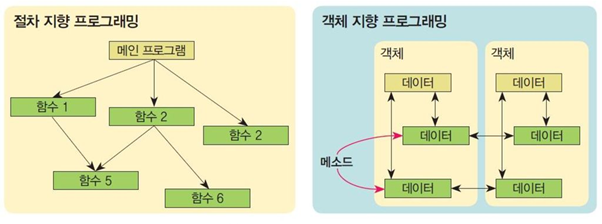
- 절차지향에서는 각 함수가 공유 데이터를 절차적으로 직접 통제했다면 객체지향에서는 객체가 데이터를 관리하고 메세지를 통해 절차를 간접적으로 통제한다.
객체 생성 방법
//객체 리터럴
const person = {
  name : "정태호",
  age : 25,
  move : function (destination){
    console.log(`${destination}으로 이동합니다`);
  },
}

//Object 생성자 함수
const person = new Object();
person.name = "정태호";
person.age = 25;
person.move = function (destination){
    console.log(`${destination}으로 이동합니다`);
};

//생성자 함수
function Person(name,age,move){
  this.name = name;
  this.age = age;
  this.move = function (destination){
    console.log(`${destination}으로 이동합니다`);
  };
}
프로토타입
- 기존의 객체를 복사하여 새로운 객체를 생성하는 방식이다.
- 기존 객체를 효율적으로 사용할 수 있는 방법
생성자 함수와 프로토타입 비교
//생성자
function Person(name, age) {
  this.name = name;
  this.age = age;

  this.getname = function() {
    return this.name;
  };

  this.setName = function(name) {
    this.name = name;
  };
}

const a = new Person('정태호', 25);
const b = new Person('홍길동', 31);

console.log(a);
console.log(b);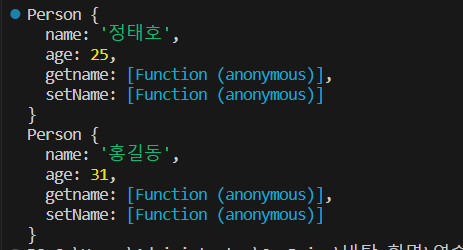
//프로토타입
function Person(name, age) {
  this.name = name;
  this.age = age;

  Person.prototype.getName = () => {
    return this.name;
  };

  Person.prototype.setName = (name) => {
    this.name = name;
  };
}

const a = new Person('정태호', 25);
const b = new Person('홍길동', 31);

console.log(a);
console.log(b);
console.log(a.name, a.age);
console.log(b.name, b.age);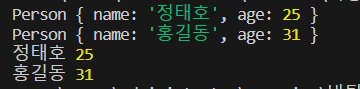
- 프로토타입을 사용한 결과 같은 기능을 가진 함수가 객체에 중복되어 저장되지 않는 것을 볼 수 있다.
상속 흉내내기-1
- 부모 객체를 이용하여 프로토타입 함수 정의하기
- 내부적으로 생성된 프로토타입 변수는 사용x
function Person(name) {
  this.name = name;
}

Person.prototype.getName = function () {
  return this.name || '정태호';
};

function Korean(name) {}

Korean.prototype = new Person();

const a = new Person('홍길동');
const b = new Korean('가나다라마바사');

console.log(a.getName()); //홍길동
console.log(b.getName()); //정태호
상속 흉내내기-2
- 부모 생성자 빌려쓰기(apply)
function Person(name) {
  this.name = name;
}

Person.prototype.getName = function () {
  return this.name || '정태호';
};

//부모 생성자 빌려쓰기
function Korean(name) {
  Person.apply(this, arguments);
}

Korean.prototype = new Person();
Korean.prototype.setName = function (name) {
  this.name = name;
};

const a = new Person('홍길동');
const b = new Korean('가나다라마바사');

console.log(a.getName()); // 홍길동
console.log(b.getName()); // 가나다라마바사

b.setName('태호정');

console.log(b.getName()); // 태호정
Object.create
- 기존 객체를 재활용 할 수 있다.
const a = {
  name: '정태호',
  getName: function () {
    return this.name;
  },
};

const b = Object.create(a);
b.name = '홍길동';

console.log(a.getName());
console.log(b.getName());
console.log(a.__proto__);
console.log(b.__proto__);
이벤트 루프
참고하기 좋은 글
https://url.kr/uj2zvo
https://baeharam.netlify.app/posts/javascript/event-loop
모듈
- 일반적으로 웹 사이트는 여러 개의 자바스크립트로 이루어졌다. 자바스크립트는 파일들을 각각 별개의 프로그램으로 취급한다.
모듈을 사용하면 스크립트 간 의존도를 파악할 수 있고 실행순서를 쉽게 제어할 수 있다.- 모듈은
설계 시점에 의미있는 요소이며 컴포넌트는런타임시점에 의미있는 요소이다.- 모듈은 우리가 의식적으로 나눠놓은 요소, 컴포넌트는 나눠놓은 요소에 포함되어 실행되는 요소이다.
모듈의 특징
- 항상
use strict(엄격모드)로 실행된다. - 모듈 레벨 스코프가 있다
- 모듈은 최상위에 변수를 선언하더라도 자체적인 모듈 레벨 스코프에 올라간다.(import 하지 않는 한 서로 참조 불가능)
- 한 번만 평가된다.
- 지연 실행된다.
- 모든 DOM이 생성된 후에만 실행된다.
요즘은?
Webpack 등을 이용하여 번들링한 스크립트를 불러오면 모듈을 사용할 일이 별로 없어졌다.
👻번들링이란? "어떤 것들을 묶는다" 기능별로 모듈화 했던 자바스크립트 파일들을 묶어준다는 뜻이다.
유니코드
- 웹 브라우저는 한글, 영어 등 다양한 문자를 표시하는 데 이게 어떻게 가능할까?
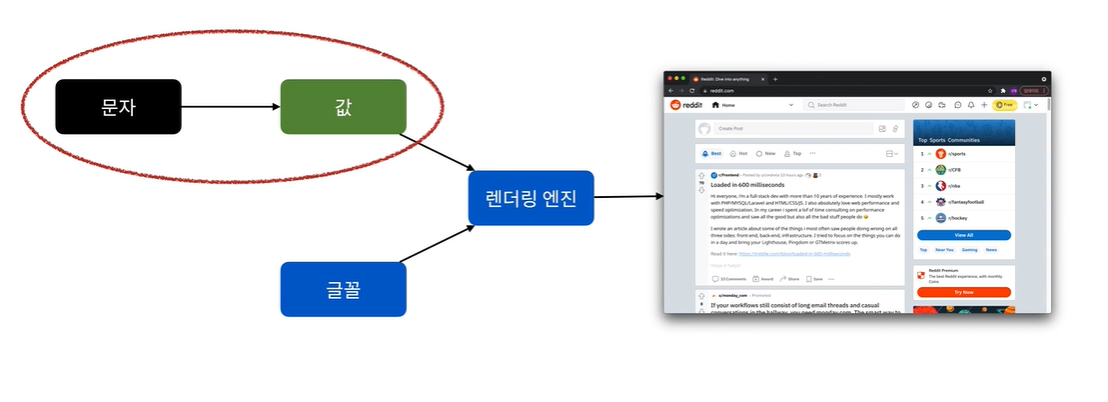
기본 개념 - CCS(Coded Character Set)
- 문자들을 Code Point(정의한 정수값)에 대응시켜 만든 코드화된 문자들의 집합. Code Point는 Character의 식별자가 된다.
기본 개념 - CES(Character Encoding Scheme)
- CCS를 8bit 집합에 대응시키는 것
- 왜 8bit? 문자를 표현하는 기본 단위이기 때문 - CCS와 CES는 1:1로 대응,
인코딩의 개념
- 인코딩 : 문자를 시스템이 인식할 수 있는 값으로 변환- 디코딩 : 인코딩된 값을 다시 문자로 변환
- 호환성에 주의하자! UTF-8, UTF-16, euc-kr 등
기본 개념 - TES(Transfer Encoding Syntax)
- 인코딩한 문자가 특정 프로토콜을 타고 전송되도록 변환
- 통신 프로토콜에 제약이 있을 수 있기 때문
- Ex) URL에서 공백은 사용X 변환해야함
유니코드
- 다양한 나라가 서로 다른 인코딩 방식을 사용해 호환성 및 확장성에 문제가 발생
- 3가지 개념을 조합해 전 세계 문자를 컴퓨터에서 다룰 수 있도록 만든 표준 시스템
유니코드문자 + 이모티콘(😀)
const item = "😀";
console.log(item.charCodeAt(0).toString(16)); // Code Point -> d83d
console.log(item.charCodeAt(1).toString(16)); // Code Point -> de00

// \u를 통해 유니코드 문자를 표현할 수 있음.
const unicodeitem = "\ud83d\ude00";
console.log(unicodeitem);

console.log(item === unicodeitem); // true

console.log(item.length); // 이모티콘은 2칸을 차지한다.

// 유니코드에서 영어든 한글이든 2바이트 차지
// 한글은 한 글자당 길이 1)
[쿠키와 웹 스토리지](https://velog.io/@nabi5986/TIL-Day22)
console.log("정태호".length);
TIL 느낀점
이제 겨우 2번째 강의 내용일 뿐인데 모르는 부분이 많아서 몇번이나 다시보기를 했던 것 같다. 그러다보니 정리하는 내용도 딱딱하게 강의 내용을 복붙한 것 같이 느껴진다. 여유를 가지고 내가 이해한 내용을 토대로 글쓰는 능력을 키워가야겠다.😱😰
주니어 프론트엔드 개발자가 되고 싶습니다!