1. HTML 공부하기
[1] 다음 markup은 유효할까?
<p> // Content model : phrasing
	<a>
		// Category : flow, phrasing, interactive, palpable
		// Content model : transparent == phrasing
		<div>Is it valid?</div>
		// Category : flow, palpable
		// Div element is not phrasing content
		// Only phrasing content is allowed here
	</a>
</p>-
p 요소 안에 a 요소가 오는 것은 유효하다.
- a 요소는 phrasing category에도 속해있기 때문에 a 요소가 p의 자식 요소로 오는 것은 허용된다.
-
a 요소 안에 div 요소가 오는 것은 유효할까?
- transparent 라는 content model 을 갖고 있으면, 자식 요소로 무엇이 와도 상관없다.
- 그러나 a 요소가 transparent 하기 때문에 부모의 요소를 따른다. 그래서 부모 요소인 p의 content model인 phrasing을 따라야한다. 따라서 a 요소는 phrasing content만 자식 요소로 담을 수 있기 때문에 a 요소 안에 div 요소가 오는 것은 a 요소의 부모인 p 요소로 인해 허용되지 않는다.
⭐️ Transparent Content Model을 가지고 있는 요소들은 자식 요소로 무엇이든 담을 수 있지만 부모 요소가 있을때는 맥락을 따져봐야 한다.
2. Content Model
HTML5 에서는 inline 요소, block 요소로만 구분되던 요소(element) 들이 Content Model이 생기면서 각각의 역할과 마크업 구조가 명확해졌다.
[1] 주요 HTML Content
(1) Flow Content
body에 포함할 수 있는 모든 요소
- base, style, title 요소를 제외한 나머지 모든 요소이다.
- a, abbr, address, article, aside, audio, b, bdo, bdi, blockquote, br, button, canvas, cite, code, data, datalist, datalis, del, dfn, dialog, div, dl, em, embed, fieldset, figure, footer, form, h1, h2, h3, h4, h5, h6, header, hgroup, hr, i, iframe, img, input, ins, kbd, label, map, mark, math, menu, meter, nav, noscript, object, ol, output, p, picture, pre, progress, q, ruby, s, samp, script, section, select, slot, small, span, strong, sub, sup, svg, table, template, textarea, time, u, ul, var, video, wbr, autonomous custom element, text
(2) Metadata Content
콘텐츠와 문서를 구조화하는 요소
- base, link, meta, noscript, style, template, title
- 실제로 화면에 출력되는 요소들은 아니다. 웹 브라우저에서는 display: none; 방식으로 화면에 표시한다.
(3) Heading Content
섹셔닝 콘텐츠의 헤더 요소
- 섹셔닝 콘텐츠가 없어도 Heading Content가 있으면 암시적으로 섹션(문서의 개요)이 형성된다.
- h1, h2, h3, h4, h5, h6, hgroup
(4) Sectioning Content
문서의 개요를 형성하는 요소
- 헤딩, 헤더, 풋터의 범위
- article, aside, nav, section : 외우자 해당 요소는 빈번하게 사용된다.
- 각 Sectioning Content는 암시적으로 문서의 개요를 형성한다.
- Sectionint Content와 Heading Content를 함께 사용하면 명시적인 개요를 형성한다.
(5) Phrasing Content
단락을 형성하는 Content
- abbr, audio, b, bdi, bdo, br, button, canvas, cite, code, data, datalist, dfn, em, embed, i, iframe, img, input, kbd, label, mark, math, meter, noscript, object, output, picture, progress, q, ruby, s, samp, script, select, slot, small, span, strong, sub, sup, svg, template, textarea, time, u, var, video, wbr, autonomous custom elements, text
(6) Embedded Content
외부 자원을 참조하는 Content
- 모든 Embedded Content는 Phrasing Content 이다.
- 외부 자원을 지원하지 않는 경우 대체 자원을 명시할 수 있다.
- audio, canvas, embed, iframe, img, math, object, picture, svg, video
(7) Interactive Content
사용자와 상호작용을 할 수 있는 Content
- 입력 장치(키보드, 마우스)로 조작할 수 있다.
- a, autio, button, details, embed, ifram, img, input, label, select, textarea, video
[2] 기타 HTML Content
(1) Palpable Content
비어있지 않은, 볼 수 있는 Content
- hidden 속성이 없다.
(2) Script-supporting element
- 렌더링 하지 않지만 사용자에게 기능을 제공한다.
- srcipt, template
(3) Transparent Content
- 부모 Content Model을 따른다.
- 투명한 요소를 제거해도 부모와 자식 관계가 문법적으로 유효해야 한다.
- a, ins, del, object, video, audio, map, noscript, canvas
<a>
	<div>Is it valid?</div>
</a>
여기서 a 요소를 제거했을 때도 유효하다면 a 는 Transparent 요소이다.
[3] HTML 명세의 구성
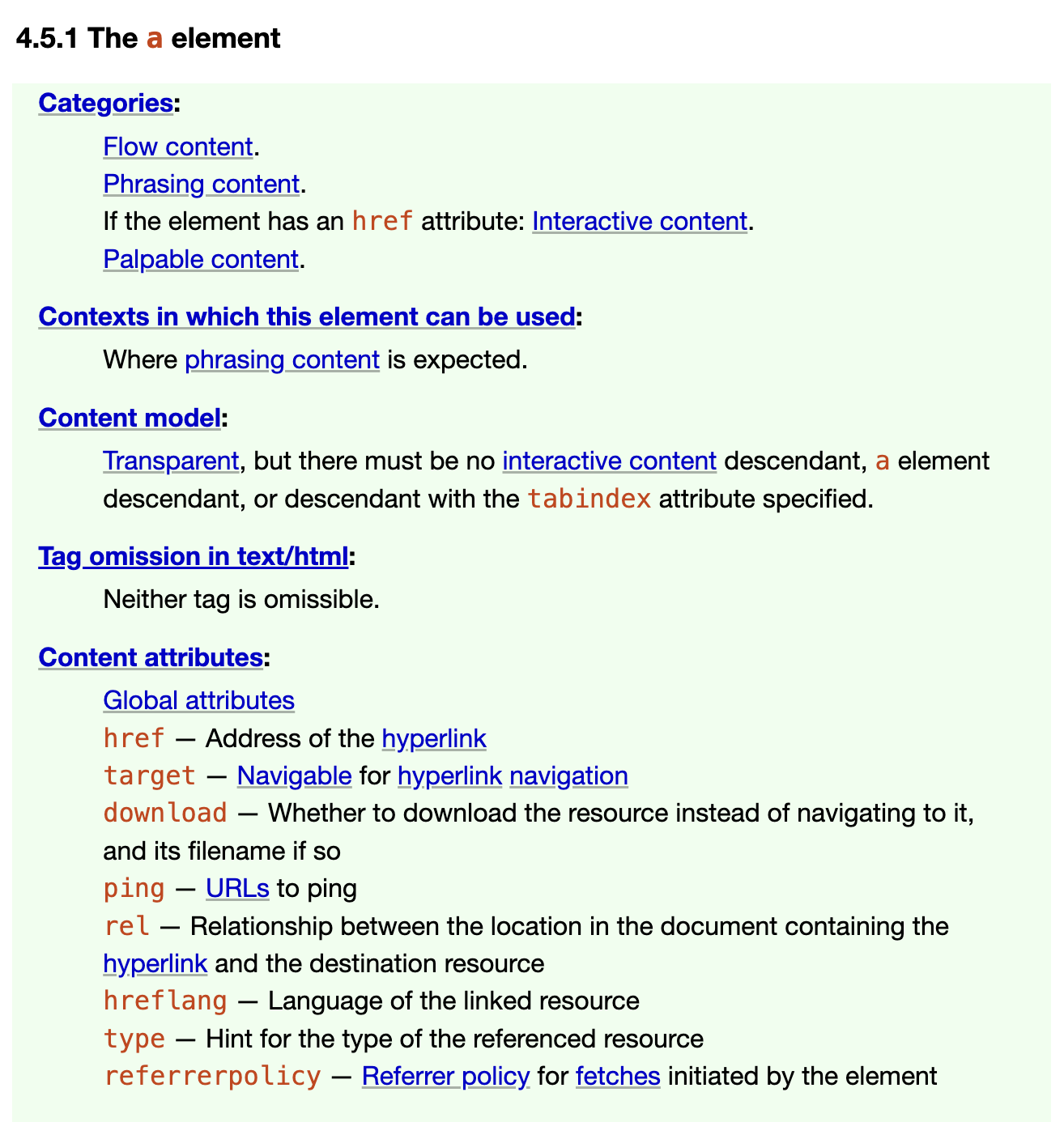
- Context : 해당 요소가 어떤 맥락에서 사용될 수 있는지를 나타낸다. (비규범적)
- Content Model : 해당 요소가 허용하는 자식 요소로 무엇이 올 수 있는지 나타낸다. (규범적)