<!DOCTYPE html>
<html lang="ko">
<head>
    <meta name="viewport" content="width=device-width">
    <meta charset="UTF-8">
    <link rel="stylesheet" href="https://meyerweb.com/eric/tools/css/reset/reset.css">
    <title>JavaScript Style</title>
</head>
<body>

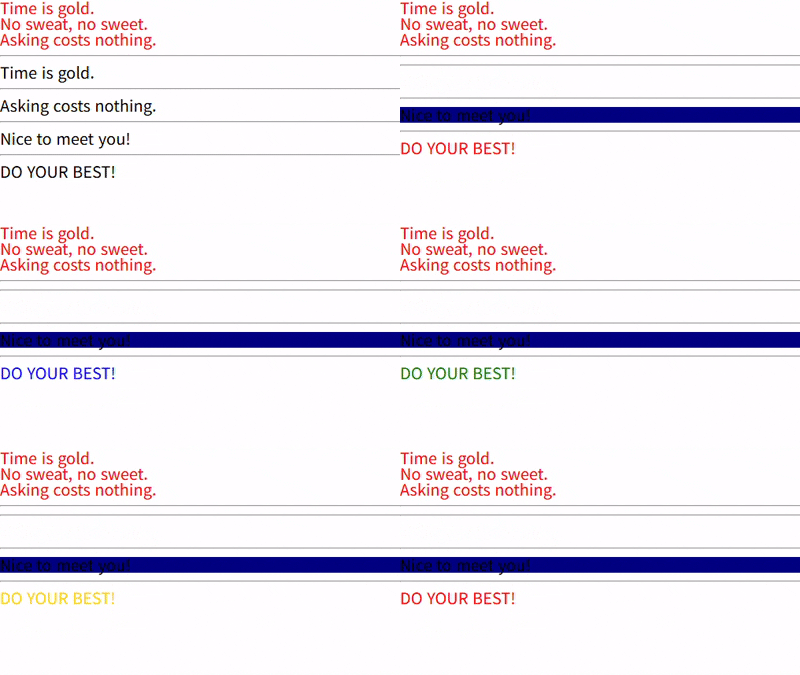
    <h2 class="words">Time is gold.</h2>
    <h2 class="words">No sweat, no sweet.</h2>
    <h2 class="words">Asking costs nothing.</h2>

    <script>

        // .words 요소의 글자 색상을 빨간색으로 설정

        // 1. DOM에서 #lorem 요소를 표현하는 HTMLElement 객체를 탐색
        var words = document.getElementsByClassName('words');

        // 2. HTMLElement 객체의 style 속성으로 HTML 요소의 스타일을 설정
        for (var i = 0; i < words.length; i++) {
            words[i].style.color = 'red';
        }

    </script>

    <hr>

    <h1 id="time">Time is gold.</h1>

    <script>

        // 2초가 지난 다음, #time 요소가 화면에서 사라지도록 설정

        // 1. window.setTimeout 메서드로 타이머를 등록
        window.setTimeout(function () {
            // 이 함수는 setTimeout 메서드로 등록한 타이머에 의해 2000ms가 지난 다음 실행

            /*
            HTML 요소가 브라우저 화면(viewport)에 보이지 않도록 설정
            1. display: none;
            2. visibility: hidden;
            3. opacity: 0;
            4. width: 0; height: 0; over-flow: hidden; font-size: 0;
            */

            // 2. DOM에서 #time 요소를 표현하는 HTMLElement 객체를 탐색
            // 3. HTMLElement 객체의 style 속성으로 #time 요소가 화면에서 사라지도록 설정
            document.getElementById('time').style.display = 'none';
        }, 2000);

    </script>

    <hr>

    <h1 id="cost">Asking costs nothing.</h1>

    <script>

        // 2초가 지난 다음, #cost 요소를 1초에 걸쳐 화면에서 점차 흐릿하게 사라지도록 설정

        // 1. window.setTimeout 메서드로 타이머를 등록
        window.setTimeout(function () {
            // 이 함수는 setTimeout 메서드로 등록한 타이머에 의해 2000ms가 지난 다음 실행

            // 2. DOM에서 #cost 요소를 표현하는 HTMLElement 객체를 탐색
            var cost = document.getElementById('cost');

            /*
             * HTML 요소가 1초에 걸쳐 화면에서 점차 흐릿하게 사라지도록 설정
             * → transition-duration: 1s;
             *   visibility: hidden;
             *   opacity: 0;
             */

             // 3. HTMLElement 객체의 style 속성으로 #cost 요소를 흐릿하게 사라지도록 설정
            cost.style.transitionDuration = '1s';
            cost.style.visibility = 'hidden';
            cost.style.opacity = '0';
           //  cost.style.display = 'none';        // WRONG!
        }, 2000);

    </script>

    <hr>

    <h1 id="nice">Nice to meet you!</h1>

    <script>

        // 3초가 지난 다음 #nice 요소의 배경색을 군청색(navy)으로 설정

        // 1. window.setTimeout 메서드로 타이머를 등록
        window.setTimeout(function () {
            // 이 함수는 setTimeout 메서드로 등록한 타이머에 의해 3000ms가 지난 다음 실행

            // 2. DOM에서 #nice 요소를 표현하는 HTMLElement 객체를 탐색
            // var nice = document.getElementById('nice');

            // 3. HTMLElement 객체의 style 속성으로 배경색을 설정
            // nice.style.background-color = 'navy';              // ERROR!
            // nice.style.backgroundColor = 'navy';

            document.getElementById('nice').style.backgroundColor = 'navy';
        }, 3000);

    </script>

    <hr>

    <h1 id="best">DO YOUR BEST!</h1>

    <script>

        // #best 요소의 글자 색상을 2초마다 빨간색, 파란색, 녹색, 노란색으로 설정

        // #best 요소에 설정할 글자 색상
        var colors = ['red', 'blue', 'green', 'gold'];

        // #best 요소에 설정할 글자 색상을 나타내는 인덱스 변수
        var i = 0;

        // 2. DOM에서 #best 요소를 표현하는 HTMLElement 객체를 탐색
        var best = document.getElementById('best');
        // → 여러 번 반복해서 접근하는 HTMLElement 객체는 미리 탐색한다.

        // 1. window.setInterval 메서드로 타이머를 등록
        window.setInterval(function () {
            // 이 함수는 setInterval 메서드로 등록한 타이머에 의해 2000ms마다 실행

            // 3. HTMLElement 객체의 style 속성으로 글자 색상을 설정
            best.style.color = colors[i];

            // 2000ms가 지난 다음, 다시 이 함수가 실행됐을 때 다음 색상으로 설정하기 위해
            // 인덱스 변수 i를 증가
            i++;

            // 인덱스 변수 i는 무한히 증가하는게 아니라 0, 1, 2, 3을 반복해야 한다.
            // 이렇게 되도록 하기 위해 인덱스 변수 i가 4가 되면, 다시 0으로 설정한다.
            i %= colors.length;
        }, 2000);

    </script>

</body>
</html>