<!DOCTYPE html>
<html lang="ko">
<head>
    <meta name="viewport" content="width=device-width">
    <meta charset="UTF-8">
    <link rel="stylesheet" href="https://meyerweb.com/eric/tools/css/reset/reset.css">
    <title>Operator</title>
</head>
<body>

    <script>

        // 변수 x, y를 선언
      	// 변수 x와 y에 각각 10, 3을 대입
      	// +, -, *, /, % 연산자로 연산하여 값을 브라우저 콘솔에 출력

        // 변수의 선언과 초기화
        var x = 10
        var y = 3;

        console.groupCollapsed('Ex-01');

        // 출력
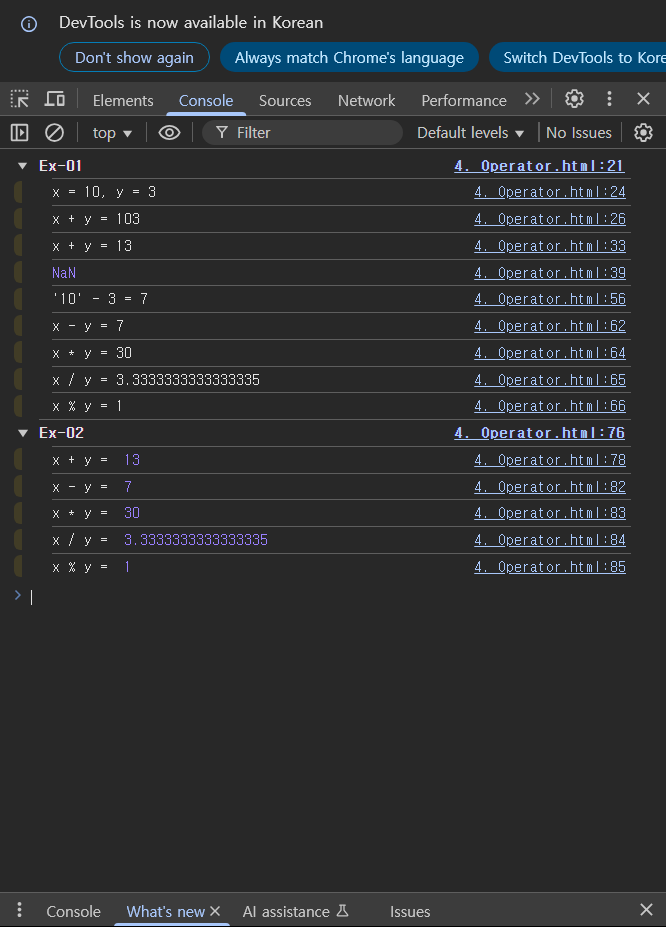
        console.log('x = ' + x + ', y = ' + y);

        console.log('x + y = ' + x + y);
        // → console.log('x + y = ' + 10 + 3);
        // → console.log('x + y = ' + '10' + 3);
        // → console.log('x + y = 10' + 3);
        // → console.log('x + y = 10' + '3');
        // → console.log('x + y = 103');

        console.log('x + y = ' + (x + y));
        // → console.log('x + y = ' + (10 + 3));
        // → console.log('x + y = ' + 13);
        // → console.log('x + y = ' + '13');
        // → console.log('x + y = 13');

        console.log('x - y = ' + x - y);
        // → console.log('x - y = ' + 10 - 3);
        // → console.log('x - y = ' + '10' - 3);
        // → console.log('x - y = 10' - 3);
        // → console.log(NaN - 3);          // Not-a-Number
        // → console.log(NaN);

        /*
         * 뺄셈 연산의 연산 결과는 반드시 자료형이 number이어야 한다.
         * 따라서 피연산자의 자료형도 number가 되어야 한다.
         * 그런데 피연산자의 자료형이 number가 아니면
         * JavaScript 해석기는 다른 자료형 값을 number 자료형으로 변환한 다음 연산한다.
         * 이때, 그 값을 숫자로 변환할 수 없으면 NaN(Not-a-Number)으로 변환된다.
         *
         * 또한, 산술 연산에서 피연산자가 하나라도 NaN이면 연산 결과는 NaN이 된다.
         */

        console.log("'10' - 3 = " + ('10' - 3));
        // → console.log("'10' - 3 = " + (10 - 3));
        // → console.log("'10' - 3 = " + 7);
        // → console.log("'10' - 3 = " + '7');
        // → console.log("'10' - 3 = 7");

        console.log('x - y = ' + (x - y));

        console.log('x * y = ' + x * y);
        console.log('x / y = ' + x / y);
        console.log('x % y = ' + x % y);

        console.groupEnd();

        /*
         * console 객체의 log 메서드에는 출력하고자 하는 값
         * 즉, 인자(Argument)를 쉼표로 구분해서 여러 개 넣을 수 있다.
         * 이때, 이 값들은 빈칸(Space)로 구분되어 브라우저 콘솔에 출력된다.
         */

        console.groupCollapsed('Ex-02');

        console.log('x + y = ', x + y);
        // → console.log('x + y = ', 10 + 3);
        // → console.log('x + y = ', 13);

        console.log('x - y = ', x - y);
        console.log('x * y = ', x * y);
        console.log('x / y = ', x / y);
        console.log('x % y = ', x % y);

        console.groupEnd();

    </script>

</body>
</html>