
1. vue 프로젝트 생성
1) cmd 창에 프로젝트를 생성할 폴더로 경로 이동 후
npm init vue로 생성한다.
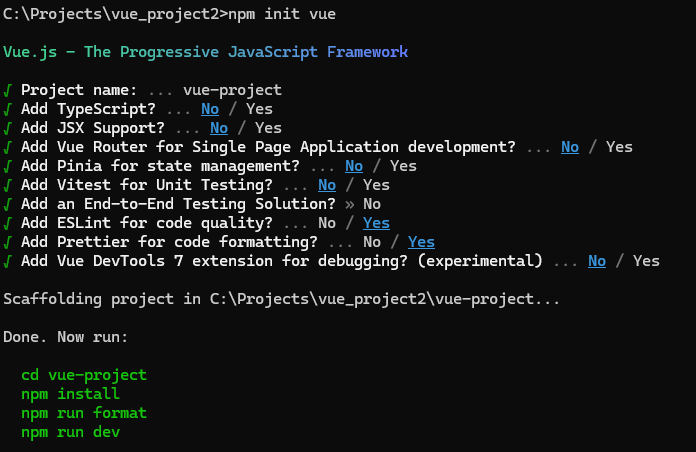
2) vscode를 열어 (cmd창에서 code . 으로 오픈 가능)
Terminal에 npm install을 통해 의존성 모듈을 설치한다. (node_modules 폴더 안 설치)
2. 설정
1) .eslintrc.cjs파일
-- 코드 검사기로 아래 설정한 옵션에 따라 작성한 코드의 문법을 교정해준다.
/* eslint-env node */
require('@rushstack/eslint-patch/modern-module-resolution');

module.exports = {
	root: true,
	extends: [
		'plugin:vue/vue3-essential',
		'eslint:recommended',
		'@vue/eslint-config-prettier/skip-formatting',
	],
	env: {
		'vue/setup-compiler-macros': true,
	},
	parserOptions: {
		ecmaVersion: '2022',
		sourceType: 'module',
	},
	rules: {
		'no-console': process.env.NODE_ENV === 'production' ? 'error' : 'off',
		'no-debugger': process.env.NODE_ENV === 'production' ? 'error' : 'off',
		'prettier/prettier': [
			'error',
			{
				singleQuote: true,
				semi: true,
				useTabs: true,
				tabWidth: 2,
				trailingComma: 'all',
				printWidth: 80,
				bracketSpacing: true,
				arrowParens: 'avoid',
				endOfLine: 'auto', // 한줄 추가
			},
		],
	},
};
2) settings.json
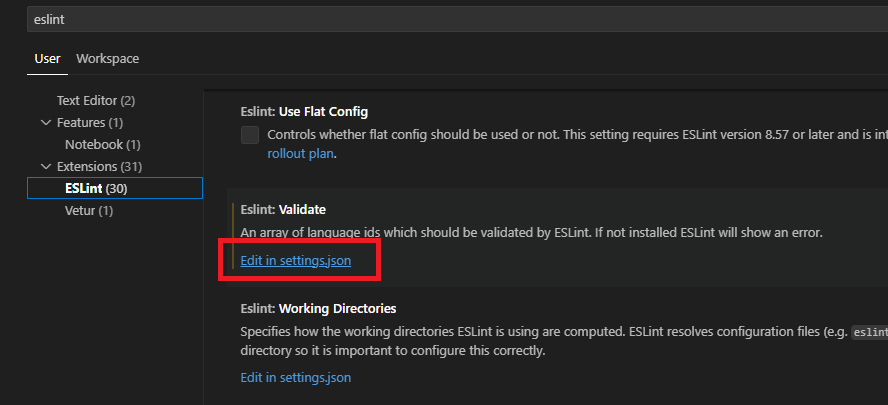
{
  "eslint.validate": [
    "javascript",
    "javascriptreact",
    "typescript",
    "typescriptreact",
    "vue",
    "markdown"
  ],
  "editor.codeActionsOnSave": {
    "source.fixAll.eslint": "explicit"
  },
  "editor.tabSize": 2,
  "eslint.workingDirectories": [

  ]
}
해당 파일까지 설정 후 터미널에 npm run lint로 전체 파일에 문법검사를 실행한다.
3) jsconfig.json
프로젝트의 루트를 지정하는 파일
{
  "compilerOptions": {
    "baseUrl": ".",
    "jsx": "preserve",
    "paths": {
      "@/*": ["./src/*"]
    }
  },
  "exclude": ["node_modules", "dist"]
}
3. 부트스트랩 (ui 프레임워크) 적용
1) vscode 터미널에 CLI로 설치
- 부트스트랩:
npm install bootstrap - 아이콘:
npm install bootstrap bootstrap-icon
2) main.js에서 적용
import 'bootstrap/dist/css/bootstrap.min.css';
import 'bootstrap-icons/font/bootstrap-icons.css';
import 'bootstrap/dist/js/bootstrap.js';
성장중인 새싹 개발자 🌱