
로깅
운영 시스템에서는 System.out.println() 같은 시스템 콘솔을 사용하지 않고, 별도의 로깅 라이브러리를 사용해 로그를 출력한다.
스프링 부트 로깅 라이브러리는 기본으로 다음 로깅 라이브러리를 사용한다.
- SLF4J
- Logback
로그 선언
- private Logger log = LoggerFactory.getLogger(getClass());
- private static final Logger log = LoggerFactory.getLogger(Xxx.class)
@Slf4j: 롬복 사용 가능
로그 호출
- log.info("hello")
- System.out.println("hello")
로그의 장점
- 쓰레드 정보, 클래스 이름 같은 부가 정보를 함께 볼 수 있고, 출력 모양을 조정할 수 있다.
- 로그 레벨에 따라 개발 서버에서는 모든 로그를 출력하고, 운영 서버에서는 출력하지 않는 등 로그를 상황에 맞게 조정할 수 있다.
- 시스템 아웃 콘솔 뿐 아니라 파일이나 네트워크 등, 로그를 별도의 위치에 남길 수 있다.
- 성능도
System.out보다 좋다.
-> 실무에서는 꼭 !! 로그를 사용해야 한다 !!
요청 매핑
@RestController
@Controller는 반환 값이String이면 뷰 이름으로 인식한다. 그래서 뷰를 찾고, 뷰가 렌더링 된다.@RestController는 반환 값으로 뷰를 찾는 것이 아니라, HTTP 메시지 바디에 바로 입력한다. 따라서, 실행 결과로 메시지를 받을 수 있는 것이다.
@RequestMapping
@RequestMapping("/hello-basic"):/hello-basicURL 이 호출되면 이 메서드가 실행되도록 매핑한다.- 대부분의 속성은 배열로 제공하므로, 다중 설정이 가능하다.
{"/hello-basic", "/hello-go"}
코드
회원 관리를 HTTP API 로 만든다 생각하고 매핑을 해보자.
@RestController
@RequestMapping("/mapping/users")
public class MappingClassController {

    /**
    회원 목록 조회: GET /users
    회원 등록: POST /users
    회원 조회: GET /users/{userId}
    회원 수정: PATCH /users/{userId}
    회원 삭제: DELETE /users/{userId}
     **/

    public String user() {
        return "get users";
    }

    public String addUser() {
        return "post user";
    }

    @GetMapping("/{userId}")
    public String findUser(@PathVariable String userId) {
        return "get userId=" + userId;
    }

    @PatchMapping("/{userId}")
    public String updateUser(@PathVariable String userId) {
        return "update userId=" + userId;
    }

    @DeleteMapping("/{userId}")
    public String deleteUser(@PathVariable String userId) {
        return "delete userId=" + userId;
    }

}
- @PathVariable
- 경로 변수를 통해 매칭되는 부분을 쉽게 조회한다.
- @PathVariable("userId") String userId -> @PathVariable userId
HTTP 요청 - 기본, 헤더 조회
HTTP 헤더 정보를 조회해보자.
@Slf4j
@RestController
public class RequestHeaderController {

    @RequestMapping("/headers")
    public String headers(HttpServletRequest request,
                          HttpServletResponse response,
                          HttpMethod httpMethod,
                          Locale locale,
                          @RequestHeader MultiValueMap<String, String> headerMap,
                          @RequestHeader("host") String host,
                          @CookieValue(value = "myCookie", required = false) String cookie
    ) {
        log.info("request={}", request);
        log.info("response={}", response);
        log.info("httpMethod={}", httpMethod);
        log.info("locale={}", locale);
        log.info("headerMap={}", headerMap);
        log.info("header host={}", host);
        log.info("myCookie={}", cookie);
        return "ok";
    }

}
HTTP 요청 파라미터
💡 클라이언트 -> 서버로 요청 데이터 전달
- GET - 쿼리 파라미터
- POST - HTML Form
- HTTP message body 에 직접 담아서 요청
쿼리 파라미터, HTML Form
HttpServletRequest 의 request.getParameter() 를 사용하면 두 요청 파라미터를 조회할 수 있다.
-
GET, 쿼리 파라미터 전송
http://localhost:8080/request-param?username=hello&age=20 -
POST, HTML Form 전송
POST /request-param ...
content-type: application/x-www-form-urlencoded
username=hello&age=20
GET 쿼리 파라미터 전송이든, POST HTML Form 전송 방식이든, 둘 다 형식이 같아서 구분없이 조회할 수 있는데, 이를 요청 파라미터 (request parameter) 조회 라 한다.
이를 코드로 살펴보자.
@Slf4j
@Controller
public class RequestParamController {

    @RequestMapping("/request-param-v1")
    public void requestParamV1(HttpServletRequest request, HttpServletResponse response) throws IOException {
        String username = request.getParameter("username");
        int age = Integer.parseInt(request.getParameter("age"));
        log.info("username={}, age={}", username, age);

        response.getWriter().write("ok");
    }
 }
위에서는 단순히 HttpServletRequest 가 제공하는 방식으로 요청 파라미터를 조회했다.
@RequestParam
@RequestParam 을 사용하면 매우 편리하게 요청 파라미터를 조회할 수 있다.
/**
 * @RequestParam 사용
 * - 파라미터 이름으로 바인딩
 * @ResponseBody 추가
 * - View 조회를 무시하고, HTTP message body에 직접 해당 내용 입력
 */
@ResponseBody
    @RequestMapping("/request-param-v2")
    public String requestParamV2(
            @RequestParam("username") String memberName,
            @RequestParam("age") int memberAge) {

        log.info("username={}, age={}", memberName, memberAge);
        return "ok";
    }
/**
* @RequestParam 사용
* HTTP 파라미터 이름이 변수 이름과 같으면 @RequestParam(name="xx") 생략 가능
*/
@ResponseBody
@RequestMapping("/request-param-v3")
public String requestParamV3(
@RequestParam String username,
@RequestParam int age) {
log.info("username={}, age={}", username, age);
return "ok";
}/**
* @RequestParam 사용
* String, int 등의 단순 타입이면 @RequestParam 도 생략 가능
*/
@ResponseBody
@RequestMapping("/request-param-v4")
public String requestParamV4 (String username, int age) {
log.info("username={}, age={}", username, age);
return "ok";
}/**
* @RequestParam.required
* /request-param-required -> username이 없으므로 예외
*
* 주의!
* /request-param-required?username= -> 빈문자로 통과
*
* 주의!
* /request-param-required
* int age -> null을 int에 입력하는 것은 불가능, 따라서 Integer 변경해야 함(또는 defaultValue 사용)
*/
@ResponseBody
@RequestMapping("/request-param-required")
public String requestParamRequired (
@RequestParam(required = true, defaultValue = "guest") String username,
@RequestParam(required = false, defaultValue = "-1") Integer age) {
log.info("username={}, age={}", username, age);
return "ok";
}/**
* @RequestParam Map, MultiValueMap
* Map(key=value)
* MultiValueMap(key=[value1, value2, ...]) ex) (key=userIds, value=[id1, id2])
*/
@ResponseBody
@RequestMapping("/request-param-map")
public String requestParamMap (@RequestParam Map<String, Object> paramMap) {
log.info("username={}, age={}", paramMap.get("username"), paramMap.get("age"));
return "ok";
}@ModelAttribute
실제 개발할 때는 요청 파라미터를 받아서 필요한 객체를 만들고, 그 객체에 값을 넣어줘야 하는데, @ModelAttribute 는 그 과정을 완전히 자동화해준다.
먼저 바인딩할 객체를 만들어주자.
import lombok.Data;

@Data
public class HelloData {
    private String username;
    private int age;
}
그리고 @ModelAttribute 를 적용해보자.
@ResponseBody
@RequestMapping("/model-attribute-v1")
public String modelAttributeV1(@ModelAttribute HelloData helloData) {
 	log.info("username={}, age={}", helloData.getUsername(), helloData.getAge());
 	return "ok";
}
자동으로 HelloData 객체가 생성되고, 요청 파라미터 값도 모두 들어가 있게 된다.
@ResponseBody
@RequestMapping("/model-attribute-v2")
public String modelAttributeV2(HelloData helloData) {
 	log.info("username={}, age={}", helloData.getUsername(), helloData.getAge());
 return "ok";
}
@ModelAttribute 는 생략할 수 있다.
🤓 생략 시 규칙
String,int,Integer같은 단순 타입 = @RequestParam나머지= @ModelAttribute
HTTP 요청 메시지
HTTP API 에서 주로 사용한다.
단순 텍스트
HTTP 메시지 바디의 데이터를 InputStream 을 사용해서 직접 읽을 수 있다.
@Slf4j
@Controller
public class RequestBodyStringController {

    @PostMapping("/request-body-string-v1")
    public void requestBodyString(HttpServletRequest request, HttpServletResponse response) throws IOException {
        ServletInputStream inputStream = request.getInputStream();
        String messageBody = StreamUtils.copyToString(inputStream, StandardCharsets.UTF_8);

        log.info("messageBody={}", messageBody);

        response.getWriter().write("ok");
    }
 }
/**
* InputStream(Reader): HTTP 요청 메시지 바디의 내용을 직접 조회
* OutputStream(Writer): HTTP 응답 메시지의 바디에 직접 결과 출력
*/
@PostMapping("/request-body-string-v2")
public void requestBodyStringV2(InputStream inputStream, Writer responseWriter) throws IOException {
String messageBody = StreamUtils.copyToString(inputStream, StandardCharsets.UTF_8);
log.info("messageBody={}", messageBody);
responseWriter.write("ok");
}/**
* HttpEntity: HTTP header, body 정보를 편리하게 조회
* - 메시지 바디 정보를 직접 조회(@RequestParam X, @ModelAttribute X)
* - HttpMessageConverter 사용 -> StringHttpMessageConverter 적용
*
* 응답에서도 HttpEntity 사용 가능
* - 메시지 바디 정보 직접 반환(view 조회X)
* - HttpMessageConverter 사용 -> StringHttpMessageConverter 적용
*/
@PostMapping("/request-body-string-v3")
public HttpEntity<String> requestBodyStringV3(HttpEntity<String> httpEntity) throws IOException {
String messageBody = httpEntity.getBody();
log.info("messageBody={}", messageBody);
return new HttpEntity<>("ok");
}/**
* @RequestBody
* - 메시지 바디 정보를 직접 조회(@RequestParam X, @ModelAttribute X)
* - HttpMessageConverter 사용 -> StringHttpMessageConverter 적용
*
* @ResponseBody
* - 메시지 바디 정보 직접 반환(view 조회X)
* - HttpMessageConverter 사용 -> StringHttpMessageConverter 적용
*/
@ResponseBody
@PostMapping("/request-body-string-v4")
public String requestBodyStringV4(@RequestBody String messageBody) throws IOException {
log.info("messageBody={}", messageBody);
return "ok";
}<정리>
- 요청 파라미터 조회 :
@RequestParam,@ModelAttribute - HTTP 메시지 바디 직접 조회 :
@RequestBody
JSON
@Slf4j
@Controller
public class RequestBodyJsonController {

    private ObjectMapper objectMapper = new ObjectMapper();

    @PostMapping("/request-body-json-v1")
    public void requestBodyJsonV1(HttpServletRequest request, HttpServletResponse response) throws IOException {
        ServletInputStream inputStream = request.getInputStream();
        String messageBody = StreamUtils.copyToString(inputStream, StandardCharsets.UTF_8);

        log.info("messageBody={}", messageBody);
        HelloData helloData = objectMapper.readValue(messageBody, HelloData.class);
        log.info("username={}, age={}", helloData.getUsername(), helloData.getAge());

        response.getWriter().write("ok");
    }
}
문자로 된 JSON 데이터를 Jackson 라이브러리인 objectMapper 를 사용해서 자바 객체로 변환한다.
/**
 * @RequestBody
 * HttpMessageConverter 사용 -> StringHttpMessageConverter 적용
 *
 * @ResponseBody
 * - 모든 메서드에 @ResponseBody 적용
 * - 메시지 바디 정보 직접 반환(view 조회X)
 * - HttpMessageConverter 사용 -> StringHttpMessageConverter 적용
 */
@ResponseBody
@PostMapping("/request-body-json-v2")
public String requestBodyJsonV2(@RequestBody String messageBody) throws IOException {
	log.info("messageBody={}", messageBody);
    HelloData helloData = objectMapper.readValue(messageBody, HelloData.class);
    log.info("username={}, age={}", helloData.getUsername(), helloData.getAge());

    return "ok";
}
/**
* @RequestBody 생략 불가능(@ModelAttribute 가 적용되어 버림)
* HttpMessageConverter 사용 -> MappingJackson2HttpMessageConverter (contenttype: application/json)
*
*/
@ResponseBody
@PostMapping("/request-body-json-v3")
public String requestBodyJsonV3(@RequestBody HelloData helloData) {
log.info("username={}, age={}", helloData.getUsername(), helloData.getAge());
return "ok";
}@RequestBody에 직접 만든 객체를 지정할 수 있다.HttpEntity,@RequestBody를 사용하면 HTTP 메시지 컨버터가 HTTP 메시지 바디의 내용을 우리가 원하는 문자나 객체 등으로 변환해준다.
@ResponseBody
@PostMapping("/request-body-json-v4")
public String requestBodyJsonV4(HttpEntity<HelloData> httpEntity) {
    HelloData data = httpEntity.getBody();
    log.info("username={}, age={}", data.getUsername(), data.getAge());

    return "ok";
}
/**
* @RequestBody 생략 불가능(@ModelAttribute 가 적용되어 버림)
* HttpMessageConverter 사용 -> MappingJackson2HttpMessageConverter (contenttype: application/json)
*
* @ResponseBody 적용
* - 메시지 바디 정보 직접 반환(view 조회X)
* - HttpMessageConverter 사용 -> MappingJackson2HttpMessageConverter 적용
(Accept: application/json)
*/
@ResponseBody
@PostMapping("/request-body-json-v5")
public HelloData requestBodyJsonV5(@RequestBody HelloData data) {
log.info("username={}, age={}", data.getUsername(), data.getAge());
return data;
}@RequestBody요청 : JSON 요청 -> HTTP 메시지 컨버터 -> 객체@ResponseBody응답 : 객체 -> HTTP 메시지 컨버터 -> JSON 응답
HTTP 응답
💡 서버에서 응답 데이터 만드는 방법
- 정적 리소스
- 뷰 템플릿
- HTTP 메시지
정적 리소스
스프링 부트는 클래스패스의 다음 디렉토리에 있는 정적 리소스를 제공한다.
/static , /public , /resources , /META-INF/resources
뷰 템플릿
뷰 템플릿을 거쳐 HTML 이 생성되고, 뷰가 응답을 만들어서 전달한다.
src/main/resources/templates
@Controller
public class ResponseViewController {

    @RequestMapping("/response-view-v1")
    public ModelAndView responseViewV1() {
        ModelAndView mav = new ModelAndView("response/hello")
                .addObject("data", "hello!");
        return mav;
    }

    @RequestMapping("/response-view-v2")
    public String responseViewV2(Model model) {
        model.addAttribute("data", "hello!!");
        return "response/hello";
    }

    @RequestMapping("/response/hello")
    public void responseViewV3(Model model) {
        model.addAttribute("data", "hello!!");
    }
}
HTTP API, 메시지 바디에 직접 입력
HTTP API를 제공하는 경우에는 HTML이 아니라 데이터를 전달해야 하므로, HTTP 메시지 바디에 JSON 같은 형식으로 데이터를 실어 보낸다.
@Slf4j
@Controller
public class ResponseBodyController {

    /** HttpServletResponse 객체를 통해서
    * HTTP 메시지 바디에 직접 ok 응답 메시지를 전달
    */
    @GetMapping("/response-body-string-v1")
    public void responseBodyV1(HttpServletResponse response) throws IOException {
        response.getWriter().write("ok");
    }

	/** ResponseEntity : HTTPEntity 상속 받고, HTTP 응답 코드 설정 가능 */
    @GetMapping("/response-body-string-v2")
    public ResponseEntity<String> responseBodyV2() {
        return new ResponseEntity<>("ok", HttpStatus.OK);
    }

	/** @ResponseBody 사용 : view 사용 x,
    * HTTP 메시지 컨버터를 통해 HTTP 메시지를 직접 입력 가능
    */
    @ResponseBody
    @GetMapping("/response-body-string-v3")
    public String responseBodyV3() {
        return "ok";
    }

    @ResponseBody
    @GetMapping("/response-body-string-v4")
    public ResponseEntity<String> responseBodyV4() {
        return new ResponseEntity<>("ok", HttpStatus.OK);
    }

    // ResponseEntity 를 반환
    @GetMapping("/response-body-json-v1")
    public ResponseEntity<HelloData> responseBodyJsonV1() {
        HelloData helloData = new HelloData();
        helloData.setUsername("userA");
        helloData.setAge(20);

        return new ResponseEntity<>(helloData, HttpStatus.OK);
    }

    @ResponseStatus(HttpStatus.OK)
    @ResponseBody
    @GetMapping("/response-body-json-v2")
    public HelloData responseBodyJsonV2() {
        HelloData helloData = new HelloData();
        helloData.setUsername("userA");
        helloData.setAge(20);

        return helloData;
    }

}
HTTP 메시지 컨버터
뷰 템플릿으로 HTML 을 생성해서 응답하는 것이 아니라, HTTP API 처럼 JSON 데이터를 HTTP 메시지 바디에서 직접 읽거나 쓰는 경우, HTTP 메시지 컨버터를 사용하면 편리하다.
-
@ResponseBody사용 원리
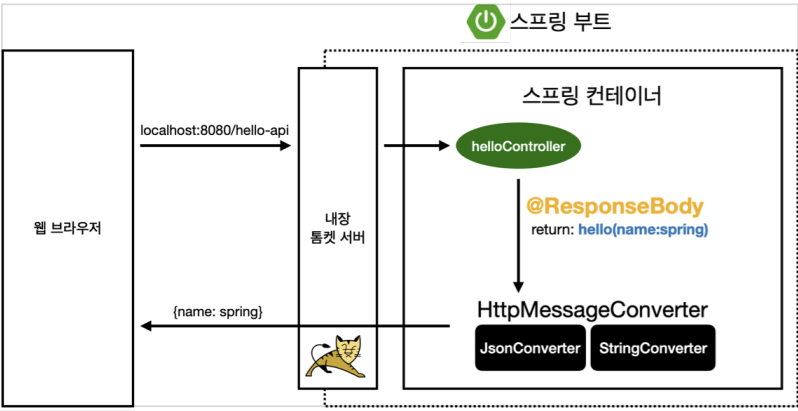
- HTTP BODY 에 문자 내용을 직접 반환
viewResolver대신HttpMessageConverter가 동작- 기본 문자 처리 :
StringHttpMessageConverter - 기본 객체 처리 :
MappingJackson2HttpMessageConverter
스프링 MVC 는 다음의 경우에 HTTP 메시지 컨버터를 적용한다.
- HTTP 요청 :
@RequestBody,HttpEntity(RequestEntity) - HTTP 응답 :
@ResponseBody,HttpEntity(ResponseEntity)
이처럼 컨버터는 HTTP 요청, 응답을 둘 다 사용한다.
canRead(),canWrite(): 메시지 컨버터가 해당 클래스, 미디어타입을 지원하는지 체크read(),write(): 메시지 컨버터를 통해 메시지를 읽고 쓰는 기능
스프링 부트 기본 메시지 컨버터
0 = ByteArrayHttpMessageConverter
1 = StringHttpMessageConverter
2 = MappingJackson2HttpMessageConverter
...
다양한 메시지 컨버터를 제공하는데, 대상 클래스 타입과 미디어 타입 두개를 체크해서 사용 여부를 결정한다. 만족하지 않으면 다음 컨버터로 우선 순위가 넘어간다.
HTTP 요청 데이터 읽기
-
HTTP 요청이 오고, 컨트롤러에서
@RequestBody,HttpEntity파라미터를 사용한다. -
메시지 컨버터가 메시지를 읽을 수 있는지 확인하기 위해 canRead() 를 호출한다.
-
대상 클래스 타입
ex)@RequestBody의 대상 클래스 : byte[], String, HelloData -
미디어 타입
ex) text/plain, application/json, */ *
- canRead() 조건 만족하면 read() 호출 -> 객체 생성, 반환한다.
HTTP 응답 데이터 생성
-
컨트롤러에서
@ResponseBody,HttpEntity로 값이 반환된다. -
메시지 컨버터가 메시지를 읽을 수 있는지 확인하기 위해 canWrite() 를 호출한다.
-
대상 클래스 타입
ex) return 의 대상 클래스 : byte[], String, HelloData -
미디어 타입
ex) text/plain, application/json, */ *
- canWrite() 조건을 만족하면 write() 호출 -> HTTP 응답 메시지 바디에 데이터를 생성한다.
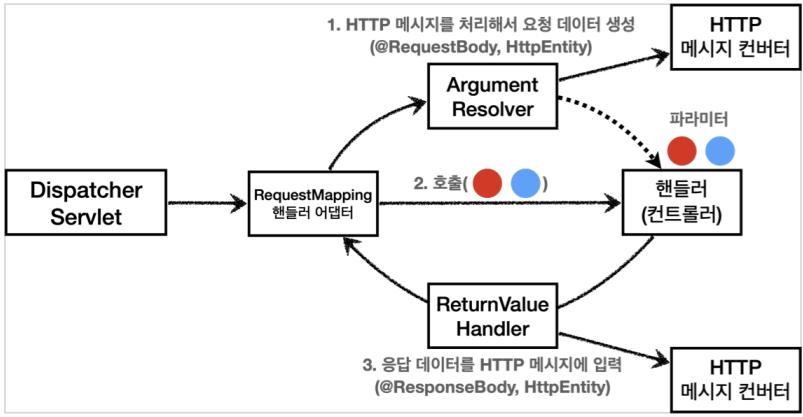
요청 매핑 핸들러 어댑터 구조
그렇다면 HTTP 메시지 컨버터는 스프링 MVC 어디에서 사용될까 ?
-
요청 의 경우,
@RequestBody를 처리하는 ArgumentResolver 가 있고,HttpEntity를 처리하는 ArgumentResolver 가 있다. 이 ArgumentResolver 들이 HTTP 메시지 컨버터를 사용해 필요한 객체를 생성하는 것이다. -
응답 의 경우,
@ResponseBody와HttpEntity를 처리하는 ReturnValueHandler 가 있다. 여기서 HTTP 메시지 컨버터를 호출해 응답 결과를 만든다.
스프링 MVC는
@RequestBody,@ResponseBody가 있으면
RequestResponseBodyMethodProcessor (ArgumentResolver)를,
HttpEntity가 있으면 HttpEntityMethodProcessor (ArgumentResolver)를 사용한다.
