문제
(venv) PS D:\imad-server-wiki> git commit
hint: Waiting for your editor to close the file... C:\Program Files\Git\usr\bin\vi: line 3: exec: vim: not found                                                                                         ne 3: exec: vim: not found
error: There was a problem with the editor 'vi'.
Please supply the message using either -m or -F option.
어제 Visual Studio Code를 업데이트 하고 나서, 에디터 내부에서 실행되는 터미널에서 git commit으로 커밋 메시지 편집 모드로 들어가려 했다. 그러나 위와 같은 에러가 발생하면서 아무것도 실행되지 않았다. 아마 업데이트를 하면서 관련 설정에 문제가 생긴 것 같다. (git bash나 Windows 터미널에서는 정상적으로 동작했다.)
해결
해결 방법에는 여러 가지가 있다.
vim 사용
git config --global core.editor 'vi'또는
git config --global core.editor 'vim'기존과 마찬가지로 git commit 사용 시 vim 에디터로 들어가는 방법이다.
VS Code 사용
swsta@DESKTOP-KLR2M01 MINGW64 /d/imad-server (master)
$ code --version
1.85.1
0ee08df0cf4527e40edc9aa28f4b5bd38bbff2b2
x64

swsta@DESKTOP-KLR2M01 MINGW64 /d/imad-server (master)
$ where code
C:\Program Files\Microsoft VS Code\bin\code
C:\Program Files\Microsoft VS Code\bin\code.cmd
code --version 명령어를 실행했을 때 위와 같이 동작해야 가능한 방법이다.
git config --global core.editor "code --wait"이 명령어를 실행하면 이제 커밋 메세지를 vs code에서 수정할 수 있다.
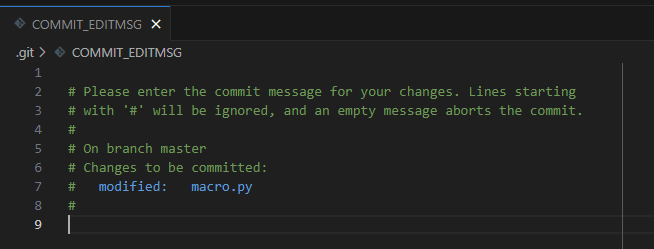
내용 작성 후 편집창을 닫으면 커밋 메세지가 저장된다. 취향에 따라 선택해서 사용하면 될 것 같다. vs code는 외부에서 에디터를 실행하기 때문에 4~5초 정도 걸리는 단점이 있다.
참고

일단 해보자