11장 예외 처리
11.1 예외와 예외 클래스
- 일반 예외(Exception)
- 컴파일러가 예외 처리 코드 여부를 검사하는 예외
- 실행 예외(Runtime Exception)
- 컴파일러가 예외 처리 코드 여부를 검사하지 않는 예외
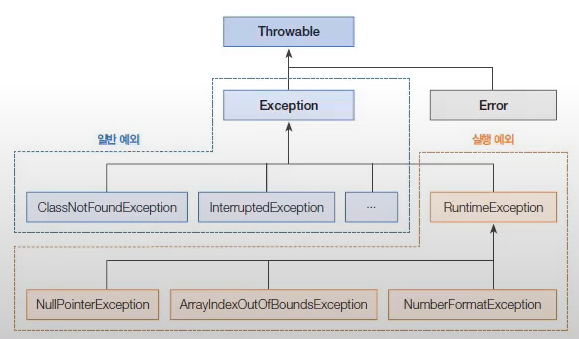
자바는 예외가 발생하면 예외 클래스로부터 객체를 생성한다.
자바의 모든 에러와 예외 클래스는 Throwable을 상속받아 만들어짐
11.2 예외 처리 코드
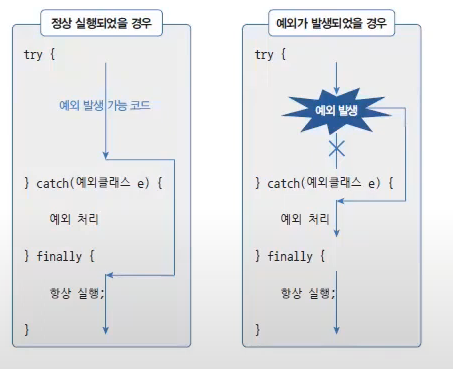
실행 예외
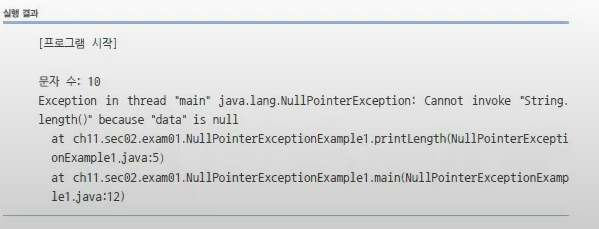
수정 전
public class ExceptionHandlingExample1 {
	public static void printLength(String data){
    	int result = data.length();
        // data가 null일 경우 NullPointerException 발생
        System.out.println("문자 수 : " + result);
    }
   	public static void main(String[] args){
    	System.out.println("[프로그램 시작]");

        printLength("ThisIsJava");	// 문자 수 : 10
        printLength(null);	// NullPointerException 실행 예외 발생

        System.out.println("[프로그램 종료]");
    }
}
수정 후
public class ExceptionHandlingExample2 {
	public static void printLength(String data){
    	try {
        	int result = data.length();
        	System.out.println("문자 수 : " + result);

        } catch(NullPointerException e) {
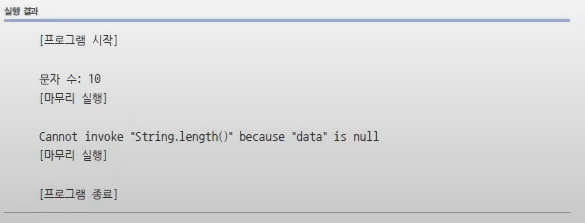
        	System.out.println(e.getMessage());
            //System.out.println(e.toString());
            //e.printStackTrace();
            // 예외 정보를 얻는 3가지 방법

        } finally {
        	System.out.println("[마무리 실행]\n");

        }
    }
   	public static void main(String[] args){
    	System.out.println("[프로그램 시작]");

        printLength("ThisIsJava");	// 문자 수 : 10
        printLength(null);	// NullPointerException 실행 예외 발생

        System.out.println("[프로그램 종료]");
    }
}
일반 예외
public class ExceptionHandlingExample {
	public static void main(String[] args) {
    	Class.forName("java.lang.String");
        // ClassPath 위치에서 주어진 클래스를 찾는 코드
        // 찾지 못했을 경우 ClassNotFoundException이라는 일반 예외가 발생
    }
}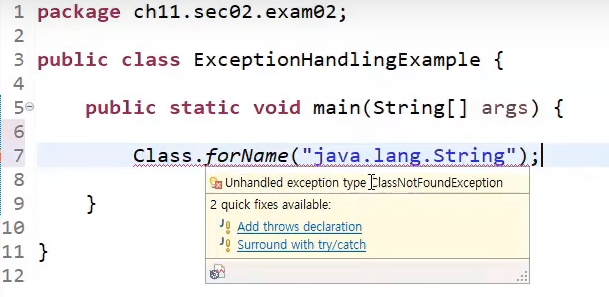
컴파일러가 예외 처리 코드 여부를 검사
11.3 예외 종류에 따른 처리
- 다중 catch를 사용하면 발생하는 예외에 따라 예외 처리 코드를 다르게 작성할 수 있다.
try{
	실행 문
} catch(ArrayIndexOutOfBoundsException e) {
	예외 처리 1
} catch(NumberFormatException e) {
	예외 처리 2
}- catch 블럭은 단 하나만 실행된다.
- 하나의 예외가 발생하면 즉시 실행을 멈추고 해당 catch 블록으로 이동하기 때문이다.
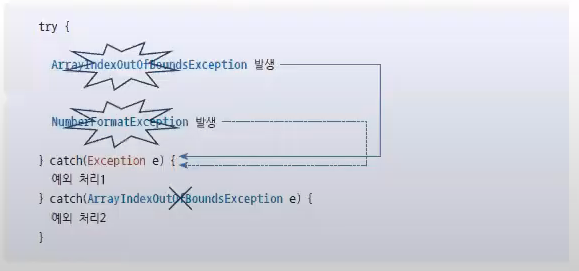
- 처리해야 할 예외 클래스들이 상속 관계에 있을 때는
하위 클래스catch 블록을 먼저 작성하고상위 클래스catch 블록을 나중에 작성해야 한다.
try {

} catch(NullPointerException | NumberFormatException e){
	// 두 가지 이상의 예외를 catch 블록으로 동일하게 예외 처리
}|기호를 사용하여 두 가지 이상의 예외를 동일하게 예외 처리
11.4 리소스 자동 닫기
리소스 : 데이터를 제공하는 객체를 말함
리소스는 사용하기 위해 열어야(open) 하며, 사용이 끝난 후에는 닫아야(close) 한다.리소스를 사용하다가 예외가 발생될 경우에도 안전하게 닫는 것이 중요하다. 그렇지 않으면 리소스가 불안정한 상태로 남아있게 된다.
FileInputStream fis = null;
try {
	fis = new FileInputStream("file.txt"); // 파일 열기
} catch(IOException e) {

} finally {
	fis.close();	// 파일 닫기
    // 예외 발생 여부와 상관없이 안전하게 close 함
}
try-with-resources 블록 사용
try(FileInputStream fis = new FileInputStream("file.txt")) {

} catch (IOException e) {

}
// AutoCloseable ac = new FileInputStream("file.txt");
// ac.close();- try 괄호에 리소스를 여는 코드를 작성하면 try 블록이 정상적으로 실행을 완료했거나 도중에 예외가 발생하면 자동으로 리소스의
close()메소드가 호출 된다. - try-with-resources 블록을 사용하기 위해서는
java.lang.AutoCloseable인터페이스를 구현해서AutoCloseable인터페이스의close()메소드를 재정의해야 한다.
public class FileInputStream implements AutoCloseable {
	@override
    public void close() throws Exception {...}
}
복수 개의 리소스를 사용 가능
try(
FileInputStream fis1 = new FileInputStream("file1.txt");
FileInputStream fis2 = new FileInputStream("file2.txt")

) {

} catch (IOException e) {

}
// AutoCloseable ac = new FileInputStream("file1.txt");
// ac.close();
// AutoCloseable ac = new FileInputStream("file2.txt");
// ac.close();
11.5 예외 떠넘기기
public void method1() {
	try {
    	method2(); // method2() 호출
    } catch(ClassNotFoundException e) {
    	...
    }
}

public void method2() throws ClassNotFoundException {
	Class.forName("java.lang.String2");
}method2()의 예외 처리를method2()메소드 선언부에 만들지 않고method2()가 호출되는 곳으로 thorws 한다.
11.6 사용자 정의 예외
- 사용자 정의 예외는 컴파일러가 체크하는 일반 예외로 선언할 수 있고, 컴파일러가 체크하지 않는 실행 예외로 선언할 수도 있다.
public class XXXException extends [ Exception | RuntimeException ]
	public XXXException() {	// 기본 생성자
    }

    public XXXException(String message) {
    // 예외 메시지를 입력받는 생성자
    	super(message);	// 부모 생성자 호출
    }
예시 insufficientException.java
public class InsufficientException extends Exception {
	public InsufficientException() {	//생성자1
    }

    public InsufficientException(String message) { //생성자2
    	super(message);
        // = catch(XXXException e) { e.getMessage(); }
    }
}
throw
- 예외를 발생시킴
void method() {
	try {
    	throw new Exception("예외 메시지"); // Exception 예외 발생
    } catch(Exception e){
    	String message = e.getMessage();
    }
}
public class Account {
private long balance; // 잔액
public Account() {} // 기본 생성자
public long getBalance() { return balance; }
public void deposit(int money) { balance += money; }
// 입금
public void withdraw(int money) throws InsufficientException {
if(balance < money) {
throw new InsufficientException(
"잔고 부족: " + (money-balance) + " 모자람");
}
balance -= money;
}
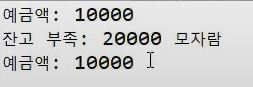
}public class AccountExample {
public static void main(String[] args) {
Account account = new Account();
account.deposit(10000); // 입급
System.out.println("예금액: " + account.getBalance());
try {
account.withdraw(30000); // 출금, 10000을 초과함
} catch(InsufficientException e) {
String message = e.getMessage();
System.out.println(message);
}
System.out.println("예금액: " + account.getBalance());
}
}