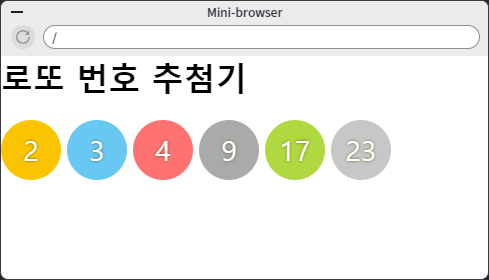
로또 번호 추첨기
index.html
<!DOCTYPE html>
<html lang="ko">
<head>
    <meta charset="UTF-8">
    <meta name="viewport" content="width=device-width, initial-scale=1.0">
    <title>로또 번호 추첨기</title>
    <link rel="stylesheet" href="style.css">
  	<!-- css 참조 -->
</head>
<body>
    <h1>로또 번호 추첨기</h1>
    <script>
        var lotto = [];
        while (lotto.length < 6) {
            var num = parseInt(Math.random() * 45 + 1); // 1이상 46미만
            if (lotto.indexOf(num) == -1) { // 이미 있는 숫자인지 판별
                lotto.push(num);
            }
        }
        lotto.sort((a,b)=>a-b); // 정렬
        document.write("<div class='ball ball1'>" + lotto[0] + "</div>");
        document.write("<div class='ball ball2'>" + lotto[1] + "</div>");
        document.write("<div class='ball ball3'>" + lotto[2] + "</div>");
        document.write("<div class='ball ball4'>" + lotto[3] + "</div>");
        document.write("<div class='ball ball5'>" + lotto[4] + "</div>");
        document.write("<div class='ball ball6'>" + lotto[5] + "</div>");
    </script>
</body>
</html>
style.css
.ball {
    float: left;
    width: 60px;
    height: 60px;
    line-height: 60px;
    font-size: 28px;
    border-radius: 100%;
    text-align: center;
    vertical-align: middle;
    color: #fff;
    font-weight: 500;
    text-shadow: 0px 0px 3px rgba(73, 57, 0, .8);
    margin-right: 6px;
}

.ball1 {
    background: #fbc400;
}
.ball2 {
    background: #69c8f2;
}
.ball3 {
    background: #ff7272;
}
.ball4 {
    background: #aaa;
}
.ball5 {
    background: #b0d840;
}
.ball6 {
    background: #c7c7c7;
}
자소서 글자수 계산기
index.html
<!DOCTYPE html>
<html lang="ko">
<head>
    <meta charset="UTF-8">
    <meta name="viewport" content="width=device-width, initial-scale=1.0">
    <title>자소서 글자수 계산기</title>
    <link rel="stylesheet" href="https://stackpath.bootstrapcdn.com/bootstrap/4.5.2/css/bootstrap.min.css" integrity="sha384-JcKb8q3iqJ61gNV9KGb8thSsNjpSL0n8PARn9HuZOnIxN0hoP+VmmDGMN5t9UJ0Z" crossorigin="anonymous">
    <style>
        h1 {
            margin-top: 30px;
        }
        #count {
            float: right;
        }
    </style>
</head>
<body class='container'>
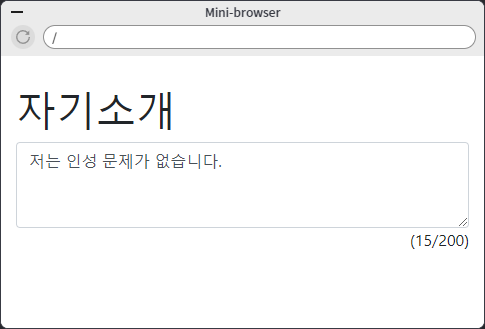
    <h1>자기소개</h1>
    <textarea class="form-control" rows="3" id="jasoseol" onkeydown="counter();">저는 인성 문제가 없습니다.</textarea> <!-- onkeydown을 이용해 event 설정 -->
    <span id="count">(0/200)</span>
    <script>
        function counter() {
            var content = document.getElementById('jasoseol').value; <!-- 특정 html의 값을 가져올 수 있다. -->
            if (content.length > 200) {
                content = content.substring(0,200);
                document.getElementById('jasoseol').value = content;
            }
            document.getElementById('count').innerHTML = '(' + content.length + '/200)'; <!-- 특정 값을 html에 넣을 수 있다. 위의 #count에 -->
        }
        counter(); <!-- 함수를 작성해 쉽게 사용 가능 -->
    </script>
</body>
</html>