>> 준비하기 <<
콘솔 창 입력
sudo apt-get update
sudo apt-get install libmysqlclient-dev	//  MySQL 클라이언트 라이브러리의 개발 파일을 제공

sudo install pymysql
> pymysql 추가 설치하기
dbapp.py
dbapp.py 생성
from fastapi import FastAPI, HTTPException
from pydantic import BaseModel
import pymysql

# FastAPI 애플리케이션 초기화
app = FastAPI()

# 데이터베이스 연결 설정
db_config = {
    'host': 'localhost',
    'user': '사용자_이름',
    'password': '비밀번호',
    'database': '데이터베이스_이름',
    'charset': 'utf8mb4',
    'cursorclass': pymysql.cursors.DictCursor
}

# FastAPI 시작 시 데이터베이스 연결 풀 생성
@app.on_event("startup")
async def startup():
    app.db_connection = pymysql.connect(**db_config)

# FastAPI 종료 시 데이터베이스 연결 풀 닫기
@app.on_event("shutdown")
async def shutdown():
    app.db_connection.close()

# Pydantic 모델 정의
class User(BaseModel):
    id: int
    name: str
    phone: str
    birth: str

# MySQL에서 데이터를 가져오는 route 정의
@app.get("/")
async def read_root():
    with app.db_connection.cursor() as cursor:
        cursor.execute("SELECT * FROM your_table")
        result = cursor.fetchall()
    return result

# MySQL에서 특정ID 데이터 가져오는 route 정의
@app.get("/users/{user_id}")
async def get_user(user_id: int):
	with app.db_connection.cursor() as cursor:
    		sql = "select * from your_table where id = %s"
    		cursor.execute(sql,(user_id,))
            result = cursor.fetchall()
	return result

# MySQL에 데이터 삽입하는 route 정의
@app.post("/users")
async def post_user(user: User):
    with app.db_connection.cursor() as cursor:
        sql = "INSERT INTO your_table (id, name, phone, birth) VALUES (%s, %s, %s, %s)"
        cursor.execute(sql, (user.id, user.name, user.phone, user.birth))
        app.db_connection.commit()
    return {"message": "User created successfully"}

# MySQL에서 데이터 수정하는 route 정의
@app.put("/users/{user_id}")
async def put_user(user_id: int, user: User):
    with app.db_connection.cursor() as cursor:
        sql = "UPDATE your_table SET name = %s, phone = %s, birth = %s WHERE id = %s"
        cursor.execute(sql, (user.name, user.phone, user.birth, user_id))
        app.db_connection.commit()
    return {"message": "User updated successfully"}

# MySQL에서 데이터 삭제하는 route 정의
@app.delete("/users/{user_id}")
async def delete_user(user_id: int):
    with app.db_connection.cursor() as cursor:
        sql = "DELETE FROM your_table WHERE id = %s"
        cursor.execute(sql, (user_id,))
        app.db_connection.commit()
    return {"message": "User deleted successfully"}
DB연결 및 CRUD
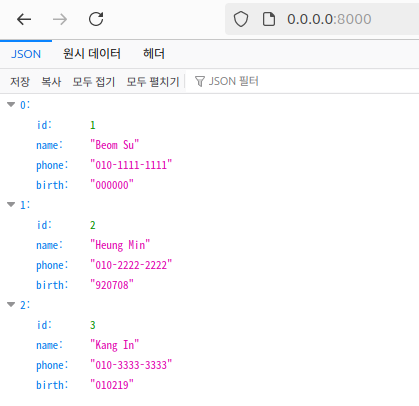
GET
콘솔 창 입력
uvicorn dbapp:app --host 0.0.0.0 --port 8000 --reload> http://your_server_ip:8000 접속
- PHP 연결 시 사용했던 user DB연결(https://velog.velcdn.com/images/neymar_10/post/c0a08b47-e7a7-4074-923b-1e6fa48ea1a3/image.png)
특정 ID 조회
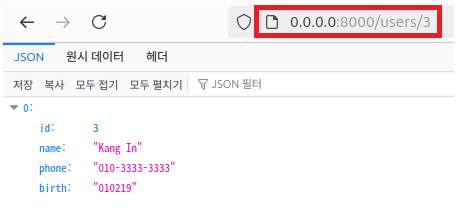
> http://your_server_ip:8000/users/id 접속
POST
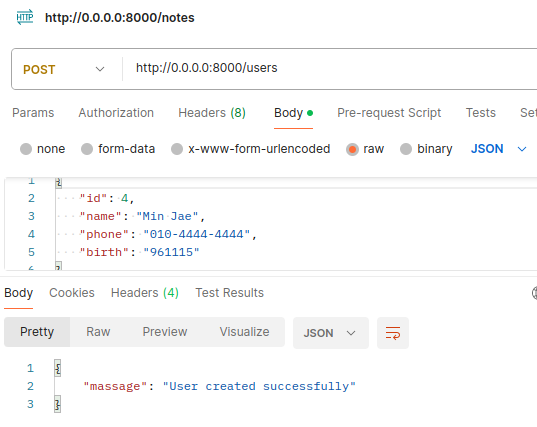
postman -> body탭 입력
{
	"id": 4,
    "name": "Min Jae",
    "phone": "010-4444-4444",
    "birth": "961115"
{
- 메소드 POST로 설정
전체 조회
PUT
postman -> body탭 입력
{
	"id": 1,
    "name": "Beom Su",
    "phone": "010-1111-1111",
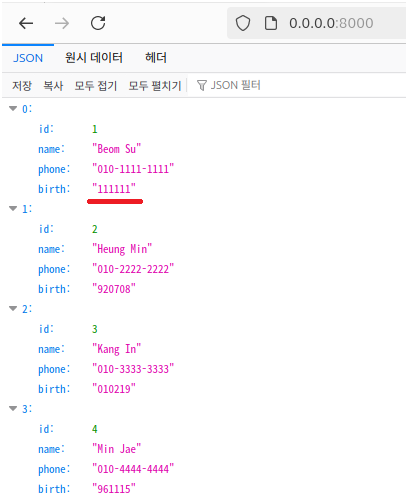
    "birth": "111111"
{
- 메소드 PUT으로 설정
birth를 "111111"로 수정
DELETE
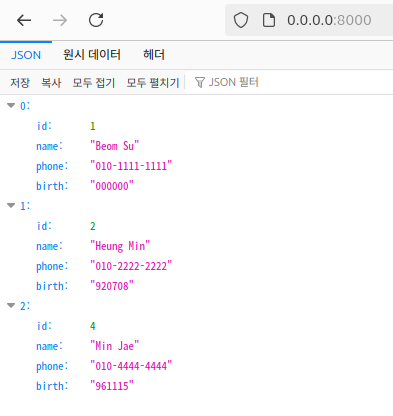
- 메소드 DELETE로 설정
- http://your_server_ip:8000/users/id (DELETE를 원하는 Id 지정)
- Send
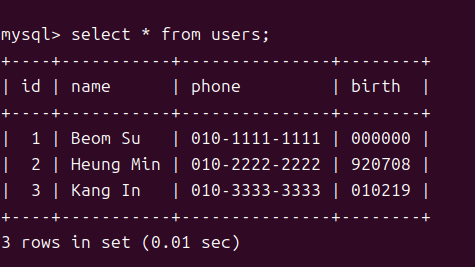
id가 3인 user 삭제

범수의 개발 놀이터😋