
깃허브에서 conflict 해결하고 merge한 후에
git pull origin main 을 때렸는데.....
Auto-merging community/urls.py
CONFLICT (content): Merge conflict in community/urls.py
Auto-merging post/admin.py
CONFLICT (content): Merge conflict in post/admin.py
Auto-merging post/models.py
CONFLICT (content): Merge conflict in post/models.py
Auto-merging post/urls.py
CONFLICT (add/add): Merge conflict in post/urls.py
Auto-merging post/views.py
CONFLICT (content): Merge conflict in post/views.py
Automatic merge failed; fix conflicts and then commit the result.
온갖 conflict 가 생겼음.. 아무튼 잘 해결은 했으나 조금 어질하다..
git pull을 하면, 깃허브의 코드와 내 로컬의 코드의 merge가 이뤄지는 과정에서 많은 빨간 불이 있었던 것으로 추정...
post-list 보는 /post/에서 뜨는 작성하기 버튼을 누르면 post/create 페이지로 넘어가야하는 데 안 넘어가는 건
- post create view와 url, template이 각각에 맞게 설정되지 않아서 발생된 문제였음
- 해결 완료!
github 연동하고 pull해서 다른 팀원분이 구현하신 메인페이지에 나오는 post-list read를 하는 과정에 있어서,
Exception Type: MultiValueDictKeyError
Exception Value:
'title'
문제 원인!
post-list에 있는 글쓰기를 누르는 것 = request.method == GET => post/create.html을 띄우면 되는데,
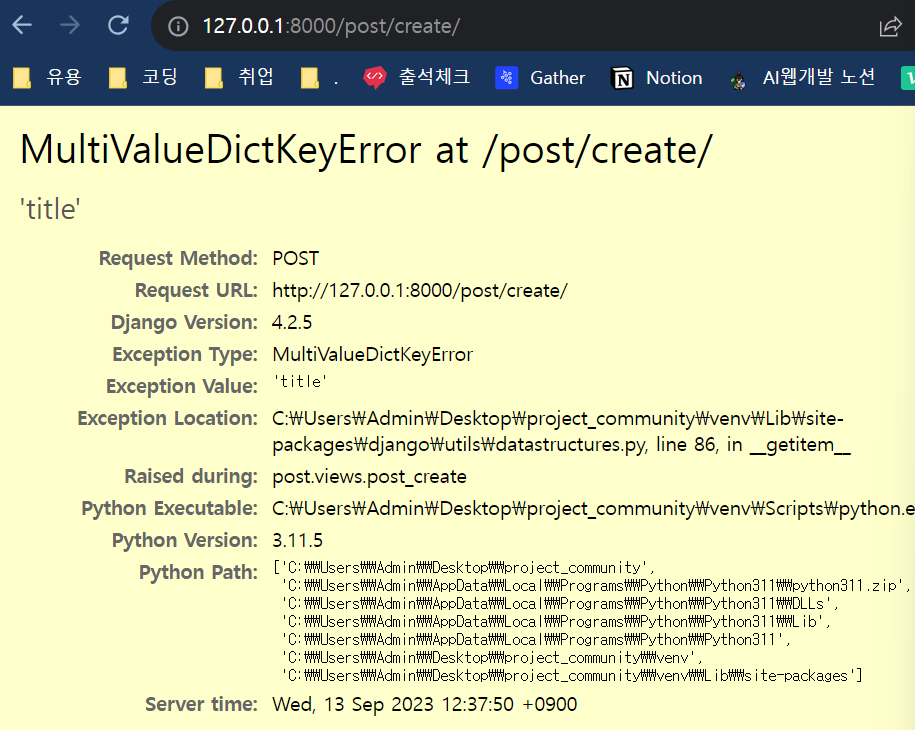
Request method: POST
post/views.py 의 post_create 메소드 정의에서
title=request.POST["title"], 가 문제임.
메인 페이지에서 post-list 안 나오는 이슈
root폴더/urls.py
urlpatterns = [
    path('admin/', admin.site.urls),
    path(
        "",
        post_read, -> 여기를 TemplateView를 써서 post 데이터를 불러오지 못함
        name="root",
    ),
    path('user/', include('user.urls')),
    path('post/', include('post.urls')),
]
상세 페이지에서 이미지 출력되지 않는 이슈
post/templates/detail.html
1.
<img src="{{ post.image_url }}" />
2.
<img src="media/post_pics/{{post_image}}" />

3.
<img src="{{ post.image.url }}" />
4. <img src="/media/post_pics/{{ post.image }}" />
5. <img src="media/post_pics/{{ post_image }}/" />

드디어 해결 !!!!!!!!!!!
<img src="{{post.post_image.url}}" alt="" srcset="">
post_image라고 모델에서 정의를 했으면 그렇게 가져와야지.....
이미지를 수정하면, create할 때 지정한 이미지 저장 폴더인 post_pics에 저장되지 않고 db에만 파일명이 저장되는 이슈
<post/views.py>
update 메소드
def post_update(request, post_id):
	....
    	# 수정 전
		post.post_image = request.Post["post_image"]
        # 수정 후
		post.post_image = request.FILES.get("post_image")
file-img, zip등 파일을 불러 올 때 장고에서는 request.FILE 하나면 된다.
request.FILE
ㄴ 모듈 ㄴ메소드
그리고 front-end에서 form 태그와 같은 거에 넣을 때 꼭 옵션으로enctype="multipart/form-data"
를 꼭 붙여줘야 한다.
- request.FILES["post_image"] vs request.FILES.get("post_image")
- 둘 다 post_image라는 파일을 가져오는 것은 똑같음- request.FILES["post_image"] 를 했을 때 post_image가 null or blank 일 때 MultiValueKeyDictError 가 떠서 view 작동을 멈추게 됨
- 이렇게 작동을 멈추지 않고 끝까지 작동하기 위해 request.FILES.get("post_image")를 사용
- FILES라는 메소드의 get이라는 fuction이 정의되어 있는 것.
깃허브 push conflict 이슈
- 결국 해결한 방법은... git pull origin ->
https://docs.github.com/ko/pull-requests/collaborating-with-pull-requests/addressing-merge-conflicts/resolving-a-merge-conflict-using-the-command-line
새로운 브랜치 만들어서 merge 를 vscode로 진행하고
add -> commit -> 새로 만든 브랜치로 push
-> 드디어 merge완성...
내 두 시간.. 그 시간이었으면 댓글 구현 가능한데 ㅜㅜ 이런 철없는 생각
포스트맨과 선더 클라이언트 활용
- 이유: 화면을 만들지 않아도 데이터를 받고, 보내고 그런 걸 확인하는 용도
POST - header(호출에 대한 설명), body(title, content, img... 와 같은 데이터)
- body를 묶어서 데이터를 보낸다
- body에도 종류가 있는데, 그 중에 form-data -> 오늘 했던
오늘의 인사이트
- 모델에서 정의한 항목들을 잘 기억하자! -> model 즉, erd 설정이 이렇게 중요하구나 -> erd 보면서 하면 되니까.. 위와 같은 오류를 마주할 일 없지..
- image 혹은 엑셀, 파워포인트, zip 등의 파일을 쉽게 불러오기 위한 장고의 request.FILE 를 쓰고, 필수적으로 프론트엔드에 인코딩 타입을 넣어줘야 한다.
- git pull origin main 을 할 때는 브랜치에서 받지 말고, main에서 받기!
