1. map 함수와 image
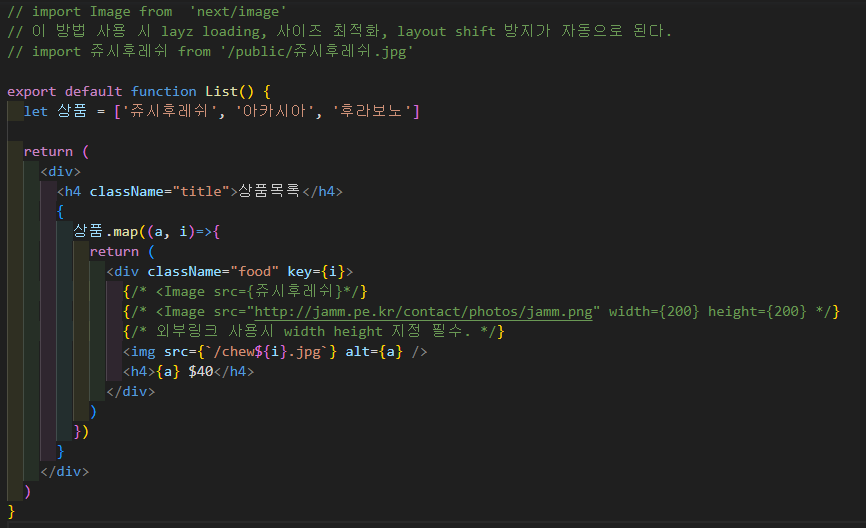
문자열로 이루어진 "상품" 배열을 만들어 map함수를 사용해 보았다.
활용 공식은 이러하다
arr.map(callback(currentValue[, index[, array]])[, thisArg])다음으로 이미지를 삽입하는 2가지 방법이 있다.
첫번째로 public 폴더에 이미지를 저장한 후 사용하는 방법이다.
<img src='/경로' />두번째 방법으로는 상단에 import 후 사용하는 방법인데
import Image from  'next/image'
import 쥬시후레쉬 from '/public/쥬시후레쉬.jpg'

<Image src={쥬시후레쉬}
+lazy loading
+사이즈 최적화
+layout shift 방지
기능들이 자동으로 적용된다고 한다. 댕꿀
예외로 외부링크 이미지 사용도 가능하다.
img태그에 width와 height를 적어주고
next.config.js 파일에 다음과 같이 추가해줘야한다.
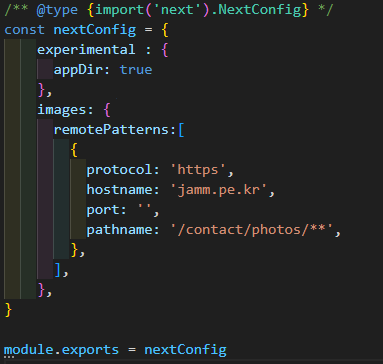
카피카피
<Image src="http://jamm.pe.kr/contact/photos/jamm.png" width={200} height={200}

images: {
      remotePatterns:[
        {
          protocol: 'https',
          hostname: 'jamm.pe.kr',
          port: '',
          pathname: '/contact/photos/**',
        },
      ],
    },
2. component
기본적인 컴포넌트의 형식은 다음과 같다.
function 컴포넌트명() {
  return (
  	HTML 구문
  )
}
Next.js 컴포넌트는 2가지 종류가 있다.
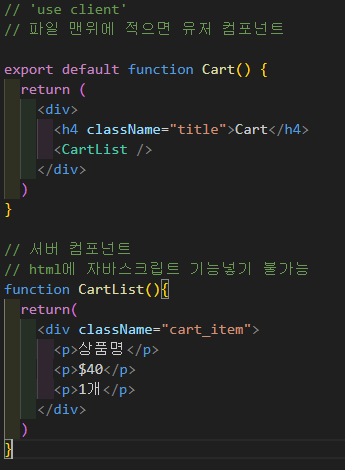
1. server component
Next.js 환경에선 모두 기본적으로 server component가 된다.
- HTML에 자바스크립트 기능 사용이 불가하다.(React Hooks도 마찬가지로 X)
- 이에따라 로딩속도가 빠르고 검색엔진 노출에 유리한 점이 있다.
2. client component
파일 최상단에 'use client'를 작성하면 client component가 된다.
- 따라서 큰 틀은 sever component를 사용하고,
자바스크립트 기능이 필요한 곳에 client component를 사용하면 되겠다.

말많은 개발자의 111강