1. INTRO
ES6, JSX에 이어 익숙해져야할 문법이 추가됐습니다. 컴포넌트라는 개념인데, 어떤 구조로 짜여지는지 알아보았습니다.
2. 컴포넌트
- 클래스형 컴포넌트와 함수형 컴포넌트 구조
클래스형 컴포넌트
render 는 화면에 보여질 내용을 반환하는데, 반드시 재정의돼야한다.
import { Component } from "react";

class MyApp extends Component {
    render() {
        return (
            <></>
        );
    }
}
export default MyApp;
함수형 컴포넌트
반환해주는 값이 화면에 출력된다.
function MyApp() {
     return (
         <>   </>
     );
}
export default MyApp;
함수 표현식으로 변경
const MyApp = function() {
     return (
         <>   </>
     );
}
export default MyApp;
화살표 함수로 변경
const MyApp = () => {
     return (
         <>   </>
     );
}
export default MyApp;
3. Props
properties의 줄임말. 컴포넌트의 속성을 설정할 때 사용하며, props 값은 해당 컴포넌트를 사용하는 부모 컴포넌트에서 설정한다. 컴포넌트 자신은 해당 props 변수를 읽기 전용으로 사용만 가능하다.
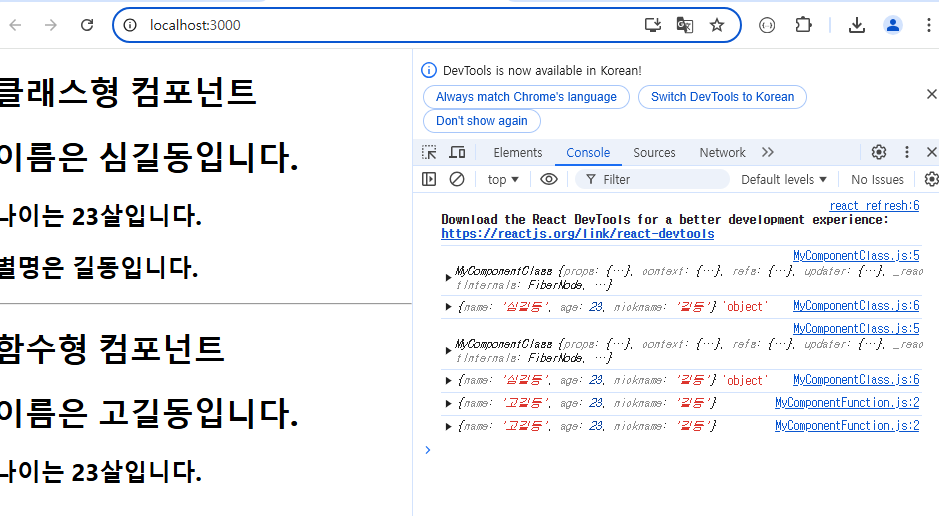
- 이름을 전달해서 출력하도록 수정
[App.js] <= 부모 컴포넌트
import { Component } from "react";
import MyComponentClass from "./MyComponentClass";
import MyComponentFunction from "./MyComponentFunction";

class App extends Component {
  render() {
    return (
      <>
        <h1>클래스형 컴포넌트</h1>
        <MyComponentClass name="홍길동" />
        <hr />
        <h1>함수형 컴포넌트</h1>
        <MyComponentFunction name="고길동" />
      </>
    );
  }
}

export default App;
[MyComponentClass.js] <= 컴포넌트에서 props 값을 활용하도록 수정
props라는 명명을 바꿔서 받으면 안된다.
import { Component } from "react";

class MyComponentClass extends Component{
    render(){
        console.log(this);
        console.log(this.props, typeof this.props);
        return (
            <>
                <h1>이름은 {this.props.name}입니다.</h1>
                <h2>나이는 23살입니다.</h2>
            </>
        );
    }
}
export default MyComponentClass;
[MyComponentFunction.js] <= 컴포넌트에서 props 값을 활용하도록 수정
함수는 props 변수를 매개변수로 받는다. 매개변수 명이 바뀌어도 인식하지만 관례적으로 props 라는 명명을 사용한다.
function MyComponentFunction(props) {
    console.log(props);
    return (
        <>
            <h1>이름은 {props.name}입니다.</h1>
            <h2>나이는 23살입니다.</h2>
        </>
    );
}

export default MyComponentFunction;
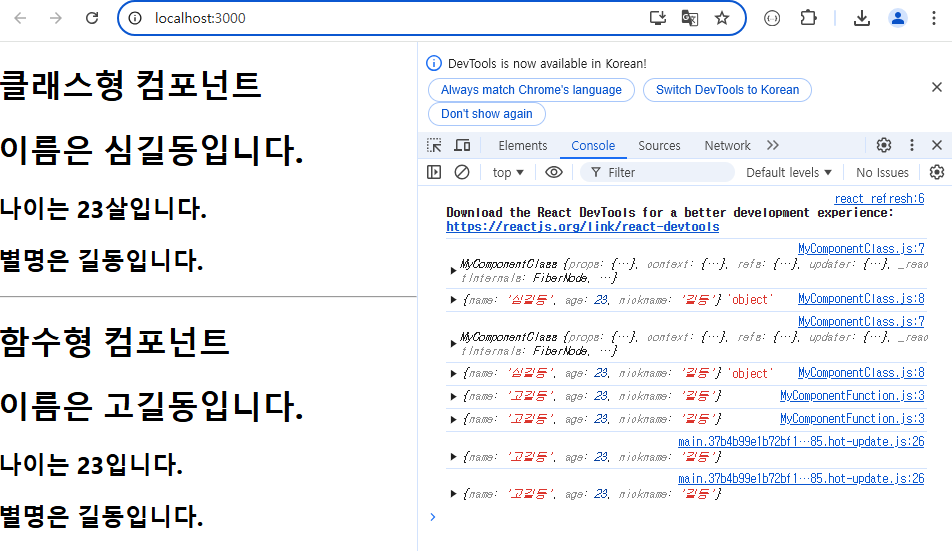
- 여러 값을 자식 컴포넌트로 전달하도록 수정
[App.js]
값 전달 시 스트링은 {}생략 가능.
import { Component } from "react";
import MyComponentClass from "./MyComponentClass";
import MyComponentFunction from "./MyComponentFunction";

class App extends Component {
  render() {
    return (
      <>
        <h1>클래스형 컴포넌트</h1>
        <MyComponentClass name="신길동" age={23} nickname={"길동"} />
        <hr />
        <h1>함수형 컴포넌트</h1>
        <MyComponentFunction name="고길동" age={40} nickname="길동" />
      </>
    );
  }
}

export default App;
[MyComponentClass.js]
객체 비구조화를 이용해서 코드를 단순화할 수 있다.
import { Component } from "react";

class MyComponentClass extends Component {
    render() {
        **const {name, age, nickname} = this.props;**

        console.log(this);
        console.log(this.props, typeof this.props);

        return (
            <>
                <h1>이름은 {name}입니다.</h1>
                <h2>나이는 {age}살입니다.</h2>
                <h2>별명은 {nickname}입니다.</h2>
            </>
        );
    }
}

export default MyComponentClass;
[MyComponentFunction.js]
객체 비구조화를 이용해서 코드를 단순화할 수 있다. 매개변수 자체를 비구조화해서 받는게 통상적인 방식이다.
function MyComponentFunction( {name, age, nickname}) {

    //console.log(props);
    return (
        <>
            <h1>이름은 {name}입니다.</h1>
            <h2>나이는 {age}입니다.</h2>
            <h2>별명은 {nickname}입니다.</h2>
        </>
    );
}

export default MyComponentFunction;
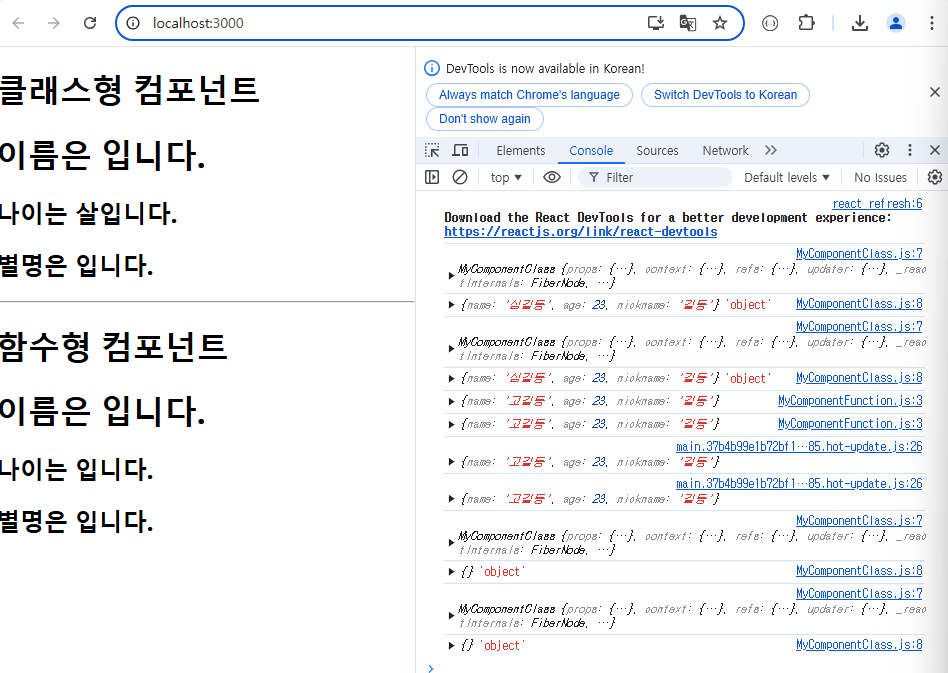
- props 값이 누락된 경우
[App.js]
props 값을 전달하지 않도록 수정 시, 내용이 출력되지 않는 걸 확인할 수 있다.
import { Component } from "react";
import MyComponentClass from "./MyComponentClass";
import MyComponentFunction from "./MyComponentFunction";

class App extends Component {
  render() {
    return (
      <>
        <h1>클래스형 컴포넌트</h1>
        <MyComponentClass />
        <hr />
        <h1>함수형 컴포넌트</h1>
        <MyComponentFunction />
      </>
    );
  }
}

export default App;
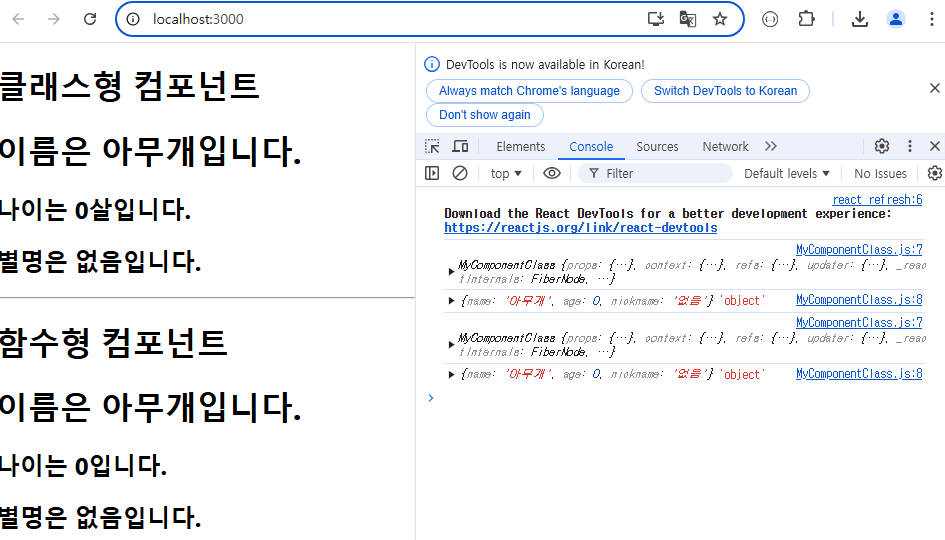
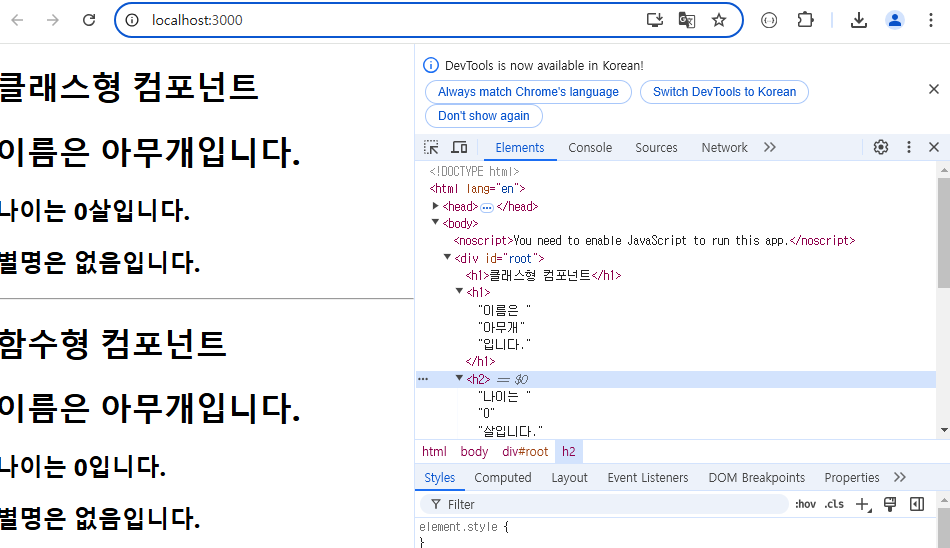
이때, defaultProps를 설정해 props 변수가 누락된 경우 기본값을 설정해 놓을 수 있다.
[MyComponentClass.js]
MyComponentClass.defaultProps = {
    name: "아무개",
    age: 0,
    nickname: "없음"
};

export default MyComponentClass;
[MyComponentFunction.js]
함수형 컴포넌트의 경우, 함수의 디폴트 파라미터로 대체해야 함.
https://react.dev/blog/2024/04/25/react-19-upgrade-guide#removed-proptypes-and-defaultprops 참고.
function MyComponentFunction( {name = "아무개", age = 0, nickname = "없음"}) {4. props.children
[App.js]
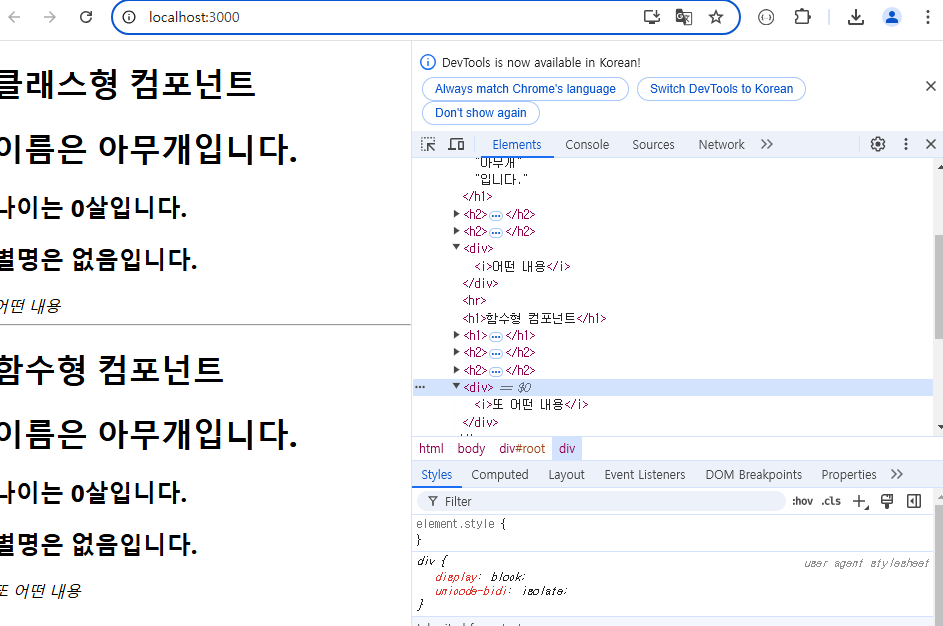
자식 컴포넌트가 내용(contents)를 포함하도록 수정
=> 자식 컴포넌트의 내용(< i> 태그의 내용)이 출력되지 않는 것을 확인
 <>
        <h1>클래스형 컴포넌트</h1>
        <MyComponentClass>
          <i>어떤 내용</i>
        </MyComponentClass>
        <hr />
        <h1>함수형 컴포넌트</h1>
        <MyComponentFunction>
          <i>또 어떤 내용</i>
        </MyComponentFunction>
</>
[MyComponentClass.js]
클래스 컴포넌트에 내용을 출력하는 코드를 추가해줘야한다.
 render() {
        const { name, age, nickname } = this.props;
        return (
            <>
                <h1>이름은 {name}입니다.</h1>
                <h2>나이는 {age}살입니다.</h2>
                <h2>별명은 {nickname}입니다.</h2>
                <div>{this.props.children}</div>
            </>
        );
    }
[MyComponentFunction.js]
함수 컴포넌트에 내용을 출력하는 코드를 추가해주면 된다.
function MyComponentFunction({ name = "아무개", age = 0, nickname = "없음", children }) {
    return (
        <>
            <h1>이름은 {name}입니다.</h1>
            <h2>나이는 {age}살입니다.</h2>
            <h2>별명은 {nickname}입니다.</h2>
            <div>{children}</div>
        </>
    );
}

export default MyComponentFunction;
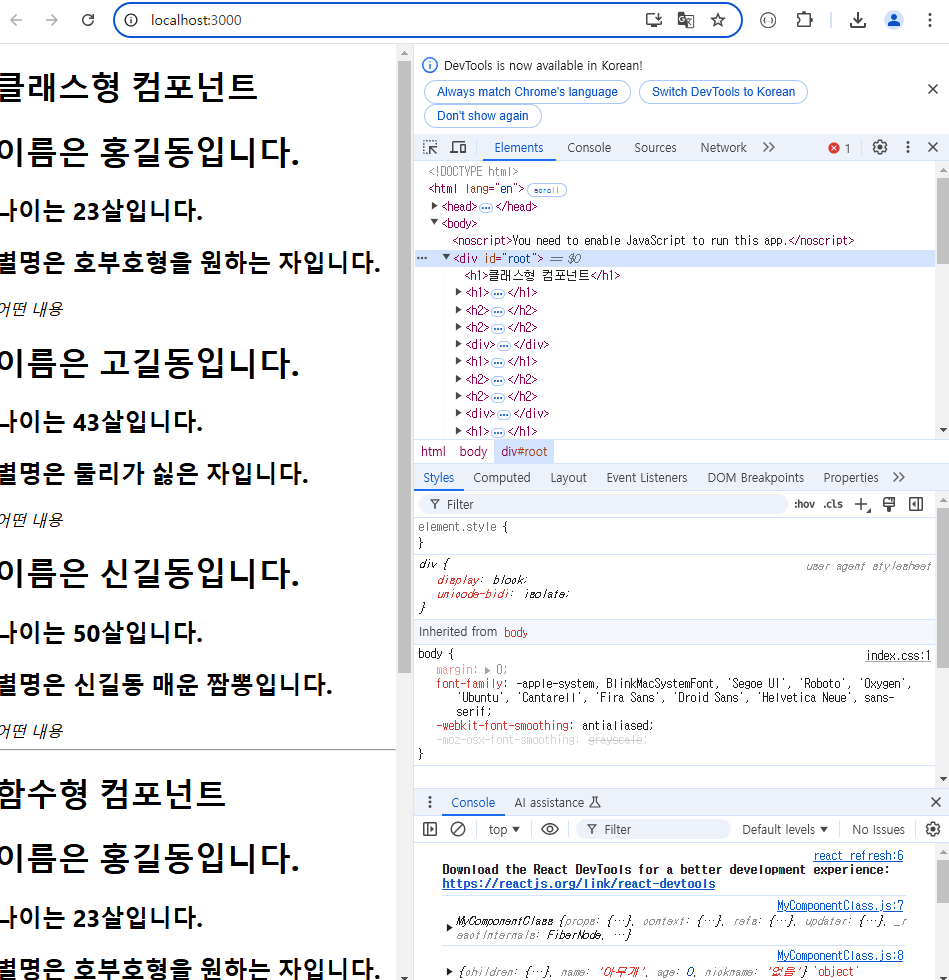
5. 객체 배열 형태의 데이터를 map 함수를 이용해서 출력
[App.js]
import { Component } from "react";
import MyComponentClass from "./MyComponentClass";
import MyComponentFunction from "./MyComponentFunction";

const datas = [
  { name: "홍길동", age: 23, nickname: "호부호형을 원하는 자" },
  { name: "고길동", age: 43, nickname: "둘리가 싫은 자" },
  { name: "신길동", age: 50, nickname: "신길동 매운 짬뽕" }
];

class App extends Component {
  render() {
    return (
      <>
        <h1>클래스형 컴포넌트</h1>
        {
          datas.map(data =>
            <MyComponentClass name={data.name} age={data.age} nickname={data.nickname}>
              <i>어떤 내용</i>
            </MyComponentClass>
          )
        }
        <hr />
        <h1>함수형 컴포넌트</h1>
        {
          datas.map(data =>
            <MyComponentFunction name={data.name} age={data.age} nickname={data.nickname}>
              <i>또 어떤 내용</i>
            </MyComponentFunction>
          )
        }
      </>
    );
  }
}

export default App;
6. 신호등 모양을 출력하는 컴포넌트 작성
App.js 파일에 일정한 크기의 Lamp를 포함한 TrafficLight 컴포넌트를 포함
TrafficLight 컴포넌트는 빨강, 초록, 노랑 속성을 가지는 같은 크기의 Lamp 컴포넌트 세 개를 포함
Lamp 컴포넌트는 색상과 크기를 부모 컴포넌트(TrafficLight)로 부터 전달 받아서 해당 색상과 크기의 원을 출력
100px의 붉은색 동그라미를 출력 ⇒ \<div style={{ width: 100, height: 100, borderRadius: 50, backgroundColor: 'red' }} />
function App() {
  return (
    <>
      <div style={{ width: 100, height: 100, borderRadius: 50, backgroundColor: 'red' }} />
      <div style={{ width: 100, height: 100, borderRadius: 50, backgroundColor: 'green' }} />
      <div style={{ width: 100, height: 100, borderRadius: 50, backgroundColor: 'yellow' }} />
    </>
  );
}

export default App;
- TrafficLight 컴포트를 정고 해당 컴포넌트를 사용, 램프의 크기를 props 변수로 받도록 수정
[TrafficLight.js]
함수형 컴포넌트로 작성.
export default function TrafficLight({ size }) {
    return (
        <>
            <div style={{ width: size, height: size, borderRadius: size / 2, backgroundColor: 'red' }} />
            <div style={{ width: size, height: size, borderRadius: size / 2, backgroundColor: 'green' }} />
            <div style={{ width: size, height: size, borderRadius: size / 2, backgroundColor: 'yellow' }} />
        </>
    );
}
[App.js]
수정
import { Component } from "react";
import MyComponentClass from "./MyComponentClass";
import MyComponentFunction from "./MyComponentFunction";
import TrafficLight from "./TrafficLight";

function App() {
  return (
    <>
      <TrafficLight size={100}/>
      <TrafficLight size={50}/>
      <TrafficLight size={20}/>
    </>
  );
}

export default App;
- 램프를 출력하는 \를 Lamp 컴포넌트로 정의
[TrafficLight.js]
function Lamp({ size, color }) {
    return (
        <div style={{ width: size, height: size, borderRadius: size / 2, backgroundColor: color }} />
    );
}

export default function TrafficLight({ size }) {
    return (
        <>
            <Lamp size={size} color="red" />
            <Lamp size={size} color="green" />
            <Lamp size={size} color="yellow" />
        </>
    );
}
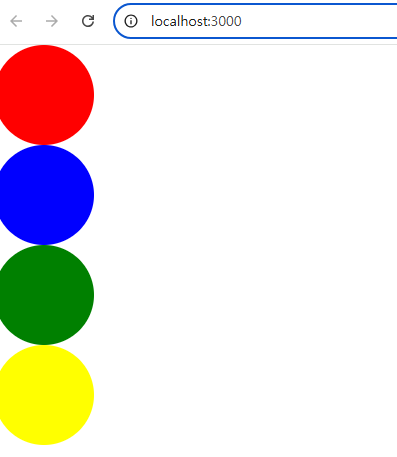
- App.js에서 신호등의 크기와 색깔을 전달해서 출력하도록 수정
[App.js]
import TrafficLight from "./TrafficLight";

function App() {
  const tlSize = 100;
  const tlColors = ["red", "blue", "green", "yellow"];

  return (
    <>
      <TrafficLight size={tlSize} colors={tlColors} />
    </>
  );
}

export default App;
[TraffficLight.js]
function Lamp({ size, color }) {
    return (
        <div style={{ width: size, height: size, borderRadius: size / 2, backgroundColor: color }} />
    );
}

export default function TrafficLight({ size, colors }) {
    return (
        <>
            {
                colors.map(color => <Lamp size={size} color={color} />)
            }
        </>
    );
}
위의 코드처럼 App.js에서 값을 제어하며 재활용성을 높일 수 있다.
7. LAB 댓글 컴포넌트 제작
댓글을 작성한 작성자의 이미지, 작성자의 이름, 댓글 내용을 출력하는 컴포넌트를 제작
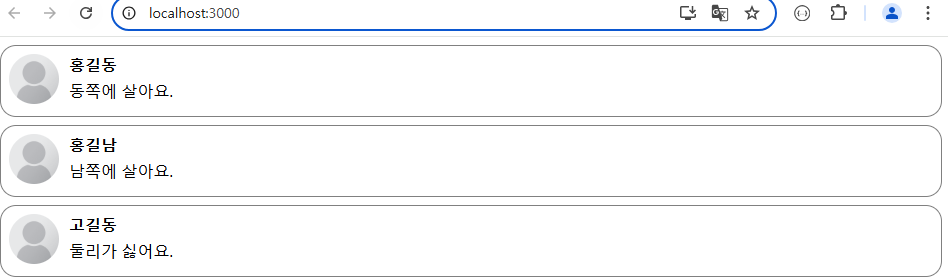
- 컴포넌트 구조 정의
>>> src 폴더 아래에 comment 폴더를 생성하고, Comment.js 파일을 추가
>>> comment 폴더에 CommentList.js 파일을 추가
>>> App.js 파일에 CommentList 컴포넌트를 추가
- 컴포넌트 구현
>>> Comment 컴포넌트에 작성한 사람의 이미지, 이름, 댓글 내용을 보여주는 코드를 추가
사람 이미지 ⇒ https://upload.wikimedia.org/wikipedia/commons/8/89/Portrait_Placeholder.png

>>> Comment 컴포넌트에 스타일을 추가
>>> Comment 컴포넌트에 props 변수로 전달된 값을 출력하도록 변경
>>> CommentList 컴포넌트에 props 값을 설정해서 Comment 컴포넌트를 호출하도록 수정
- 댓글 데이터를 이용하도록 수정
>>> CommentList.js 파일에 댓글 데이터를 추가
>>> CommentList 파일에 댓글 데이터를 이용해서 Comment가 출력되도록 수정
[CommentList.js]
import Comment from "./Comment";

const comments = [
    { name: "홍길동", comment: "동쪽에 살아요." },
    { name: "홍길남", comment: "남쪽에 살아요." },
    { name: "고길동", comment: "둘리가 싫어요." }
];

function CommentList() {
    return (
        <>
            {   // 익명 함수 표현식
                comments.map(function (c) {
                    return <Comment name={c.name} comment={c.comment} />;
                })
            }
            {   // 화살표 함수
                comments.map(c => {
                    return <Comment name={c.name} comment={c.comment} />;
                })
            }
            {   // 화살표 함수 축약
                comments.map(c => <Comment name={c.name} comment={c.comment} />)
            }
        </>
    );
}
export default CommentList;
>>> 위의 코드를 개발자 도구로 확인하면 key 누락으로 경고가 뜬다.
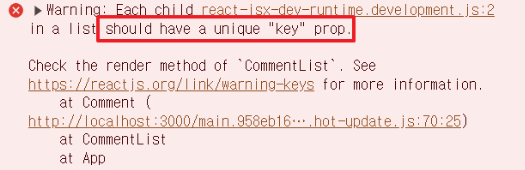
위의 같은 경고가 나오면 key값을 넣어 해결한다.
[CommentList.js]
import Comment from "./Comment";

const comments = [
    { name: "홍길동", comment: "동쪽에 살아요." },
    { name: "홍길남", comment: "남쪽에 살아요." },
    { name: "고길동", comment: "둘리가 싫어요." }
];

function CommentList() {
    return (
        <>
            {   // 익명 함수 표현식
                comments.map(function (c, i) {
                    return <Comment key={i} name={c.name} comment={c.comment} />;
                })
            }
            {   // 화살표 함수
                comments.map((c,i) => {
                    return <Comment key={i} name={c.name} comment={c.comment} />;
                })
            }
            {   // 화살표 함수 축약
                comments.map((c,i) => <Comment key={i} name={c.name} comment={c.comment} />)
            }
        </>
    );
}
export default CommentList;
- 글쓴이 별로 이미지를 다르게 출력하도록 수정
사람 이미지
홍길동 ⇒ https://png.pngtree.com/png-clipart/20190705/original/pngtree-vector-business-men-icon-png-image_4186858.jpg
홍길남 ⇒ https://png.pngtree.com/png-clipart/20190630/original/pngtree-vector-avatar-icon-png-image_4162757.jpg
고길동 ⇒ https://png.pngtree.com/png-clipart/20190520/original/pngtree-male-worker-icon-graphic-png-image_3668949.jpg


>>> CommentList 컴포넌트의 댓글 데이터에 이미지 정보를 추가하고 Comment 컴포넌트의 props 변수로 전달
[CommentList.js]
import Comment from "./Comment";

const comments = [
    { name: "홍길동", comment: "동쪽에 살아요." , picture: "https://png.pngtree.com/png-clipart/20190705/original/pngtree-vector-business-men-icon-png-image_4186858.jpg"},
    { name: "홍길남", comment: "남쪽에 살아요." , picture: "https://png.pngtree.com/png-clipart/20190630/original/pngtree-vector-avatar-icon-png-image_4162757.jpg"},
    { name: "고길동", comment: "둘리가 싫어요." , picture: "https://png.pngtree.com/png-clipart/20190520/original/pngtree-male-worker-icon-graphic-png-image_3668949.jpg"}
];

function CommentList() {
    return (
        <>
            {   // 익명 함수 표현식
                comments.map(function (c, i) {
                    return <Comment key={i} name={c.name} comment={c.comment} picture={c.picture}/>;
                })
            }
            {   // 화살표 함수
                comments.map((c,i) => {
                    return <Comment key={i} name={c.name} comment={c.comment} picture={c.picture}/>;
                })
            }
            {   // 화살표 함수 축약
                comments.map((c,i) => <Comment key={i} name={c.name} comment={c.comment} picture={c.picture}/>)
            }
        </>
    );
}
export default CommentList;
>>> Comment 컴포넌트에 props 변수로 전달된 이미지를 사용하도록 수정
[Comment.js]
function Comment(props) {
    const styles = {
        wrapper: {
            display: "flex",
            flexDirection: "row",
            border: "1px solid gray",
            borderRadius: 16,
            padding: 8,
            margin: 8
        },
        image: {
            width: 50,
            height: 50,
            borderRadius: 25
        },
        contentContainer: {
            marginLeft: 10,
            display: "flex",
            flexDirection: "column"
        },
        nameText: {
            color: "black",
            fontSize: 16,
            fontWeight: "bold",
            marginBottom: 5
        },
        commentText: {
            color: "black",
            fontSize: 16
        }
    };
    return (
        <div style={styles.wrapper}>
            {/* 작성한 사람의 이미지 */}
            <div>
               {/* <img style={styles.image} src="https://upload.wikimedia.org/wikipedia/commons/8/89/Portrait_Placeholder.png" /> */}
                <img style={styles.image} src ={props.picture}/>
            </div>

            {/* 작성한 사람의 이름과 댓글 내용 */}
            <div style={styles.contentContainer}>
                <span style={styles.nameText}>{props.name}</span>
                <span style={styles.commentText}>{props.comment}</span>

            </div>
        </div>
    );
}

export default Comment;
[App.js]
import CommentList from "./comment/CommentList";

function App() {
  return (
    <>
      <CommentList />
    </>
  );
}
export default App;
>>> 홍길동만 출력되도록 수정
<h1>홍길동만 출력</h1>
            {   // filter 메서드를 이용하는 경우
                comments
                    .filter(c => c.name === "홍길동")
                    .map((c, i) => <Comment key={i} name={c.name} comment={c.comment} picture={c.picture} />)
            }
            {   // && 연산자를 이용한 조건부 렌더링
                comments
                    .map((c, i) => c.name === "홍길동" && <Comment key={i} name={c.name} comment={c.comment} picture={c.picture} />)
            }
            {   // 삼항연산자를 이용
                comments
                    .map((c, i) => c.name === "홍길동" ? <Comment key={i} name={c.name} comment={c.comment} picture={c.picture} /> : null)
            }
- 댓글 정보와 사용자 정보가 분리되어 있는 경우
>>> 댓글 작성자 이름과 동일한 이름을 가진 사용자 정보를 반환하는 함수를 만들어서 사용
import Comment from "./Comment";

const users = [
    { name: "홍길동", picture: "https://png.pngtree.com/png-clipart/20190705/original/pngtree-vector-business-men-icon-png-image_4186858.jpg" },
    { name: "홍길남", picture: "https://png.pngtree.com/png-clipart/20190630/original/pngtree-vector-avatar-icon-png-image_4162757.jpg" },
    { name: "고길동", picture: "https://png.pngtree.com/png-clipart/20190520/original/pngtree-male-worker-icon-graphic-png-image_3668949.jpg" }
];

const comments = [
    { name: "홍길동", comment: "동쪽에 살아요." },
    { name: "홍길남", comment: "남쪽에 살아요." },
    { name: "고길동", comment: "둘리가 싫어요." }
];

function getUserPicture(name) {
    return users.filter(user => user.name === name)[0].picture;
}

function CommentList() {
    return (
        <>
            <h1>모두 출력</h1>
            {
                comments.map((c, i) => <Comment key={i} name={c.name} comment={c.comment} picture={getUserPicture(c.name)} />)
            }
        </>
    );
}
export default CommentList;
>>> getUserPicture 함수를 표현식에 직접 기술
<>
            <h1>모두 출력</h1>
            {
                comments.map((c, i) => <Comment key={i} name={c.name} comment={c.comment} picture={users.filter(user => user.name === c.name)[0].picture} />)
            }
        </>
>>> find 함수로 대체
find는 처음으로 일치하는 배열 요소를 반환하는 함수로, 배열 인덱스를 사용할 필요가 없다.
<>
            <h1>모두 출력</h1>
            {
                comments.map((c, i) => <Comment key={i} name={c.name} comment={c.comment} picture={users.find(user => user.name === c.name).picture} />)
            }
        </>
- 댓글 정보와 사용자 정보를 결합한 새로운 데이터를 정의해서 활용
const users = [
    { name: "홍길동", picture: "https://png.pngtree.com/png-clipart/20190705/original/pngtree-vector-business-men-icon-png-image_4186858.jpg" },
    { name: "홍길남", picture: "https://png.pngtree.com/png-clipart/20190630/original/pngtree-vector-avatar-icon-png-image_4162757.jpg" },
    { name: "고길동", picture: "https://png.pngtree.com/png-clipart/20190520/original/pngtree-male-worker-icon-graphic-png-image_3668949.jpg" }
];

const comments = [
    { name: "홍길동", comment: "동쪽에 살아요." },
    { name: "홍길남", comment: "남쪽에 살아요." },
    { name: "고길동", comment: "둘리가 싫어요." }
];

**const commentsWithPicture = comments.map(c => ({ ...c, picture: users.find(u => u.name === c.name).picture }));**

function CommentList() {
    return (
        <>
            <h1>모두 출력</h1>
            {
                **commentsWithPicture.map((c, i) => <Comment key={i} name={c.name} comment={c.comment} picture={c.picture} />)**
            }
        </>
    );
}
export default CommentList;
- 사용자 정보에 주민번호가 전달됐을 때, 남녀 구분을 이름 뒤에 출력하도록 수정 예) 홍길동 (남)
import Comment from "./Comment";

const users = [
    { name: "홍길동", regno: "701010-1457934", picture: "https://png.pngtree.com/png-clipart/20190705/original/pngtree-vector-business-men-icon-png-image_4186858.jpg" },
    { name: "홍길남", regno: "201010-3457934", picture: "https://png.pngtree.com/png-clipart/20190630/original/pngtree-vector-avatar-icon-png-image_4162757.jpg" },
    { name: "고길동", regno: "211010-4157934", picture: "https://png.pngtree.com/png-clipart/20190520/original/pngtree-male-worker-icon-graphic-png-image_3668949.jpg" }
];

const comments = [
    { name: "홍길동", comment: "동쪽에 살아요." },
    { name: "홍길남", comment: "남쪽에 살아요." },
    { name: "고길동", comment: "둘리가 싫어요." }
];

function getUserGender(name) {
    const regno = users.find(u => u.name === name).regno;
    return [1, 3].includes(Number(regno[7])) ? "남" : "여";
}

const commentsWithPicture = comments.map(c => ({
    ...c,
    picture: users.find(u => u.name === c.name).picture,
    name: `${c.name} (${getUserGender(c.name)})`
}));

function CommentList() {
    return (
        <>
            <h1>모두 출력</h1>
            {
                commentsWithPicture.map((c, i) => <Comment key={i} name={c.name} comment={c.comment} picture={c.picture} />)
            }
        </>
    );
}
export default CommentList;
OUTRO
=와 :를 쓰는 타이밍, ','와 {}, (), ""를 쓰는 타이밍을 잘 모르겠다. 계속 보면서 친숙해져야할 것 같다. 2시 반쯤엔 문법도 복잡하고 집중력도 흐트러져서 힘들었다... 쉬는 시간을 잘 활용해서 집중력을 높일 수 있게 해야겠다.