- if문
var x = 4
if x < 5 {
print("5보다 작습니다")
}
-> 출력 : 5보다 작습니다
if 불리언 표현식 {
// 불리언 표현식이 참일 경우 수행될 스위프트 코드, 거짓일 경우 수행 안 됨
}
- if-else문
var x = 7
if x % 2 == 0 {
print("짝수입니다")
}else{
print("홀수입니다")
}
-> 출력 : 홀수입니다
- if문이 거짓이여도 실행되는 코드
if 불리언 표현식 {
// 표현식이 참일 경우 실행되는 코드
} else {
// 표현식이 거짓일 경우 실행되는 코드
}
- 다중 if-else문
var num = 5
if (num == 1 || num == 3){
print("당신은 남성이군요!\n")
}else if (num == 2 || num == 4){
print("당신은 여성이군요!\n")
}else {
print("당신은 대한민국 사람이 아니군요!\n")
}
-> 출력 : 당신은 대한민국 사람이 아니군요!
- 응용
다중 if-else문 switch-case문으로 변경하기
var num = 6
switch (num)
{
case 1,3:
print("당신은 남성이군요!\n")
case 2,4:
print("당신은 여성이군요!\n")
default:
print("당신은 대한민국 사람이 아니군요!\n")
}
-> 출력 : 당신은 대한민국 사람이 아니군요!
- guard문
- 표현식이 거짓으로 판단될 경우에 수행될 else절을 포함해야 함
- else절에 속한 코드는 현재의 코드 흐름을 빠져 나갈 수 있는 구문(return, break, continue, throw구문) 포함
- 또는 다른 함수를 else 코드 블록 안에서 호출할 수도 있음
- 특정 조건에 맞지 않을 경우에 현재의 함수나 반복문에서 빠져 나갈 수 있도록 하는 '조기 출구(early exit)' 전략을 제공
guard <불리언 표현식> else {
// 표현식이 거짓일 경우에 실행될 코드
<코드 블록을 빠져 나갈 구문>
}
// 표현식이 참일 경우에 실행되는 코드는 이곳에 위치
- if~let vs guard~let
func printName(firstName:String, lastName:String?){
// if let
if let lName = lastName { // lastName이 nil이 아니면
print(lName,firstName)
}
else {
print("성이 없네요!")
}
}
printName(firstName: "길동", lastName:"홍")
printName(firstName: "길동", lastName:nil)
-> 출력 :
홍 길동
성이 없네요!
func printName(firstName:String, lastName:String?){
// guard let
guard let lName = lastName else { // lastName이 nil이면
print("성이 없네요!")
return // early exit
}
print(lName,firstName)
}
printName(firstName: "길동", lastName:"홍")
printName(firstName: "길동", lastName:nil)
-> 출력 : 홍 길동
성이 없네요!
func multiplyByTen(value: Int?) {
guard let number = value, number < 10 else { // 조건식이 거짓일 때 실행 되어 에러메시지 출력하고 함수에서 빠져나가도록 return문이 실행
print("수가 없거나 10보다 크다.")
return
}
print(number*10) //조건식이 참일 때 실행, 주의 : number를 여기서도 사용 가능
}
multiplyByTen(value: 3) //30
multiplyByTen(value: nil) // 수가 없거나 10보다 크다
multiplyByTen(value: 5) // 50
- guard문은 값을 언래핑하기 위해서 옵셔널 바인딩을 이용하며 그 그값이 10보다 	작은지 검사
- 언래핑 된 number 변수를 guard문 밖에 있는 코드가 사용할 수 있음- switch-case문
각 case문 마지막에 break가 자동으로 들어있음
var value = 7
switch value
{
case 0:
print("영")
case 1:
print("일")
case 2:
print("이")
case 3:
print("삼")
case 4:
print("사")
case 5:
print("오")
case 6:
print("육")
case 7:
print("칠")
case 8:
print("팔")
case 9:
print("구")
default:
print("10이상")
}
-> 출력 : 칠
let someCharacter: Character = "b"
switch someCharacter {
case "a":
print("The first letter of the alphabet") // case 다음 실행 가능한 문장이 없으면 에러가 남
case "z":
print("The last letter of the alphabet")
default:
print("Some other character")
}
-> 출력 : Some other character
- 응용
switch-case문 만들어보기
var month = 1
switch (month)
{
case 3,4,5:
print("봄 입니다\n")
case 6,7,8:
print("여름 입니다\n")
case 9,10,11:
print("가을 입니다\n")
case 12,1,2:
print("겨울 입니다\n")
default:
print("월을 잘못 입력하셨습니다\n")
}
-> 출력 : 겨울 입니다
- switch-case문에서 범위 지정 매칭
let num = 333
let count : String
switch num {
case 0...9:
count = "한자리 수"
case 10...99:
count = "두자리 수"
case 100...999:
count = "세자리 수"
default:
count = "네자리 수 이상"
}
print("(count)입니다.")
-> 출력 : 세자리 수입니다.
- BMI 계산 결과 판정 switch-case문으로 변경하기
let weight = 60.0
let height = 170.0
let bmi = weight / (heightheight0.0001) // kg/m*m
var body = ""switch bmi {
case 40...:
body = "3단계 비만"
case 30...40:
body = "2단계 비만"
case 25...30:
body = "1단계 비만"
case 18.5...25:
body = "정상"
default:
body = "저체중"
}
print("BMI: (bmi), 판정: (body)")
-> 출력 : BMI: 20.761245674740483, 판정: 정상
- 응용
let weight = 140.0
let height = 170.0
let bmi = weight / (heightheight0.0001) // kg/m*m
var body = ""switch bmi {
case 50...:
body = "위험 운동 필요"
case 40...50:
body = "3단계 비만"
case 30...40:
body = "2단계 비만"
case 25...30:
body = "1단계 비만"
case 18.5...25:
body = "정상"
default:
body = "저체중"
}
print("BMI: (bmi), 판정: (body)")
-> 결과 : BMI: 51.90311418685121, 판정: 위험 운동 필요
- switch-case에서 where절 사용
값이 속하는 범위 뿐만 아니라 그 숫자가 홀수인지 짝수인지도 검사
var temperature = 67 // 67은 홀수이기 때문에 default 출력
switch (temperature)
{
case 0...49 where temperature % 2 == 0:
print("Cold and even")
case 50...79 where temperature % 2 == 0:
print("Warm and even")
case 80...110 where temperature % 2 == 0:
print("Hot and even")
default:
print("Temperature out of range or odd")
}
-> 출력 : Temperature out of range or odd
- where절 예제
var temperature = 22
switch (temperature)
{
case 0...49 where temperature > 40:
print("cold and even")
case 50...79 where temperature > 70:
print("warm and even")
case 80...110 where temperature > 100:
print("hot and even")
default:
print("Temperature out of range or odd")
}
-> 출력 : Temperature out of range or odd
- fallthrough문
case별로 빠져 나가지 않고 아래로 계속 내려가게 하려면 fallthrough문 사용
var value = 3
switch (value)
{
case 4:
print("4")
fallthrough
case 3:
print("3")
fallthrough
case 2:
print("2")
fallthrough
default:
print("1")
}
-> 출력 :
3
2
1
- 함수
매개변수(parameter, 인자)와 인수(argument)는 차이점이 있음
함수 정의부의 값을 매개변수, 호출 시의 값은 아규먼트라고 부름
#include <stdio.h>
void Fun(int Param) // parameter(매개변수, 인자), 형식 매개변수(formal parameter)
{
printf("%d",Param);
}
int main()
{
Fun(10); // 10은 argument(인수), 실 매개변수(actual parameter)
return 0;
}
-
메서드 (method)
특정 클래스, 구조체, 열거형 내의 함수
함수를 스위프트 클래스 내에 선언하면 메서드라 부름 -
함수 선언 방법
func <함수명> (<매개변수 이름>: <매개변수 타입>, <매개변수 이름>: <매개변수 타입>,... ) -> <반환값 타입>
{
// 함수 코드
}
// func : 함수라는 것을 스위프트 컴파일러에게 알려주는 키워드
- 매개변수를 받지 않으며 결과를 반환하지도 않고 오직 메시지만 출력
func sayHello() { //리턴값 없으면( -> Void ) 지정하지 않아도 됨
print("Hello")
} // 정의만 하고 호출을 하지 않았기 때문에 결과가 출력되지 않음
void sayHello() { //C, C++
printf("Hello");
}
- 하나의 문자열과 하나의 정수를 매개변수로 받아서 문자열을 반환
func message(name: String, age: Int) -> String {
return("(name) (age)")
}
- 스위프트 함수 정의와 호출
func sayHello() { // -> Void 생략
print("Hello")
}
sayHello() // 호출
- C언어에서 Swift 함수 변경
int add(int x, int y) // parameter { //C, C++
return(x+y);
}
add(10,20); // argument
func add(x: Int, y: Int) -> Int {
return x+y
}
print(add(x:10, y:20))
print(type(of:add)) // add 함수의 자료형은 ?// let x = add(x:10, y:10)
// print(x)
//print(type(of:x)) 로도 가능 // 리턴형이 void 일 경우 () 출력
-> 출력 :
30
(Int, Int) -> Int
- 내부 매개변수(prarmeter) 이름과 외부 매개변수 (argument label) 이름
func add(first x: Int, second y: Int) -> Int {
//(argument(외부) prarmeter(내부) :자료형,argument prarmeter :자료형 -> 리턴형
return(x+y) //함수 정의할 때는 내부 매개변수명을 사용
//return(first+second)은 오류
}
print(add(first:10, second:20)) //함수 호출할 때는 외부 매개변수명을 사용
//add(x:10, y:20)은 오류
-> 출력 : 30
- Swift 함수 실습
add 함수의 type 과 add 함수의 함수명
func add(x: Int, y: Int) -> Int {
print(#function) // add 함수의 함수명
return(x+y)
}
print(type(of:add)) // add 함수의 type
print(add(x:10, y:20))
-> 출력 :
(Int, Int) -> Int
add(x:y:)
30
func add(first x: Int, second y: Int) -> Int {
print(#function)
return(x+y)
}
print(type(of:add))
print(add(first:10, second:20))
-> 출력 :
(Int, Int) -> Int
add(first:second:)
30
func add(_ x: Int, with y: Int) -> Int {
// 언더바의 의미는 외부 매개변수를 생략한다는 의미
print(#function)
return(x+y)
}
print(type(of:add))
print(add(10,with:20))
-> 출력 :
(Int, Int) -> Int
add(_:with:)
30
- C/C++ 함수 Swift 함수로 변경
int ddd(int x) // C/C++
{
return(x*2);
}int ddd(int x) // Swift
{
return(x*2)
}
print(ddd(x:10)) // 20 출력
void setX(int x) // C/C++
{
xx=x;
}func setX(x:Int) -> Int // Swift
{
return(x)
}
let xx = setX(x:20)
print(xx) // 20 출력
void setXY(int x, int y) // C/C++
{
xx=x;
yy=y;
}func setXY(x:Int, y:Int) -> (xx : Int, yy : Int) // Swift
{
let xx = x
let yy = y
return (xx, yy)
}
print(setXY(x:10, y:20)) // (xx: 10, yy:20) 출력
- 함수명과 함수자료형
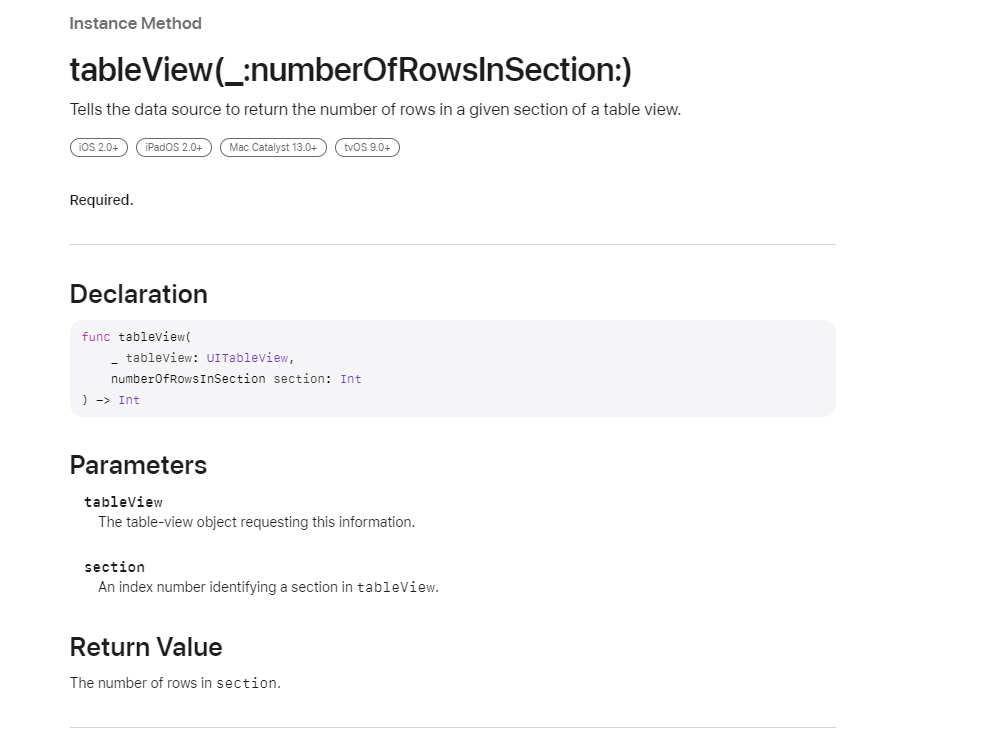
func tableView(_ tableView: UITableView, numberOfRowsInSection section: Int) -> Int {
return items.count
}
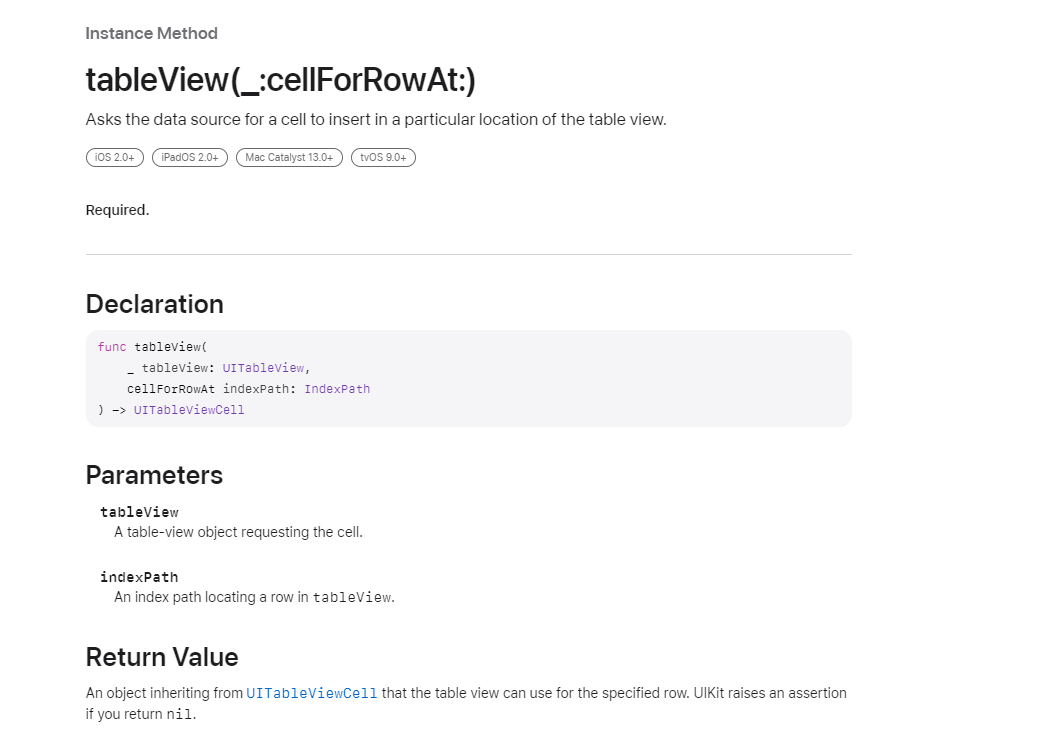
func tableView(_ tableView: UITableView, cellForRowAt indexPath: IndexPath) -> UITableViewCell {
return cell
}
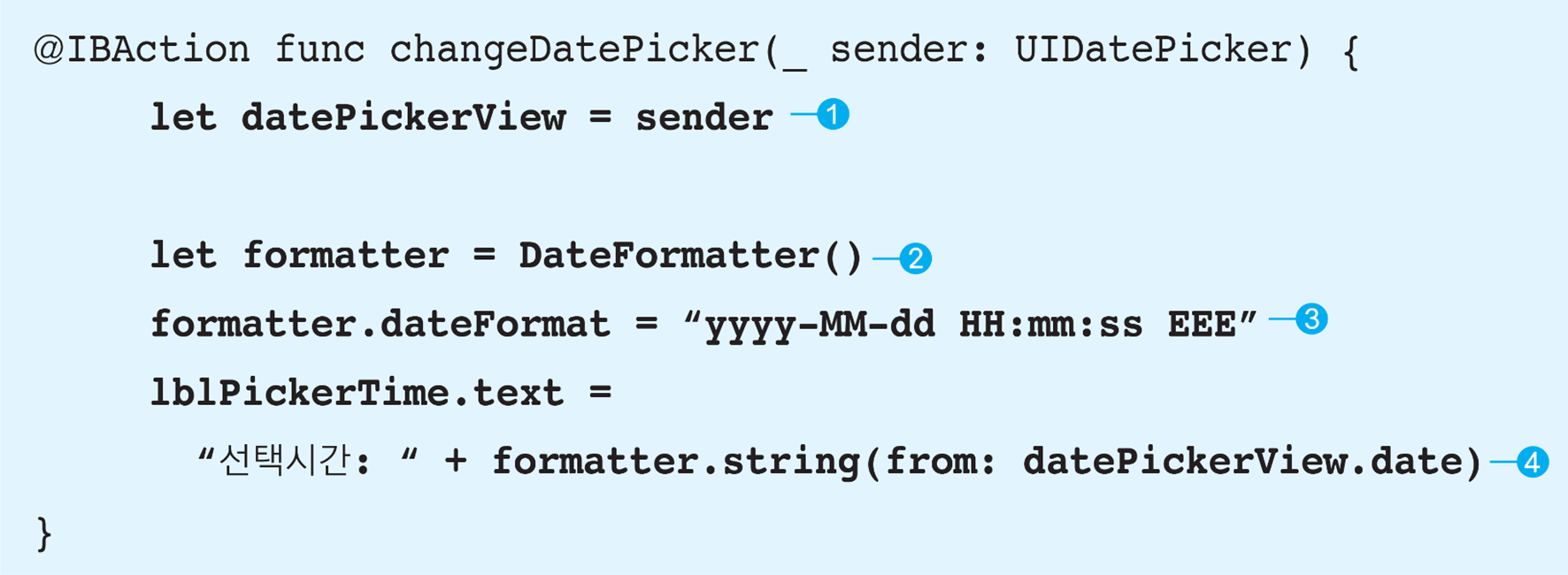 함수명 - changeDatePicker(_:)
함수 자료형 - (UIDatePicker) -> void
 함수명 - pickerView(_:rowHeightForComponent:)
함수 자료형 - (UIPickerView, Int) -> CGFloat
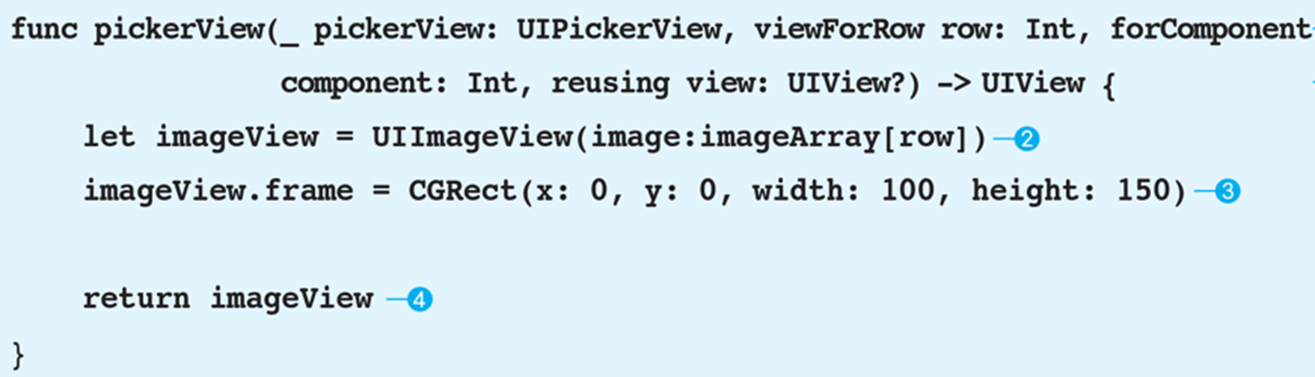 함수명 - pixkerView(_:viewForRow:forComponent:reusing:)
함수 자료형 - (UIPickerView, Int, Int, UIView) -> UIView
- 함수로부터 여러개의 결과 반환하기
func converter(length: Float) -> (yards: Float, centimeters: Float, meters: Float) {
let yards = length 0.0277778
let centimeters = length 2.54
let meters = length * 0.0254
return (yards, centimeters, meters)
}var lengthTuple = converter(length:10)
print(lengthTuple)
print(lengthTuple.yards)
print(lengthTuple.centimeters)
print(lengthTuple.meters)
-> 출력 :
(yards: 0.277778, centimeters: 25.4, meters: 0.254)
0.277778
25.4
0.254
- 과제 : 2개의 정수를 입력받아 가감제 리턴
import Foundation
func sss(x : Int, y : Int) -> (sum : Int, sub : Int, div : Double, mul : Int, rem : Int)
{
let sum = x+y
let sub = x-y
let div = Double(x)/Double(y) //같은 자료형만 연산 가능
let mul = x*y
let rem = x % y
return (sum, sub, div, mul, rem)
}var result = sss(x:10,y:3)
print(type(of:sss)) // sss함수의 자료형
print(result.sum)
print(result.sub)
print(String(format: "%.3f", result.div)) // 소수점 3자리에서 반올림
print(result.mul) // 곱셈
print(result.rem) // 나머지
-> 출력 :
(Int, Int) -> (sum: Int, sub: Int, div: Double, mul: Int, rem: Int)
13
7
3.333
30
1
- Swift 3에서는 inout의 위치가 바뀜
//Swift 2, 지금은 오류
var myValue = 10
func doubleValue (inout value: Int) -> Int {
value += value
return(value)
}
doubleValue(value:&myValue)
//Swift 3이후
var myValue = 10
func doubleValue (value: inout Int) -> Int { // call by reference 하고 싶은 매개변수의 자료형 앞에 inout 씀
value += value
return(value)
}
print(myValue)
print(doubleValue(value : &myValue)) // call by reference 하고 싶은 변수에 '&'붙여서 호출
print(myValue)
-> 출력 :
10
20
20
< 인덕대학교 'iOS 프로그래밍 기초' 한성현 교수님 강의 자료 참고 >