이 서비스는 SCI 에서 생년월일, 성별, 이름을 파라미터로 본인인지 아닌 지 확인하는 서비스이다.
파라미터에서 알 수 있듯이, 같은 날 태어난 동명이인의 식별이 불가능하다.
물론, 같은 날 태어난 같은 이름의 여러사람이 있다면, 한사람만 실명인증이 된다 하더라도 본인이겠지.
그러나 특정 개인을 본인인지 식별하는 서비스가 다른 사람의 정보로 실명인증이 된다는 것은 문제이다.
따라서 휴대폰정보나 다른 정보를 추가하여 특정 개인의 본인인증이 가능하다.
그러나 이 서비스는 이런 문제로 서비스가 종료될 예정이다. 신규서비스 계약을 하지 않고, 기존 고객만 유지한다고 SCI 에서 말해주었다.
SCI 로부터 서비스를 사용할 수 있도록 요청하면 언어에 따라 프로그램 및 문서를 제공해준다.
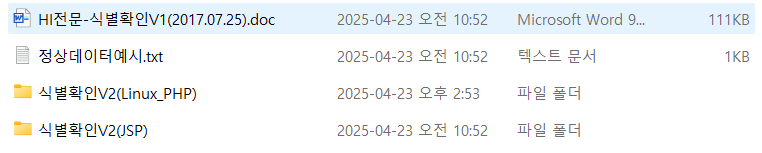
PHP 던 JSP 던 사실은 아무것도 중요하지 않다.
JAVA 의 경우는 SciClient.jar 파일을 제공해준다.
PHP 및 그 밖의 언어는 통신모듈을 제공해준다.
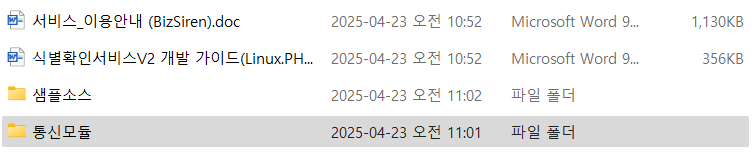
통신모듈 디렉토리에는 아래의 파일들이 제공된다.
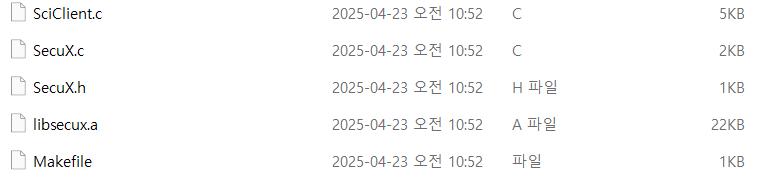
gcc 로 make 파일을 실행해 컴파일한다.
그러면 실행파일이 생성되는데 PHP, Node.js 에서는 Shell Execute 를 이용해서 쉘 명령어를 실행하는 것 뿐...
그런데 여기서 주의할 점이 있다.
SCI 서버의 받는 쪽에서 인코딩이 EUC-KR 이다. 인코딩을 맞추지 않으면 이름이 깨져서 본인인증이 안된다.
아래는 SCI 본인 인증을 받는 코드이다.
#!/usr/bin/env bash
#
# realname_check.sh
# 사용법: realname_check.sh <생년월일 YYYYMMDD> <성별 1|2> <이름>
# 디버그 모드(on/off): 스크립트 상단 DEBUG 변수를 변경
#

# ────────────────────────────────────────────────────
# 0) 디버그 플래그 (기본 off)
DEBUG=false

# ────────────────────────────────────────────────────
# 1) 인자 확인
if [ $# -ne 3 ]; then
  echo "Usage: $0 <YYYYMMDD> <sex (1|2)> <name>"
  exit 1
fi

birth="$1"         # ex) 19880510
sex="$2"           # 1: 남자, 2: 여자 3: 남자, 4: 여자
name="$3"          # ex) 류정현

# ────────────────────────────────────────────────────
# 2) 고정필드 설정
host="210.207.91.239"
port="25501"
timeout="10"

user_id="XXXXXXX"       # 8바이트 (%-8s 로 패딩)
spec_code="0000"        # 전문종별코드(4)
work_code="100"         # 업무구분코드(3)
resv_code="000"         # 응답코드(3, N 속성 미사용 → '0')
service_no="000000"     # 서비스번호(6, N 속성 미사용 → '0')

# ────────────────────────────────────────────────────
# 3) 이름 → EUC-KR 변환 및 20바이트 패딩
name_euc=$(printf "%s" "$name" | iconv -f UTF-8 -t EUC-KR//IGNORE)
byte_len=$(printf "%s" "$name_euc" | wc -c)
pad_len=$((20 - byte_len))
pad=$(printf '%*s' "$pad_len")

# ────────────────────────────────────────────────────
# 4) 헤더 조립 (총 33바이트)
#    %-8s: user_id 뒤 자동 스페이스 채움
printf -v header "%-8s%s%s%s%s%s%s" \
  "$user_id" \
  "$spec_code" \
  "$work_code" \
  "$resv_code" \
  "$service_no" \
  "$birth" \
  "$sex"

# ────────────────────────────────────────────────────
# 5) 최종 페이로드 (33 + 20 = 53바이트)
payload="${header}${name_euc}${pad}"

# ────────────────────────────────────────────────────
# 6) 실행 명령어 문자열
cmd="/data/www/realname-api/SciClient ${host} ${port} ${timeout} \"${payload}\" 2>&1"

# ────────────────────────────────────────────────────
# 디버그 출력 함수
debug() {
  if [ "$DEBUG" = true ]; then
    echo -e "$1"
  fi
}

# ────────────────────────────────────────────────────
# 7) 디버그: 명령어/HEX 덤프 출력
debug "▶ 실행 명령어:\n  ${cmd}\n"
debug "▶ 요청 전문 (HEX):"
debug "$(echo -n "${payload}" | xxd -p -c 256)\n"

# ────────────────────────────────────────────────────
# 8) SciClient 실행 및 응답 수신
response="$(eval "${cmd}")"

# ────────────────────────────────────────────────────
# 9) 디버그: 원시 응답 덤프
debug "▶ 원시 응답 (HEX):"
debug "$(echo -n "${response}" | xxd -p -c 256)\n"

# ────────────────────────────────────────────────────
# 10) 응답 UTF-8 변환
response_utf8="$(echo -n "${response}" | iconv -f EUC-KR -t UTF-8//IGNORE)"

debug "▶ 서버 응답 (UTF-8):"
debug "${response_utf8}\n"

# ────────────────────────────────────────────────────
# 11) 결과 코드 추출 (마지막 1바이트)
resp_code="${response_utf8: -1}"

# 12) 코드 → 의미 매핑
case "$resp_code" in
  1) resp_value="정상" ;;
  2) resp_value="미존재" ;;
  5) resp_value="시스템 오류" ;;
  6) resp_value="전문 항목 오류" ;;
  *) resp_value="알 수 없음" ;;
esac

# ────────────────────────────────────────────────────
# 13) JSON 출력
cat <<EOF
{
  "request_brith": "$birth",
  "request_name": "$name",
  "request_sex": "$sex",
  "response_code": "$resp_code",
  "response_value": "$resp_value"
}
EOF
위 코드를 Swagger로 보기 편하게 문서화 하였다.
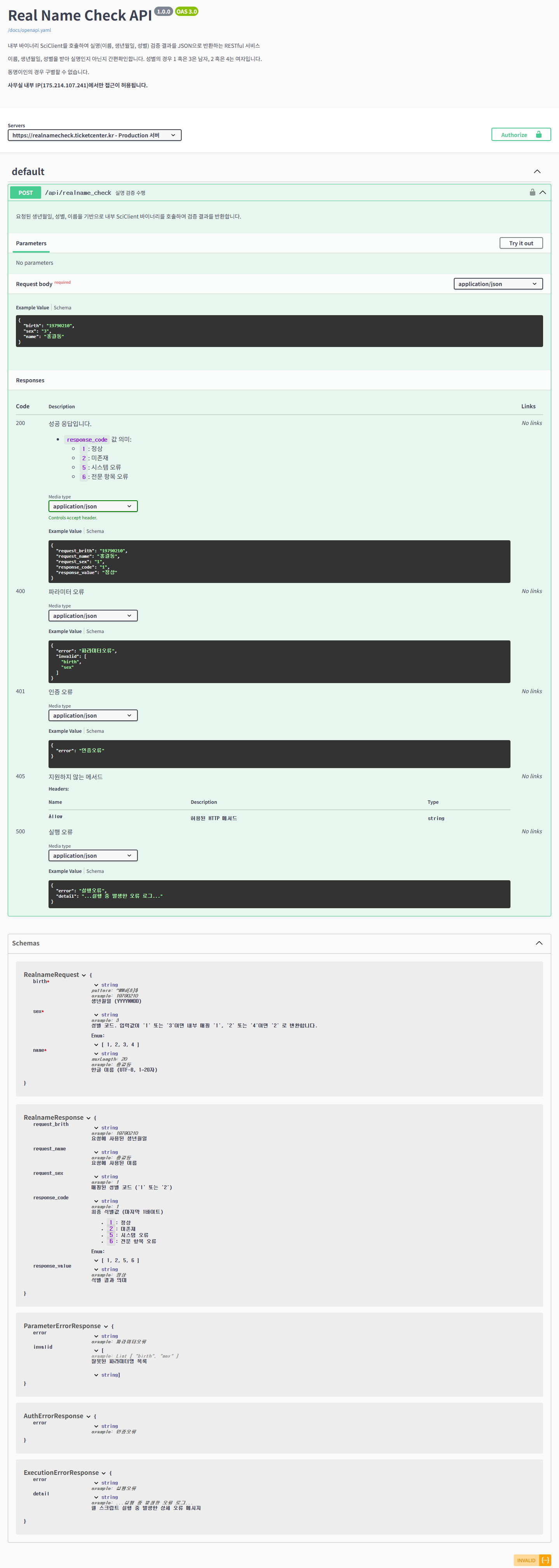
swagger yml code:
openapi: 3.0.0
info:
  title: Real Name Check API
  description: |
    내부 바이너리 SciClient를 호출하여 실명(이름, 생년월일, 성별) 검증 결과를 JSON으로 반환하는 RESTful 서비스

    이름, 생년월일, 성별을 받아 실명인지 아닌지 간편확인합니다. 성별의 경우 1 혹은 3은 남자, 2 혹은 4는 여자입니다.

    동명이인의 경우 구별할 수 없습니다.

    **사무실 내부 IP(175.214.107.241)에서만 접근이 허용됩니다.**
  version: 1.0.0
servers:
  - url: https://realnamecheck.ticketcenter.kr
    description: Production 서버

# 전역 인증 설정: 모든 경로에 Basic 인증 요구
security:
  - basicAuth: []

paths:
  /api/realname_check:
    post:
      summary: 실명 검증 수행
      description: |
        요청된 생년월일, 성별, 이름을 기반으로 내부 SciClient 바이너리를 호출하여 검증 결과를 반환합니다.
      security:
        - basicAuth: []
      requestBody:
        required: true
        content:
          application/json:
            schema:
              $ref: '#/components/schemas/RealnameRequest'
      responses:
        '200':
          description: |
            성공 응답입니다.
            * `response_code` 값 의미:
              - `1`: 정상
              - `2`: 미존재
              - `5`: 시스템 오류
              - `6`: 전문 항목 오류
          content:
            application/json:
              schema:
                $ref: '#/components/schemas/RealnameResponse'
        '400':
          description: 파라미터 오류
          content:
            application/json:
              schema:
                $ref: '#/components/schemas/ParameterErrorResponse'
        '401':
          description: 인증 오류
          content:
            application/json:
              schema:
                $ref: '#/components/schemas/AuthErrorResponse'
        '405':
          description: 지원하지 않는 메서드
          headers:
            Allow:
              description: 허용된 HTTP 메서드
              schema:
                type: string
        '500':
          description: 실행 오류
          content:
            application/json:
              schema:
                $ref: '#/components/schemas/ExecutionErrorResponse'
components:
  securitySchemes:
    basicAuth:
      type: http
      scheme: basic
      description: "Basic 인증 헤더를 사용합니다. 예: 'Basic Ku64QDnNfrlVRRPf7Io8tnsuUhY8trSzPWUC7hezcVI='"
  schemas:
    RealnameRequest:
      type: object
      required:
        - birth
        - sex
        - name
      properties:
        birth:
          type: string
          description: 생년월일 (YYYYMMDD)
          pattern: '^\\d{8}$'
          example: '19790210'
        sex:
          type: string
          description: |
            성별 코드. 입력값이 '1' 또는 '3'이면 내부 매핑 '1',
            '2' 또는 '4'이면 '2' 로 변환합니다.
          enum: ['1','2','3','4']
          example: '3'
        name:
          type: string
          description: 한글 이름 (UTF-8, 1~20자)
          maxLength: 20
          example: '홍길동'
    RealnameResponse:
      type: object
      properties:
        request_brith:
          type: string
          description: 요청에 사용된 생년월일
          example: '19790210'
        request_name:
          type: string
          description: 요청에 사용된 이름
          example: '홍길동'
        request_sex:
          type: string
          description: 매핑된 성별 코드 ('1' 또는 '2')
          example: '1'
        response_code:
          type: string
          description: |
            최종 식별값 (마지막 1바이트)
            * `1`: 정상
            * `2`: 미존재
            * `5`: 시스템 오류
            * `6`: 전문 항목 오류
          enum: ['1','2','5','6']
          example: '1'
        response_value:
          type: string
          description: 식별 결과 의미
          example: '정상'
    ParameterErrorResponse:
      type: object
      properties:
        error:
          type: string
          example: '파라미터오류'
        invalid:
          type: array
          items:
            type: string
          description: 잘못된 파라미터명 목록
          example: ['birth','sex']
    AuthErrorResponse:
      type: object
      properties:
        error:
          type: string
          example: '인증오류'
    ExecutionErrorResponse:
      type: object
      properties:
        error:
          type: string
          example: '실행오류'
        detail:
          type: string
          description: 쉘 스크립트 실행 중 발생한 상세 오류 메시지
          example: '...실행 중 발생한 오류 로그...'