1. 개요
1) 소개
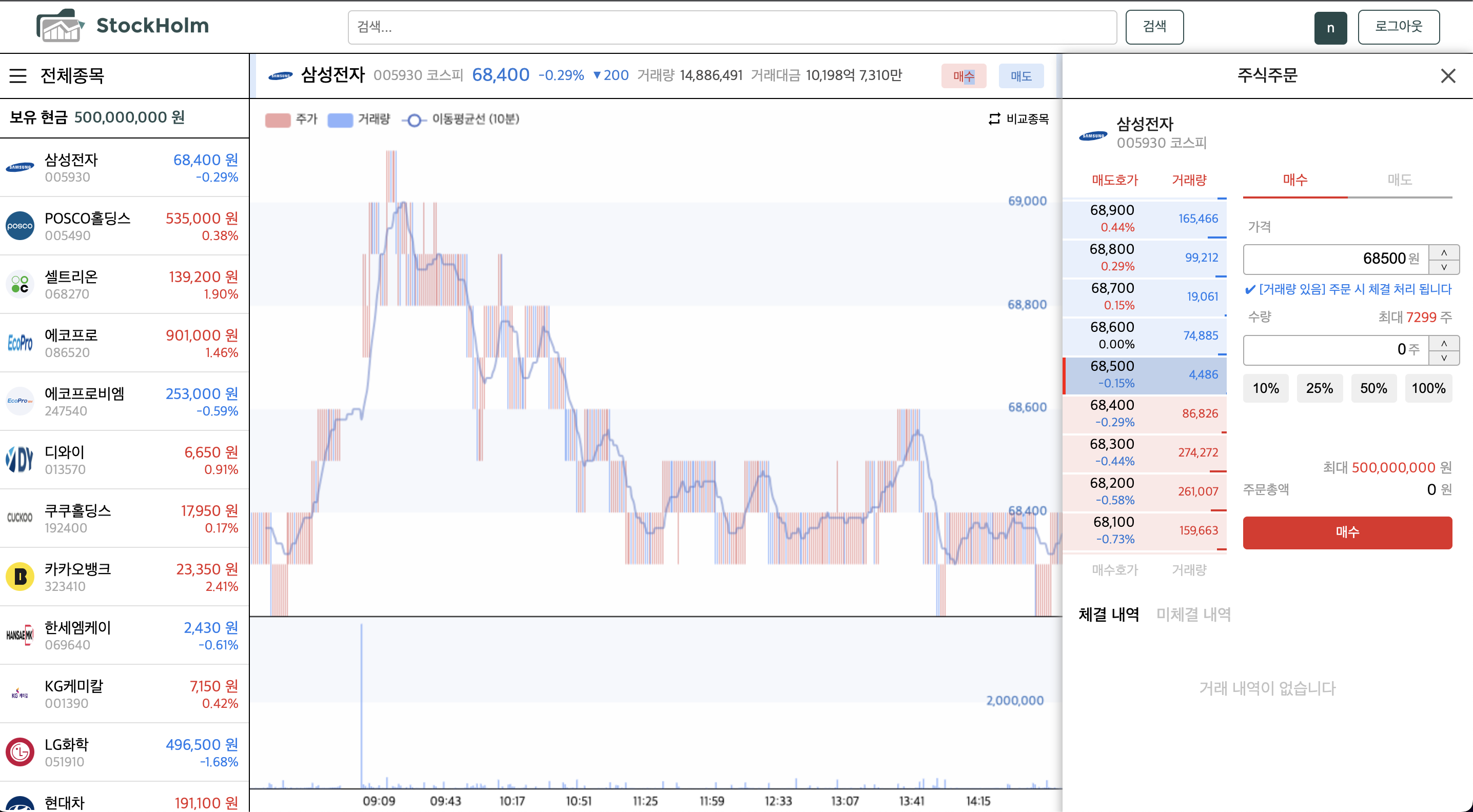
- 주식 입문자를 위한 모의 주식투자 사이트입니다
- 한국투자증권 오픈 API를 활용하여 실제 주가 및 거래량을 제공합니다
- 단일 페이지로 구성하여 직관적인 UX를 제공합니다
2) 기술 스택 (FE)
- TypeScript
- React
- Redux-Toolkit
- React-Query
- Apache Echarts
3) 기타
- 참여인원 : 7명 (BE 4명, FE 3명)
- 제작기간 : 약 4주 (2023.09 ~ )
- 배포 링크 : http://seb008stockholm.s3-website.ap-northeast-2.amazonaws.com/
- 깃 허브 : https://github.com/codestates-seb/seb45_main_008
2. 담당한 역할
- 주식 데이터 자동 갱신 로직 구현
→ setTimeout과 React-Query를 활용하여 통신 및 데이터 관리 로직 구현
- 주가 및 거래량 차트 시각화
→ Apache Echarts 라이브러리를 기반으로 차트 구현 및 추가 기능 구현 (종목 간 비교차트)
-
주식 매수/매도 UI 및 기능 구현
→ React-Query 라이브러리 활용하여 AJAX 효율화
→ 유저가 설정한 거래 정보 (거래가, 거래량 등) 를 컴포넌트 간에 공유하기 위해 Redux-Toolkit 활용하여 전역 상태관리 구현 -
로그인 기능 관련 서포트
→ 자동 로그아웃 기능 구현 (setTimeout 비동기 로직 활용)
3. 구현 시 고민한 부분
1) 주식 데이터 관리
✅ 문제 상황
- 주기적인 데이터 갱신
→ 서버에서 주식 데이터가 30분 마다 갱신되어 클라이언트에서도 동기화 필요
- 폐장시간/개장시간 구분
→ 폐장시간에는 데이터를 갱신할 필요가 없으므로 개장시간/폐장시간을 구분하여 로직 구현 필요
- 통신 효율화
→ 다수의 종목을 번갈아 조회할 경우 메모이제이션을 활용하여 동일 데이터 중복 호출 방지
✅ 해결 방법
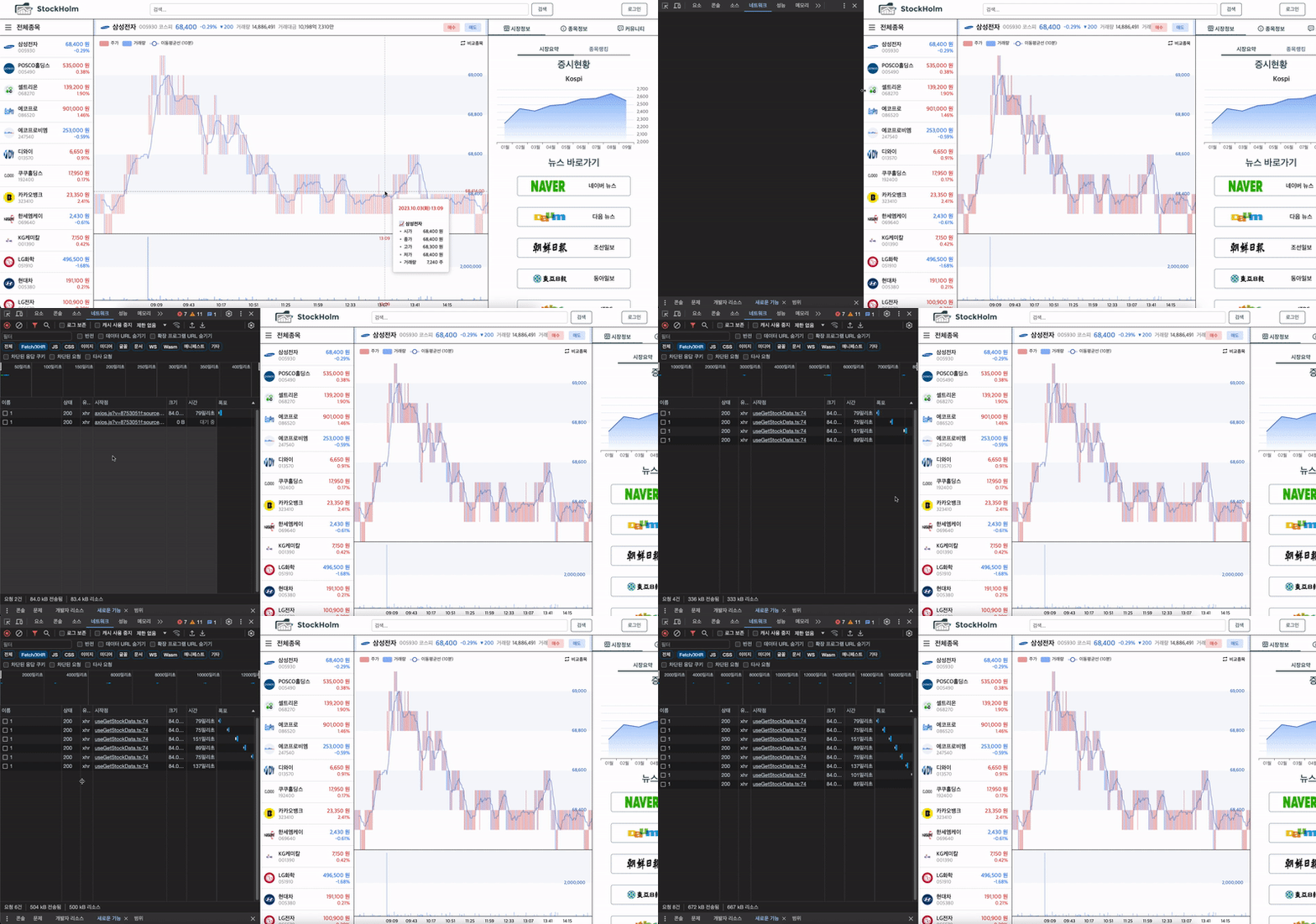
✔️ 자동 refetch 구현
(실제로는 30분마다 refetch 되나 시연을 위해 2초마다 갱신되도록 조정)
-
React-Query 라이브러리 활용
→ 메모이제이션을 활용하여 동일 데이터를 중복 호출 방지 (StaleTime, CacheTime 속성 활용)
→ 30분 주기로 데이터 자동 갱신 (refetchInterval 기능 활용) -
setTimeout 메서드 활용
→ 데이터 관리 로직이 제때 실행될 수 있도록 비동기 로직 활용
1) 최초 접속 시 30분 혹은 정각에 맞춰서 refetch 되도록 설정
2) 폐장시간 (15시 30분) 이후 refech 중단 되도록 설정
✔️ 고민했던 부분 (Query Key의 동적인 부여)
- 다수의 종목을 번갈아 조회할 시 문제 발생 (A회사 → B회사 → A회사)
→ 첫번째로 A회사를 조회할 때는 API 요청을 하지만 두번째는 Query Key가 동일하므로 캐싱한 데이터를 활용
- 동일 데이터 중복 호출을 방지할 수 있어 효율적이나
→ 서버 데이터가 갱신되어 클라이언트 동기화가 필요할 경우에는 문제 발생
- 문제 해결을 위해 TimeZone을 설정하여 Query Key 동적으로 부여
const timeZone = minute === 0 || minute === 30 ? "30 or 60" : 0 < minute && minute < 30 ? "1~29" : "31~59"
const queryKey= ${month}월 ${day}일 ${hour}시 ${timeZone}
→ 데이터 갱신 필요 여부에 따라 API 호출 여부 결정되도록 구현
✅ 구현 코드
import { isHoliday } from "@hyunbinseo/holidays-kr";
import { useState, useEffect } from "react";
import { useQuery } from "react-query";
import axios from "axios";

const url = "http://ec2-13-125-246-160.ap-northeast-2.compute.amazonaws.com/companies/charts/";

const useGetStockData = (companyId: number) => {
  const [autoRefetch, setAutoRefetch] = useState(false);

  // 1) 주말, 공휴일 여부 체크
  const currentTime = new Date();
  const isBusinessDay = !isHoliday(currentTime, { include: { saturday: true, sunday: true } }); // 토요일, 일요일, 공휴일 (임시 공휴일 포함)

  // 2) 개장시간 여부 체크
  const currentHour = currentTime.getHours();
  const currentMinute = currentTime.getMinutes();
  const isBefore9AM = currentHour < 9;
  const isAfter330PM = currentHour > 15 || (currentHour === 15 && currentMinute >= 30);
  const marketCloseTime = isBefore9AM || isAfter330PM;

  const dataRenewalTime = isBusinessDay && !marketCloseTime;

  // 시간대 (timeZone) 별로 queryKey를 다르게 설정해서, 서버 데이터가 동일할 때는 캐싱된 데이터 활용하고 서버 데이터가 갱신됐을 때는 새롭게 받아옴 (서버 데이터 30분마다 갱신)
  const [month, day, hour, minute] = [currentTime.getMonth(), currentTime.getDate(), currentTime.getHours(), currentTime.getMinutes()];
  const timeZone = minute === 0 || minute === 30 ? "30 or 60" : 0 < minute && minute < 30 ? "1~29" : "31~59";
  const queryKey = dataRenewalTime ? `chartData${companyId} ${month}월 ${day}일 ${hour}시 ${timeZone}` : `chartData${companyId}`;

  // 개장 시간 이내일 경우, 현재 시각이 30분, 정각이 아닌 경우 남은 시간 계산하여 checkTime 함수 다시 실행
  useEffect(() => {
    if (dataRenewalTime) {
      if (currentMinute === 0 || currentMinute === 30) {
        setAutoRefetch(true);
      } else if (0 < currentMinute && currentMinute < 30) {
        const delayTime = (30 - currentMinute) * 60000;
        setTimeout(() => {
          refetch();
          setAutoRefetch(true);
        }, delayTime);
      } else if (30 < currentMinute && currentMinute < 60) {
        const delayTime = (60 - currentMinute) * 60000;
        setTimeout(() => {
          refetch();
          setAutoRefetch(true);
        }, delayTime);
      }

      // 15시 30분까지 남은 시간 계산 → 폐장시간 autoRefetch 중단
      const targetTime = new Date();
      targetTime.setHours(15);
      targetTime.setMinutes(30);
      const remainTime = targetTime.getTime() - currentTime.getTime();

      setTimeout(() => {
        setAutoRefetch(false);
      }, remainTime);
    }
  }, []);

  const { data, isLoading, error, refetch } = useQuery(queryKey, () => getChartData(companyId), {
    staleTime: Infinity,
    cacheTime: Infinity,
    refetchInterval: autoRefetch && dataRenewalTime ? 60000 * 30 : false, // 정각 혹은 30분에 맞춰서 30분 마다 데이터 리패칭
  });

  return { stockPrice: data, stockPriceLoading: isLoading, stockPriceError: error };
};

export default useGetStockData;

const getChartData = async (companyId: number) => {
  const res = await axios.get(`${url}${companyId}`);
  return res.data;
};
2) 차트 및 비교차트 구현
✅ 문제 상황
- 서버에서 받아온 데이터 (종목별 주가/거래량) 를 차트 형식으로 시각화 해야함
- 유저가 차트를 제어하며 자유롭게 조회가 가능해야함 (차트 확대/축소, 주가/거래량 동시 조회)
- 종목별 주가 차트를 시각적으로 비교할 수 있어야 함
✅ 해결 방법
-
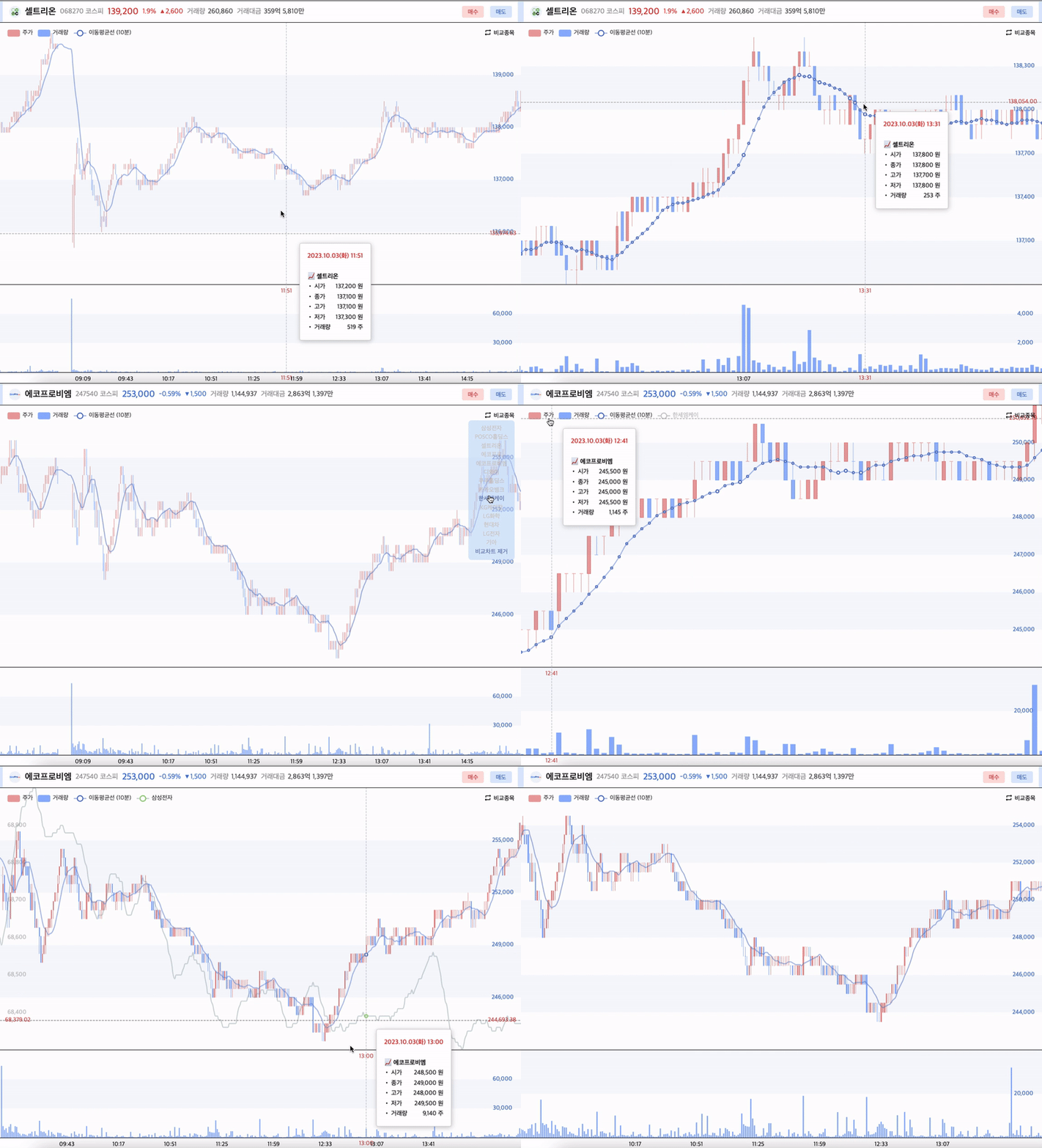
Apache Echarts 라이브러리 활용
1) 공식 문서가 잘 작성 되어있어 러닝커브가 낮으며 커스터마이징이 용이함
2) 필요로 하는 기능을 갖추고 있음 (차트 줌 인/아웃 기능 등) -
서버에서 받아온 데이터를 차트 형식에 맞게 변환
→ 날짜 및 시간, 종목명, 주가(시가/종가/저가/고가), 거래량 데이터 정리
→ 차트 및 마우스 조회 정보에 맞추어 설정 -
주가/거래량 차트 동기화 되도록 설정
→ 차트 옵션 설정 시, X축은 공유하되 Y축은 분리되도록 설정
→ 상/하로 나누어 표시되나, X축을 공유하므로 마우스로 조회 시 함께 동기화 -
비교종목 기능 추가
→ 라이브러리 자체적으로 비교 종목 기능 부재
→ 우측 상단에 비교종목 버튼 추가하여 마우스 오버 시 종목 리스트 렌더링 되도록 구현
→ 종목명 클릭 시 비교종목 주가 차트 시각화 (Redux-Toolkit 전역상태 관리 및 useEffect 활용)
3) 매도/매수 거래가 설정 로직
✅ 문제 상황
-
백엔드에서 한국투자증권 오픈 API를 받아와서 그대로 사용
→ 한국투자증권에서 제공한 호가와 일치할 때만 거래가 체결 됨 -
이외의 가격으로 거래 시 대기처리 됨
→ 30분 마다 갱신된 호가를 기반으로 체결 여부 체크 -
애매한 가격 설정 시 무기한 대기처리 됨
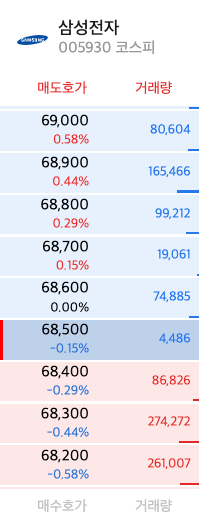
✔️ 예를 들어서
- 현 시점 삼성전자 호가는 1백원 단위로 변동되고 있음
- 만약 유저가 68,100원을 설정하여 매수 신청할 경우,
현재는 해당 가격의 거래량이 없어 대기처리 되지만 서버 데이터가 갱신되면 체결 전환될 가능성이 있음- 하지만 호가 간격과 불일치 하는 애매한 가격 설정 시 대기가 무기한으로 지속될 수 있음 ex) 68,011원
✅ 해결 방법
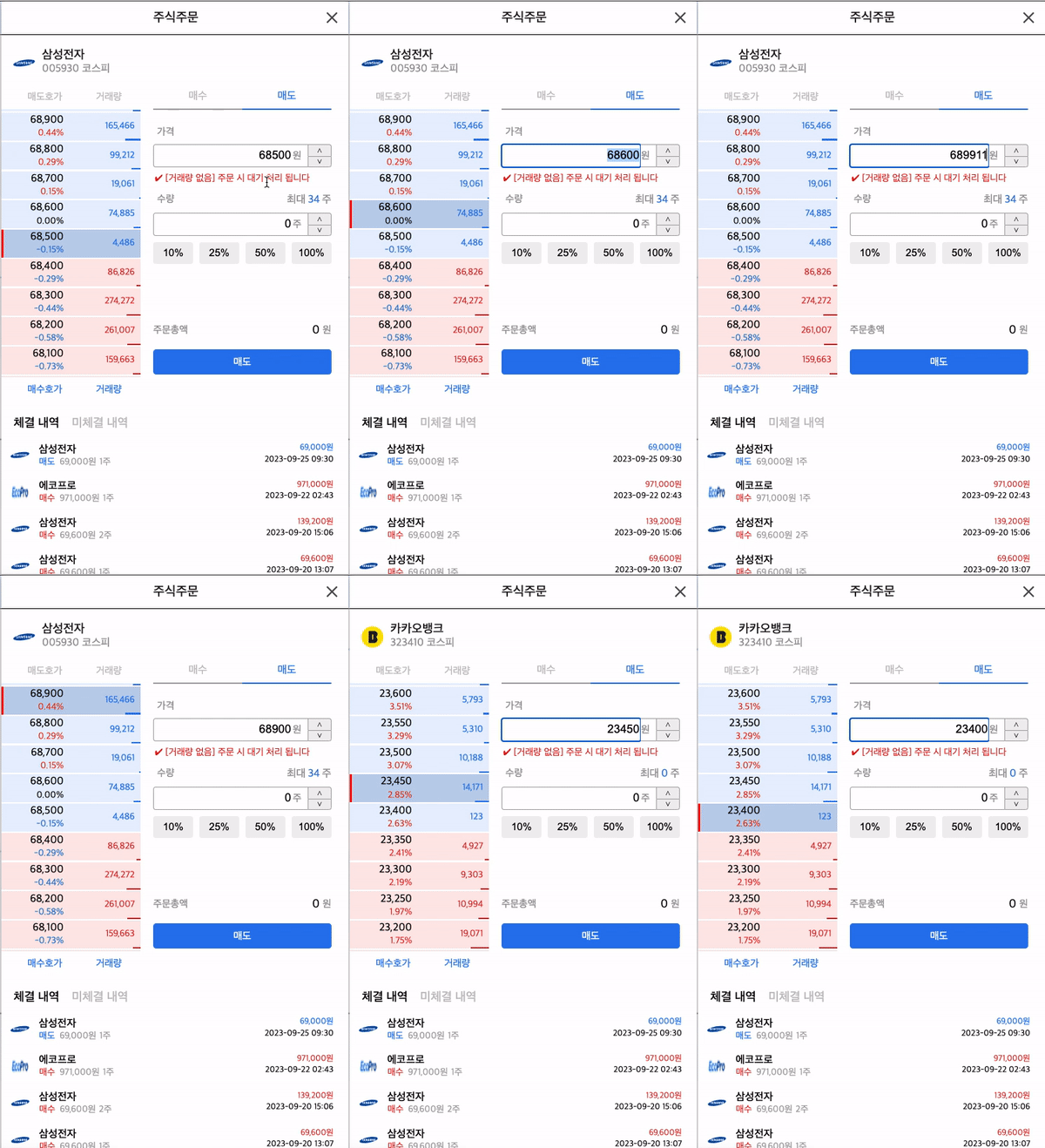
✔️ 자동 보정 기능 구현
→ 호가 간격 (priceInterval) 으로 나누어 떨어지도록 자동 보정하는 로직 구현
✔️ 간단한 설명
-
서버에서 받아온 종목 관련 데이터 (StockInfo) 에서 호가 데이터 추출하여 정리
(askp, bidp 각각 매수/매도 호가) -
정리한 호가 데이터 활용하여 호가 간격 추출 (priceInterval)
-
유저가 키보드로 거래가를 입력할 시 priceInterval로 나누어 떨어지는 경우와 아닌 경우를 분기
A. 나누어 떨어지는 경우
→ 입력 값 그대로 적용
B. 나누어 떨어지지 않는 경우
→ 나머지 (remainder) 를 계산하여 입력 값에서 차감
→ setTimeout을 활용하여 조정 값 (remainder 차감한 값) 으로 자동 보정
-
추가 입력이 발생할 경우
→ 이전 비동기 로직 제거 (clearTimout) 후 위의 3번 로직 동일하게 수행
✅ 해당 내용 관련된 코드 외에는 편의상 제거함
const PriceSetting = (props: OwnProps) => {
const { stockInfo, companyId } = props;
const dispatch = useDispatch();
const orderPrice = useSelector((state: StateProps) => state.stockOrderPrice);
const [priceChangeTimer, setPriceChangeTimer] = useState<NodeJS.Timeout | null>(null);
// 매도/매수호가 정리
const { askp1, askp2, askp3, askp4, askp5, askp6, askp7, askp8, askp9, askp10 } = stockInfo;
const { bidp1, bidp2, bidp3, bidp4, bidp5, bidp6, bidp7, bidp8, bidp9, bidp10 } = stockInfo;
const sellingPrice = [askp1, askp2, askp3, askp4, askp5, askp6, askp7, askp8, askp9, askp10].map((price) => parseInt(price));
const buyingPrice = [bidp1, bidp2, bidp3, bidp4, bidp5, bidp6, bidp7, bidp8, bidp9, bidp10].map((price) => parseInt(price));
const existSellingPrice = sellingPrice.filter((price) => price !== 0); // price 0인 데이터 제외
const existBuyingPrice = buyingPrice.filter((price) => price !== 0);
// 호가 간 가격 차
const priceInterval = existSellingPrice[1] - existSellingPrice[0];
const handleWriteOrderPrice = (event: React.ChangeEvent<HTMLInputElement>) => {
const inputPrice = event.target.value;
const numberInputPrice = parseInt(inputPrice, 10);
// 1) 음수를 임력하거나, 숫자 아닌 값 기입 시 -> 입력 무시 2) 값을 다 지워서 빈 문자열인 경우 -> 0으로 설정
if (numberInputPrice < 0 || isNaN(numberInputPrice)) {
if (inputPrice === "") {
dispatch(setStockOrderPrice(0));
}
return;
}
// priceInterval로 나누어 떨어지지 않는 값을 기입 시 -> 0.8초 후에 나누어 떨어지는 값으로 변경
if (priceChangeTimer !== null) {
clearTimeout(priceChangeTimer); // 이전 입력으로 인한 비동기 작업 존재할 시 -> 제거
}
dispatch(setStockOrderPrice(numberInputPrice));
if (numberInputPrice > priceInterval && numberInputPrice % priceInterval !== 0) {
const newTimer = setTimeout(() => {
const remainder = numberInputPrice % priceInterval;
const modifiedInputValue = numberInputPrice - remainder;
dispatch(setStockOrderPrice(modifiedInputValue));
}, 800);
setPriceChangeTimer(newTimer);
}
};
return (
<Container>
<div className="PriceCategoryBox">
<div className="Title">{priceSettingTitle}</div>
</div>
<div className="PriceSettingBox">
<PriceController
defaultValue={orderPrice}
value={orderPrice}
onChange={handleWriteOrderPrice}
onKeyDown={handleInputArrowBtn}
onFocus={handleCheckTradePossibility} />
<UnitContent>{priceUnit}</UnitContent>
<div className="DirectionBox">
<button className="PriceUp" onClick={handlePlusOrderPrice}>
⋀
</button>
<button className="PriceDown" onClick={handleMinusOrderPrice}>
⋁
</button>
</div>
</div>
<CheckTradingVolume orderPossibility={orderPossibility}>
<div>✔ {orderPossibility ? `${existVolumeNotification}` : `${noVolumeNotification}`}</div>
</CheckTradingVolume>
</Container>
);
};4) 로그인 기능 관련 서포트 (자동 로그아웃)
✅ 문제 상황
- 액세스 토큰 유효기간 만료 시 문제발생
→ 로그인 처리 후 서버에서 발급 받은 액세스 토큰을 로컬 스토리지에 저장하여 활용
→ 클라이언트에서는 로그인 상태이나 액세스 토큰 만료로 인해 서버에서 유효한 유저로 인정받지 못하게 됨
- 리프레시 토큰 활용 관련하여 논의
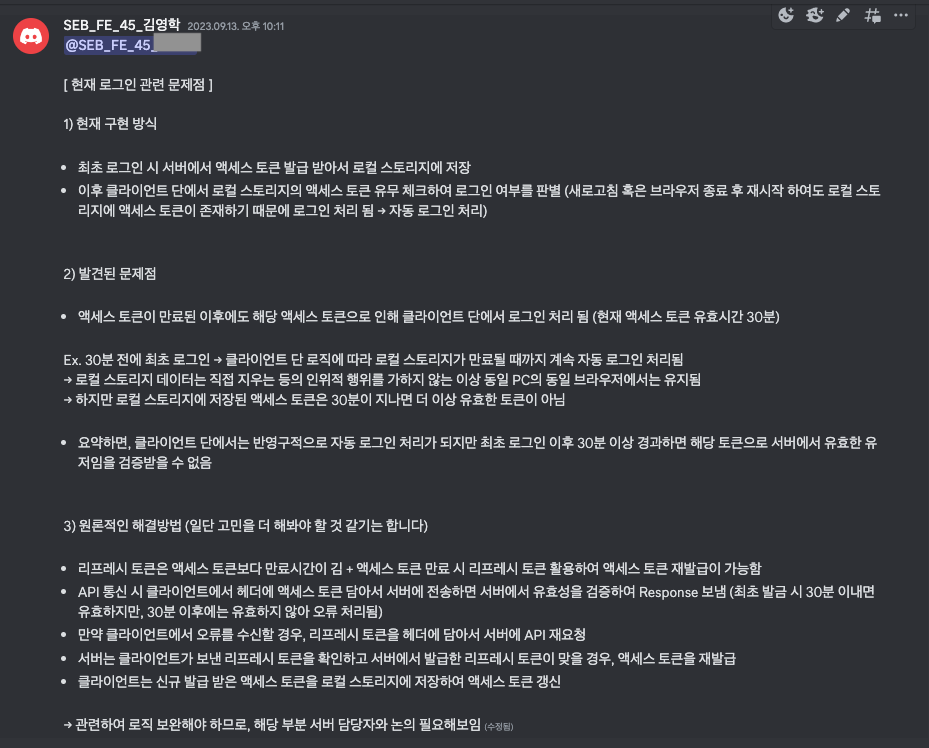
→ 로그인 담당 팀원과 소통하였으나 프로젝트 마감까지 리프레시 토큰 활용 로직 구현이 어렵다는 결론이 남✔️ 해당 문제 발견 후 개괄적인 상황 정리하여 담당 팀원과 소통 (사진 첨부)
→ 대안이 필요한 상황이나 담당 팀원의 일정이 여의치 않은 상황이라 대신 맡아서 구현하게 됨
✅ 해결 방법
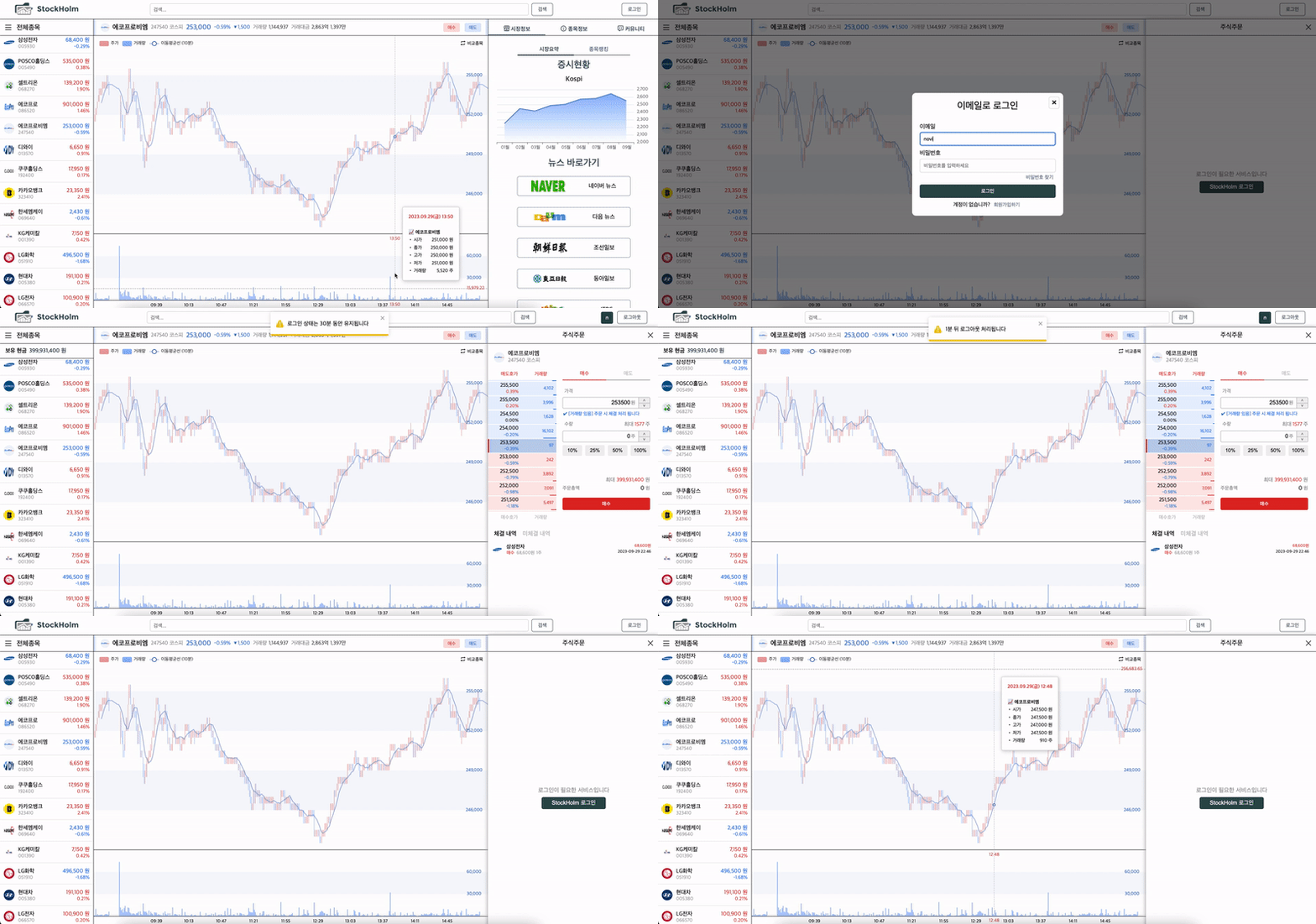
✔️ 자동 로그아웃 기능 구현
(본래 30분 뒤에 자동 로그아웃 처리되나, 시연 영상 촬영을 위해 처리시간 단축함)
✔️ 액세스 토큰 만료 시 로그아웃 처리가 필요한 상황
- setTimeout 비동기 로직을 활용하여 30분이 지나면 자동으로 로그아웃이 처리되도록 기능 구현
→ 유저가 명확하게 인지할 수 있도록 토스트 메세지로 안내 (총 3차례 안내)
- 로그인 후 브라우저 새로고침 및 종료 되더라도 자동 로그아웃 정상적으로 처리 되도록 구현
→ 브라우저가 새로고침 혹은 종료 되더라도 로그아웃 처리 및 로컬 스토리지의 액세스 토큰 제거되도록 구현
✔️ 간단한 설명
-
로그인 시 총 2번의 비동기 로직이 실행됨
1) 첫번째는 29분 뒤 실행 (로그아웃 예정 알림)
2) 두번째는 첫번째 로직 종료 후 1분 뒤 실행 (로그아웃 완료 알림) -
브라우저 종료 및 새로고침 시에도 동일하게 처리 되도록 설정
→ 로컬 스토리지를 활용하여 로그인 처리된 시간을 기록
→ 브라우저 재시작 시 현재 시간과 기록해둔 시간 비교1) 브라우저 종료 시
→ 현재 시간이 최초 로그인 기준 30분 이상 지났는지 여부 체크
(30분 이상 지났을 경우 로컬 스토리지에 저장해둔 토큰과 로그인 시간 기록 삭제)2) 브라우저 새로고침 시
→ 현재 시간에서 최초 로그인 시간 차감하여 남은 시간 계산 (remainTime)
→ remainTime 활용하여 비동기 로직 재시작 (최종적으로 실행되는 시간은 동일)
✅ 자동 로그아웃 관련 유틸 함수
import { toast } from "react-toastify";
import { setLogoutState } from "../reducer/member/loginSlice";

/*
- 자동 로그아웃 설정을 하는 함수입니다.

- 총 3차례의 토스트 메시지 안내를 실행합니다
  1차) 로그인 시 30분 뒤 로그아웃 됨을 알림
  2차) 로그아웃 시간 1분 남음을 알림
  3차) 로그아웃 처리 되었음을 알림

- 해당 함수는 총 4개의 인자를 가집니다
  1) 로그인 전역상태 변경에 필요한 dispatch
  2) 알람 설정 개수 (first일 경우 3개 다, second일 경우 2개, last일 경우 마지막 1개만 설정)
  3) 2차 알림 설정 시간 (설정한 시간만큼 지난 후 2차 알림 발생)
  4) 3차 알림 설정 시간 (상동)
*/

export const secondAlarmTime = 1000 * 60 * 29; // 29분
export const lastAlarmTime = 1000 * 60; // 1분

const setAutoLogoutAlarm = (dispatch: any, alarmNum: string, secondAlarmTime: number, lastAlarmTime?: number) => {
  // 1~3차 알림 모두 설정
  if (alarmNum === alarmNumType.First) {
    toast.warning("로그인 상태는 30분 동안 유지됩니다", {
      style: toastStyle,
      position: "top-center",
    });

    // 2차 알림 셋팅 시간 기록
    const autoLogoutSecondAlarm = Date.now();
    localStorage.setItem("autoLogoutSecondAlarm", `${autoLogoutSecondAlarm}`);

    setTimeout(() => {
      // 2차 알림 셋팅 시간 제거
      localStorage.removeItem("autoLogoutSecondAlarm");

      toast.warning("1분 뒤 로그아웃 처리됩니다", {
        style: toastStyle,
        position: "top-center",
      });

      // 3차 알림 셋팅 시간 기록
      const autoLogoutLastAlarm = Date.now();
      localStorage.setItem("autoLogoutLastAlarm", `${autoLogoutLastAlarm}`);

      setTimeout(() => {
        // 3차 알림 셋팅 시간 제거
        localStorage.removeItem("autoLogoutLastAlarm");

        dispatch(setLogoutState());
        localStorage.removeItem("accessToken");
        localStorage.removeItem("refreshToken");

        toast.warning("로그아웃 처리되었습니다", {
          style: toastStyle,
          position: "top-center",
        });
      }, lastAlarmTime);
    }, secondAlarmTime);
  }

  // 2~3차 알림 설정
  if (alarmNum === alarmNumType.Second) {
    setTimeout(() => {
      // 2차 알림 셋팅 시간 제거
      localStorage.removeItem("autoLogoutSecondAlarm");

      toast.warning("1분 뒤 로그아웃 처리됩니다", {
        style: toastStyle,
        position: "top-center",
      });

      // 3차 알림 셋팅 시간 기록
      const autoLogoutLastAlarm = Date.now();
      localStorage.setItem("autoLogoutLastAlarm", `${autoLogoutLastAlarm}`);

      setTimeout(() => {
        // 3차 알림 셋팅 시간 제거
        localStorage.removeItem("autoLogoutLastAlarm");

        dispatch(setLogoutState());
        localStorage.removeItem("accessToken");
        localStorage.removeItem("refreshToken");

        toast.warning("로그아웃 처리되었습니다", {
          style: toastStyle,
          position: "top-center",
        });
      }, lastAlarmTime);
    }, secondAlarmTime);

    return;
  }

  // 3차 알림만 설정
  if (alarmNum === alarmNumType.Last) {
    setTimeout(() => {
      // 3차 알림 셋팅 시간 제거
      localStorage.removeItem("autoLogoutLastAlarm");

      dispatch(setLogoutState());
      localStorage.removeItem("accessToken");
      localStorage.removeItem("refreshToken");

      toast.warning("로그아웃 처리되었습니다", {
        style: toastStyle,
        position: "top-center",
      });
    }, lastAlarmTime);
  }
};

export default setAutoLogoutAlarm;
✅ 브라우저 종료 및 새로고침 시 처리 로직 (경우의 수 고려하여 분기)
  useEffect(() => {

    const acessToken = localStorage.getItem("accessToken");

    if (acessToken !== null) {
      const currentTime = Date.now();
      const autoLogoutSecondAlarm = localStorage.getItem("autoLogoutSecondAlarm");
      const autoLogoutLastAlarm = localStorage.getItem("autoLogoutLastAlarm");

      if (autoLogoutSecondAlarm !== null) {
        if (currentTime >= parseInt(autoLogoutSecondAlarm) + secondAlarmTime + lastAlarmTime) {
          localStorage.removeItem("accessToken");
          localStorage.removeItem("refreshToken");
          localStorage.removeItem("autoLogoutSecondAlarm");

        } else {
          const timeGone = currentTime - parseInt(autoLogoutSecondAlarm);
          const remainTime = secondAlarmTime - timeGone;
          dispatch(setLoginState());
          setAutoLogoutAlarm(dispatch, "second", remainTime, lastAlarmTime);
        }
      }

      if (autoLogoutLastAlarm !== null) {
        if (currentTime >= parseInt(autoLogoutLastAlarm) + lastAlarmTime) {
		  localStorage.removeItem("accessToken");
          localStorage.removeItem("refreshToken");
          localStorage.removeItem("autoLogoutLastAlarm");

        } else {
          const timeGone = currentTime - parseInt(autoLogoutLastAlarm);
          const remainTime = lastAlarmTime - timeGone;
          dispatch(setLoginState());
          setAutoLogoutAlarm(dispatch, "last", remainTime);
        }
      }
    }
  }, []);
4. 아쉬운 점
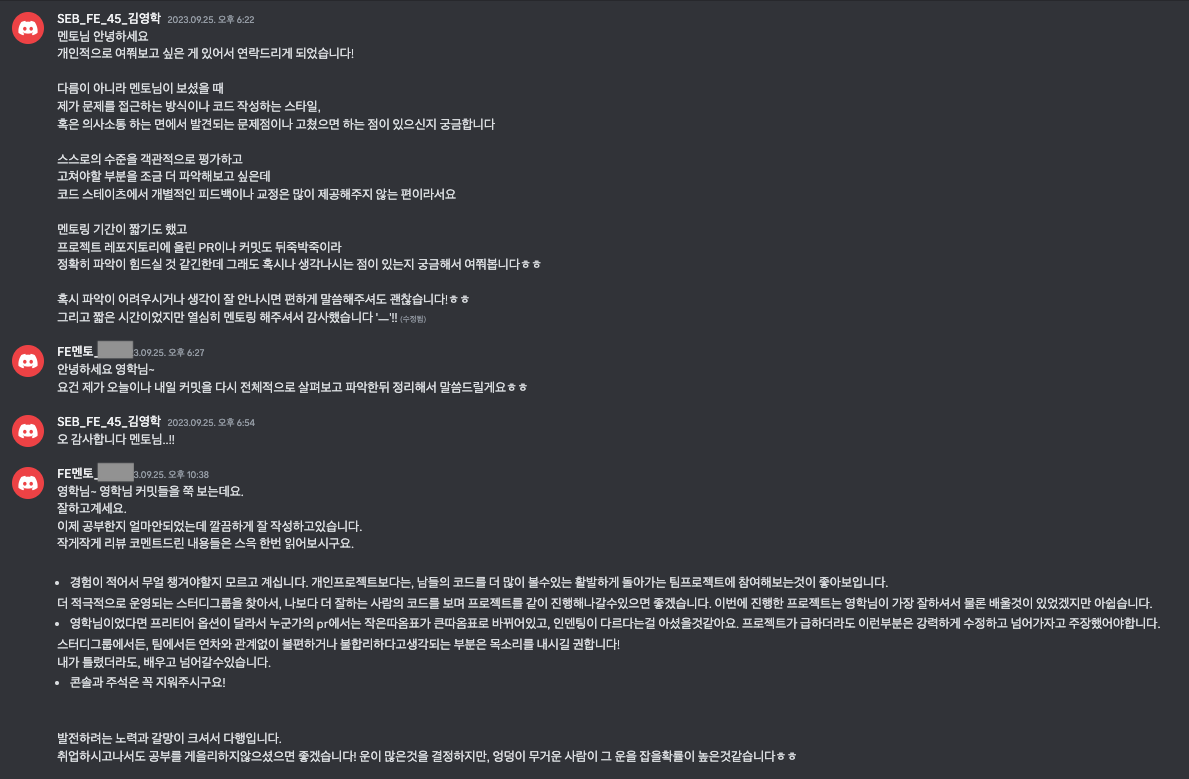
- 프로젝트 담당 멘토님이 주신 피드백 (사진 첨부)
-
코드 컨벤션 통일 및 PR 시 리뷰가 부족하여 전반적인 가독성이 저해됨
→ 어려움을 느끼시는 분들이 계셔서 배려한다는 생각으로 해당 부분에 대한 언급을 자제 하였는데 문제가 계속해서 누적되어 이후에는 서로가 작성한 코드를 이해하기 어려워하는 경우도 발생하여 전반적인 효율성이 저하되었다.
사소한 부분, 추후에 수정이 충분히 가능한 부분이라고 소홀히 하였는데 시간이 지날 수록 코드가 누적되고 서로 관계성을 가지게 되니 쉽사리 해결하기 어려워졌다. 처음부터 해당 부분을 제대로 잡고 진행했으면 협업 시 효율성이 훨씬 증진되었을 것 같다
-
더욱 도전적인 경험
→ 금번 프로젝트에서도 처음 구현해본 부분이 존재하지만 (차트 구현 등) 더 도전적인 과제를 수행해봤으면 좋았겠다는 생각이 든다.
초반에 주식 데이터 관련하여 REST API가 아닌 웹소켓 방식으로 구현하는 하는 것에 대한 논의가 이루어졌는데 BE 에서 다소 무리가 될 것 같아 결국 REST API 방식으로 구현하게 되었다. 주식 데이터를 웹소켓 방식으로 구현해보는 것도 좋은 경험이었겠다는 생각이 든다.
- 관련하여 몇몇 팀원들과 리팩토링을 진행하며 아쉬웠던 점을 조금씩 보완해가고 있다