Websocket을 도전해보자
웹소켓
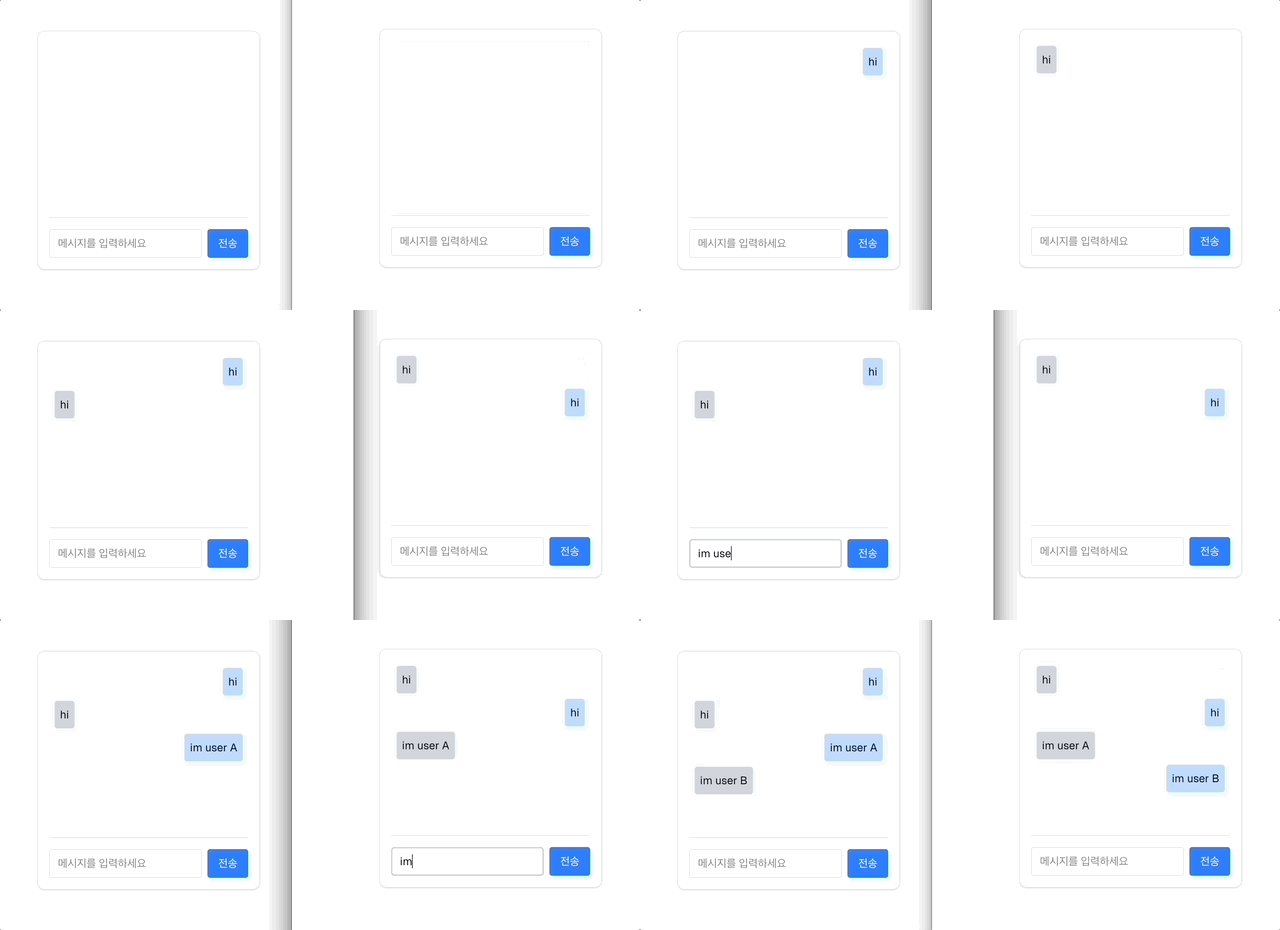
WebSocket은 브라우저와 서버 간의 양방향 실시간 통신을 가능하게 하는 프로토콜(protocol)이다.
기존에 호출했던 API들은 HTTP 기반으로 요청할때마다 연결하여 단방항으로 요청하면 응답해주는 방식을 사용하고 있었다 HTTP의 문제는 단방향 즉 요청할때 까지 응답을 해주지 못한다.
하지만 Websocket은 한번 연결하면 하나의 다리를 만들어줘서 양방향 즉 서버도 실시간으로 응답을 할수있게 해준다.
클라이언트 <-> 서버 <-> 클라이언트
여기서 의문점은 그럼 서버에서 통신할때 Websocket으로만 가능한가?
NOPE!
SSE : Server-Sent Events 라고 서버에서 클라이어트로 데이터를 지속적으로 보낼수있다. 하지만 이또한 단방향 즉 서버 -> 클라이언트
이제 코드를 보면서 확인해보자
서버측 코드
// 서버측 websocket
import WebSocket, { WebSocketServer } from "ws";
import { userSockets } from "./socket";

export const setupWebSocket = (server: any) => {
  const wss = new WebSocketServer({ server });

  wss.on("connection", (ws) => {
    let userId: string | null = null;

    ws.on("messageㄴ", (msg: string) => {
      try {
        const data = JSON.parse(msg);

        if (data.type === "init" && data.userId) {
          userId = data.userId;
          userSockets.set(userId as string, ws);
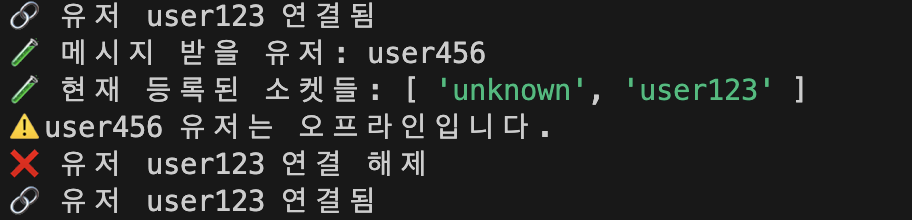
          console.log(`🔗 유저 ${userId} 연결됨`);
          return;
        }

        if (data.type === "chat") {
          const { fromUserId, toUserId, message } = data;
          const receiver = userSockets.get(toUserId);
          console.log("🧪 메시지 받을 유저:", toUserId);
          console.log("🧪 현재 등록된 소켓들:", [...userSockets.keys()]);
          const payload = {
            type: "chat",
            fromUserId,
            message,
            timestamp: new Date().toISOString(),
          };

          if (receiver && receiver.readyState === WebSocket.OPEN) {
            console.log(`📤 ${fromUserId} → ${toUserId}: ${message}`);
            receiver.send(JSON.stringify(payload));
          } else {
            console.log(`⚠️ ${toUserId} 유저는 오프라인입니다.`);
          }
        }
      } catch (err) {
        console.error("메시지 처리 중 에러:", err);
      }
    });

    ws.on("close", () => {
      if (userId) {
        userSockets.delete(userId);
        console.log(`❌ 유저 ${userId} 연결 해제`);
      }
    });
  });
};

///userSocket
const userSockets = new Map<string, WebSocket>();
우선 핸드 쉐이크를 통해서 연결을 해줘야 하는데 이건 HTTP 요청이다
클라이언트: 다리 연결해주셈 -> 서버 : ㅇㅋ userId 등록.하고 다리 연결 해줌
1. new WebSocketServer({ server }) server 라는 HTTP 를 받아서 Websocket 서버를 HTTP 서버에통합
2. ws.on('connection',.... ) 새 클라이언트가 websocket에 연결되었을때 실행
3. ws.message() 메세지 수신 처리
안에 들어가는 type에 따른 다른 동작을 수행할수 있다
- type === 'init' 유저 등록 -> userSocket인 map 함수에 유저 추가
- type === 'message' 메세지 전송 userSokcets.get()으로 유저 찾고 연결되어있는 상태라면 메세지 전송
- ws.on('close',...) 브라우저가 탭을 닫거나 끊기면 실행 유저를 제거 한다
여기서 주의할점 express 앱과 Websokcet을 사용할때 WebSocket 서버를 그 HTTP 서버에 연결하고 하나의 서버에서 HTTP 와 Webscoket처리가 가능하다
// 1. 기존의 Express 서버 생성
const server = http.createServer(app);
// 2. WebSocket 서버를 Express 기반 HTTP 서버에 붙임
setupWebSocket(server);
server.listen(PORT, () => {
  console.log(`🚀 서버 실행됨: http://localhost:${PORT}`);
});
클라이언트 코드
const socketRef = useRef<WebSocket | null>(null)
 const socket = new WebSocket("ws://localhost:3005");
  socketRef.current = socket;

  socket.onopen = () => {
    socket.<send(JSON.stringify({ type: "init", userId }));
  };
websocket객체를 컴포넌트 생명주기 동안 유지 주어진 userId websocket 연결 생성 type=== 'init' 을 줘서 연결해줘 요청 보내기
new Websocket은 브라우저ㅇ 내장되어있는 객체를 사용한다
new Websocket에 내장되있는 이벤트 핸들러
- onopen()은 연결이 성공적일때 실행되는 콜백
- onmessage()은 서버로부터 메시지를 수신했을 때 실행되는 콜백
- onclose()은 연결이 종료되었을 때
  socket.onmessage = (event) => {
    try {
      const data = JSON.parse(event.data);
      if (data.type === "notification" && onNotify) {
        onNotify(data.message);
      }
      if (data.type === "chat" && onChat) {
        onChat({ fromUserId: data.fromUserId, message: data.message });
      }
    } catch (err) {
      console.error("메시지 파싱 실패:", err);
    }
  };
type에 따라 알림인지 메세지 인지 확인 하고 모든 메세지 파싱해서 유저 아이디들과 같이 전달
return {
  socketRef,
  sendMessage: (toUserId: string, message: string) => {
    if (
      socketRef.current &&
      socketRef.current.readyState === WebSocket.OPEN
    ) {
      socketRef.current.send(
        JSON.stringify({
          type: "chat",
          fromUserId: userId,
          toUserId,
          message,
        })
      );
    }
  },
};
반환값들 설명
socketRef : useRef로 저장된 인스턴스 반환 , 외부에서 객체 접근할때 사용
ssendMessage : 메시지 전공 함수-> websokcet이 열려있는지 확인하고 json으로 직렬화 후 서버로 메시지 전송
채팅 컴포넌트
 const [messages, setMessages] = useState<Message[]>([]);
 const [input, setInput] = useState("");
 const { sendMessage } = useNotification(userId, {
    onChat: ({ fromUserId, message }) => {
      console.log("📨 받은 메시지:", message);
      setMessages((prev) => [...prev, { fromUserId, message }]);
    },
  });

  const handleSubmit = () => {
    if (!input.trim()) return;
    sendMessage(opponentId, input);
    setMessages((prev) => [...prev, { fromUserId: userId, message: input }]);
    setInput("");
  };
useWebsocket.ts 전체 코드
import { useEffect, useRef } from "react";

interface ChatData {
  fromUserId: string;
  message: string;
}

interface UseNotificationOptions {
  onNotify?: (msg: string) => void;
  onChat?: (data: ChatData) => void;
}

export const useNotification = (
  userId: string,
  { onNotify, onChat }: UseNotificationOptions
) => {
  const socketRef = useRef<WebSocket | null>(null);

  useEffect(() => {
    if (!userId) return;

    const socket = new WebSocket("ws://localhost:3005");
    socketRef.current = socket;

    socket.onopen = () => {
      socket.send(JSON.stringify({ type: "init", userId }));
    };

    socket.onmessage = (event) => {
      try {
        const data = JSON.parse(event.data);
        if (data.type === "notification" && onNotify) {
          onNotify(data.message);
        }
        if (data.type === "chat" && onChat) {
          onChat({ fromUserId: data.fromUserId, message: data.message });
        }
      } catch (err) {
        console.error("메시지 파싱 실패:", err);
      }
    };

    return () => {
      socket.close();
    };
  }, [userId, onNotify, onChat]);

  return {
    socketRef,
    sendMessage: (toUserId: string, message: string) => {
      if (
        socketRef.current &&
        socketRef.current.readyState === WebSocket.OPEN
      ) {
        socketRef.current.send(
          JSON.stringify({
            type: "chat",
            fromUserId: userId,
            toUserId,
            message,
          })
        );
      }
    },
  };
};
우왕 굿 채팅 구현 멋져요!