📍1.사용자의 방문 빈도 집계하기
◾ 1)한 주 동안 며칠 사용하는 이용자가 몇명인지 집계하기 (2016년 11월 1일 ~ 2016년 11월 7일)
데이터 변경하기
원본 데이터
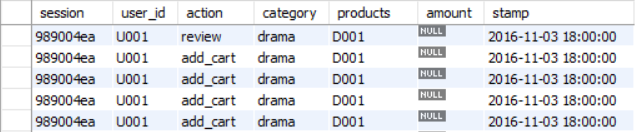
데이터 출력 값이 제대로 표현되지 않을 것 같아 임의로 변경함!
주의 사항 : 데이터를 새로 만들때 DB 데이터 저장해야함 텍스트 파일 저장하고나서 실행시키기
(그렇게 안하면 출력 아무것도 안된다)
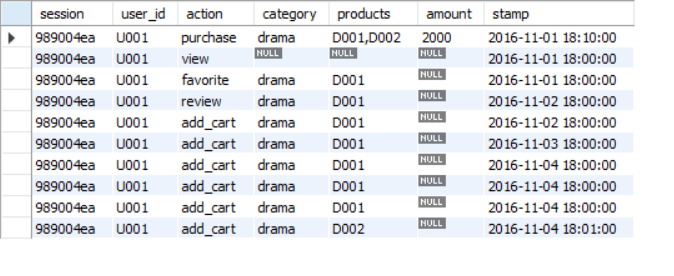
변경 데이터
유저 ID와 stamp 컬럼을 변경하였음
코드
with cte_1(user_id, count_day) as (select user_id,count(distinct date_format(stamp,'%Y-%m-%d'))
from action_log_3
where date_format(stamp,'%Y-%m-%d') between '2016-11-01' and '2016-11-07'
group by user_id)
select concat(count_day,'일') as count_day, concat(count(distinct user_id),'명') as count from cte_1
group by count_day
order by count_day;
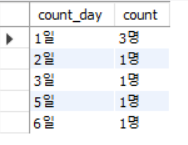
결과
◾ 2)구성비와 구성비 누계를 구하기
주의사항
주의사항
누적합계를 구하는 코드
SELECT *,
SUM(count) OVER (ORDER BY count_day) AS cumulative_sum
FROM cte_2;
코드
with cte_1(user_id, count_day) as (select user_id,count(distinct date_format(stamp,'%Y-%m-%d'))
from action_log_3
where date_format(stamp,'%Y-%m-%d') between '2016-11-01' and '2016-11-07'
group by user_id),
cte_2 as(select concat(count_day,'일') as count_day, count(distinct user_id) as count ,
(select count() from cte_1) as total
from cte_1
group by count_day
order by count_day)
select ,
round(count100/total,2) cumulative_ratio,
-- count_day 컬럼을 기준으로 누적 합계를 구하기
ROUND(SUM(count 100.0 / total) OVER (ORDER BY count_day), 2) AS cumulative_ratio_accumulated
from cte_2;
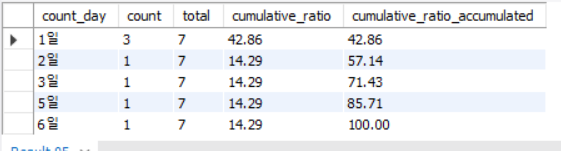
결과
📍2.벤 다이어그램으로 사용자 액션 집계하기
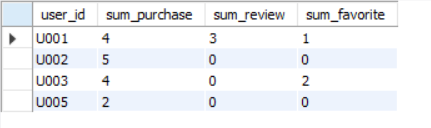
◾ 1) 유저 별로 액션을 어떻게 취했는지 합계 값 구하기
코드
with cte_1 as(select *,
case when action = 'purchase' then 1 else 0 end as has_purchase,
case when action = 'review' then 1 else 0 end as has_review,
case when action = 'favorite' then 1 else 0 end as has_favorite
from action_log_3
where action in ('purchase','review','favorite'))
select user_id,
sum(has_purchase) as sum_purchase,
sum(has_review) as sum_review,
sum(has_favorite) as sum_favorite
from cte_1 group by user_id
결과
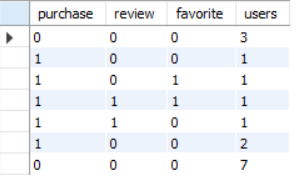
◾ 2) 모든 액션 조합에 대한 사용자 수 계산하기
코드
with cte_1 as(select *,
case when action = 'purchase' then 1 else 0 end as has_purchase,
case when action = 'review' then 1 else 0 end as has_review,
case when action = 'favorite' then 1 else 0 end as has_favorite
from action_log_3
),
cte_2 as(select user_id,
sum(has_purchase) as sum_purchase,
sum(has_review) as sum_review,
sum(has_favorite) as sum_favorite
from cte_1 group by user_id),
-- 1.null값을 0으로 변경
-- 2.0이 아닌 숫자 나온다면 1 값이 출력되도록 변경하기
-- 3.rollup
cte_3 AS (
SELECT distinct
if(ifnull(sum_purchase,'any')!=0,1,0) as purchase
, if(ifnull(sum_review,'any')!=0,1,0) as review
, if(ifnull(sum_favorite,'any')!=0,1,0) as favorite
, count(1) AS users
FROM cte_2
GROUP BY sum_purchase, sum_review, sum_favorite WITH ROLLUP
)
select * from cte_3;
결과
수정사항
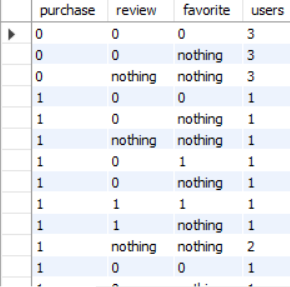
null 값을 any로 표현하여 not action인거랑 별도 구분해보기!
null/ not action / action 따로 나누어서 계산 다시해보기
코드 (수정 후)
with cte_1 as(select *,
case when action = 'purchase' then 1 else 0 end as has_purchase,
case when action = 'review' then 1 else 0 end as has_review,
case when action = 'favorite' then 1 else 0 end as has_favorite
from action_log_3
),
cte_2 as(select user_id,
sum(has_purchase) as sum_purchase,
sum(has_review) as sum_review,
sum(has_favorite) as sum_favorite
from cte_1 group by user_id),
cte_3 AS (
SELECT
if (ifnull(sum_purchase,'any')>=1 , 1, ifnull(sum_purchase,'nothing') ) as purchase
, if (ifnull(sum_review,'any')>=1 , 1, ifnull(sum_review,'nothing') ) as review
, if (ifnull(sum_favorite,'any')>=1 , 1, ifnull(sum_favorite,'nothing') ) as favorite
, count(1) AS users
FROM cte_2
GROUP BY sum_purchase, sum_review, sum_favorite WITH ROLLUP
)
select * from cte_3;
결과 (수정 후)
따로 출력됨
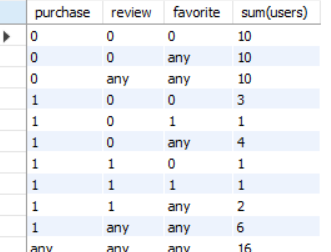
◾ 3) 벤 다이어그램을 만들기 위해 데이터를 관리하는 쿼리
코드
with cte_1 as(select *,
case when action = 'purchase' then 1 else 0 end as has_purchase,
case when action = 'review' then 1 else 0 end as has_review,
case when action = 'favorite' then 1 else 0 end as has_favorite
from action_log_3
),
cte_2 as(select user_id,
sum(has_purchase) as sum_purchase,
sum(has_review) as sum_review,
sum(has_favorite) as sum_favorite
from cte_1 group by user_id),
-- 1.null값을 0으로 변경
-- 2.0이 아닌 숫자 나온다면 1 값이 출력되도록 변경하기
-- 3.rollup
cte_3 AS (
SELECT distinct
if(ifnull(sum_purchase,'any')!=0,1,0) as purchase
, if(ifnull(sum_review,'any')!=0,1,0) as review
, if(ifnull(sum_favorite,'any')!=0,1,0) as favorite
, count(1) AS users
FROM cte_2
GROUP BY sum_purchase, sum_review, sum_favorite WITH ROLLUP
)
select ifnull(purchase,'any') as purchase,
ifnull(review,'any') as review ,
ifnull(favorite,'any') as favorite,
sum(users) from cte_3 group by purchase, review , favorite with rollup;
결과
📍3.Decline 분석을 사용해 사용자를 10단계 그룹으로 나누기
-- 사용자의 구매 금액에 따라 순위를 구분하자
-- 중요도를 파악하는 리포트를 구성하자
주의사항 : ntile함수를 사용하여 분위수 출력하기
사용 예시
NTILE(n) OVER (PARTITION BY column_name ORDER BY column_name) AS tile_column
사용 예제
SELECT
employee_id,
sales,
NTILE(4) OVER (ORDER BY sales) AS quartile
FROM sales_table;
1)Decline 분석을 사용해 사용자를 5단계 그룹으로 나누기
데이터 개수가 없어서 그룹을 5개로 나눔
코드
select user_id, ifnull(sum(amount),0) as amount ,
NTILE(5) OVER (ORDER BY ifnull(sum(amount),0) desc) AS tile_col
from action_log_3
group by user_id;
결과값
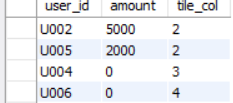
select user_id, ifnull(sum(amount),0) as amount ,
NTILE(5) OVER (ORDER BY ifnull(sum(amount),0) desc) AS tile_col
from action_log_3
group by user_id;
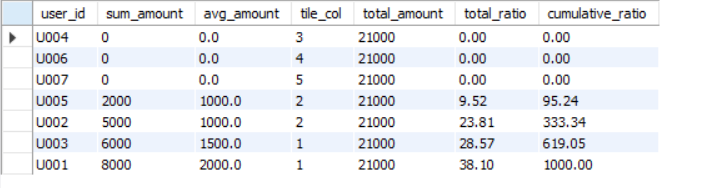
2)구매액이 많은 decline 순서대로 구성비와 구성비 누계를 계산하는 쿼리
코드
with cte_1 as(select user_id, ifnull(sum(amount),0) as sum_amount ,round(ifnull(avg(amount),0),1) as avg_amount,
NTILE(5) OVER (ORDER BY ifnull(sum(amount),0) desc) AS tile_col,
(select sum(amount) as total_amount from action_log_3) as total_amount
from action_log_3
group by user_id)
select ,round((sum_amount100/total_amount),2) as total_ratio ,
sum(round((sum_amount1000/total_amount),2)) over (order by round((sum_amount100/total_amount),2)) as cumulative_ratio
from cte_1;
결과값
📍4.RFM 관점으로 사용자를 3가지 관점 그룹으로 나누기
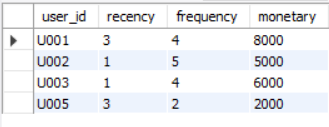
1)recency,frequency,monetary구하기
코드
with cte_1 as (select user_id, category, amount, date_format(stamp, '%Y-%m-%d') as stamp from action_log_3 where action in ('purchase'))
SELECT
user_id,
DATEDIFF( '2016-11-07',MAX(stamp) ) as recency,
COUNT(*) AS frequency,
ROUND(SUM(amount), 2) AS monetary
FROM cte_1
GROUP BY user_id;
결과값
2)고객 분류하기
데이터 분류하기에는 user개수가 총 4개라 더 큰 데이터가 필요
해당 데이터로 추후 진행해보기!
https://velog.io/@liveandletlive/SQL-RFM-1