Python Syntax 1 for A.I
Variables, Function, Console & I/O, Conditinals, Loops
Variables
변수(Variable)은 data, 값을 저장하기 위한 메모리 공간의 프로그래밍 상 이름.
a = 5
b = 3
a + b
8
그럼 변수는 어디에, 어떻게 저장되는 걸까?
"a = 5" -> Application -> OS -> CPU -> Memory
변수는 메모리 주소를 가지고 있고,
변수에 들어가는 값은 메모리 주소에 할당이 되는 방식이다.
- 폰 노이만 아키텍처에서는 사용자가 컴퓨터에 값을 입력하거나
프로그램을 실행할 경우에, 그 정보를 먼저 메모리에 저장시키고,
CPU가 순차적으로 그 정보를 해석하고 계산하여 사용자에게 결과값을 전달함.
- 변수 : 프로그램에서 사용하기 위해 특정한 값을 저장하는 공간
- 선언 되는 순간 메모리의 특정영역에 물리적인 공간이 할당됨.
- 변수에는 값이 할당되고 해당 값은 메모리에 저장됨.
primitive data types
data type 이란 파이썬이 처리할 수 있는 데이터 유형이다.
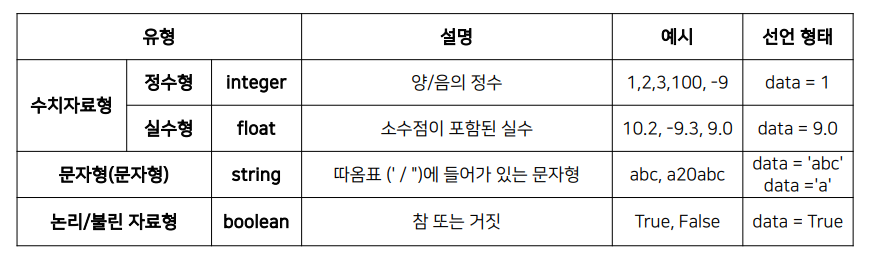
각 자료형마다, 차지하는 메모리의 공간이 다 다르다.
Dynamic Typing
파이썬은 동적 타이핑 언어이다.
이는 코드 실행시점에 데이터의 type을 결정해주는 언어라는 뜻이다.
예를 들어, 변수에 정수형 값을 넣을 때,
파이썬은 그냥 "a = 1" 을 적는데,
다른 언어와 다르게 integer라고 굳이 적어주지 않아도 된다.
Operator
1) 형 변환
10.3과 10.7을 정수형으로 형변환 후, 덧셈하면 어떤 결과가 나올까?
a = 10.7
b = 10.3

a = int(a)
b = int(b)

print(a+b)
20
int형으로 자료형 변환 시, 소수점 버림.
2) 컴퓨터의 반올림 오차
아래와 같이 결과가 나오는 이유는 뭘까?
c = 38.8
print(c)
38.8
c
38.799999999999997
왜지?
컴퓨터의 모든 값은 이진수로 변환되어 메모리에 저장되기 때문
3) 0.1을 이진수로 변환하라
0.1 x 2 = 0.2 -> 0
0.2 x 2 = 0.4 -> 0
0.4 x 2 = 0.8 -> 0
0.8 x 2 = 1.6 -> 1
0.6 x 2 = 1.2 -> 1
0.2 x 2 = 0.4 -> 0 .........

0.00011001100110011 ... ... (2)
단순한 실수도 이진수로 변환하면 무한소수가 된다.
반올림 오차는 충분히 작아서 반올림을 하여 일반적으로 문제가 되지는 않는다.
integer - 32bit
float - 64bit
cf
컴퓨터는 왜 이진수를 쓰는가?
컴퓨터는 실리콘이라는 재료로 만든 반도체로 구성.
반도체란, 특정 자극을 주었을 때 전기가 통할 수 있도록 하는 물질
도체와 부도체에 반해, 반도체는 전류의 흐름의 제어가 가능
전류가 흐를 때, 1 그리고 흐르지 않을 때, 0으로 표현할 수 있음.
이진수 한자리를 bit라 칭하고 8개의 bit는 1byte
list
만약 데이터가 100개가 있다면 이를 어떻게 관리할 것인가?
100개의 변수를 만들어 관리하나?
list 자료형을 사용하면, 하나의 변수를 만들어 관리할 수 있다.
- list는 시퀀스 자료형, 여러 데이터들의 집합
- int, float 같은 다양한 데이터 타입을 포함한다.
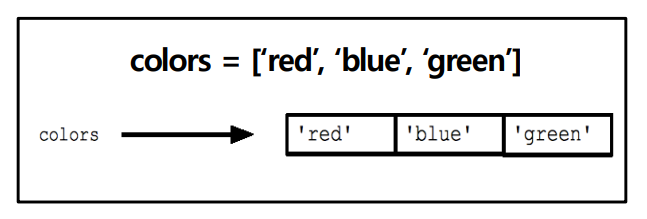
list의 특징
1) indexing
- list에 있는 값들은 주소(offset)을 가진다
- 주소를 사용해 할당된 값을 호출
2) slicing
- list의 값들을 잘라서 쓰는 것이 slicing
- list offset 값들을 기반으로 부분값을 반환
3) list 연산
- concat, is, in 등 다양한 연산 함수를 사용할 수 있다.
4) 원소 추가, 삭제
- append, extend, insert, remove, del 등 method 활용가능
- method 마다 리스트를 변화시키고 저장하거나 변화한 값을 반환하거나 하는데, 이 둘을 잘 구분할 줄 알아야 한다.
5) 메모리 저장 방식
- python은 memory에 주소를 계속 참조한다.
- 하나의 객체에 다양한 data type의 자료가 저장 될 수 있다.
- "=" 의 의미가 같다가 아니라, 메모리 주소에 해당값을 할당(연결)한다는 의미이다.
a = [5, 4, 3, 2, 1]
b = [1, 2, 3, 4, 5]
b = a
print(b)
[5, 4, 3, 2, 1]
a.sort()
print(b)
[1, 2, 3, 4, 5]- a와 b가 같은 공간을 가리키고 있다. 그래서 같은 결과가 나타난다.
- 하지만, 이것을 만약에 따로 카피하고 싶다면 b = a[:] 이런식으로나 copy()메서드를 사용할 수 있다.
6) packing & unpacking
- 패킹 : 한 변수에 여러 개의 데이터를 넣는 것
- 언패킹 : 한 변수에 데이터를 각각의 변수로 반환하는 것
t = [1, 2, 3]
a, b, c = t
print(t, a, b, c)
[1, 2, 3] 1 2 3
7) 이차원 list
- 리스트안에 리스트를 만들어 행렬(matrix)를 생성해서 활용할 수 있다.
kor_score = [49, 79, 20, 100, 80]
math_score = [43, 59, 85, 30, 90]
eng_score = [49, 79, 48, 60, 100]
midterm_score = [kor_score, math_score, eng_score]
print(midterm_score[0][2])
20- 복사가 일어나는 구문이 1 Dimension에서는 가능하지만, 2D에서는 불가능하다.
그래서, copy 라이브러를 import 해서, copy.deepcopy를 해서 복사해야만 함
import copy
midterm_copy = copy.deepcopy(midterm_score)
midterm_score[0][0] = 100
midterm_copy[0][0]
49
midterm_score[0][0]
100
Function & Console I/O
function
함수란? 어떤 일을 수행하는 코드의 덩어리.
- 반복적인 수행을 1회만 작성 후, 호출
- 코드를 논리적인 단위로 분리
- 캡슐화 : 인터페이스만 알면 타인의 코드 사용 가능
함수 선언 문법
def 함수이름(parameter #1, ..., ) :
	수행문 #1(statements)
    수행문 #2(statements)
    return <반환값>
parameter은 함수의 input값 인터페이스
indentation 들여쓰기 이후, 함수의 statements를 작성
return value(optional) 반환값을 설정할 수 있는데 이는 선택적임.
argument는 실제 parameter에 대입된 값을 의미함.
함수 수행 순서
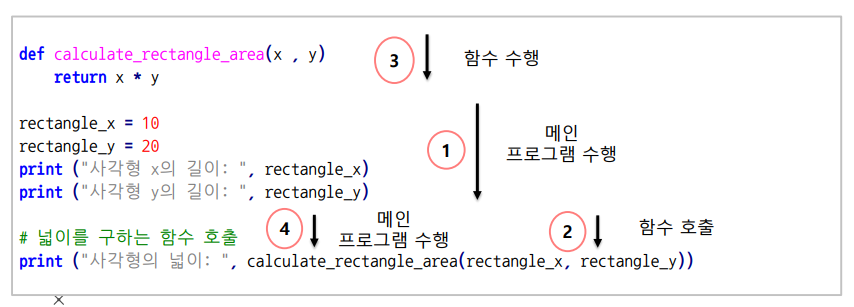
0단계)
def calculate_rectangle_area(x, y):
    return x * y
함수 정의 부분을 먼저 읽고 저장.
1단계)
rectangle_x = 10
rectangle_y = 20
print("사각형의 x 길이: ", rectangle_x)
print("사각형의 y 길이: ", rectangle_y)
메인 코드 실행 시작
함수 밖의 코드가 실행되기 시작함.
2단계)
print("사각형의 넓이: ", calculate_rectangle_area(rectangle_x, rectangle_y))
함수 호출 발견하면 바로 이전에 저장했던 함수로 돌아옴.
3단계)
def calculate_rectangle_area(x, y):
    return x * y
함수 실행.
x에는 rectangle_x 값이 들어가고, y에는 rectangle_y 값이 들어감.
4단계)
print("사각형의 넓이: ", #return값 : 200)
메인 코드로 복귀. 마저 나머지 코드 실행.
함수 형태
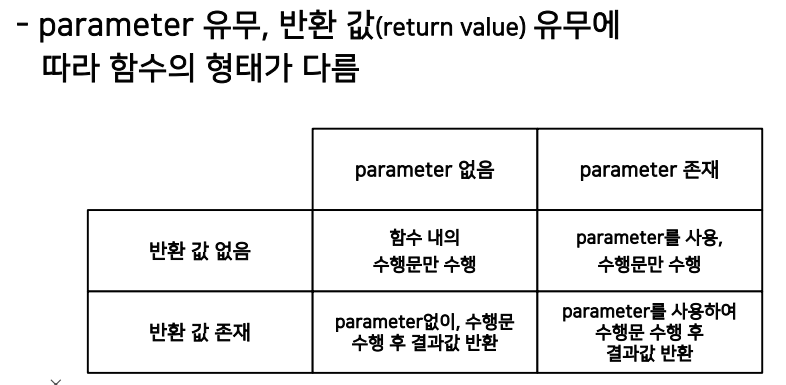
parameter의 유무,return 값의 유무에 따라 함수의 형태를 구분할 수 있음.
shell 특성상, print문이 없어도 그 값을 보여줄 수 있다.
(앞전에 언급했던, sort vs sorted 떠올려보라)
Console in/out
어떻게 프로그램과 데이터를 주고 받을 것이냐??
input()
input()함수는 콘솔창에서 문자열을 입력 받는 함수이다.
기본적으로 문자열로 입력받기 때문에,
형변환을 통해 내가 원하는 자료형으로 수정해서 입력받을 수 있다.
print()
print문에서 type이 다른 경우 사이에 ','를 넣어주면 연결이 된다.
print formatting
프린트문은 기본적인 출력 외에 출력의 양식의 형식을 지정할 수 있다.
1) % string
%-format 함수를 사용함.
print("I eat %d apples." %3)
print("I eat %s apples." % "five")
number = 3
day = "three"
print("I ate %d apples. I was sick for %s days." % (number, day))
print("Product : %s, Price per unit : %f." % ("Apple", 5.243))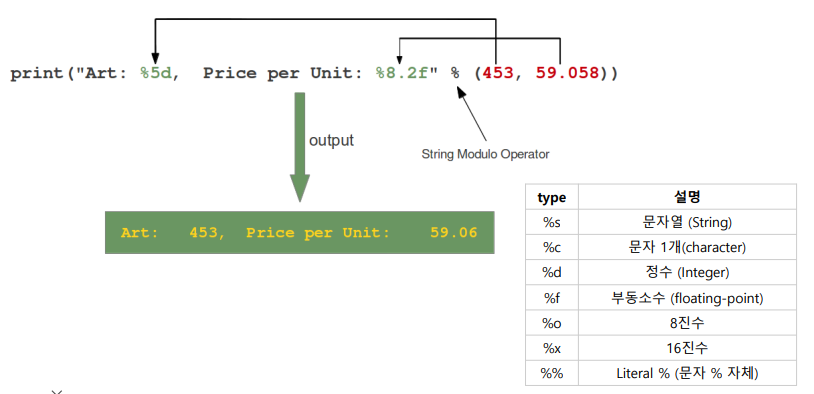
"%datatype" %(variable) 형태로 출력 양식을 표현함.
(variable)안에는 두 개 이상의 값이 들어갈 수 있다.
2) str.format()
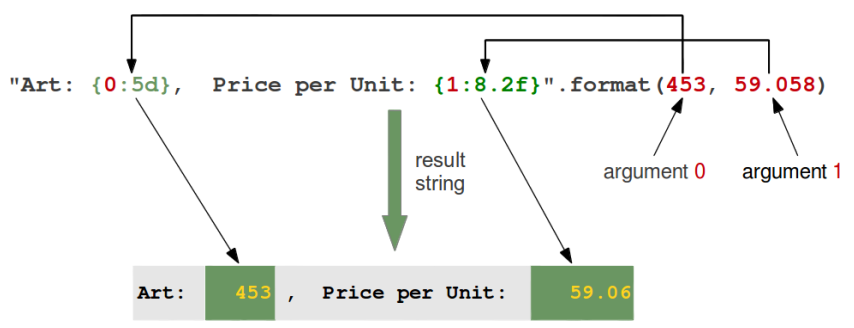
"~{datatype}~".format(argument)
age = 29
name = "Seung Beom"
print("I'm {0} years old".format(age))
print("My name is {0} and {1} years old.".format(name, age))
print("Product : {0}, Price per unit : {1:.3f}.".format("Apple", 5.243))
{} 안에 처음 들어오는 숫자는 뒤에 argument의 인덱스라고 볼 수 있고,
추가로, : 뒤에 data type도 정해줄 수 있다.
Padding
- 여유 공간을 지정하여 글자배열 + 소수점 자릿수 맞추기
#%5s -> 5자리를 두고 거기에 채워라
print("Product : %5s, Price per unit: %.5f" % ("Apple", 5.243))
#{0:5s} -> 0번 인덱스를, 5자리 두고 거기에 채워라
print("Product : {0:5s}, Price per unit : {1:.5f}."format("Apple", 5.243))

#%10.3f -> 소수점 세자리 까지 표기하고 10자리 두고 거기에 채워라
print("Product : %10s, Price per unit : %10.3f." % ("Apple", 5.243))
#{0:>10s} -> 10자리 두고 거기에 채우되, 오른쪽 정렬하라
print("Product : {0:>10s}, Price per unit : {1:10.3f}.".format("Apple", 5.243))
naming
- 해당 표시할 내용을 변수로 표시하여 입력
#%d 나 %s 이런거 들어갈 자리에 변수를 넣어주고 뒤에{}에서 변수:값을 넣어줌 like dictionary
print("Product : %(name)10s, Price per unit : %(price)10.5f." % {"name" : "Apple", "price" : 5.243})

#{ 뒤에 인덱스 번호가 아닌 변수를 넣어서 출력할 수 있음. 해당 변수는 뒤에 argument 에서 변수 = 값 꼴로 넣어줌.
print("Product : {name:>10s}, Price per unit : {price:10.5f}.".format(name = "Apple", price = 5.243))
3) f-string
- python 3.6 이후, PEP498(사용자 커뮤니티 문서?느낌스)에 근거한 formatting 기법
name = "Seung Beom"
age = 29
print(f"Hello, {name}. You are {age}.")
#Hello, Seung Beom. You are 29.
print(f"{name:20}")
#Seung Beom
print(f"{name:>20}")
#          Seung Beom
print(f"{name:*<20}")
#Seung Beom**********
print(f"{name:*>20}")
#**********Seung Beom
print(f"{name:*^20}")
#*****Seung Beom*****

number = 3.14159265358979
print(f"{number:.2f}")
#3.14
Conditinals and Loops
Condition
조건문이란? 조건에 따라 특정한 동작을 하게 하는 명령어
- 조건문은 조건을 나타내는 기준과 실행해야할 명령으로 구성되며,
조건의 참, 거짓에 따라 실행해야 할 명령이 수행되거나 되지 않음. - 파이썬은 조건문으로 if, else, elif 등의 예약어를 사용함.
비교 연산자
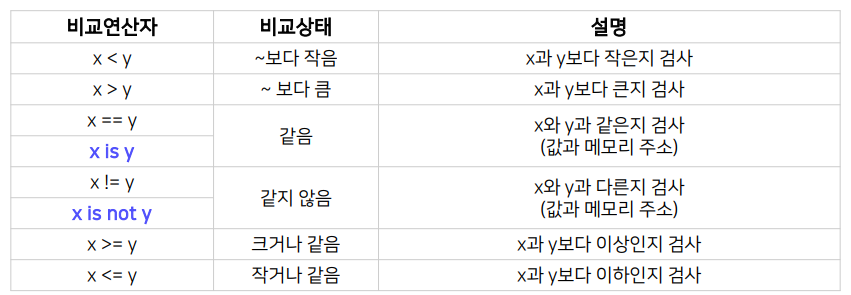
- if 다음에 조건을 표기하여 참 또는 거짓을 판단하고 이를 위해 비교 연산자를 활용할 수 있다.
- is / is not 연산자는 주의해야한다.
왜냐하면, Memory의 주소를 비교하기 때문.
예를 들어, integer 형의 -5~256 까지의 숫자는 같은 메모리 주소에 할당하지만(정적 메모리), 이 범위를 벗어나는 숫자는 새로 메모리를 할당해주기 때문.
a = 256
b = 256
print(a is b) #True

a = 257
b = 257
print(a is b) #False
True/False
- 숫자형의 경우, 수학에서의 참/거짓과 동일
- 컴퓨터는 존재하면 True, 존재하지 않으면 False라고 판단한다.
- 1 , 'abc' 그냥 존재하는 거 -> True
>>>if 1 :
...    print("True")
...else :
...    print("False")
...
True
논리 연산자
- 조건문을 표현할 때, 집합의 논리 키워드를
함께 사용하여 참과 거짓을 판단하기도 함
a = 8
b = 5
if a == 8 and b == 4 :
	print("True")
else :
	print("False")
#False
삼항 연산자(Ternary operators)
- 조건문을 사용하여 참일 경우와 거짓일 경우를 한 줄에 표현
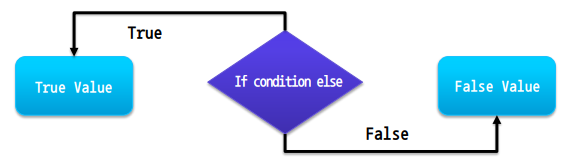
value = 12
is_even = True if value % 2 == 0 else False
print(is_even)
#True

boolean_list = [True, True, True, True]
all(boolean_list) # True

any(boolean_list)
- all 은 안에 요소가 모두 True일 때, True를 반환하고 하나라도 False라면, False를 반환한다.
- any 는 안에 요소 중 하나라도 True 이면, True를 반환하고 모두 False라면, False를 반환한다.
Loop
반복문이란? 정해진 동작을 반복적으로 수행하게 하는 명령문
- 반복문은 반복 시작 조건, 종료 조건, 수행 명령으로 구성됨.
- 반복문은 들여쓰기와 block으로 구분됨.
- 파이썬은 반복문으로 for, while 등의 명령 키워드를 사용.
- 무한루프 : 반복 명령이 끝나지 않는 프로그램 오류.
CPU와 메모리 등 컴퓨터의 리소스를 과다하게 점유하기 때문에 지양해야 함.
for loop
반복 범위를 지정하여 반복문을 수행하는 for 문
- 반복문은 대부분 0부터 반복을 시작함.
- 무한루프 : 반
for문의 다양한 반복문 조건 표현
- 문자열을 한자씩 리스트로 처리
- iterable 한 시퀀스형 자료형을 사용한다.
for i in "abcdefg" :
	print(i)
#a
#b
#c
#d
#e
#f
#g- 각각의 문자열 리스트로 처리
for i in ["americano", "latte", "frafuchino"] :
	print(i)
#americano
#latte
#frafuchino- 간격을 두고 세기
for i in range(1, 10, 2) :
	print(i)
#1
#3
#5
#7
#9- range() 함수의 세번 째 파라미터는, step으로 간격을 설정할 수 있다.
- 역순으로 반복문 수행
for i in range(10, 1, -1) :
print(i)- range(10, 1, -1) : step을 -1로 설정하면 하나씩 감소시키면서 반복문을 수행한다.
range()
range() 함수를 이용하여 반복 범위를 정해줄 수 있기 때문에 많이 사용된다.
- range()는 마지막 숫자 바로 앞까지 리스트를 만들어준다.
- range(0,5) = [0, 1, 2, 3, 4] = range(5) 모두 같은 의미이다.
while
조건이 만족하는 동안 반복 명령문을 수행하는 while 문
반복 실행횟수가 명확하지 않을 때, while문을 사용한다.
break, continue
break는 특정 조건에서 반복을 종료할 수 있도록 함.
for i in range(10) :
	if i == 5 : break
    print(i)
print("EOP")
continue는 특정 조건에서 남은(아래 코드) 반복 명령을 skip함.
for i in range(10) :
	if i == 5 : continue
    print(i)
print("EOP")
반복의 제어 - else
else 문을 이용해서, 반복 조건이 만족하지 않을 경우 반복 종료 시 수행하는 구문을 설정할 수 있다.
#for with else
for i in range(10) :
	print(i,)
else :
	print("EOP")
#while with else
i = 0
while i < 10 :
print(i, )
i += 1
else :
print("EOP")loop review
#1
sentence = "I love you"
reverse_sentence = ""

for char in sentence :
	reverse_sentence = char + reverse_sentence
print(reverse_sentence)
#2
decimal = 10
result = ""
while (decimal > 0) :
	remainter = decimal % 2
    decimal = decimal // 2
    result = str(remainder) + result
print(result)
#debugging loop
print("input decimal number : ")
decimal = int(input())
result = ""
loop_counter = 0

while (decimal > 0) :
	temp_decimal_input = decimal
    temp_result_input = result

    remainder = decimal % 2
    decimal = decimal // 2
    result = str(remainder) + result

    print("----------", loop_counter, "loop value check ----------")
    print("Initial decimal:", temp_decimal_input,
    	", Remainder : ", remainder,
        ", Initial result", temp_result_input)
    print("Output decimal : ", decimal,
    	"Output result: ", result)
    print("--------------------------------------------------")
    print("")

    loop_counter += 1
print("Binary number is", result)
loops & control example
#숫자 맞추기
import random
guess_number = random.randint(1, 100)
print("숫자를 맞춰보세요 (1~100)")
user_input = int(input())
while (users_input is not guess_number) :
	if users_input > guess_number :
    	print("숫자가 너무 큽니다.")
    else :
    	print("숫자가 너무 작습니다.")
    user_input = int(input())
else :
	print("정답입니다.", "입력한 숫자는 ", user_input, "입니다.")
#구구단
print ("구구단 몇 단을 계산할까요(1~9)?")
x = 1
while (x is not 0):
	x = int(input())
	if x == 0: break
	if not(1 <= x <= 9):
		print ("잘못 입력하셨습니다", "1부터 9사이 숫자를 입력해주세요")
		continue
	else:
		print ("구구단 " + str(x) +"단을 계산합니다.")
		for i in range(1,10):
			print (str(x) + " X " + str(i) + " = " + str(x*i))
		print ("구구단 몇 단을 계산할까요(1~9)?")
print ("구구단 게임을 종료합니다")
#이차원 리스트 처리하기
student_score = [0,0,0,0,0]
i = 0
for subject in midterm_score:
	for score in subject:
		student_score[i] += score # 각 학생마다 개별로 교과 점수를 저장
		i += 1 # 학생 index 구분
	i = 0 # 과목이 바뀔 때 학생 인덱스 초기화
else:
	a, b, c, d, e = student_score # 학생 별 점수를 unpacking
	student_average = [a/3,b/3,c/3,d/3,e/3]
	print (student_average)
debugging
- 디버깅이란? 코드의 오류를 발견하여 수정하는 과정을 말한다.
- 오류의 '원인'을 알고 '해결책'을 찾아야 함.
- 문법적 에러를 찾기 위해 <- 에러 메시지 분석
문법적 오류에는 들여쓰기, 오탈자, 대소문자 구분 등이 흔히 있고,
이런 경우에는 에러가 발생하면 인터프리터가 알려주기 때문에 이를 보고 수정. - 논리적 에러를 찾기 위해 <- 테스트도 중요함.
논리적 에러는 내 뜻대로 실행이 되지 않는 코드인데,
이런 경우엔 중간 중간 프린트 문을 찍어서 확인하며 수정해 볼 수 있다.
trapezium_area.py exercise
- main() 함수는 그 파일을 import하면 자동으로 실행해버린다.
#trapezium_area.py
def addition(x, y) :
	return x+y

def multiplication(x, y) :
	return x*y

def divided_by_2(x)
	return x/2

def main() :
	print(addition(10, 5))
    print(multipication(10, 5))
    print(divided_by_2(50))

#아래 코드는 파이썬 환경에서 실행하면 제일 먼저 실행한다는 뜻.
#python shell 환경에서는 __name__ 묶어놓으면 main함수가 자동으로 실행 x.
if __name__ == "__main__" :
main()- 특수한 언더바 두개 name 부분은 python shell에서 호출 할 경우, 실행되지 않음.
#shell 환경
>>>import trapezium_area as ta
#name으로 묶어놓았기 때문에 main함수 실행 x.
ta.addition(10, 5)
#15
ta.multiplication(10, 5)
#50
ta.divided_by_2(50)
#25
출처
https://www.boostcourse.org/precourse1/lecture/1547333?isDesc=false