chat completion api 의 function call
Function calling (tool calls)
https://platform.openai.com/docs/guides/function-calling
결론 부터 말하면 function calling은 llm이 사용자의 질의를 읽고, 로컬 코드에 구현된 함수 중에 어떤 걸 호출할지 선택하는 기능이다.
function call의 lifecycle
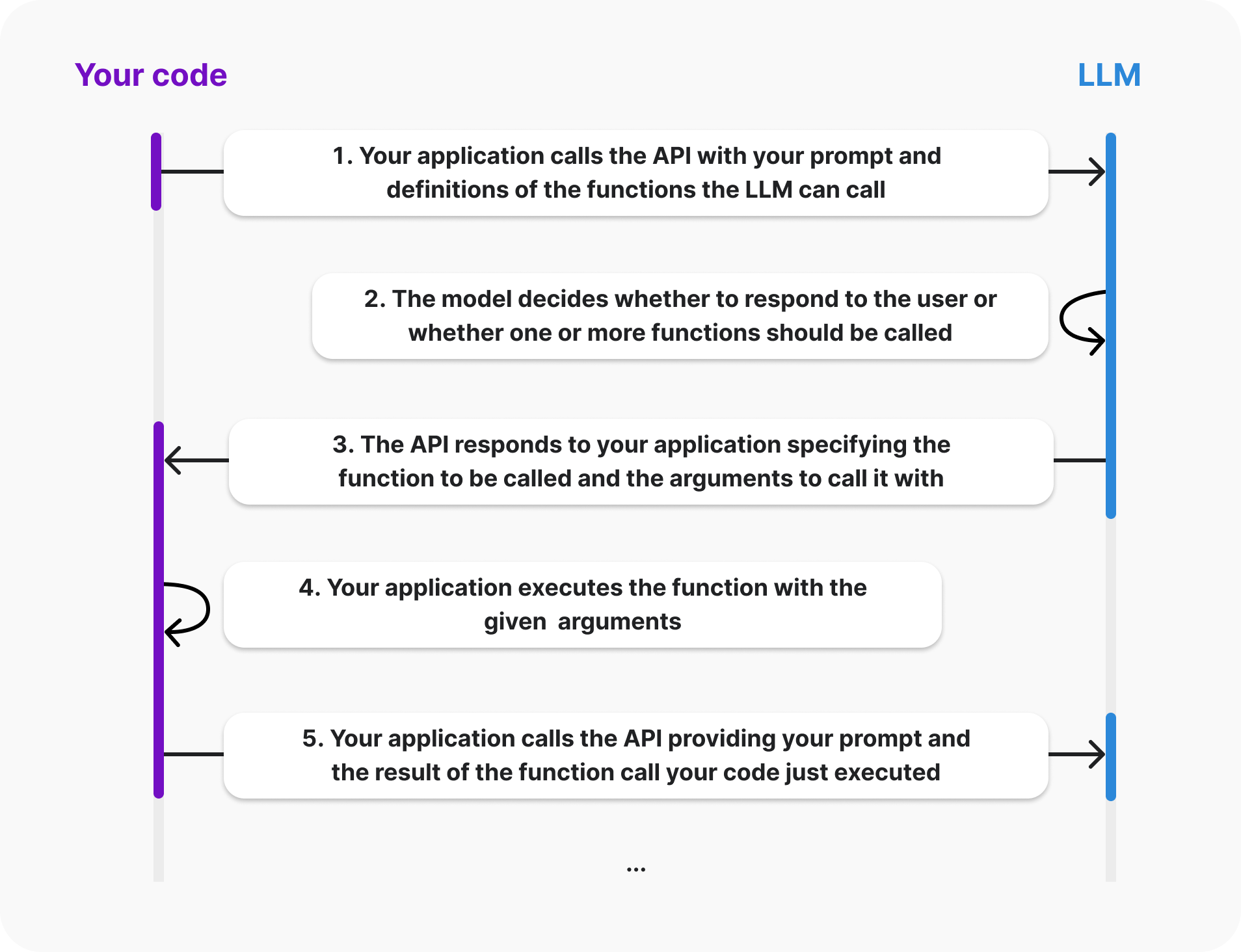
- 사용자는 요청에 직접 정의한 functions 정보를 담아서 llm에 보냄
- llm 모델은 user에게 응답을 생성할지, 혹은 하나 이상의 function을 호출할지 여부를 결정함.
- llm 모델은 호출할 functions와 그걸 호출할 때 필요한 arguments가 뭔지 구체화해서 응답을 보내줌.
- 사용자는 해당 function을 주어진 arguments를 이용해 실행함.
- 사용자는 다음 질의와 함께 좀 전에 실행한 function의 결과를 messages에 담아서 llm에 보냄. 이 때 function의 결과는
role: "tool"에 해당함.
여기서 주의할 점은, llm이 해당 함수를 직접 실행하는 것이 아니다. llm은 단지 3번째 단계에서 해당 function을 실행하는데 필요한 arguments를 생성해서 사용자에게 넘겨줄 뿐이다. 사용자는 이 파라미터를 받아서 알아서 쓰면 된다.
function calling 사용법
아래 예시는 사용자의 배달 주문을 도울 수 있는 대화형 assistant의 예시다. 사용자는 ai기반의 assistant와 채팅할 수 있다. 이 assistant를 유용하게 만들기 위해 주문을 조회하고 사용자 주문에 대한 실제 데이터로 답변할 수 있는 기능을 제공하고자 한다.
1단계: 모델이 호출할 수 있는 코드 베이스의 함수를 선택한다.
코드상에 구현해둔 함수를 선택한다. 이 함수에 대한 정보를 llm에 알려주면, 함수를 실행하기 위해 필요한 arguments를 llm이 생성할 것이다. 배송 날짜를 가져오는 get_delivery_date() 함수를 구현하고 선택한다고 가정하자.
# This is the function that we want the model to be able to call
def get_delivery_date(order_id: str) -> datetime:
    # Connect to the database
    conn = sqlite3.connect('ecommerce.db')
    cursor = conn.cursor()
    # ...
2단계: 모델에 함수를 설명하여 호출 방법을 알려준다.
함수를 선택했으면 모델에 함수를 설명할 "함수 정의"를 만든다. 이 정의에는 함수가 수행하는 작업(그리고 잠재적으로 언제 호출해야 하는지)과 함수를 호출하는 데 필요한 매개변수를 모두 포함한다.
함수 정의의 parameters섹션은 JSON 규격을 준수해야 한다. 모델은 이 정보를 기반으로 arguments를 생성한다.
{
    "name": "get_delivery_date",
    "description": "Get the delivery date for a customer's order. Call this whenever you need to know the delivery date, for example when a customer asks 'Where is my package'",
    "parameters": {
        "type": "object",
        "properties": {
            "order_id": {
                "type": "string",
                "description": "The customer's order ID.",
            },
        },
        "required": ["order_id"],
        "additionalProperties": false,
    }
}"required"에 해당하는 필드가 llm이 생성할 arguments다.
3단계: "messages"필드와 함께 위에서 선택한 함수 정의를 "tools"에 넣어 모델에 전달한다.
tools = [
   {
       "type": "function",
       "function": {
           "name": "get_delivery_date",
           "description": "Get the delivery date for a customer's order. Call this whenever you need to know the delivery date, for example when a customer asks 'Where is my package'",
           "parameters": {
               "type": "object",
               "properties": {
                   "order_id": {
                       "type": "string",
                       "description": "The customer's order ID.",
                   },
               },
               "required": ["order_id"],
               "additionalProperties": False,
           },
       }
   }
]

messages = [
   {"role": "system", "content": "You are a helpful customer support assistant. Use the supplied tools to assist the user."},
   {"role": "user", "content": "Hi, can you tell me the delivery date for my order?"}
]

response = openai.chat.completions.create(
   model="gpt-4o",
   messages=messages,
   tools=tools,
)
4단계: 모델 응답 수신 및 처리
case 1. 모델이 어떠한 function call을 할 수 없다 결정하는 경우.
모델이 function call을 생성하지 않으면 응답에는 일반적인 채팅과 마찬가지로 사용자 질의에 대한 답변이 포함된다.
{
"content": "Hi there! I can help with that. Can you please provide your order ID?",
"role": "assistant",
"function_call": None,
"tool_calls": None
}
user에게 이 응답을 보여주고 이 응답에 대해 user가 반응한 과정을 전부 messages에 추가한 후 다시 llm에 전송한다.
tools = [
    {
        "type": "function",
        "function": {
            "name": "get_delivery_date",
            "description": "Get the delivery date for a customer's order. Call this whenever you need to know the delivery date, for example when a customer asks 'Where is my package'",
            "parameters": {
                "type": "object",
                "properties": {
                    "order_id": {
                        "type": "string",
                        "description": "The customer's order ID."
                    }
                },
                "required": ["order_id"],
                "additionalProperties": False
            }
        }
    }
]

messages = []
messages.append({"role": "system", "content": "You are a helpful customer support assistant. Use the supplied tools to assist the user."})
messages.append({"role": "user", "content": "Hi, can you tell me the delivery date for my order?"})
// highlight-start
messages.append({"role": "assistant", "content": "Hi there! I can help with that. Can you please provide your order ID?"})
messages.append({"role": "user", "content": "i think it is order_12345"})
// highlight-end

response = client.chat.completions.create(
    model='gpt-4o',
    messages=messages,
    tools=tools
)
case2. 모델이 function call을 생성한 경우
모델이 function call을 생성하면, function 호출을 위한 arguments를 생성한다. 이 arguments는 사용자가 제공한 parameters 정의를 기반으로 생성한다. 응답은 아래와 같다.
Choice(
    finish_reason='tool_calls',
    index=0,
    logprobs=None,
    message=chat.completionsMessage(
        content=None,
        role='assistant',
        function_call=None,
        tool_calls=[
            chat.completionsMessageToolCall(
                id='call_62136354',
                function=Function(
                    arguments='{"order_id":"order_12345"}', // 생성된 arguments
                    name='get_delivery_date'),
                type='function')
        ])
)
응답에서 함수를 호출해야 한다는 것을 나타내는 경우, 해당 함수와 arguments를 갖고 로컬 코드에서 처리한다.
# Extract the arguments for get_delivery_date
# Note this code assumes we have already determined that the model generated a function call. See below for a more production ready example that shows how to check if the model generated a function call
tool_call = response.choices[0].message.tool_calls[0]
arguments = json.loads(tool_call['function']['arguments'])

order_id = arguments.get('order_id')

# Call the get_delivery_date function with the extracted order_id
delivery_date = get_delivery_date(order_id)
5단계: 함수 호출 결과를 모델에 다시 제공한다.
로컬에서 함수를 호출했으므로, 이 함수 호출의 결과를 Chat Completions API에 다시 제공해야한다. 이렇게 하면 모델이 사용자에게 보여야 할 실제 응답을 생성할 수 있다.
# Simulate the order_id and delivery_date
order_id = "order_12345"
delivery_date = datetime.now()

# Simulate the tool call response
response = {
    "choices": [
        {
            "message": {
                "role": "assistant",
                "tool_calls": [
                    {
                        "id": "call_62136354",
                        "type": "function",
                        "function": {
                            "arguments": "{'order_id': 'order_12345'}",
                            "name": "get_delivery_date"
                        }
                    }
                ]
            }
        }
    ]
}

# Create a message containing the result of the function call
function_call_result_message = {
    "role": "tool",
    "content": json.dumps({
        "order_id": order_id,
        "delivery_date": delivery_date.strftime('%Y-%m-%d %H:%M:%S')
    }),
    "tool_call_id": response['choices'][0]['message']['tool_calls'][0]['id']
}

# Prepare the chat completion call payload
completion_payload = {
    "model": "gpt-4o",
    "messages": [
        {"role": "system", "content": "You are a helpful customer support assistant. Use the supplied tools to assist the user."},
        {"role": "user", "content": "Hi, can you tell me the delivery date for my order?"},
        {"role": "assistant", "content": "Hi there! I can help with that. Can you please provide your order ID?"},
        {"role": "user", "content": "i think it is order_12345"},
        response['choices'][0]['message'],
        function_call_result_message
    ]
}

# Call the OpenAI API's chat completions endpoint to send the tool call result back to the model
response = openai.chat.completions.create(
    model=completion_payload["model"],
    messages=completion_payload["messages"]
)

# Print the response from the API. In this case it will typically contain a message such as "The delivery date for your order #12345 is xyz. Is there anything else I can help you with?"
print(response)
실제 활용
"tools" 배열에 여러 개의 함수를 정의해서, 사용자의 질의에 대해 어떤 함수를 호출할지 판단시키기
{
  "model": "gpt-3.5-turbo-0613",
  "messages": [
    {"role": "user", "content": "내 주요 고객이 누구야?"}
  ],
  "tools": [
    {
      "type": "function",
      "function": {
        "name": "get_customers",
        "description": "이 함수는 특정 매출 기준을 충족하는 고객 데이터를 내부 시스템에서 가져옵니다.",
        "parameters": {
          "type": "object",
          "properties": {
            "min_revenue": {
              "type": "integer",
              "description": "최소 매출 금액을 나타내는 숫자입니다."
            },
            "created_before": {
              "type": "string",
              "description": "이 날짜 이전에 생성된 고객 데이터만 가져옵니다."
            },
            "limit": {
              "type": "integer",
              "description": "가져올 고객의 최대 수를 나타냅니다."
            }
          },
          "required": ["min_revenue", "created_before", "limit"]
        }
      }
    },
    {
      "type": "function",
      "function": {
        "name": "get_orders",
        "description": "이 함수는 특정 기간 동안의 주문 데이터를 조회합니다.",
        "parameters": {
          "type": "object",
          "properties": {
            "start_date": {
              "type": "string",
              "description": "조회할 시작 날짜입니다."
            },
            "end_date": {
              "type": "string",
              "description": "조회할 종료 날짜입니다."
            },
            "limit": {
              "type": "integer",
              "description": "가져올 주문의 최대 수를 나타냅니다."
            }
          },
          "required": ["start_date", "end_date", "limit"]
        }
      }
    },
    {
      "type": "function",
      "function": {
        "name": "get_products",
        "description": "이 함수는 특정 카테고리의 제품 데이터를 조회합니다.",
        "parameters": {
          "type": "object",
          "properties": {
            "category": {
              "type": "string",
              "description": "조회할 제품 카테고리입니다."
            },
            "limit": {
              "type": "integer",
              "description": "가져올 제품의 최대 수를 나타냅니다."
            }
          },
          "required": ["category", "limit"]
        }
      }
    }
  ]
}
결론
tool calls는 여러 개의 함수를 정의해서 llm에게 알려주면, llm이 사용자의 질의를 보고 어떤 함수를 써야할지 판단하여 호출할 함수 이름 필요한 파라미터 값을 준다. 그럼 agent는 해당 결과를 기반으로 실제 함수를 호출한다.
추가적인 팁
1. 구조화된 출력 사용
복잡한 스키마를 사용할 때 모델이 매개변수를 놓치거나 매개변수의 유형을 잘못 지정할 때가 가끔 있는데, "구조화된 출력" 기능을 사용하면 함수 호출에 대한 모델 출력이 제공된 스키마와 정확히 일치하도록 보장한다.
strict: true. 옵션만 주면 된다. 그냥 켜두는 걸 권장한다.
구조화된 출력을 활성화하면 OpenAI API는 첫 번째 요청 시 제공된 스키마를 사전 처리한 다음 이 아티팩트를 사용하여 모델을 스키마에 맞게 제한한다.
모델은 몇 가지 상황을 제외하고 항상 정확한 스키마를 따른다.
- 모델의 응답이 끊어지는 경우( max_tokens, stop tokens 또는 최대 컨텍스트 길이로 인해)
- 모델 거부가 발생하는 경우
- content_filter완료 사유가 있는 경우
2. tool_choice를 사용해 함수 호출 동작 구성
기본적으로 모델은 tool_choice: "auto".설정에 의해 호출할 함수를 자동으로 선택한다. 이걸 수정할 수도 있는데,
1. 모델이 하나 이상의 함수를 호출하도록 강제하고 싶으면 tool_choice: "required".
2. 모델이 특정 함수를 호출하도록 하고 싶으면 tool_choice: {"type": "function", "function": {"name": "my_function"}}
3. 함수 호출을 비활성화하고 모델이 사용자에게 표시하는 메시지만 생성하도록 하려면 tools를 제공하지 않거나 tool_choice: "none" 설장
만약 1번이나 2번을 설정했으면 finish_reason이 "tool_calls"대신 "stop"이 된다.
3. 함수의 이름은 직관적으로, description은 자세하게
4. system 메세지에 함수 호출 방법 및 시기와 관련된 정보를 추가 제공하면 좋을 수 있다.
system 메시지에 명확한 지침을 제공하면 모델의 함수 호출 정확도가 크게 향상될 수 있다.
예시:
"사용자가 '내 주문은 어디에 있나요?' 또는 '내 주문은 아직 발송되지 않았나요?'와 같이 주문 상태를 문의할 때 check_order_status를 사용하세요" "schedule_meeting으로 회의 일정을 잡기 전에 check_availability를 사용하여 사용자의 일정에서 가용성을 확인하여 충돌을 방지하세요"
5. enum 쓰기
사용 사례가 허용한다면 열거형을 사용하여 인수에 대한 가능한 값을 제한할 수 있다. 이렇게 하면 할루시네이션을 줄일 수 있다.
티셔츠 주문을 도와주는 AI assistant 예시
{
    "name": "pick_tshirt_size",
    "description": "Call this if the user specifies which size t-shirt they want",
    "parameters": {
        "type": "object",
        "properties": {
            "size": {
                "type": "string",
                "enum": ["s", "m", "l"],
                "description": "The size of the t-shirt that the user would like to order"
            }
        },
        "required": ["size"],
        "additionalProperties": false
    }
}
티셔츠의 고정된 사이즈가 있을 가능성이 높으며, 모델이 특정 형식으로 출력하기를 원할 수 있다. 모델이 small, medium, large에 대해 "s", "m", "l" 등으로 제한하여 출력하기를 원한다면, 열거형에 해당 값을 제공할 수 있다.
출력을 제한하지 않으면 사용자가 "large" 또는 "L"이라고 말할 수도 있다.
6. 정확도를 높이려면 function개수는 적게
단일 tool call에서 20개 이상의 함수를 사용하는걸 권장하지 않는다. 많이 필요하다면 파인튜닝해라.
7. 파인 튜닝은 function call의 정확도를 향상시키는데 도움이 될 수 있다.
8. 프롬프팅에 대한 eval