안드로이드 14 이후로는 인증서 저장 장소가 /system/etcsecurity/cacerts에서 /apex/com.android.conscrypt/cacerts 로 변경되었다.
/apex 는 remount가 불가하므로 root 권한이 있어도 원칙적으로는 인증서 등록이 불가하다.
그렇다고 아주 불가능한가하면 그건 아니다. 앱 개별로 사용하는 각각의 마운트 스페이스에 인증서를 삽입하는 방식으로 우회가 가능했다.
설치 방법만 알고 싶다면 해결책 파트를 참고하시라.
자세한 설명
안드로이드는 Linux namespace를 사용하여 앱을 컨테이너화 한다. namespace는 커널이 제공하는 일종의 컨테이너이며 각 프로세스마다 고유의 파일 시스템, 네트워크, PID 등을 독립적으로 가지고 있다. 즉, 각 앱마다 고유한 마운트 네임스페이스가 있다.
아래 명렁어를 사용하면 직관적으로 확인 가능하다.
nsenter --mount=/proc/$PID/ns/mnt /bin/sh왼쪽은 화면은 기기 자체의 mount 정보이고, 오른쪽은 화면은 위의 명령어로 특정 프로세스에 접근 후 mount를 실행한 것이다. 둘의 내용에 차이가 있다.
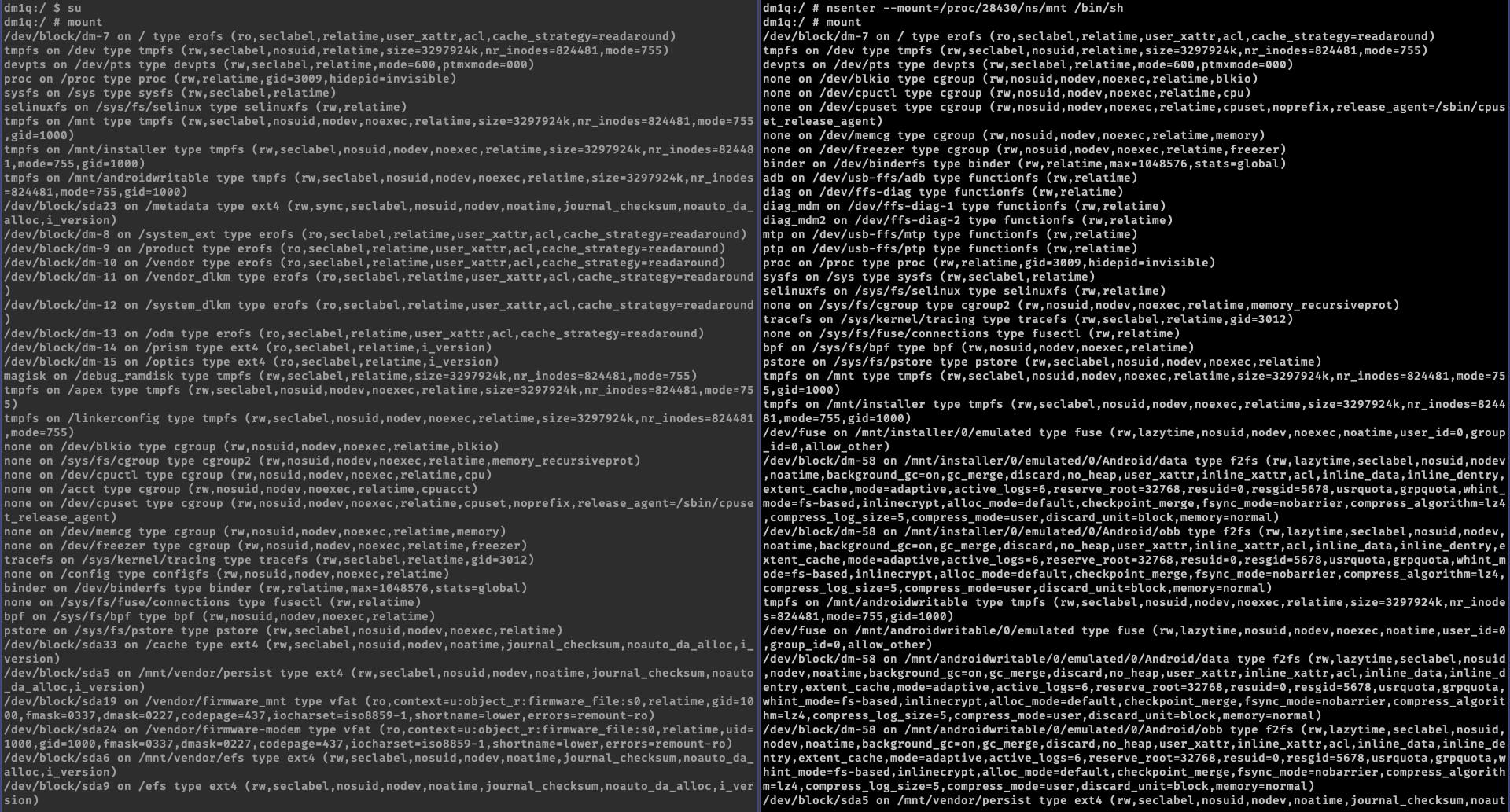
마운트는 기본적으로는 'SHARED'로 생성되며 마운트가 변경되는 경우 즉시 네임스페이스 간에 자동으로 전파 된다. 즉, 완전히 분리되었다고 볼 수 없다.
그럼 우리가 인증서를 삽입해야 할 /apex는 어떨까? 안타깝게도 'PRIVATE' 설정이 되어 있어 마운트에 대한 변경이 프로세스 간 공유되지 않는다.
안드로이드의 앱은 zygote를 fork한 프로세스에서 실행되므로 모든 앱의 마운트 네임 스페이스는 zygote를 복사하여 생성된다. 이 zygote 프로세스를 실행하는 init 프로세스는 부팅 시 private /apex 마운트 정보를 포함하여 zygote의 네임 스페이스를 생성한다. 원칙적으로 읽기 전용인 /apex 마운트를 수정할 방법이 없는 것이다.
하지만 /apex 마운트를 수정할 수 없다 뿐이지, 새로운 mount를 생성할 수는 있다.
시스템 경로 하에 인증서를 보관하는 경로는 여전히 존재한다. 해당 경로를 tmpfs 타입으로 메모리에 마운트하여 쓰기 속성을 부여한다.
mount -t tmpfs tmpfs /system/etc/security/cacerts쓰기 속성이 부여 된 시스템 인증서 경로에 기존 인증서들과 새로 등록할 인증서를 넣어둔다.
권한과 selinux 라벨도 설정해야하는데 그건 아래 해결책에 기재 된 전체 코드에서 확인 가능.
# 기존 인증서 복사
cp /apex/com.android.conscrypt/cacerts/* /data/local/tmp/tmp-ca-copy/
mv /data/local/tmp/tmp-ca-copy/* /system/etc/security/cacerts/

# 시스템 인증서 경로에 새로 등록할 인증서 복사
CERTIFICATE_PATH=/data/local/tmp/9a5ba575.0
cp $CERTIFICATE_PATH /system/etc/security/cacerts/
nsenter 명령어로 zygote의 마운트 namespace로 진입하여 수정한 내용이 반영된 시스템 인증서 경로(/system/etc/security/cacerts)를 apex 인증서 경로(/apex/com.android.conscrypt/cacerts)에 마운트 한다. 이를 통해 추후 실행 되는 앱이 zygote 프로세스의 마운트 스페이스를 복사할 때 수정 된 인증서 내용이 반영된다.
nsenter --mount=/proc/$ZYGOTE_PID/ns/mnt -- \
    /bin/mount --bind /system/etc/security/cacerts /apex/com.android.conscrypt/cacerts
기 실행중인 앱에도 아래 명령어로 인증서를 삽입한다.
nsenter --mount=/proc/$APP_PID/ns/mnt -- \
    /bin/mount --bind /system/etc/security/cacerts /apex/com.android.conscrypt/cacerts
해결책
길게 설명했던 일련의 행위는 아래 코드를.sh 파일로 만들어서 실행하면 간단하게 수행 가능하다.
CERTIFICATE_PATH 를 수정해주는 걸 잊지 말자.
# Define tte a separate temp directory, to hold the current certificates
# Otherwise, when we add the mount we can't read the current certs anymore.
mkdir -p -m 700 /data/local/tmp/tmp-ca-copy

# Copy out the existing certificates
cp /apex/com.android.conscrypt/cacerts/* /data/local/tmp/tmp-ca-copy/

# Create the in-memory mount on top of the system certs folder
mount -t tmpfs tmpfs /system/etc/security/cacerts

# Copy the existing certs back into the tmpfs, so we keep trusting them
mv /data/local/tmp/tmp-ca-copy/* /system/etc/security/cacerts/

# Copy our new cert in, so we trust that too
# Have to change cert
CERTIFICATE_PATH=/data/local/tmp/mac_cert/9a5ba575.0
cp $CERTIFICATE_PATH /system/etc/security/cacerts/

# Update the perms & selinux context labels
chown root:root /system/etc/security/cacerts/*
chmod 644 /system/etc/security/cacerts/*
chcon u:object_r:system_file:s0 /system/etc/security/cacerts/*

# Deal with the APEX overrides, which need injecting into each namespace:

# First we get the Zygote process(es), which launch each app
ZYGOTE_PID=$(pidof zygote || true)
ZYGOTE64_PID=$(pidof zygote64 || true)
# N.b. some devices appear to have both!

# Apps inherit the Zygote's mounts at startup, so we inject here to ensure
# all newly started apps will see these certs straight away:
for Z_PID in "$ZYGOTE_PID" "$ZYGOTE64_PID"; do
    if [ -n "$Z_PID" ]; then
        nsenter --mount=/proc/$Z_PID/ns/mnt -- \
            /bin/mount --bind /system/etc/security/cacerts /apex/com.android.conscrypt/cacerts
    fi
done

# Then we inject the mount into all already running apps, so they
# too see these CA certs immediately:

# Get the PID of every process whose parent is one of the Zygotes:
APP_PIDS=$(
    echo "$ZYGOTE_PID $ZYGOTE64_PID" | \
    xargs -n1 ps -o 'PID' -P | \
    grep -v PID
)

# Inject into the mount namespace of each of those apps:
for PID in $APP_PIDS; do
    nsenter --mount=/proc/$PID/ns/mnt -- \
        /bin/mount --bind /system/etc/security/cacerts /apex/com.android.conscrypt/cacerts &
done
이건 인증서가 여러개일 때 인증서와 sh 파일이 동일한 경로에 넣고 편하게 쓰려고...
# Define tte a separate temp directory, to hold the current certificates
# Otherwise, when we add the mount we can't read the current certs anymore.
mkdir -p -m 700 /data/local/tmp/tmp-ca-copy

# Copy out the existing certificates
cp /apex/com.android.conscrypt/cacerts/* /data/local/tmp/tmp-ca-copy/

# Create the in-memory mount on top of the system certs folder
mount -t tmpfs tmpfs /system/etc/security/cacerts

# Copy the existing certs back into the tmpfs, so we keep trusting them
mv /data/local/tmp/tmp-ca-copy/* /system/etc/security/cacerts/

# Copy our new cert in, so we trust that too
# Have to change cert
CURRENT_DIR=$(pwd)
CERTIFICATE_PATH=$CURRENT_DIR/9a5ba575.0
cp $CERTIFICATE_PATH /system/etc/security/cacerts/
echo "CERTIFICATE FILE: $CERTIFICATE_PATH"

# Update the perms & selinux context labels
chown root:root /system/etc/security/cacerts/*
chmod 644 /system/etc/security/cacerts/*
chcon u:object_r:system_file:s0 /system/etc/security/cacerts/*

# Deal with the APEX overrides, which need injecting into each namespace:

# First we get the Zygote process(es), which launch each app
ZYGOTE_PID=$(pidof zygote || true)
ZYGOTE64_PID=$(pidof zygote64 || true)
# N.b. some devices appear to have both!

# Apps inherit the Zygote's mounts at startup, so we inject here to ensure
# all newly started apps will see these certs straight away:
for Z_PID in "$ZYGOTE_PID" "$ZYGOTE64_PID"; do
    if [ -n "$Z_PID" ]; then
        nsenter --mount=/proc/$Z_PID/ns/mnt -- \
            /bin/mount --bind /system/etc/security/cacerts /apex/com.android.conscrypt/cacerts
    fi
done

# Then we inject the mount into all already running apps, so they
# too see these CA certs immediately:

# Get the PID of every process whose parent is one of the Zygotes:
APP_PIDS=$(
    echo "$ZYGOTE_PID $ZYGOTE64_PID" | \
    xargs -n1 ps -o 'PID' -P | \
    grep -v PID
)

# Inject into the mount namespace of each of those apps:
for PID in $APP_PIDS; do
    nsenter --mount=/proc/$PID/ns/mnt -- \
        /bin/mount --bind /system/etc/security/cacerts /apex/com.android.conscrypt/cacerts &
done
wait # Launched in parallel - wait for completion here

echo "System certificate injected"
참조
https://httptoolkit.com/blog/android-14-install-system-ca-certificate/