03_제어문
02. 반복문
* 중첩 반복문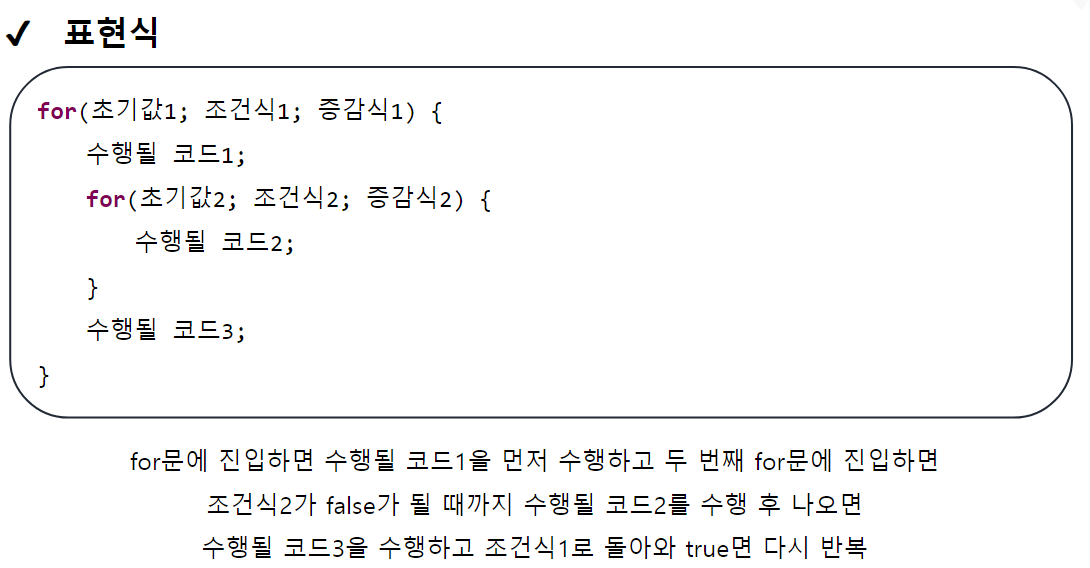
package edu.kh.control.loop;

import java.util.Scanner;

public class ForExample {

// ** 중첩반복문 **
	public void ex16() {
		// 구구단 모두 출력하기

		for(int dan = 2; dan <= 9; dan++) { // 2 ~ 9 단까지 차례대로 증가

			for(int num = 1; num <=9; num++) { // 각 단에 곱해질 수 1~9까지 차례대로 증가

				System.out.printf("%2d X %2d = %2d  ", dan, num, dan * num);

			}

			System.out.println(); // 하나의 단 출력이 끝났을 때 줄바꿈
			// 아무내용 없는 println() == 줄바꿈
		}

	}

	public void ex17() {
		// 구구단 역순 출력
		// 9단 -> 2단까지 역방향
		// 곱해지는 수는 1 -> 9 정방향

		for(int dan = 9; dan >= 2; dan--) { // 단 9 -> 2 역

			for(int num = 1; num <= 9; num++) { // 수 1 -> 9 정

				System.out.printf("%2d X %2d = %2d  ", dan, num, dan * num);
			}

			// 한단 출력 종료시점에 줄바꿈
			System.out.println();
		}

	}

	public void ex18() {
		// 2중 for 문을 이용해서 다음 모양을 출력하시오

		// 12345
		// 12345
		// 12345
		// 12345
		// 12345

		for(int i = 1; i <= 5; i++) { // 5바퀴 반복하는 for문

			for(int j = 1; j <= 5; j++) { // 12345 한 줄 출력하는 for문
				System.out.print(j);
			}

			System.out.println();
		}

		System.out.println("-----------------------------------");

		// 54321
		// 54321
		// 54321

		for(int i = 1; i <= 3; i++) {

			for(int j = 5; j >= 1; j--) {
				System.out.print(j);
			}

			System.out.println();
		}
	}

	public void ex19() {
		// 2중 for문을 이용하여 다음 모양을 출력하시오.

		// 1
		// 12
		// 123
		// 1234

		// 현재 바퀴수와 마지막 찍히는 수가 똑같다(Hint)

		for(int i = 1; i <= 4; i++) { // 줄반복

			for(int j = 1; j <= i; j++) { // 출력반복
				System.out.print(j);
			}

			System.out.println();
		}

		System.out.println("--------------------------------------");

		// 4321
		// 321
		// 21
		// 1

		for(int x = 4; x >= 1; x--) { // 줄반복

			for(int i = x; i >= 1; i--) {
				System.out.print(i);
			}

			System.out.println();
		}

	}

    public void ex20() {
		// 숫자세기 count

		// 1부터 20까지 1씩 증가하면서
		// 3의 배수의 총 개수 출력
		// 3의 배수의 합계 출력

		// 3 6 9 12 15 18 : 6개
		// 3의 배수 합계 : 63

		int count = 0; // 3의 배수의 개수를 세기 위한 변수
		int sum = 0; // 3의 배수의 합계를 구하기 위한 변수

		for(int i = 1; i <= 20; i++) {

			if( i % 3 == 0 ) {
				System.out.print(i + " ");
				count++; // 3의 배수일 때마다 카운트 누적
				sum += i; // 3의 배수일 때마다 합계 누적
			}
		}

		System.out.println(": " + count + "개");
		System.out.println("3의 배수 합계 : " + sum);

	}

	public void ex21() {

		// 2중 for문과 count를 이용해서 아래모양 출력하기

		// 1  2  3  4
		// 5  6  7  8
		// 9 10 11 12

		int count = 1;

		for(int x = 1; x <= 3; x++) { // 3줄

			for(int i = 1; i <= 4 ; i++) { // 4칸

				System.out.printf("%3d", count);
				count++;
			}

			System.out.println();
		}
	}

}
package edu.kh.control.loop;
public class LoopRun {
public static void main(String[] args) {
ForExample forEx = new ForExample();
//forEx.ex16();
//forEx.ex17();
//forEx.ex18();
//forEx.ex19();
//forEx.ex20();
//forEx.ex21();
}
}반복문을 사용하여 하단의 결과 나타내기

public void ex22() {

		for(int i = 1; i <= 9; i++) {

			for(int j = 2; j <= 9; j++) {
				System.out.printf("%-2d X %-2d = %-2d      ", j, i, j * i);
			}

			System.out.println();
		}

	}
문제 안내
패키지 : edu.kh.control.practice
실행 클래스 : Run2
기능 작성 클래스 : LoopPractice
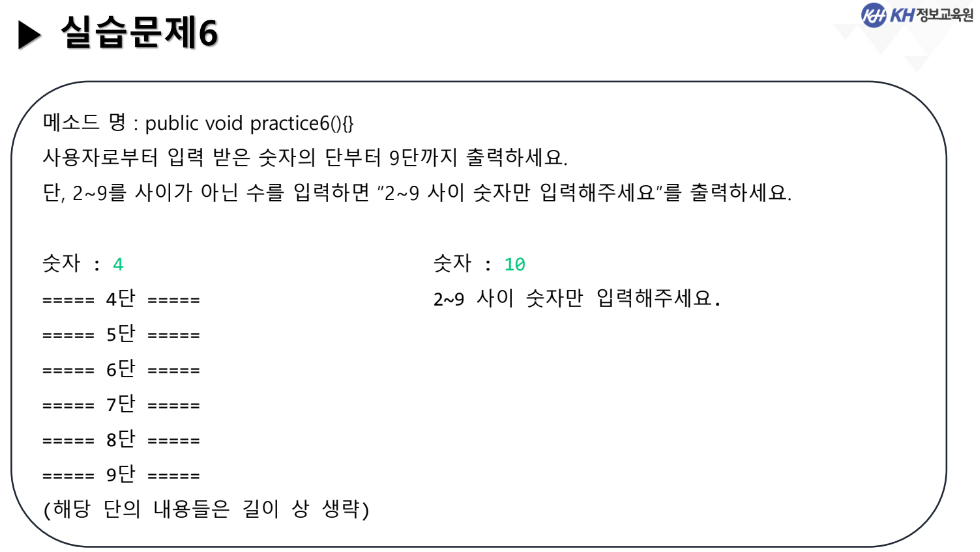
	public void practice6() {

		System.out.print("숫자 : ");
		int num = sc.nextInt();

		int count = 0;

		if(num < 2 || num > 9) {
			System.out.println("2~9 사이 숫자만 입력해주세요");
		} else {
			for(int i = num; i <= 9; i++) {
				System.out.printf("===== %d단 =====\n", i);
				for(int j = 1; j <= 9; j++) {
					System.out.printf("%d X %d = %d\n", i, j, i * j);
				}
			}
		}
	}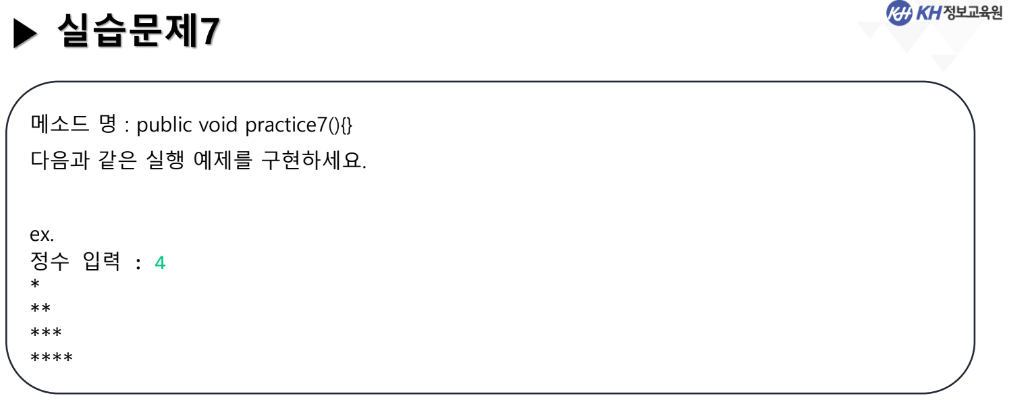
	public void practice7() {

		System.out.print("정수 입력 : ");
		int num = sc.nextInt();

		for(int i = 1; i <= num; i++) {

			for(int j = 1; j <= i; j++) {
				System.out.print("*");
			}
			System.out.println();
		}
	}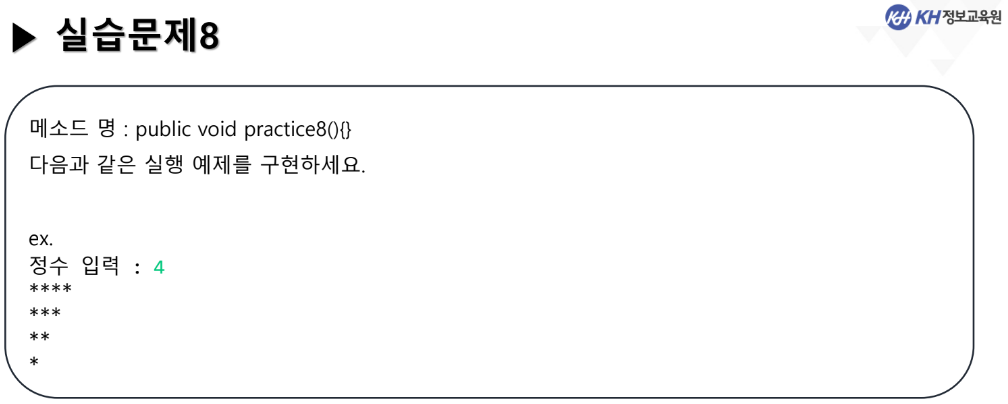
	public void practice8() {

		System.out.print("정수 입력 : ");
		int num = sc.nextInt();

		for(int i = 1; i <= num; i++) {

			for(int j = 4; j >= i; j--) {
				System.out.print("*");
			}
			System.out.println();
		}
	}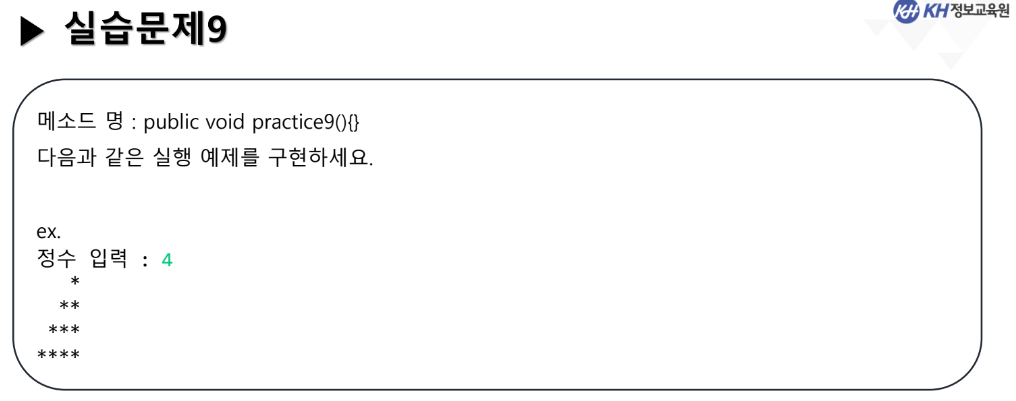
못푼문제 : 강사님 답안
	public void practice9() {


		Scanner sc = new Scanner(System.in);

		System.out.print("정수 입력 : ");
		int input = sc.nextInt(); // 4입력시
						//1) 1 <= 4;
		for(int row = 1 ; row <= input ; row++ ) {

			// if문을 이용한 풀이   1) 1 <= 4
			for(int col = 1 ; col <= input ; col++) {
				// 1) 1 <= 4 - 1; -> 1 <= 3 true
				// 2) 2 <= 4 - 1; -> 2 <= 3 true
				// 3) 3 <= 4 - 1; -> 3 <= 3 true
				// 4) 4 <= 4 - 1; -> 4 <= 3 false
				// -> else문으로 이동
				if(col <= input - row) {
					System.out.print(" ");

				}else {
					// 4) 4 <= 4 - 1; -> 4 <= 3 false
					// 일 때 처음 찍힘
					System.out.print("*");
				}
			}

			System.out.println(); // 줄바꿈
		}

	}
못푼문제 : 강사님 답안
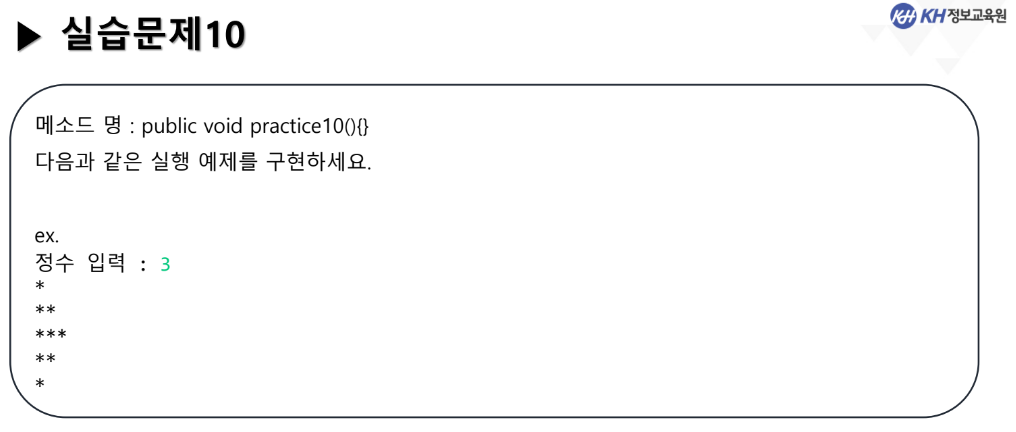
	/* 실습문제 10
	다음과 같은 실행 예제를 구현하세요.
	ex.
	정수 입력 : 3
	*
	**
	***
	**
	*
	*/
	// 했던거
	public void practice10() {


		Scanner sc = new Scanner(System.in);

		System.out.print("정수 입력 : ");
		int input = sc.nextInt();

		// 위쪽 삼각형
		for(int row = 1 ; row <= input ; row++) {
			for(int col = 1 ; col <= row ; col++) {
				System.out.print("*");
			}
			System.out.println(); // 줄바꿈
		}

		// 아랫쪽 삼각형
		for(int row = input - 1; row >= 1 ; row--) {
			for(int col = 1 ; col <= row ; col++) {
				System.out.print("*");
			}
			System.out.println(); // 줄바꿈
		}


		System.out.println("====================");

		// 줄의 수: input에 2를 곱한값의 -1
		for(int row = 1; row <= input*2-1; row++) {

    	  if(row < input) {

             for(int col=1; col <= row; col++) {
                System.out.print("*");
             }

          } else {
             for(int col=input ; col > row-input; col--) {
                System.out.print("*");
             }
          }

          System.out.println();
       }

	}
못푼문제 : 강사님 답안
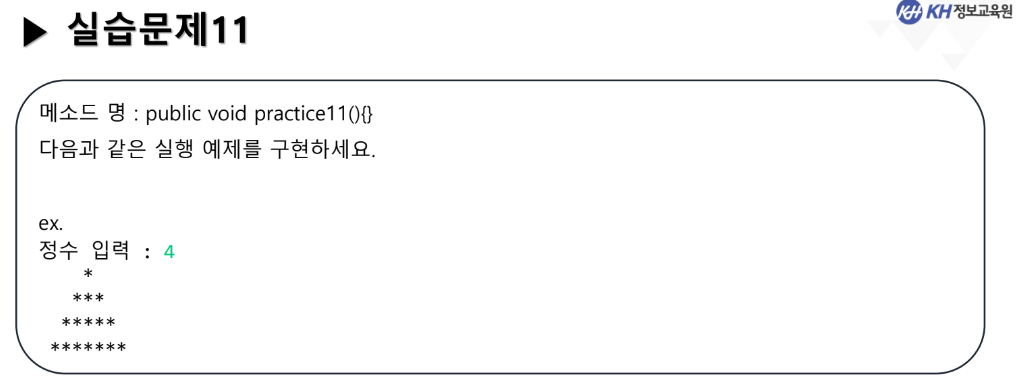
	/* 실습문제 11
	다음과 같은 실행 예제를 구현하세요.
	ex.
	정수 입력 : 4
	    *
	   ***
	  *****
	 *******
	*/
	// 양쪽으로 하나씩 늘어남
	// 입력한 정수의 줄 만큼
	public void practice11() {

		Scanner sc = new Scanner(System.in);

		System.out.print("정수 입력 : ");
		// 4입력시
		int input = sc.nextInt();
						// 1) 1 <= 4
		for(int row = 1 ; row <= input ; row++ ) {

			// if문을 이용한 풀이   1 <= 4 * 2 - 1;
			for(int col = 1 ; col <= input * 2 - 1; col++) {
				// 마지막 줄의 별 갯수: input에 2를 곱한값의 -1
				//		row	  col ||      row  col
				//1)  4 - 1 >= 1  ||  4 + 1 <= 1  true
				//2)  4 - 1 >= 2  ||  4 + 1 <= 2  true
				//3)  4 - 1 >= 3  ||  4 + 1 <= 3  true
				//4)  4 - 1 >= 4  ||  4 + 1 <= 4  false
				if( input-row>=col || input+row<=col) {
					System.out.print(" ");

				}else{
					System.out.print("*");
				}
			}

			System.out.println(); // 줄바꿈
		}

	}
못푼문제 : 강사님 답안
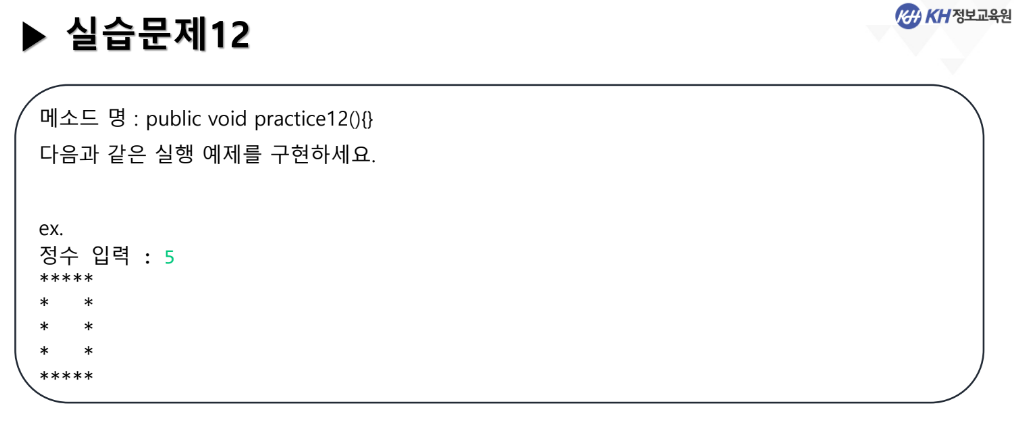
public void practice12() {


	Scanner sc = new Scanner(System.in);

	System.out.print("정수 입력 : ");
	int input = sc.nextInt();

	for(int row = 1 ; row <= input ; row++) {

		for(int col = 1 ; col <= input ; col++) {

			// 첫 번째 / 마지막 줄, 칸일 때만 * 출력
			// 입력한 인풋의 길이만큼 행열 길이를 지정
			if(row == 1 || row == input || col == 1 || col == input) {
				System.out.print("*");
			}else {
				System.out.print(" ");
			}
		}
		System.out.println();
	}
}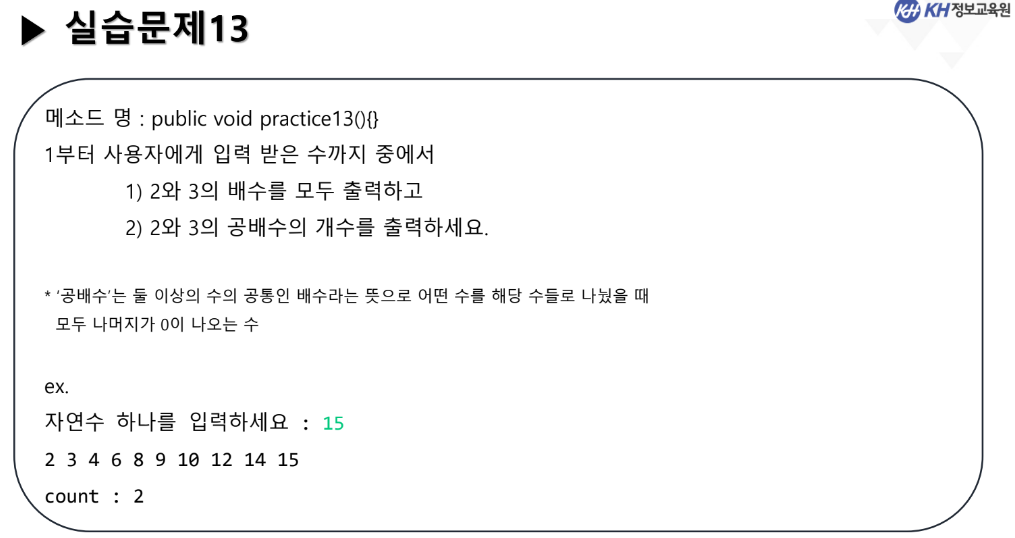
	public void practice13() {

		System.out.print("자연수 하나를 입력하세요 : ");
		int num = sc.nextInt();

		int count = 0;

		if (num <= 0) {
			System.out.println("1부터 입력해주세요.");
		} else {
			for(int i = 1; i <= num; i++) {
				if (i % 2 == 0 || i % 3 == 0) {
					System.out.print(i + " ");
					if(i % 2 == 0 && i % 3 == 0) {
						count++;
					}
				}
			}
			System.out.println();
			System.out.println("count : " + count);
		}
	}
03_제어문
02. 반복문
* while문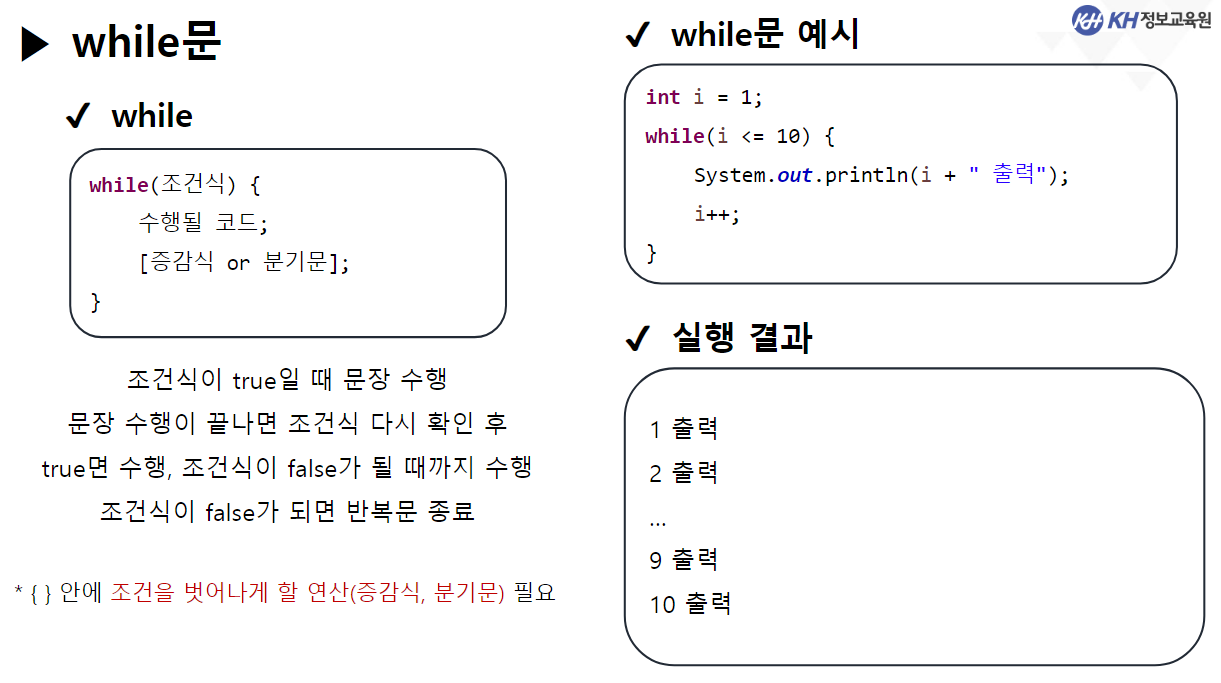
package edu.kh.control.loop;

import java.util.Scanner;

public class WhileExample {

	/* while문
	 * - 별도의 초기식, 증감식이 존재하지 않고
	 * 	 반복 종료 조건을 자유롭게 설정하는 반복문.
	 *
	 *
	 * ** 확실히 언제 반복이 끝날지는 모르지만
	 *    언젠가 반복 조건이 false가 되는 경우 반복을 종료함.
	 *
	 *
	 *   [작성법]
	 * 	 while ( 조건식 ) {
	 *
	 * 		조건식이 true 일 때 반복 수행할 구문
	 *
	 *   }
	 *
	 */

	public void ex1() {

		Scanner sc = new Scanner(System.in);

		int input = 0; // while문 종료조건으로 사용할 변수

		while( input != 9 ) {
			// input에 저장된 값이 9가 아닌 경우 반복

			System.out.println("----메뉴선택----");
			System.out.println("1. 떡볶이");
			System.out.println("2. 쫄면");
			System.out.println("3. 김밥");
			System.out.println("9. 종료");

			System.out.print("메뉴 선택 >>");
			input = sc.nextInt();

			switch(input) {
			case 1 : System.out.println("떡볶이를 주문했습니다.");
			break;

			case 2 : System.out.println("쫄면을 주문했습니다.");
			break;

			case 3 : System.out.println("김밥을 주문했습니다.");
			break;

			case 9 : System.out.println("메뉴선택을 종료합니다.");
			break;

			default : System.out.println("잘못 입력하셨습니다.");
			}

		}

	}

	public void ex2() {

		Scanner sc = new Scanner(System.in);

		// 입력되는 모든 정수의 합 구하기
		// 단, 0이 입력되면 반복 종료 후 결과 도출
		// -> 0이 입력되지 않으면 계속 반복

		int input = -1; // 입력 받은 값을 저장할 변수
						// 사람들이 대체로 0, 양수를 입력할 것이기 때문에
						// -1로 초기화 값을 넣어줌

		int sum = 0; // 모든 정수의 합을 저장하는 변수

		while( input != 0 ) {

			System.out.print("정수 입력 : ");
			input = sc.nextInt();

			sum += input; // 입력받은 값을 sum에 누적

		}

		System.out.println("합계 : " + sum);

	}

	public void ex3() {

		Scanner sc = new Scanner(System.in);

		// 입력되는 모든 정수의 합 구하기
		// 단, 0이 입력되면 반복 종료 후 결과 도출
		// -> 0이 입력되지 않으면 계속 반복

		int input = 0; // 입력받은 값을 저장할 변수

		int sum = 0; // 모든 정수의 합을 저장하는 변수

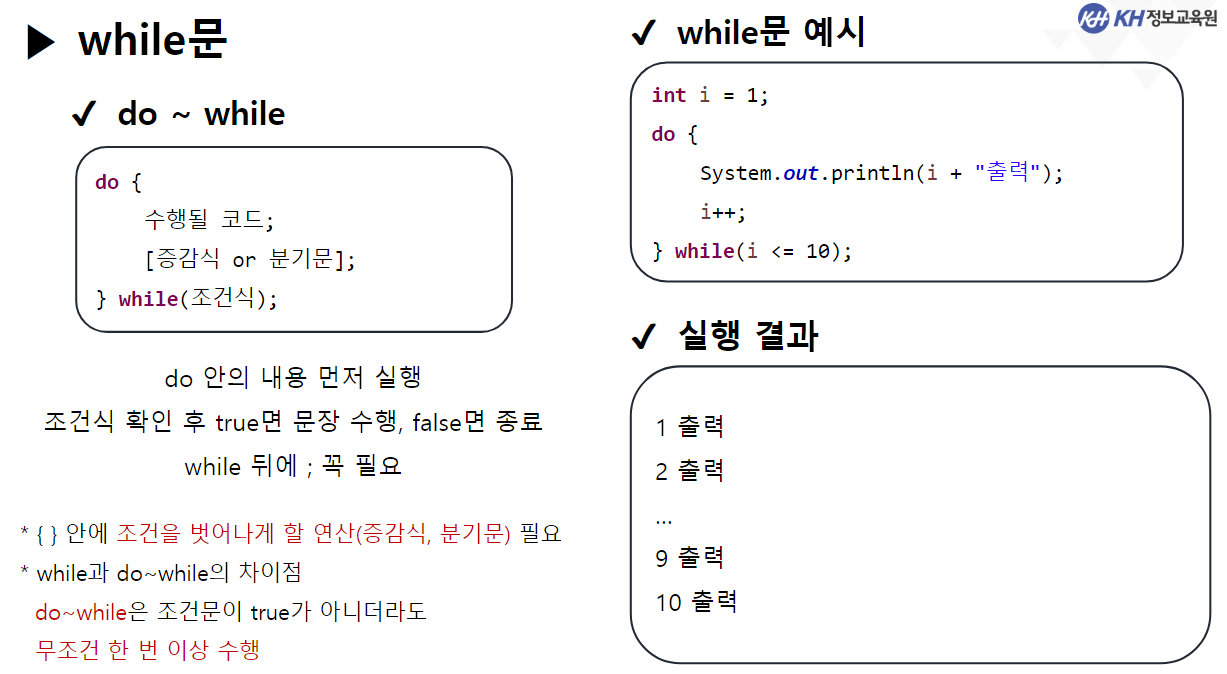
		// while문을 최소 한번은 수행하는 반복문
		// -> do ~ while 문

		do {

			System.out.print("정수 입력 : ");
			input = sc.nextInt();

			sum += input; // 입력받은 값을 sum에 누적

		} while( input != 0 );

	}


}
package edu.kh.control.loop;
public class LoopRun {
public static void main(String[] args) {
WhileExample whileEx = new WhileExample();
//whileEx.ex1();
//whileEx.ex2();
whileEx.ex3();
}
}03_제어문
03. 분기문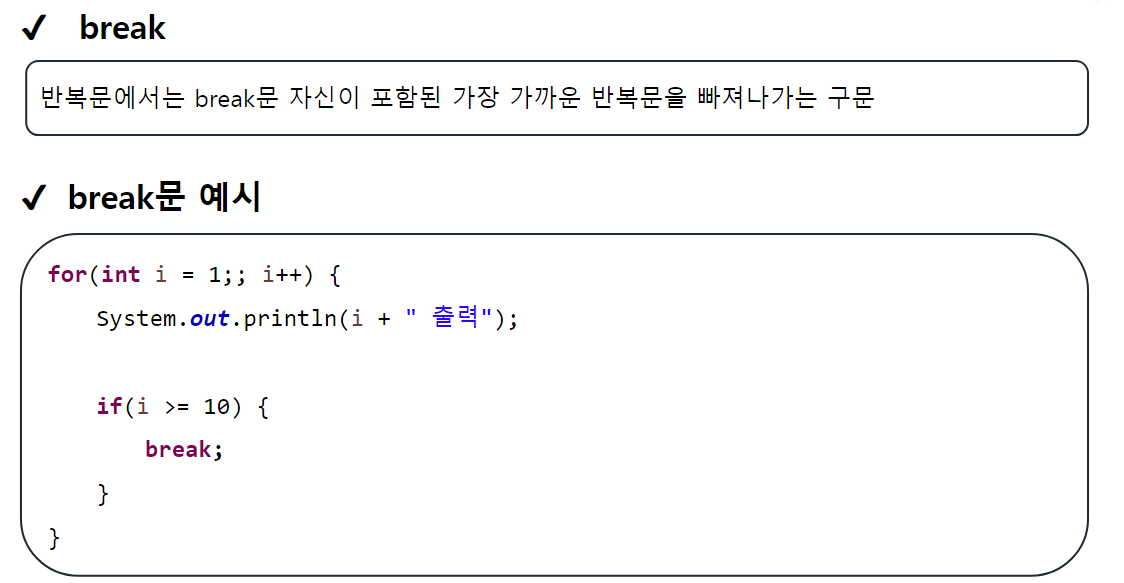
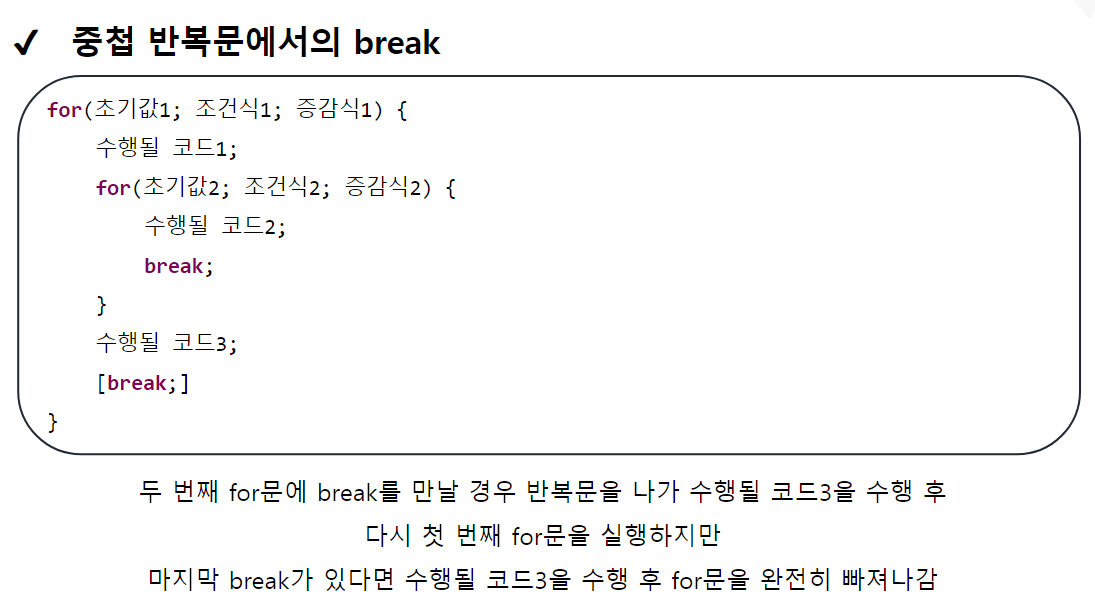
package edu.kh.control.branch;

import java.util.Scanner;

public class BranchExample {


	public void ex1() {

		// 1부터 10까지 1씩 증가하며 출력하는 반복문 작성
		// 단, 5를 출력하면 반복문 종료
		// 1 2 3 4 5

		for(int i = 1; i <= 10; i++) {
			System.out.print(i + " ");

			if( i == 5 ) {
				break;
			}
		}

	}

	public void ex2() {

		// 0이 입력될때 까지의 모든 정수의 합 구하기

		Scanner sc = new Scanner(System.in);

		int input = 0;
		int sum = 0;

		// while문을 처음에 무조건 수행하고, 특정 조건에 종료하는 방법
		// 1) input에 초기값을 0이 아닌 다른값 while (input != 0)

		// 2) do ~ while 문 사용

		// 3) 무한 루프 상태의 while문을 만들고
		// 	  내부에 break 조건 작성

		while(true) { // 무한루프

			System.out.println("정수 입력 : ");
			input = sc.nextInt(); // 입력

			if(input == 0) {
				break; // break 만나면 하단코드 수행하지 않고 빠져나감

			}

			sum += input;
		}

		System.out.println("합계 : " + sum);

	}

	public void ex3() {

		// 입력받은 모든 문자열을 누적
		// 단, "exit@" 입력시 문자열 누적을 종료하고 결과 출력

		Scanner sc = new Scanner(System.in);

		String str = ""; // 빈 문자열
						 // 쌍따옴표("")라는 기호를 이용해 String 리터럴임을 지정
						 // 하지만 내용은 없음.

		// cf) String str; 과 String str = "";은 서로 다름

		while(true) {

			System.out.print("문자열 입력(exit@ 입력 시 종료) : ");

			String input = sc.nextLine();
			// next() : 다음 한 단어 (띄어쓰기 포함 X)
			// nextLine() : 다음 한 줄 (띄어쓰기 포함 O)

			if(input.equals("exit@")) {
				// String 자료형은 비교연산자(==)로 같은 문자열인지 판별할 수 없다.

				// 기본 연산자는 보통 기본자료형끼리의 연산에서만 사용 가능하다.
				// -> String 은 기본자료형이 아닌 참조형

				// ** 해결방법 : 문자열1.equals(문자열2) 으로 비교 가능 **

				break;
			}

			str += input + "\n";
		}

		System.out.println("===============================");
		System.out.println(str);
	}

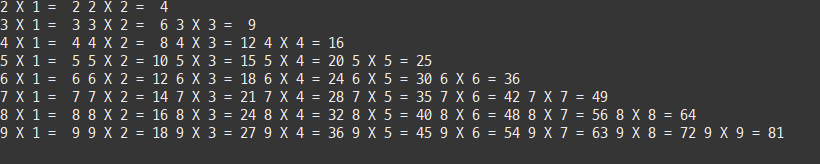
	public void ex4() {

		// 중첩 반복문 내부에서 break 사용하기
		// 구구단 2~9단
		// 단, 2단은 *2까지, 3단은 *3까지, 4단 *4.... 9단은 *9까지 출력

		for(int dan = 2; dan <= 9; dan++) {

			for(int num = 1; num <= 9; num++) {

				System.out.printf( "%d X %d = %2d ", dan, num, dan * num);

				if( num == dan ) {
					break;
				}
			}

			System.out.println();
		}

	}

}
위 예제는 하단 결과 출력
package edu.kh.control.branch;

public class BranchRun {

	public static void main(String[] args) {

		BranchExample branchEx = new BranchExample();

		//branchEx.ex1();
		//branchEx.ex2();
		//branchEx.ex3();
		branchEx.ex4();

	}

}
package edu.kh.control.branch;

import java.util.Scanner;

public class BranchExample {


	public void ex1() {

		// 1부터 10까지 1씩 증가하며 출력하는 반복문 작성
		// 단, 5를 출력하면 반복문 종료
		// 1 2 3 4 5

		for(int i = 1; i <= 10; i++) {
			System.out.print(i + " ");

			if( i == 5 ) {
				break;
			}
		}

	}

	public void ex2() {

		// 0이 입력될때 까지의 모든 정수의 합 구하기

		Scanner sc = new Scanner(System.in);

		int input = 0;
		int sum = 0;

		// while문을 처음에 무조건 수행하고, 특정 조건에 종료하는 방법
		// 1) input에 초기값을 0이 아닌 다른값 while (input != 0)

		// 2) do ~ while 문 사용

		// 3) 무한 루프 상태의 while문을 만들고
		// 	  내부에 break 조건 작성

		while(true) { // 무한루프

			System.out.println("정수 입력 : ");
			input = sc.nextInt(); // 입력

			if(input == 0) {
				break; // break 만나면 하단코드 수행하지 않고 빠져나감

			}

			sum += input;
		}

		System.out.println("합계 : " + sum);

	}

	public void ex3() {

		// 입력받은 모든 문자열을 누적
		// 단, "exit@" 입력시 문자열 누적을 종료하고 결과 출력

		Scanner sc = new Scanner(System.in);

		String str = ""; // 빈 문자열
						 // 쌍따옴표("")라는 기호를 이용해 String 리터럴임을 지정
						 // 하지만 내용은 없음.

		// cf) String str; 과 String str = "";은 서로 다름

		while(true) {

			System.out.print("문자열 입력(exit@ 입력 시 종료) : ");

			String input = sc.nextLine();
			// next() : 다음 한 단어 (띄어쓰기 포함 X)
			// nextLine() : 다음 한 줄 (띄어쓰기 포함 O)

			if(input.equals("exit@")) {
				// String 자료형은 비교연산자(==)로 같은 문자열인지 판별할 수 없다.

				// 기본 연산자는 보통 기본자료형끼리의 연산에서만 사용 가능하다.
				// -> String 은 기본자료형이 아닌 참조형

				// ** 해결방법 : 문자열1.equals(문자열2) 으로 비교 가능 **

				break;
			}

			str += input + "\n";
		}

		System.out.println("===============================");
		System.out.println(str);
	}

	public void ex4() {

		// 중첩 반복문 내부에서 break 사용하기
		// 구구단 2~9단
		// 단, 2단은 *2까지, 3단은 *3까지, 4단 *4.... 9단은 *9까지 출력

		for(int dan = 2; dan <= 9; dan++) {

			for(int num = 1; num <= 9; num++) {

				System.out.printf( "%d X %d = %2d ", dan, num, dan * num);

				if( num == dan ) {
					break;
				}
			}

			System.out.println();
		}

	}

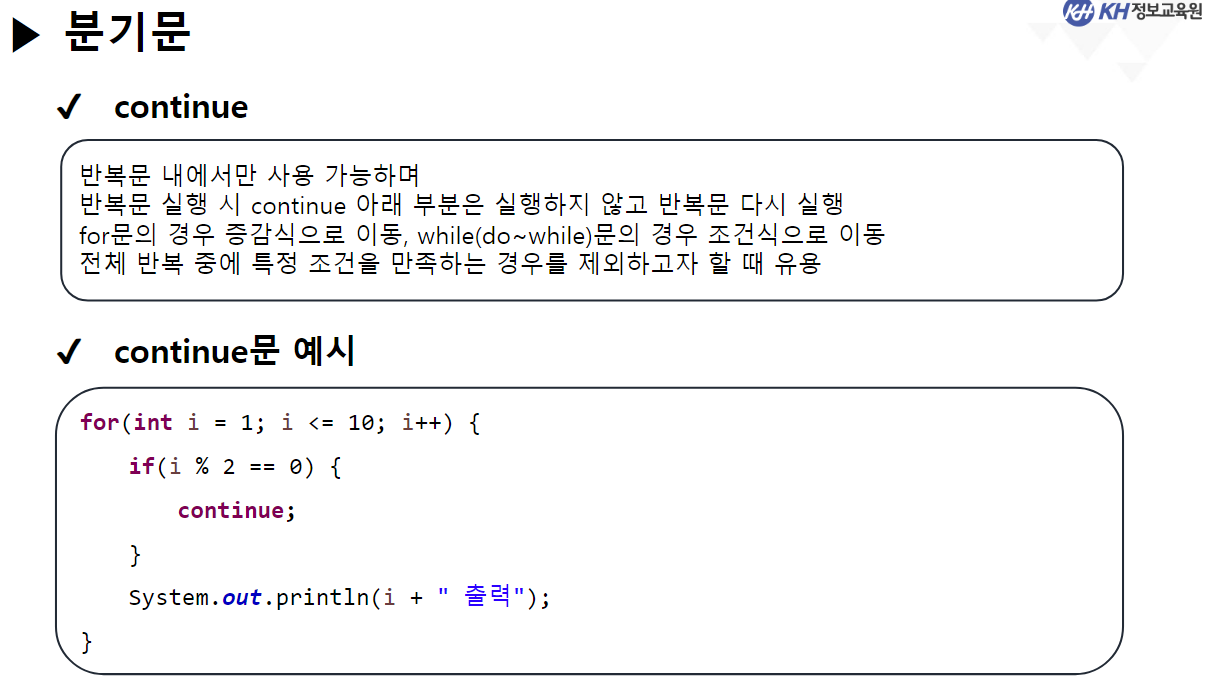
	// ** continue **
	public void ex5() {

		// break : 반복문을 바로 멈춤
		// continue : 다음 반복으로 넘어감

		// 1 ~ 10 까지 1씩 증가하면서 출력
		// 단, 3의 배수 제외

		for(int i = 1; i <= 10; i++) {

			if(i % 3 == 0) {
				continue;
			}

			System.out.print(i + " "); // 1 2 4 5 7 8 10
		}

	}

	public void ex6() {
		// 1 ~ 100까지 1씩 증가하며 출력하는 반복문
		// 단, 5의 배수는 건너뛰고
		// 증가하는 값이 40이 되었을 때 반복을 멈춤

		// 1
		// 2
		// 3
		// ..
		// 39

		for(int i = 1; i <= 100; i++) {

			if(i == 40) {
				break;
			}

			if(i % 5 == 0) {
				continue;
			}
			System.out.println(i);
		}
	}

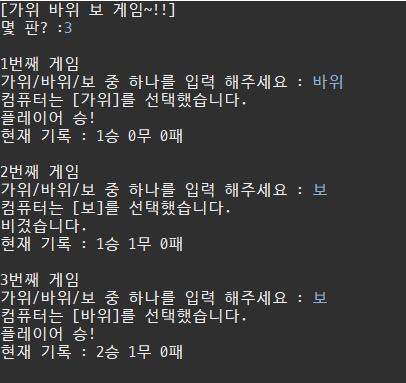
	public void RSPGame() {

		Scanner sc = new Scanner(System.in);

		System.out.println("[가위 바위 보 게임~!!]");
		System.out.print("몇 판? :");
		int round = sc.nextInt();

		// 승패 기록용 변수
		int win = 0;
		int draw = 0;
		int lose = 0;

		for(int i = 1; i <= round; i++) { // 입력 받은 판 수 만큼 반복

			System.out.println("\n" + i + "번째 게임");

			System.out.print("가위/바위/보 중 하나를 입력 해주세요 : ");

			String input = sc.next();

			// Math.random();
			// 난수 생성 -> 0.0 이상 1.0 미만의 난수 생성

			// 1) 1~3사이 난수 생성
			// 2) 1이면 가위, 2이면 바위, 3이면 보 지정 (switch)

			int random = (int)(Math.random() * 3 + 1);
			// 0.0 <= x < 1.0
			// 0.0 <= x * 3 < 3.0
			// 1.0 <= x * 3 + 1 < 4.0
			// 1 <= (int)(x*3+1) < 4
			// == 1 이상 4 미만 정수 --> 1 2 3

			String com = null; // 컴퓨터가 선택한 가위/바위/보를 저장하는 변수
			// null : 아무것도 참조하고 있지 않음.

			switch(random) {// default 필요 없음(컴퓨터가 잘못 입력할 일 없음)
			case 1 :
				com = "가위";
				break;
			case 2 :
				com = "바위";
				break;
			case 3 :
				com = "보";
				break;
			}

			// 컴퓨터는 [바위]를 선택했습니다.
			System.out.printf("컴퓨터는 [%s]를 선택했습니다.\n", com);

			// 컴퓨터와 플레이어 가위 바위 보 판별

			if( input.equals(com) ) {
				System.out.println("비겼습니다.");
				draw++;

			} else {

				boolean win1 = input.equals("가위") && com.equals("보");
				boolean win2 = input.equals("바위") && com.equals("가위");
				boolean win3 = input.equals("보") && com.equals("바위");

				if(win1 || win2 || win3) {
					System.out.println("플레이어 승!");
					win++;

				} else {

					System.out.println("졌습니다 ㅜㅜ");
					lose++;
				}

			}
			System.out.printf("현재 기록 : %d승 %d무 %d패\n", win, draw, lose);
		}


	}

}
위 예제는 하단 결과 출력
package edu.kh.control.branch;

public class BranchRun {

	public static void main(String[] args) {

		BranchExample branchEx = new BranchExample();

		//branchEx.ex1();
		//branchEx.ex2();
		//branchEx.ex3();
		//branchEx.ex4();
		//branchEx.ex5();
		//branchEx.ex6();
		branchEx.RSPGame();

	}

}