Google Places API 맛집 정보 가져오기
사용자가 지역을 하나 선택하면, 해당 지역에 있는 맛집들을 나열해주는 기능을 개발하기로 했다. 외부 API를 호출해서 검색한 맛집 결과를 뿌려주고자 했는데, google에 좋은 API가 있었다.
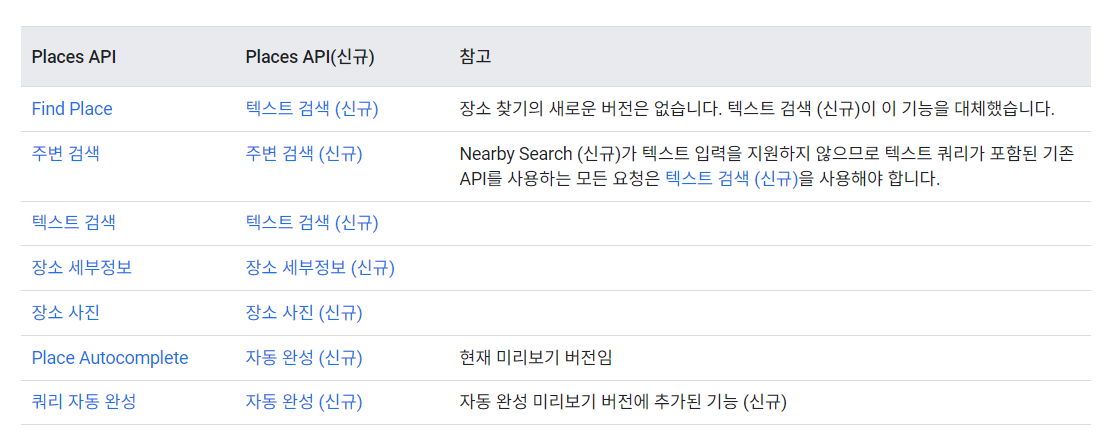 사용할 수 있는 Places API가 꽤 다양했는데, 현재 뿌려야 할 정보들을 고려했을 때 필요할 API로는 'Find Place' 또는 '텍스트 검색', '장소 사진', '장소 세부정보' 정도가 있었다. 각 API의 response를 확인해보니 검색 결과로 나타나는 장소에 대해 각각 고유 아이디를 갖고 있었다. 장소 사진이나 세부정보 API는 이 장소 고유 아이디를 가지고 호출하는 방식이었다.
Find Place는 뭐고 텍스트 검색은 뭐지? 싶어서 둘 차이점을 찾아봤었다.
- Find Place API
검색어는 주로 단일 문자열로 제공된다.
정확한 주소나 위치를 제공하는 대신에 일반적인 검색어를 사용한다.
(ex: "에펠탑", "타임스퀘어" 등)
- Text Search API
복잡한 검색 쿼리를 지원하고 여러 매개변수를 사용해 결과 필터링이 가능하다.
검색어를 더 자세하게 구성할 수 있으며 유형, 키워드 등을 조합해서 찾을 수 있다.
(ex: "에펠탑 근처 레스토랑", "타임스퀘어 근처 호텔" 등)
현재 구현하고자 하는 기능에서는 "{국가} {지역} 맛집" 형식으로 검색 키워드를 구성하기 때문에 Text Search API가 더 적합하다고 판단했다.
Google Places API 사용하기
Places API 문서에 사용 방법이 굉장히 자세히 나와 있어서 처음 외부 API를 호출해본 나도 꽤 어렵지 않게 호출해볼 수 있었다.
Google Maps API key 생성하기
위 링크에서 설명해주는 순서를 따라 Google Cloud에 새로운 프로젝트를 생성해서 API 키를 먼저 발급 받았다.
Google API가 사용하기 너무 편했던 이유가 자체적인 라이브러리를 제공하기 때문이다.
build.gradle에 Google Maps API 라이브러리 의존성을 추가해주면 된다.
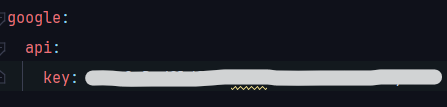
API 키는 호출 횟수에 따라 과금이 되기도 하므로 외부에 노출되면 안되기 때문에 내부에서 예민하게 관리되어야 한다. 그러므로 application.yml 파일에 따로 넣어두었다.
 해당 API를 사용하고자 하는 Service 코드에 가서 이제 라이브러리로 편하게 사용해주면 된다.
public class RecommendService {
	...
	@Value("${google.api.key}")
	private String apiKey;

    // 추천 맛집 검색 결과 반환
    public List<GetRecommendedPlacesResponseDTO> getAllRecommendedPlace(Country country, City city){
		List<GetRecommendedPlacesResponseDTO> result = new ArrayList<>();

        // "{국가} {도시} 맛집" 검색 키워드 구성
		String searchKeyword = country.toString().concat(" ").concat(city.toString()).concat(" 맛집");
        // Google Maps API 키 등록
		GeoApiContext context = new GeoApiContext.Builder()
			.apiKey(apiKey)
			.build();

		try{
        	// Text Search API 호출
			PlacesSearchResponse response = PlacesApi.textSearchQuery(context, searchKeyword).await();
			if(response.results != null && response.results.length > 0){
            	// 검색한 모든 장소들에 대해, 장소 세부정보 API 호출
				for(PlacesSearchResult res : response.results){
					GetRecommendedPlacesResponseDTO place = getPlaceDetails(res.placeId);
					if(place != null) result.add(place);
				}
			}
			else log.info("No place found : "+searchKeyword);
		}
		catch (Exception e){
			throw new GoogleApiException();
		}
		return result;
	}

    // 장소 세부정보 API
	private GetRecommendedPlacesResponseDTO getPlaceDetails(String placeId){
		// Google Maps API 키 등록
        GeoApiContext context = new GeoApiContext.Builder()
			.apiKey(apiKey)
			.build();

        String photoUrl;

        try{
        	// Details API 호출
			PlaceDetails details = PlacesApi.placeDetails(context, placeId).language("ko").await();
            // 이미지가 없는 장소는 결과에 포함하지 않음
			if(details.photos == null)
				return null;
			else {
            	// 장소 이미지를 url로 저장 (maxwidth = 500 설정)
				photoUrl = "https://maps.googleapis.com/maps/api/place/photo?maxwidth=500&photoreference="
					.concat(details.photos[1].photoReference) // 장소에 있는 두 번째 이미지
					.concat("&key=")
					.concat(apiKey);
			}
			return new GetRecommendedPlacesResponseDTO(
				details.placeId,
				details.name,
				details.url.toString(),
				details.rating,
				photoUrl
			);
		}catch (Exception e){
			throw new GoogleApiException();
		}
	}
    ...
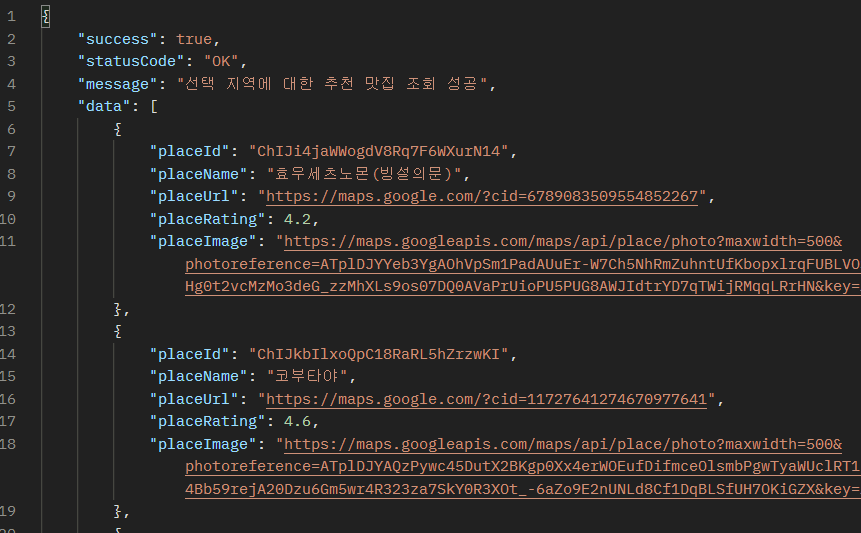
Postman으로 호출한 결과 의도한대로 response가 나왔다!