공부 내용 : mdn web docs - HTML 기초
HTML이란 ?
- 마크업 언어
- elements(요소)로 이루어져있음
- 태그 → 하이퍼링크나 글씨체 변경 가능함
HTML 요소 분석
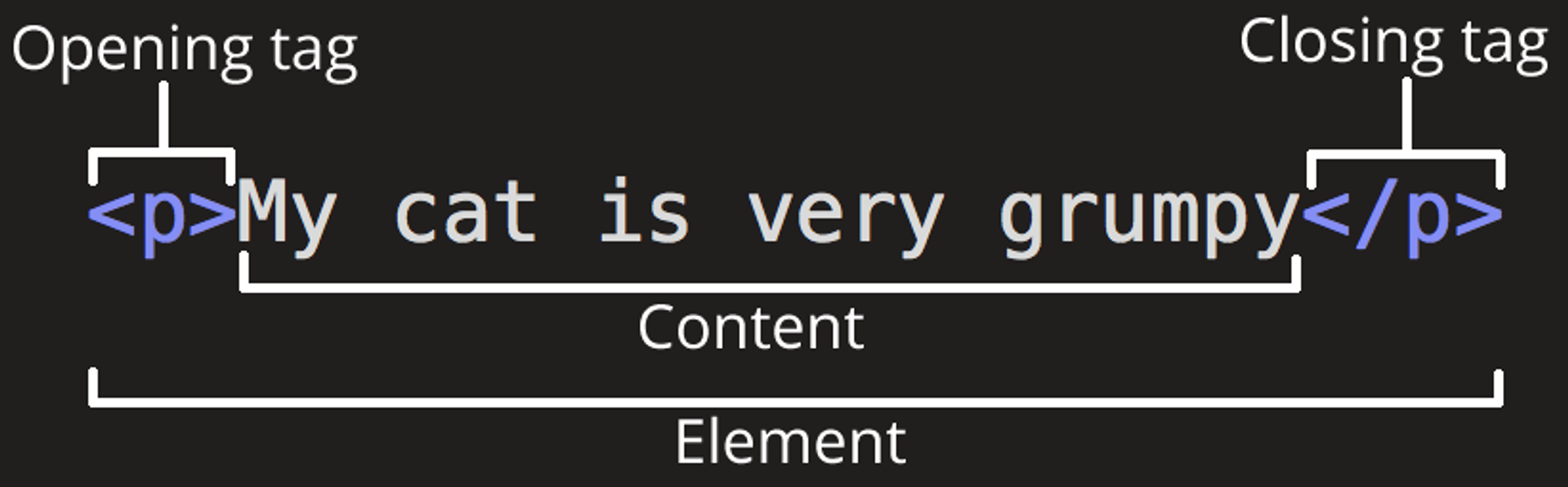
Elements의 주요 부분
- 여는 태그(Opening tag) : 요소가 시작되는 곳
- 닫는 태그(Closing tag): 요소가 끝나는 곳
- 콘텐츠: 내용
- 요소: 여는태그 + 닫는태그 + 콘텐츠
요소 중첩
<p>My cat is <strong>very</strong> grumpy.</p>빈 요소
<img src="images/firefox-icon.png" alt="My test image">HTML 문서 해부
<!DOCTYPE html>
<html>
  <head>
    <meta charset="utf-8">
    <title>My test page</title>
  </head>
  <body>
    <img src="images/firefox-icon.png" alt="My test image">
  </body>
</html>
<!DOCTYPE html>— 필수 서문<html></html>— 페이지 전체의 콘텐츠를 감싸며, 루트(root) 요소라고도 함.<head></head>- 페이지를 조회하는 사람들에게 보여주는 콘텐츠가 아닌, 내가 HTML 페이지에 포함하고 싶어하는 모든 재료들을 위한 컨테이너 역할
- 페이지 설명, 콘텐츠를 꾸미기 위한 CSS, 문자 집합 선언 등과 같은 것들을 포함
<meta name="viewport" content="width=device-width">— 뷰포트의 너비에서 페이지가 렌더링하도록 함- 모바일 브라우저가 뷰포트보다 넓은 페이지를 렌더링한 후 축소하는 것을 방지
<title></title>— 페이지의 제목을 설정- 로드된 페이지 브라우저의 탭에 나타나는 제목
- 북마크나 즐겨찾기에서 페이지를 설명하는 것으로도 사용
<body></body>— 페이지에 방문한 모든 웹 사용자들에게 보여주길 원하는 모든 컨텐츠를 담고 있음- 텍스트일 수도, 이미지, 비디오, 게임, 플레이할 수 있는 오디오 트랙이나 다른 무엇이든 될 수 있음
이미지
<img src="images/firefox-icon.png" alt="My test image">src: 이미지 경로와 파일명alt: 대안, 이미지 볼수 없는 경우의 설명 텍스트
문자
제목
<!-- 4 heading levels: -->
<h1>My main title</h1>
<h2>My top level heading</h2>
<h3>My subheading</h3>
<h4>My sub-subheading</h4>
문단
<p>This is a single paragraph</p><p> : 문단을 포함하기 위한 태그
목록
- 순서 없는 목록:
<ul> - 순서 있는 목록:
<ol>
목록의 각 항목은 <li> 요소 안에 넣어야 한다.
링크
<a> : anchor의 약자로 링크를 만들수 있게함
<a href="https://www.mozilla.org/en-US/about/manifesto/">Mozilla Manifesto</a>