참조형 타입 변수란?
대강 Math.random() 같이 앞글자가 대문자인 것.
그럼 기본형은?
int , boolean, double 등등 소문자로 시작하는 것
Math.random
public class s08 {
    public static void main(String[] args){

        // math.random() 은 0보다 크거나 같고, 1보다 작다.
        // 45를 곱하면 0~44.9999.. 로 나온다.
        double num = Math.random() * 45;

        //int로 형변환을 캐스팅하여 0~44로 만든다. +1은 1~45로 가게 된다.
        int result = ((int) num) + 1;


    }
}
스캐너
- 키보드로 입력한 값을 받는 인풋 비스무리한 것.
import java.util.*;

public class s03 {
    public static void main(String[] args){
        // 콘솔에 입력을 받을 때 사용한다
        //표준입력장치인 키보드등의 데이터를 받는다
        Scanner scanner = new Scanner(System.in);

        // 스캐너에서 nextInt를 사용하면 입력된 값을 int 타입으로 형변환해서 리턴
        // int nextInt = scanner.nextInt();
        // System.out.println("나온 값은" + nextInt);

        // ctrl+alt+v로 추출
        // String next = scanner.next();

        // 넥스트는 띄어쓰기 기준으로 데이터를 나누어 갖느낟.
        // System.out.println(next);
        // scanner.close();

        // 넥스트라인은 '한줄'로 데이터를 가진다.
        String nextLine = scanner.nextLine();
        System.out.println(nextLine);

        // nextInt, nextString 등등은. next와 유사하다.
    }
}
객체 비교
public class s07 {
    public static void main(String[] args) {
        String str = " show me the money ";

        System.out.println("str.length() : " + str.length());
        System.out.println("str.charAt(1) : " + str.charAt(1));
        System.out.println("str.substring(6) : "+ str.substring(6));
        System.out.println("str.substring(6) : "+ str.substring(6,11));
        // 주민번호 등을 잘라 낼 때, '12345678' -> "1" + "*******"
        System.out.println("str.toLowerCase() : " + str.toLowerCase());
        System.out.println("str.toUpperCase() : " + str.toUpperCase());
        System.out.println("str.indexOf() : " + str.indexOf("e"));
        System.out.println("str.lastindexOf() : " + str.lastIndexOf("e"));
        System.out.println("str.contains() : " + str.contains("the"));
        System.out.println("str.startswith() : " + str.startsWith("show"));
        System.out.println("str.endswith() : " + str.endsWith("money"));
        System.out.println("str.trim() : " + str.trim());
        System.out.println("str.replace() : " + str.replace("e", "x"));
        System.out.println("str.repead() : " + str.repeat(2));
        System.out.println("str.repead() : " + str.split(" ")[0]);
        System.out.println("str.repead() : " + str.split(" ")[1]);
        System.out.println("str.repead() : " + str.split(" ")[4]);
                //띄어 쓰기 기준으로 쪼갬.

        String name1 = "홍 길 동";
        System.out.println("str.repead().length : " + name1.split(" ").length);

        //값이 없는 빈 문자열 "" 만 true " " 는 해당 X
        System.out.println("\"\".isEmpty() : " + "".isEmpty());
        // ""과 " " 둘다 true "   " 도 일단은 true
        System.out.println("\"\".isblank() : " + "".isBlank());
        System.out.println("\" \".isblank() : " + " ".isBlank());


        String bird3 = "독수리";
        System.out.println("bird3 == \"독수리\" : " + (bird3 == "독수리"));

        String bird4 = new String("갈매기");
        String bird5 = new String("갈매기");
        System.out.println("bird4 == bird5 : " + (bird4 == bird5));
        System.out.println("bird4 == bird5 : " + (bird4 == "갈매기"));
        // String 공간과 힙 공간의 차이.
        // String 에선 두가지를 bird1 = "오리" bird2 = "오리" 라고 해도
        // 동일하게 인식 가능하다만,
        // new를 사용할 경우 블록으로 구분되는 형태로 되어버린다.
        // == 는 주소를 비교한다. 그래서 틀리게 나온다.

        // 객체끼리 equals를 사용하면 주소를 비교해보고, false면
        // 내부의 값을 한번 더 확인해서 비교한 뒤 true, false를 리턴한다.
        System.out.println("bird3.equals(bird5) : " + bird3.equals(bird5));
        System.out.println("bird4.equals(bird5) : " + bird4.equals(bird5));
    }
    	// split을 쓰면 문자열을 문자배열로 만들 수 있다
        String korean = "가나다라";
        String[] split = korean.split(""); // 2)

        // 문자열의 문자를 반복할 때
        for (int i=0; i<korean.length(); i++){
        	System.out.println(korean.charAt(i));
        }
        // 문자열을 문자배열로 바꿔서 반복할 때 2)
        // 각 문자에 문자열메소드를 사용하고 싶을 때
        for (int i=0; i<korean.length; i++){
        	System.out.println(split[i].repeat(2));
        }

        //쪼개진 문자열을 다시 합치고 싶을때
        System.out.println("String.join(\"\", split) : " + String.join("a",split));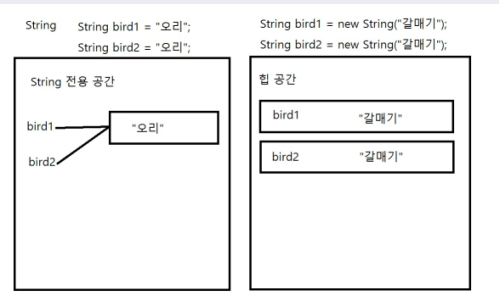
숫자에 대한 비교
public class s07_2 {
    public static void main(String[] args) {
        // 0이상 1미만의 랜덤한 double
        System.out.println("Math.random() : " + Math.random());
        // abs 숫자의 절대값을 리턴한다
        System.out.println("Math.abs(-10) : " + Math.abs(-10));
        // round 5를 기준으로 반올림값을 정수로 리턴한다
        System.out.println("Math.round(1.5) : " + Math.round(1.5));
        System.out.println("Math.round(1.4) : " + Math.round(1.4));
        //FLOOR 내림값을 DOUBLE로 리턴한다
        System.out.println("Math.floor(1.5) : " + Math.floor(1.5));
        System.out.println("Math.floor(1.25) : " + Math.floor(1.25));
        // ceil 올림값을 double로 리턴한다
        System.out.println("Math.ceil(1.5) : " + Math.ceil(1.5));
        System.out.println("Math.ceil(1.25) : " + Math.ceil(1.25));
        System.out.println("Math.ceil(1.0) : " + Math.ceil(1.0));
        // pow 제곱값을 double로 리턴한다.
        System.out.println("Math.pow(2,3) : " + Math.pow(2,3));
        // sqrt 루트값을 double로 리턴한다
        System.out.println("Math.sqrt(4) : " + Math.sqrt(4));

        System.out.println("Math.PI : " + Math.PI);
    }
}