버전 관리??
- 기획서.pdf
- 기획서_수정본.pdf
- 기획서_수정.pdf
- 기획서진짜최종.pdf
- 기획서진짜진짜최종.pdf
- 기획서_20230801.pdf
GitHub Tutorial
사용 문서
정보
https://docs.github.com/ko/get-started/using-git/about-git
pull requests
간편안내서
https://rogerdudler.github.io/git-guide/index.ko.html
GitLens
https://marketplace.visualstudio.com/items?itemName=eamodio.gitlens
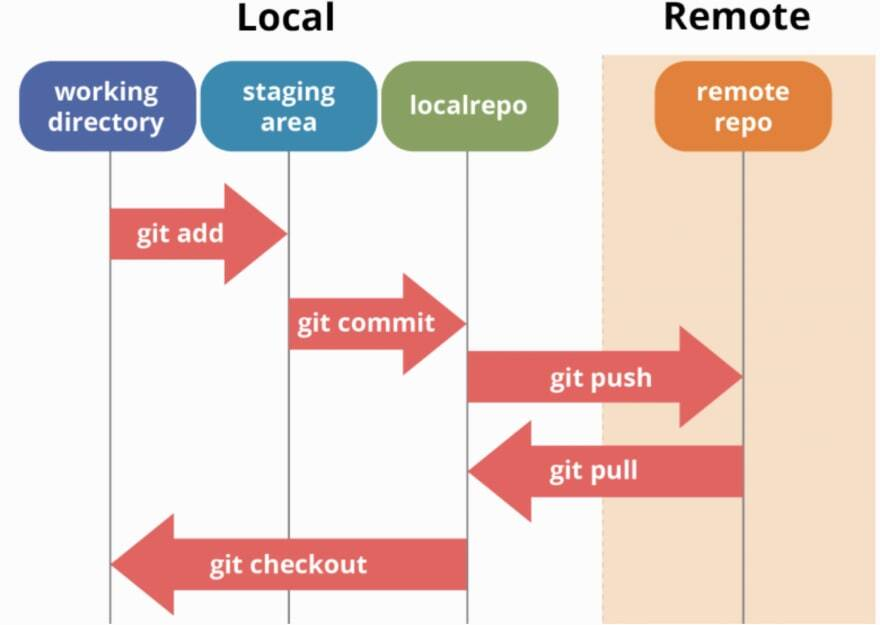
저장소의 간단 구조
로그인 설정 / 초기화 (한번만)
계정 unset
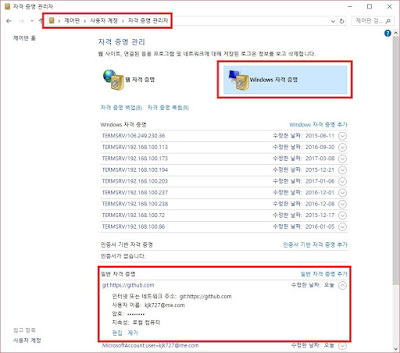
윈도우 자격 증명 관리자
- 제어판 - 사용자 계정 - 자격 증명 관리자
- Windows 자격 증명
- 일반 자격 증명
- git 관련 자격 증명 편집
or 터미널(git bash)
git config --unset --global user.name
git config --unset --global user.email
gitbash 로그인
Git 사이트에 전역 사용자명/이메일 구성하기
git config --global user.name "Your Name Here"
git config --global user.email "your_email@youremail.com"
GitHub 명령어
저장소 초기화하기
Git을 사용하려는 프로젝트 디렉토리에서 다음 명령을 사용하여 새로운 Git 저장소를 초기화합니다.
git init변경 내역 추가하기
변경된 파일을 Git이 추적하도록 추가해야 합니다. 이를 "스테이징"이라고 합니다.
git add <파일 이름>

// 모든 변경된 파일 한번 추가하기
git add .
변경 내역 커밋하기
스테이징한 파일들을 커밋하여 변경 내역을 확정합니다. 커밋 메시지를 함께 작성합니다.
git commit -m "커밋 메시지"원격 저장소 연결하기
원격 저장소를 추가하여 프로젝트를 온라인으로 공유하거나 협업할 수 있습니다.
git remote add origin <원격 저장소 URL>변경 내역 푸시하기
로컬 저장소의 커밋들을 원격 저장소로 업로드합니다.
git push origin <브랜치 이름>변경 내역 가져오기
원격 저장소의 변경 내역을 로컬 저장소로 가져옵니다.
git pull origin <브랜치 이름>저장소 받아오기
git 리모트 URL을 이용하여 원격저장소에 저장된 파일을 컴퓨터로 복사해올 수 있습니다.
git clone <원격 저장소 URL>변경 내역 확인하기
Git은 파일의 상태 변화를 추적합니다. 변경된 파일들을 확인하려면 다음 명령을 사용합니다.
git status변경 내역 조회하기
이전 커밋들과 변경 내역을 조회합니다.
git loghome - office 예제
// office 폴더 만들기

git init
git remote add origin https://github.com/username/office.git

// README.md, index.html 파일 생성

git add .
git commit -m "first commit"
git push

// home 폴더 만들기

git clone https://github.com/username/office.git .

// a.html 파일 생성

git add .
git commit -m "a 파일 생성"
git push
브랜치 관리하기
다양한 기능을 개발하거나 수정할 때 브랜치를 사용하여 작업합니다.
브랜치 생성하기
git branch 새로운_브랜치_이름브랜치 전환하기
git checkout 브랜치_이름브랜치 생성하고 전환하기
git checkout -b 새로운_브랜치_이름브랜치 삭제하기
git branch -d 브랜치_이름브랜치 병합하기
merge
git checkout feature
git merge main

git merge nadahelly/goods-list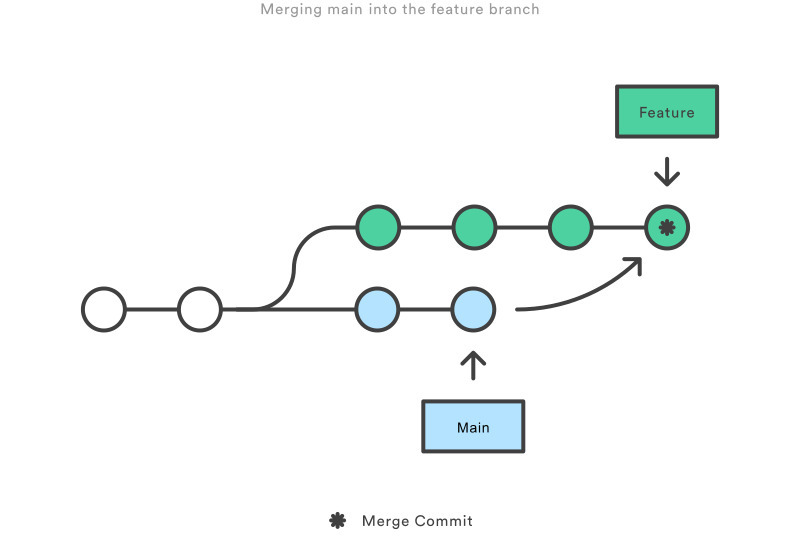
rebase
히스토리를 더 이쁘게 만들 수 있다
git checkout feature
git rebase main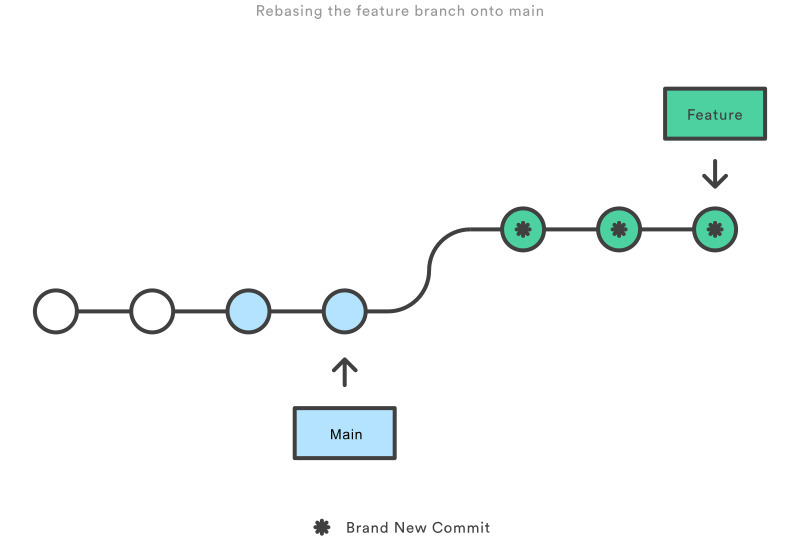
merge와 rebase 차이
https://pearlluck.tistory.com/754
git flow
브랜치 전략
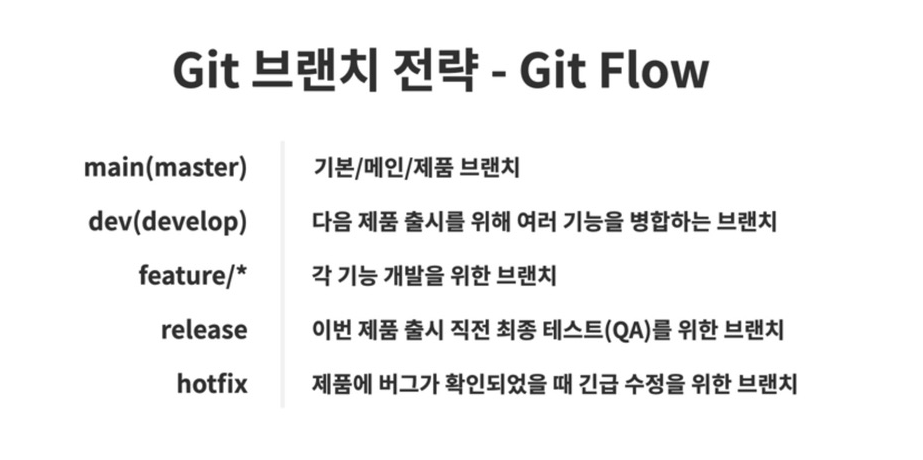
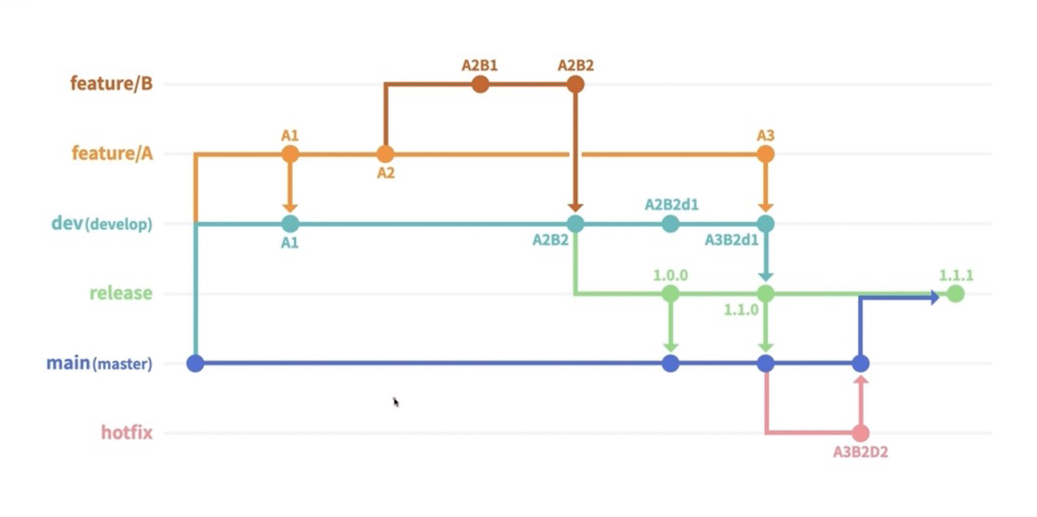
예제

git checkout -b feature1   // a.html 파일 추가
git checkout -b feature2   // b.html 파일 추가
git checkout feature1
git merge feature2         // feature1에 feature2를 병합한다.
git checkout main
git merge feature1         // main에 feature1를 병합한다.