리액트의 하나의 컴포넌트에서 데이터를 생성하거나 업데이트하거나 다른 컴포넌트와 데이터를 공유해서 사용하는 여러 방법이 있습니다.
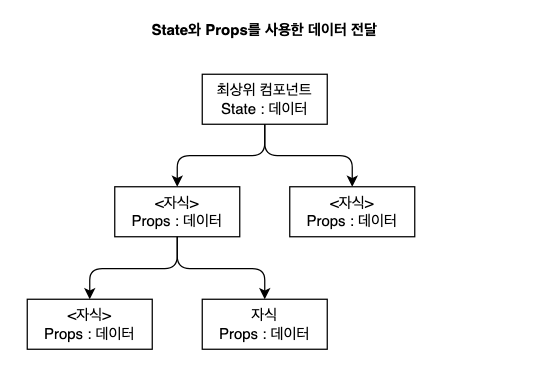
- state 와 props를 사용해서 컴포넌트 간에 데이터를 전달
useContext 란?
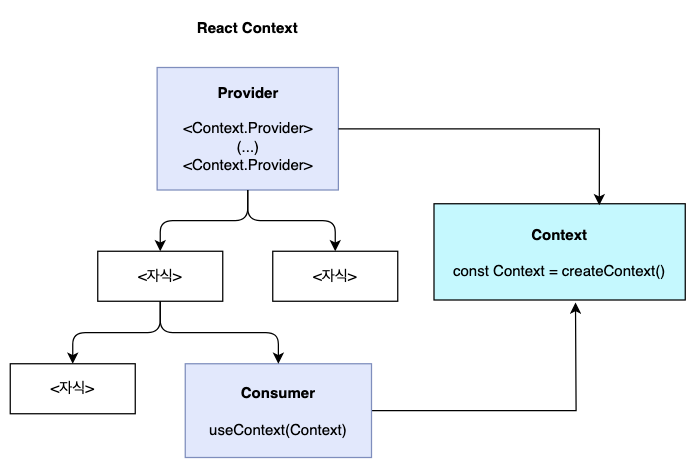
- React Context는 Component 트리 전체에 props를 전달하지 않고도 Component 데이터를 제공하는 방법으로
- 전역 상태를 관리하기 위한 간단한 방법입니다.
Context 문법
- 생성 :
createContext함수를 사용하여Context를 생성합니다. - 제공 :
Context.Provider컴포넌트를 만나면,valueprop을 통해Context의 값을 제공합니다. - 사용 :
useContext컴포넌트를 사용하여Context의 값을 사용합니다.
Context 사용하기
createContext함수를 사용하여 Context를 생성합니다.defaultValue는Provider를 사용하지 않았을 때 사용할 기본값입니다.
const MyContext = createContext(defaultValue);Context.Provider컴포넌트를 사용하여 Context를 제공합니다.valueprop을 통해 Context의 값을 제공합니다.
// 왜 value를 객체로 감싸서 전달하는가?
// 여러 개의 값을 전달하기 위해 객체로 묶어서 전달
// value={{ key1: value1, key2: value2 }}

<MyContext.Provider value={/* 상태 값 */}>
  {/* 여기에 위치한 컴포넌트들은 이 Context의 값을 사용할 수 있음 */}
</MyContext.Provider>Context의 값을 사용할 때는useContexthook을 사용합니다.
// 왜 useContext로 데이터를 가져오는가?
// 컴포넌트 계층 구조에 상관없이 Context의 값을 사용할 수 있음
// 부모 컴포넌트에서 자식 컴포넌트로 데이터를 전달하지 않아도 됨

const value = useContext(MyContext);
왜 주고 받는 구조를 사용하는가?
1. 상태를 전역적으로 공유하기 위해
만약 useContext 없이 컴포넌트 간 데이터를 주고받는다면, 상태를 부모 → 자식 → 손자 순서로 props를 계속 전달해야 합니다. 하지만, Context를 사용하면 컴포넌트 계층과 상관없이 원하는 곳에서 상태를 바로 사용할 수 있습니다.
- Without Context (props drilling):
<Parent isLiked={isLiked} toggleLike={toggleLike}>
  <Child isLiked={isLiked} toggleLike={toggleLike}>
    <Grandchild isLiked={isLiked} toggleLike={toggleLike} />
  </Child>
</Parent>- With Context:
<LikeProvider>
  <Parent>
    <Child>
      <Grandchild /> {/* 바로 isLiked와 toggleLike 사용 가능 */}
    </Child>
  </Parent>
</LikeProvider>
like 버튼 만들기
1. Context 없이 만들기
import React, { useState } from "react";

const LikeButton = ({ isLiked, toggleLike }) => {
  return (
    <div className="flex items-center justify-center mt-10">
      <button onClick={toggleLike} className="text-3xl">
        <span className={isLiked ? "text-red-500" : "text-gray-400"}>❤️하트</span>
      </button>
    </div>
  );
};

const FollowButton = () => {
  return (
    <div className="flex items-center justify-center mt-10">
      <button onClick={toggleLike} className="text-3xl">
        <span className={isLiked ? "text-green" : "text-gray-400"}>+팔로우</span>
      </button>
    </div>
  );
}

const App = () => {
  const [isLiked, setIsLiked] = useState(false);

  const toggleLike = () => {
    setIsLiked((prev) => !prev);
  };

  return (
    <div className="p-8">
      <LikeButton isLiked={isLiked} toggleLike={toggleLike} />
      <FollowButton isLiked={isLiked} toggleLike={toggleLike} />
    </div>
  );
};

export default App;
2. Context로 만들기
import React, { createContext, useContext, useState } from "react";

// Context 생성
const ButtonContext = createContext();

const App = () => {
  const [isLiked, setIsLiked] = useState(false);

  const toggleLike = () => {
    setIsLiked((prev) => !prev);
  };

  return (
    // Context Provider로 상태 공유
    <ButtonContext.Provider value={{ isLiked, toggleLike }}>
      <div className="p-8">
        <LikeButton />
        <FollowButton />
      </div>
    </ButtonContext.Provider>
  );
};

const LikeButton = () => {
  // Context에서 상태 가져오기
  const { isLiked, toggleLike } = useContext(ButtonContext);

  return (
    <div className="flex items-center justify-center mt-10">
      <button onClick={toggleLike} className="text-3xl">
        <span className={isLiked ? "text-red-500" : "text-gray-400"}>❤️하트</span>
      </button>
    </div>
  );
};

const FollowButton = () => {
  // Context에서 상태 가져오기
  const { isLiked, toggleLike } = useContext(ButtonContext);

  return (
    <div className="flex items-center justify-center mt-10">
      <button onClick={toggleLike} className="text-3xl">
        <span className={isLiked ? "text-green-500" : "text-gray-400"}>+팔로우</span>
      </button>
    </div>
  );
};

export default App;
3. Custom Hook을 사용하는 경우
src/
├── App.jsx                  # 메인 컴포넌트
├── context/
│   └── ButtonContext.jsx    # Context 및 Provider 정의
├── components/
    ├── LikeButton.jsx       # 좋아요 버튼 컴포넌트
    └── FollowButton.jsx     # 팔로우 버튼 컴포넌트
// src/contexts/ButtonContext.jsx
import React, { createContext, useContext, useState } from "react";
// Context 생성
const ButtonContext = createContext();
// 커스텀 Hook
export const useButtonContext = () => {
const context = useContext(ButtonContext);
if (!context) {
throw new Error("useButtonContext must be used within a ButtonProvider");
}
return context;
};
// Provider 컴포넌트
export const ButtonProvider = ({ children }) => {
const [isLiked, setIsLiked] = useState(false);
const toggleLike = () => {
setIsLiked((prev) => !prev);
};
return (
<ButtonContext.Provider value={{ isLiked, toggleLike }}>
{children}
</ButtonContext.Provider>
);
};// src/components/LikeButton.jsx
import React from "react";
import { useButtonContext } from "../context/ButtonContext";
const LikeButton = () => {
const { isLiked, toggleLike } = useButtonContext();
return (
<div className="flex items-center justify-center mt-10">
<button onClick={toggleLike} className="text-3xl">
<span className={isLiked ? "text-red-500" : "text-gray-400"}>❤️하트</span>
</button>
</div>
);
};
export default LikeButton;// src/components/FollowButton.jsx
import React from "react";
import { useButtonContext } from "../context/ButtonContext";
const FollowButton = () => {
const { isLiked, toggleLike } = useButtonContext();
return (
<div className="flex items-center justify-center mt-10">
<button onClick={toggleLike} className="text-3xl">
<span className={isLiked ? "text-green-500" : "text-gray-400"}>+팔로우</span>
</button>
</div>
);
};
export default FollowButton;// src/App.jsx
import React from "react";
import { ButtonProvider } from "./context/ButtonContext";
import LikeButton from "./components/LikeButton";
import FollowButton from "./components/FollowButton";
const App = () => {
return (
<ButtonProvider>
<div className="p-8">
<LikeButton />
<FollowButton />
</div>
</ButtonProvider>
);
};
export default App;데이터 전달 방식 비교
1. props를 사용하는 경우
import React from 'react';

const UserProfile = ({ name, email, userData }) => {
  return (
    <div className="p-4 border rounded">
      <h2 className="text-xl font-bold">기본 정보</h2>
      <div className="mt-2">
        <p>이름: {name}</p>
        <p>이메일: {email}</p>
      </div>
      <UserInfo age={userData.age} location={userData.location} />
    </div>
  );
};

const UserInfo = ({ age, location }) => {
  return (
    <div className="mt-4 border-t pt-4">
      <h3 className="font-bold">상세 정보</h3>
      <div className="mt-2">
        <p>나이: {age}</p>
        <p>지역: {location}</p>
      </div>
    </div>
  );
};

const User = () => {
  const userData = {
    name: "김철수",
    email: "cheolsu@example.com",
    age: 25,
    location: "서울"
  };

  return (
    <div className="p-8">
      <UserProfile name={userData.name} email={userData.email} userData={userData} />
    </div>
  );
};

export default User;
2. Context를 사용하는 경우
import React, { createContext, useContext } from 'react';

const UserContext = createContext();

const UserProfile = () => {
  const { name, email } = useContext(UserContext);

  return (
    <div className="p-4 border rounded">
      <h2 className="text-xl font-bold">기본 정보</h2>
      <div className="mt-2">
        <p>이름: {name}</p>
        <p>이메일: {email}</p>
      </div>
      <UserInfo />
    </div>
  );
};

const UserInfo = () => {
  const { age, location } = useContext(UserContext);

  return (
    <div className="mt-4 border-t pt-4">
      <h3 className="font-bold">상세 정보</h3>
      <div className="mt-2">
        <p>나이: {age}</p>
        <p>지역: {location}</p>
      </div>
    </div>
  );
};

const User = () => {
  const userData = {
    name: "김철수",
    email: "cheolsu@example.com",
    age: 25,
    location: "서울"
  };

  return (
    <div className="p-8">
      <UserContext.Provider value={userData}>
        <UserProfile />
      </UserContext.Provider>
    </div>
  );
};

export default User;
3. Custom Hook을 사용하는 경우
import React, { createContext, useContext } from 'react';

// Context 생성
const UserContext = createContext();

// Provider 컴포넌트 분리
const UserProvider = ({ children }) => {
  const userData = {
    name: "김철수",
    email: "cheolsu@example.com",
    age: 25,
    location: "서울"
  };

  return (
    <UserContext.Provider value={userData}>
      {children}
    </UserContext.Provider>
  );
};

// 커스텀 훅 생성
const useUser = () => {
  const context = useContext(UserContext);
  if (!context) {
    throw new Error('useUser must be used within a UserProvider');
  }
  return context;
};

const UserProfile = () => {
  const { name, email } = useUser();

  return (
    <div className="p-4 border rounded">
      <h2 className="text-xl font-bold">기본 정보</h2>
      <div className="mt-2">
        <p>이름: {name}</p>
        <p>이메일: {email}</p>
      </div>
      <UserInfo />
    </div>
  );
};

const UserInfo = () => {
  const { age, location } = useUser();

  return (
    <div className="mt-4 border-t pt-4">
      <h3 className="font-bold">상세 정보</h3>
      <div className="mt-2">
        <p>나이: {age}</p>
        <p>지역: {location}</p>
      </div>
    </div>
  );
};

const User = () => {
  return (
    <div className="p-8">
      <UserProvider>
        <UserProfile />
      </UserProvider>
    </div>
  );
};

export default User;
Counter useContext로 변경
// src/reducers/counterReducer.js
export const ACTION_TYPE = {
    INCREMENT: 'INCREMENT',
    DECREMENT: 'DECREMENT',
    RESET: 'RESET',
}

export function counterReducer(state, action) {
    switch (action.type) {
        case ACTION_TYPE.INCREMENT:
            return { ...state, counter: state.counter + 1 }
        case ACTION_TYPE.DECREMENT:
            return { ...state, counter: state.counter - 1 }
        case ACTION_TYPE.RESET:
            return { ...state, counter: 0 }
        default:
            return state
    }
}
// src/components/Counter.js
import React, { useReducer } from 'react'
import { counterReducer, ACTION_TYPE } from '../reducers/counterReducer'
function Counter() {
const [state, dispatch] = useReducer(counterReducer, {
counter: 0,
name: 'counter',
})
return (
<div>
<h1>
{state.name}: {state.counter}
</h1>
<button onClick={() => dispatch({ type: ACTION_TYPE.INCREMENT })}>+1</button>
<button onClick={() => dispatch({ type: ACTION_TYPE.DECREMENT })}>-1</button>
<button onClick={() => dispatch({ type: ACTION_TYPE.RESET })}>Reset</button>
</div>
)
}
export default Counter이전 페이지에서 만든 Counter 코드를 useContext를 사용하여 변경해보겠습니다.
// src/contexts/CounterContext.js
import React, { createContext, useReducer } from 'react'
import { counterReducer, ACTION_TYPE } from '../reducers/counterReducer'

const CounterContext = createContext()

export function CounterProvider({ children }) {
    const [state, dispatch] = useReducer(counterReducer, {
        counter: 0,
        name: 'counter',
    })

    return (
        <CounterContext.Provider value={{ state, dispatch }}>
            {children}
        </CounterContext.Provider>
    )
}

export function useCounter() {
    const context = React.useContext(CounterContext)
    if (!context) {
        throw new Error('useCounter must be used within a CounterProvider')
    }
    return context
}
// src/App.js
import React from 'react'
import Counter from './components/Counter'
import { CounterProvider } from './contexts/CounterContext'
function App() {
return (
<CounterProvider>
<Counter />
</CounterProvider>
)
}
export default App// src/components/Counter.js
import React from 'react'
import { useCounter, ACTION_TYPE } from '../contexts/CounterContext'
function Counter() {
const { state, dispatch } = useCounter()
return (
<div>
<h1>
{state.name}: {state.counter}
</h1>
<button onClick={() => dispatch({ type: ACTION_TYPE.INCREMENT })}>+1</button>
<button onClick={() => dispatch({ type: ACTION_TYPE.DECREMENT })}>-1</button>
<button onClick={() => dispatch({ type: ACTION_TYPE.RESET })}>Reset</button>
</div>
)
}
export default CounterCounter 컴포넌트에서 useCounter hook을 사용하여 CounterContext의 state와 dispatch를 사용할 수 있습니다.