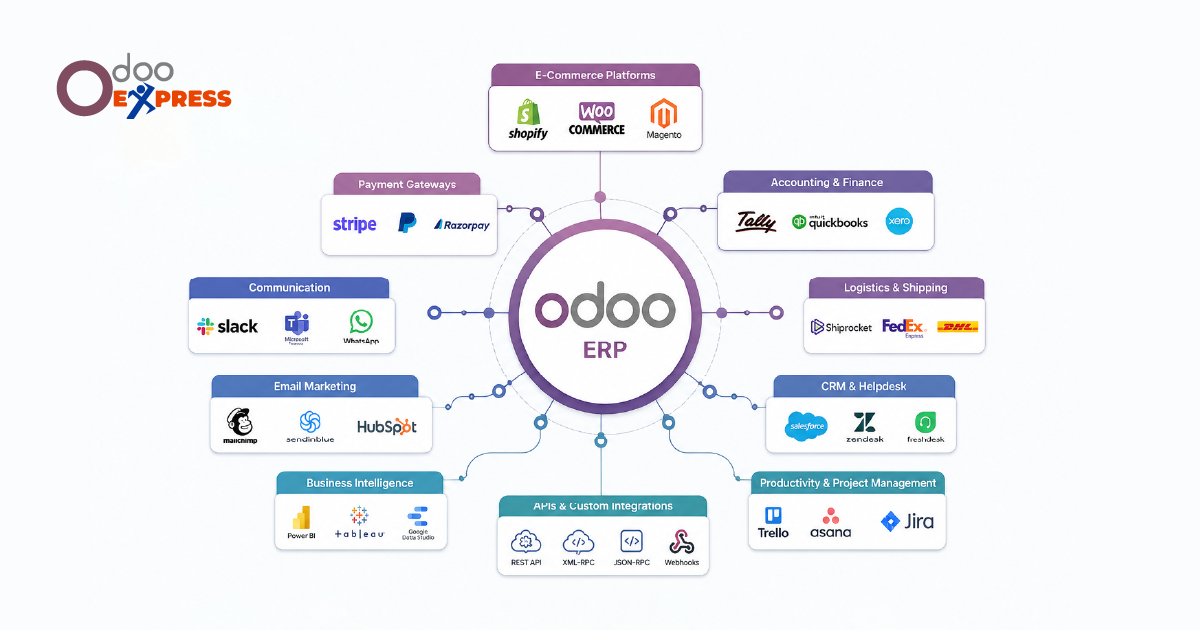
You use Odoo. You also use other tools. Maybe a website store. Maybe an email system. Maybe an old accounting software. You want them to work together. This guide shows you how.
Part 1: Why Connect Odoo to Other Tools?
Here is what happens when you connect things.
Without connection:
You type the same data twice
You make mistakes when copying
Your team wastes time
Reports show wrong numbers
With connection:
Data enters once and moves by itself
No copy-paste means no mistakes
Team focuses on real work
Reports show the truth
Connections save time. Connections stop errors.
Visit Site :- https://www.odooexpress.com/odoo/erp
Part 2: Four Questions To Ask Before You Start
Do not call a developer yet.
Sit with your team. Answer these four questions first.
Question 1: What is your biggest problem?
Pick one specific pain.
"I hate typing website orders into Odoo"
"Stock numbers are never correct"
"Sales sees one price. Accounting sees another"
Start with one problem. Not five.
Question 2: Which two systems need to talk?
Pick two tools. Only two.
Connect those first. Add more later.
Question 3: Who is the boss of each data?
For every piece of data, one system decides.
Example:
Odoo decides product prices
Your online store obeys Odoo
Store cannot change prices on its own
No fighting over which number is right.
Question 4: How fast does data need to move?
One second? (real-time)
One hour?
One day?
Faster costs more. Choose the slowest speed that works for you.
Part 3: Three Ways To Connect Odoo
Pick the way that fits your tools and your budget.
Way 1: Direct connection (API)
Odoo opens a door. Other software knocks and enters.
Good for: Fast updates. Lots of data.
Bad for: Very old software.
Way 2: File transfer
One system saves a file. The other system reads the file later.
Example: Website saves orders to a folder at night. Odoo reads the folder in the morning.
Good for: Old systems. Simple needs.
Bad for: Real-time needs.
Way 3: Ready-made connectors
Some companies sell pre-built connections.
Example: A connector that already knows how to talk between Odoo and Shopify.
Good for: Popular tools. Fast setup.
Bad for: Unusual tools. Special workflows.
Part 4: Data Mapping — The Most Important Step
Data mapping is simple.
It means: "This field in Tool A goes to that field in Odoo."
Example:
Your online store has one field called Full Name (John Doe)
Odoo has two fields: First Name (John) and Last Name (Doe)
Your mapping decides: First word goes to First Name. Rest goes to Last Name.
That is data mapping.
Common mappings:
Order Number → Sale Order Name
Customer Email → Contact Email
Product SKU → Product Internal Reference
Quantity → Quantity
Write down every mapping. Keep the paper safe. You will need it later.
Part 5: Testing Without Breaking Things
Follow one golden rule.
Never test on your live data.
Make a copy of Odoo. This is your practice area.
Connect your practice Odoo to a practice version of your other tool.
Break things there. Fix things there.
What to test:
One normal order. Does it move correctly?
Strange cases. What if a customer has no name?
Failure cases. What if the internet dies?
Big case. Test with 1,000 fake orders.
Only move to live systems when all tests pass.
Part 6: Keep Your Data Safe
When two systems talk, there are risks.
Follow these safety rules.
Use encrypted connections (look for "https")
Never store passwords in simple files
Give access only to data that is needed
Follow GDPR rules for customer data
Ask a security expert if you are not sure.
Part 7: After Going Live
The work does not stop when you go live.
Check your logs every week. Logs are simple records of every data transfer.
Look for failed transfers. Look for errors.
Simple weekly checklist:
Check error logs → Every day
Count successful transfers → Every week
Review speed → Every month
Update documentation → When anything changes
Your tools will change over time. Odoo will update. Your other software will change.
These changes can break your connection. Stay alert.
Part 8: When To Call An Expert
You can build simple connections yourself.
But some situations need help.
Call an expert when:
You need to connect more than three systems
You have very high data volume (thousands of changes per hour)
Your old system has no documentation
You handle sensitive data (credit cards, medical records)
Your first try failed and you do not know why
An expert costs money. But they save you from bigger losses later.
Part 9: Real Examples
Example 1: Online store + Odoo
A clothing brand connects Shopify to Odoo.
Result: When someone buys a shirt online, Odoo creates the order, reduces stock, and prepares shipping. No human touches the data.
Example 2: Email tool + Odoo
A software company connects Mailchimp to Odoo.
Result: When a new customer appears in Odoo, they join the right email list automatically. No manual export.
Example 3: Old accounting system + Odoo
A factory keeps its 10-year-old accounting software.
But they connect it to new Odoo for sales and stock.
Result: Sales team uses modern Odoo. The finance team keeps their old system. Data flows between them every night.
Part 10: Your Action Plan
Week 1: Answer the four questions from Part 2. Write down your answers.
Week 2: Pick one connection method from Part 3.
Week 3: Map your data. Write down every field mapping.
Week 4: Build and test in a practice environment.
Week 5: Go live. Watch closely for 7 days.
Every week after: Use the checklist from Part 7.
Connecting Odoo to other tools is not hard. Start small. Pick one problem. Map your data clearly. Test before going live. One good connection is better than five broken ones.